Install MATLAB Coder Support Package for PyTorch and LiteRT Models
R2026bTo add code generation support for PyTorch® and LiteRT models to MATLAB® and Simulink®, install the MATLAB Coder™ Support Package for PyTorch and LiteRT Models.
Install Support Package
On the MATLAB Home tab, in the Environment section, select Add-Ons > Explore Add-Ons.
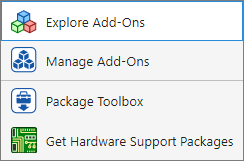
In the Add-Ons Explorer window, search for MATLAB Coder Support Package for PyTorch and LiteRT Models.

Click Next to install the support package. To integrate PyTorch models in MATLAB and Simulink, the tool installs required software and third-party tools, including Python® and the Torch-MLIR library.
Note
On Windows, this support package requires the latest Microsoft® Visual C++® Redistributable. If you encounter missing dynamic-link library (DLL) errors when loading or running models, download and install the latest Microsoft Visual C++ Redistributable.
Update Support Package
On the MATLAB Home tab, in the Resources section, select Help > Check for Updates.
Uninstall Support Package
To uninstall the support package, first open the Add-Ons
panel. To open the Add-Ons panel, click the Add-Ons icon
 on the left sidebar.
Then in the Add-Ons panel, click the
Options button  next to the installed support package, and then click
Uninstall.
next to the installed support package, and then click
Uninstall.

