Sqrt
R2026bSqrt block
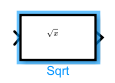
To add a block to a model, double-click the canvas and start typing the block name. Then, select the block from the list.
Libraries:
Embedded Coder Support Package for Qualcomm Hexagon Processors /
Hexagon /
Math
Description
The Sqrt block computes the square root of a fixed-point input signal. The block supports fixed-point inputs and generates code that integrates with Qualcomm® Hexagon® library (QHL) for optimized execution.
Use this block when you want to simulate results to match QHL-generated code results for square root operations on Hexagon targets. The block implements a QHL-aligned algorithm so that model behaviour and generated code produce consistent results.
For fixed-point inputs, the block expects input values in unsigned Q0 format (16-bit) and produces output values in unsigned Q8.8 format. This scaling reflects the behaviour of the underlying QHL APIs. The block supports scalar and vector inputs and applies the element-wise square root operation.
The block computes the square root using a QHL implementation that first estimates the inverse square root and then refines the result using one Newton–Raphson iteration. The algorithm scales the result to produce an output in Q8.8 fixed-point format and ensures consistency between simulation and generated code.
You can use this block for fixed-point modeling, code generation, and execution on Qualcomm Hexagon DSP targets.
Examples
The model uses a fixed-point constant as input and passes the signal through the Sqrt block. The block computes the square root using QHL-compatible behavior and produces an output in Q8.8 fixed-point format. In this example you:
Create a fixed-point input signal in unsigned Q0 format.
Compute the square root using the Sqrt block.
Observe the output in Q8.8 fixed-point format.
Verify that the result matches the expected square root value.
To create the input, add a constant block to the model and set the Constant value to 16. Set the Output datatype to unit16.
Add the Sqrt block from the Qualcomm® Hexagon® Math library. Connect the Constant block to the input of the Sqrt block. Connect a Display block to the output of the Sqrt block.
To generate code for Qualcomm Hexagon targets, configure the model to use the Qualcomm Hexagon QHL code replacement library.
Press Ctrl+E to open the model settings.
Go to Hardware Implementation and set Hardware board to Qualcomm Hexagon Simulator or the appropriate Hexagon target.
Go to Code Generation → Interface and set Code Replacement Library to Qualcomm Hexagon QHL.
Run the simulation.
open_system('ComputeFixedPointSqrt')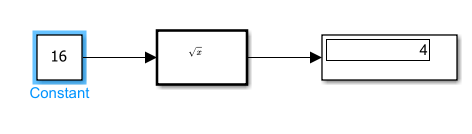
Ports
Input
Output
Extended Capabilities
Version History
Introduced in R2026b

