Contenuto principale

Analog To Digital Converter

Convert analog signal on ADC input pin to digital signal

Since R2026a

  • Analog to Digital Converter block

Libraries:
Embedded Coder Support Package for Renesas RA Microcontrollers / Renesas RA6 Based

Description

Use the Analog to Digital Converter block to convert the analog value at an ADC input pin to a digital value. The block output is a 1-by-N row vector depending on the number of conversions N. The block measures the voltage of an analog pin relative to the analog input reference voltage on Renesas RA Microcontrollers.

Examples

Ports

Input

expand all

Convert analog signal on ADC input pin to digital signal.

Triggers the ADC input pin for conversion.

  • 1 - ADC start of conversion is triggered

  • 0 - ADC start of conversion is not triggered

Dependencies

To enable this port, set the Trigger mode parameter to Trigger only.

Data Types: Boolean

Output

expand all

The block outputs the digital values of selected analog channels converted from Analog to Digital Converter (ADC) as a 1-by-N vector, where N is number of conversions.

Dependencies

To enable this port, set the Trigger mode parameter to either Trigger and read or Read results only.

Data Types: uint16

The block outputs the ADC block status.

When the trigger mode is Trigger and Read or Read results only the block outputs the following status:

  • 0 - output counts are valid.

  • 1 - output counts are not available or overrun flag is set.

When the trigger mode is Trigger only the block outputs the following status:

  • 0 - when ADC is triggered

  • 1 - when ADC is not triggered

Dependencies

To enable this port, select the Output status parameter.

Data Types: int32

Parameters

expand all

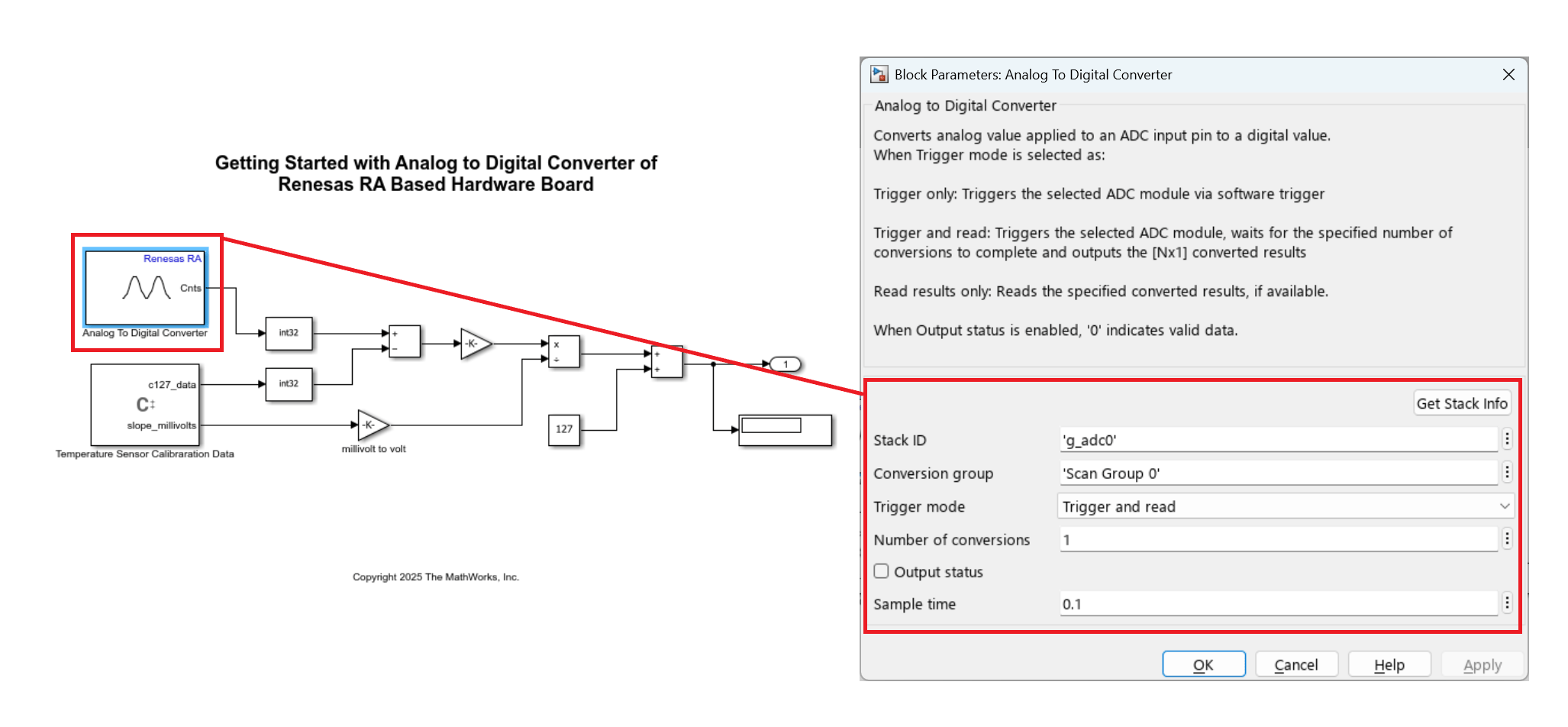
Specify the unique identifier for the ADC stack to be used for conversion. This string links the Analog to Digital Converter block to a specific ADC hardware instance or configuration. Click Get Stack Info to retrieve the Stack ID from the linked RA Smart Configurator project, or specify it manually in character array format.

Programmatic Use

Block Parameter: StackID

Specify the conversion group within the selected ADC module to be used for analog to digital conversions.

Programmatic Use

Block Parameter: GroupId

Select how conversion is handled for this block. Some options trigger a new conversion, while option such as Read results only simply read the result of a previous conversion without starting a new one.

  • Trigger and read — Select this option to trigger ADC start of conversion at every sample time. The block output waits until the conversion is complete and emits the results. This option enables the output port Cnts.

  • Trigger only — Use this option to trigger start of ADC conversion of specified conversion group with Stack ID and Conversion group in triggered or enabled subsystems. As the block does not show the conversion results in this mode, use another Analog to Digital Converter block with the Trigger mode parameter set to Read results only to display the conversion results.

  • Read results only — Select this option to read converted data. Check the Output status port to determine data validity: 0 indicates a successful read; any nonzero value indicates an error. This option also enables the output port Cnts.

Programmatic Use

Block Parameter: TriggerMode

Specify the number of conversions the ADC module should perform in one operation. This value determines how many analog-to-digital conversion results will be read and output by the block. The block will wait for the specified number of conversions to complete before outputting the results as an array of size [Nx1], where N is the number of conversions.

Dependencies

To enable the Sample time parameter, set the Trigger mode parameter to either Trigger and read or Read results only.

Programmatic Use

Block Parameter: NumberOfConversions

When you select this parameter, the block configures Status output port. The Status port outputs the status of the ADC conversion.

Programmatic Use

Block Parameter: OutputStatus

Specify how often (in seconds) the block reads the pin value. Enter a value greater than zero. When you specify this parameter as -1, Simulink® determines the best sample time for the block based on the block context within the model.

Dependencies

To enable the Sample time parameter, set the Trigger mode parameter to either Trigger and read or Read results only.

Programmatic Use

Block Parameter: SampleTime

Version History

Introduced in R2026a