Customize C Functions Generated from Atomic Subsystems
R2026bAn Atomic Subsystem, also known as a nonvirtual subsystem, is a subsystem that executes as single unit. Unless you configure the atomic subsystem to be inlined, an independent function is generated from it when you generate code from the model. You can customize how the code generator names the generated function, and you can customize the way it accesses inports and outports. If you configure the function to use input arguments to access inports and outports, you can customize the argument identifiers. This example shows how to apply these customizations.
Open and Explore Model
Open the model AtomicSubsys, which has three atomic subsystems.
asModel = "AtomicSubsys";
open_system(asModel);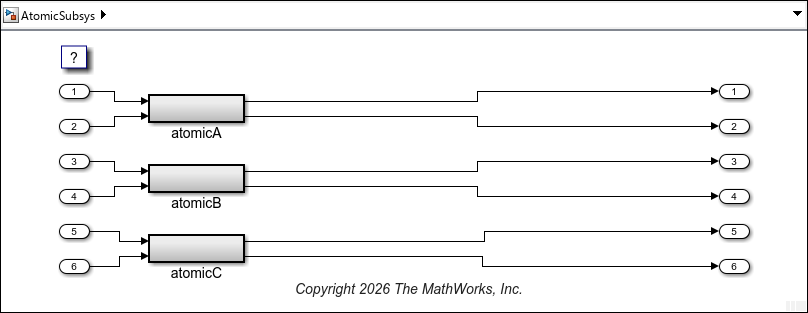
Specify Function Packaging
In some configurations, the code generator attempts to inline atomic subsystems when you generate code from the model. To prevent this, and to have the code generator generate an independent function for each atomic subsystem, specify the file packaging for the atomic subsystems as either Reusable function or Nonreusable function.
The model is now configured as nonreusable, so set the function packaging of the atomic subsystems as nonreusable.
In the Simulink editor, select the atomic subsystem block atomicA and open the Property Inspector. In the Code Generation section, from the Function packaging list, select Nonreusable function.
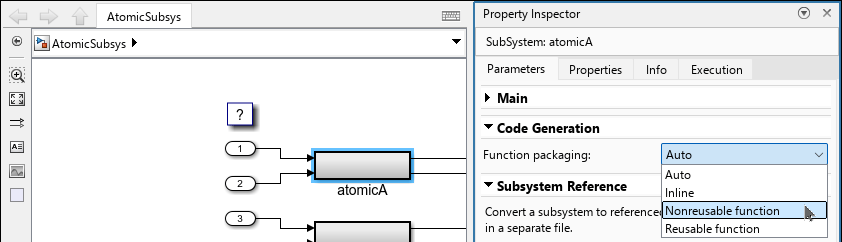
Do the same for atomicB and atomicC.
Alternatively, you can specify the function packaging parameter by using the function set_param in the Command Window:
atomicSubA = asModel+"/atomicA";
set_param(atomicSubA,RTWSystemCode="Nonreusable function")

atomicSubB = asModel+"/atomicB";
set_param(atomicSubB,RTWSystemCode="Nonreusable function")

atomicSubC = asModel+"/atomicC";
set_param(atomicSubC,RTWSystemCode="Nonreusable function")
Customize Generated Function Names
Customize General Naming Rule for Generated Function Names
By default, the name of the function generated from an atomic subsystem is based on the name of the subsystem block, and is created according to the naming rule specified in the configuration parameter Subsystem methods. The specified value is a combination of valid C language characters and the macros $F, $H, $M, $N, $R, and $U. For the definition of each macro, see Subsystem methods.
In this example, specify the naming rule as atomFunc_$N$M.
The macro
$Nis replaced by the Subsystem block name.The macro
$Mis replaced by an autogenerated name-mangling text to avoid naming collisions. If there is no name collision, this macro is ignored.
To specify this value, open the Configuration Parameters dialog box and navigate to Code Generation > Identifiers. Specify Subsystem methods as atomFunc_$N$M and click Apply.
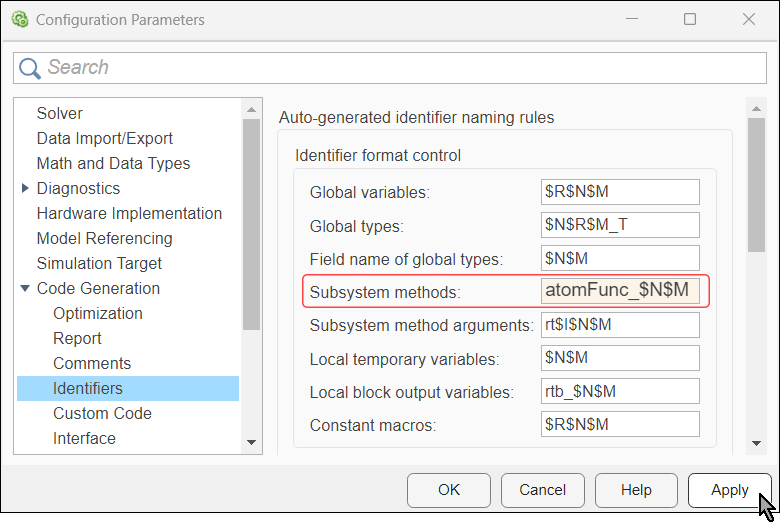
Alternatively, specify the configuration parameter by using the function set_param in the Command Window:
set_param(asModel,CustomSymbolStrFcn="atomFunc_$N$M")Customize Names of Individual Generated Functions
You can customize names of individual functions generated from atomic subsystems.
In the Simulink editor, select the atomic subsystem block atomicA and open the Property Inspector. In the Code Generation section, from the Function name options list, select User specified. A new parameter, Function name, appears. Specify the value of this parameter as myAtomicFuncA.
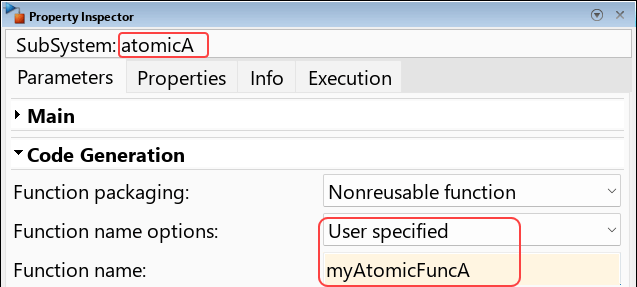
Alternatively, you can update the parameters, by using set_param in the Command Window:
set_param(atomicSubA,RTWFcnNameOpts="User specified",RTWFcnName="myAtomicFuncA")
Customize Function Arguments Interface
A nonreusable function is dedicated to a single model, so it can access the variables corresponding to the inports and outports of the subsystem directly without having to rely on arguments. The default prototype of functions generated from nonreusable atomic subsystems is void_void. You can override the default behavior for individual nonreusable functions, and customize them to use arguments.
Open the Property Inspector. In the Code Generation section, locate the Function interface parameter.
In the Simulink editor, select the atomic subsystem block
atomicC. Then, from the Function interface list, selectAllow arguments (Match graphical interface). In this configuration, the signature of the generated function includes an argument for each of the inports and outports of the atomic subsystem, without allowing the code generator to omit any inport or outport for optimization purposes.
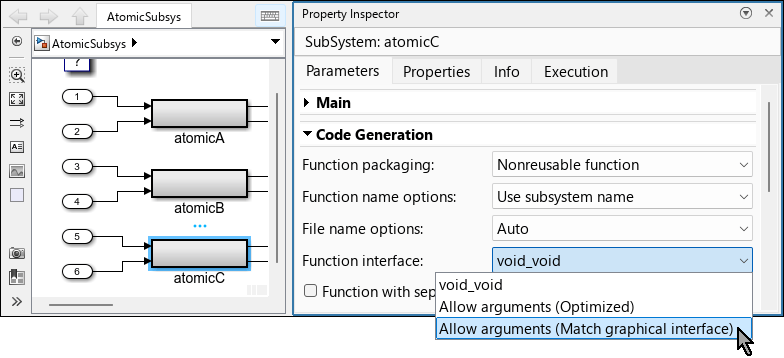
Alternatively, you can specify the value for this parameter by using set_param in the Command Window:
set_param(atomicSubC,FunctionInterfaceSpec="Allow arguments (Match graphical interface)")In the Simulink editor, select the atomic subsystem block
atomicB. Then, from the Function interface list, selectAllow arguments (Optimized). In this configuration, you allow the code generator to generate the function with arguments, but you allow it to omit inports and outports for optimization purposes.
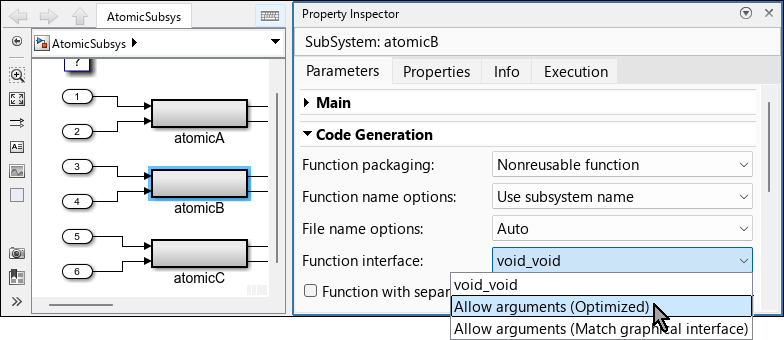
Alternatively, you can specify the value for this parameter by using the set_param function in the Command Window:
set_param(atomicSubB,FunctionInterfaceSpec="Allow arguments (Optimized)")In the Simulink editor, select the atomic subsystem block
atomicA. Then, verify that the selected option from the Function interface list isvoid_void. In this configuration, the signature of the generated function does not have arguments, and the function accesses inports and outports directly through the global variables that correspond to them.
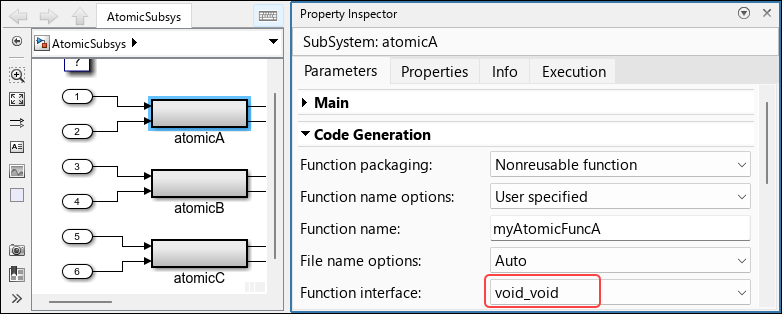
Alternatively, you can verify the value programmatically, by using the get_param function in the Command Window:
get_param(atomicSubA,"FunctionInterfaceSpec")ans = 'void_void'
Note:
When the model is configured as reusable, configure the function packaging of atomic subsystems as
Auto,Inline, orReusable function.The signature of a function generated from an atomic subsystem configured as a reusable function includes an argument for each of the inports and outports of the atomic subsystem.
Generate and Examine Code
Generate code from the model:
Open the Embedded Coder® app.
In the Simulink® Toolstrip, select the C Coder tab.
In the Generate Code section, click Generate Code
 .
.

Alternatively, you can use the slbuild function in the Command Window to generate code programmatically. You can use the evalc function to suppress the output of the function slbuild.
evalc("slbuild(asModel)");
Open the Code pane and navigate to the generated header file AtomicSubsys.h. Examine the definition of the signal structures ExtU_AtomicSubsys_T and ExtU_AtomicSubsys_T.
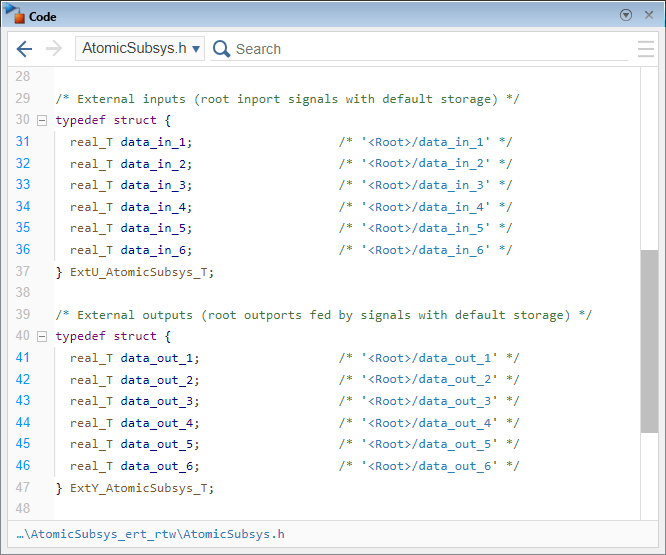
In the generated code:
The fields of the structure
ExtU_AtomicSubsys_Tcorrespond to the root-level inports of the model.The fields of the structure
ExtY_AtomicSubsys_Tcorrespond to the root-level outports of the model.
In the Code pane, navigate to the generated source code file AtomicSubsys.c. Examine the instantiation of the signal structures AtomicSubsys_U and AtomicSubsys_Y, and examine the function myAtomFuncA, which was generated from the atomic subsystem atomicA.
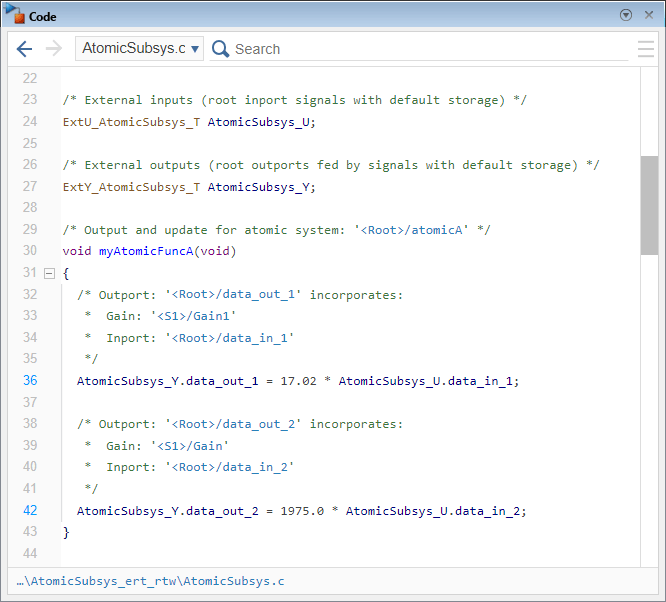
In the generated code:
AtomicSubsys_Uis a global instance of typeExtU_AtomicSubsys_TandAtomicSubsys_Yis a global instance of typeExtU_AtomicSubsys_T.The name of the function is
myAtomicFuncA, which is the name you specified for Function name in the Property Inspector.The function signature is
void_void.The function accesses the signals directly, through the global variables
AtomicSubsys_UandAtomicSubsys_Y.
In the same file, AtomicSubsys.c, examine the functions atomFunc_atomicB and atomFunc_atomicC, which were generated from the atomic subsystems atomicB and atomicC, respectively.
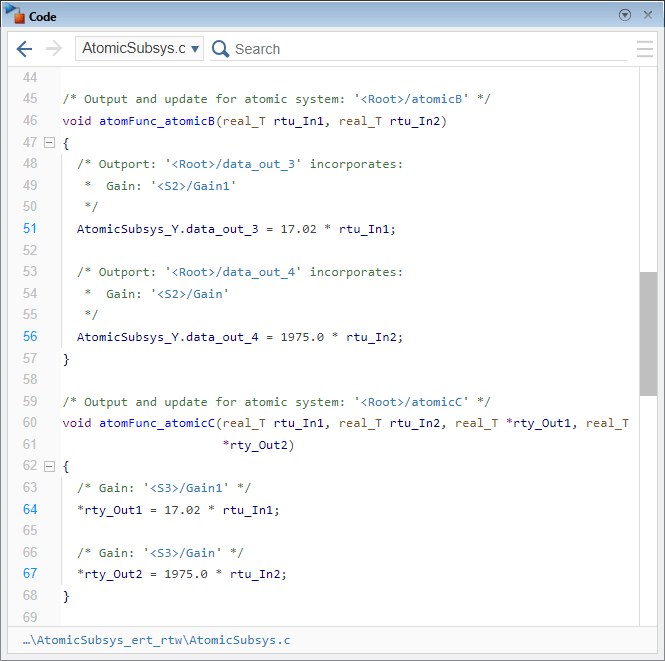
In the generated code:
The names of the functions adhere to the naming rule you specified in the configuration parameter Subsystem methods.
The prototype of the function
atomFunc_atomicBhas two arguments, through which it accesses the subsystem inports of the subsystem block. The function accesses outports of the subsystem block through the global variableAtomicSubsys_Y.The prototype of the function
atomFunc_atomicChas four arguments, through which it accesses the subsystem inports and outports.Arguments that correspond to subsystem block inports are passed by value and arguments that correspond to subsystem block outports are pointer arguments.
Customize Argument Identifiers
The identifiers of both input and output arguments of the generated function are defined by the naming rule specified in the configuration parameter Subsystem method arguments. The naming rule is a combination of valid C language characters and the macros $I, $M, $N, and $U. For the definition of each macro, see Subsystem method arguments Settings.
Note: Customizing individual argument identifiers is not supported.
Define the naming rule for argument identifiers by specifying the configuration parameter Subsystem method arguments:
Open the Configuration Parameters dialog box of the model and navigate to Code Generation > Identifiers.
On the right, locate the parameter Subsystem method arguments, and specify its value as
custArg_$I_$N$M.Click Apply.
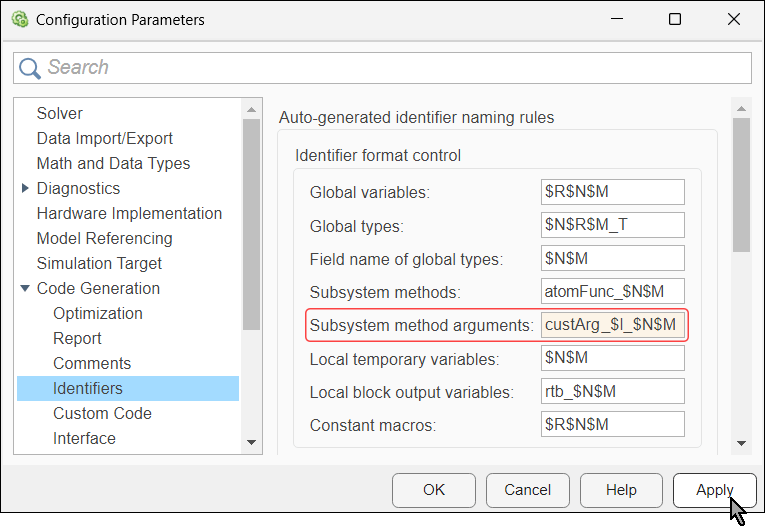
The macro
$Iis replaced with the letterufor each argument that corresponds to an inport of the atomic subsystem and the letteryfor each argument that corresponds to an outport of the atomic subsystem.The macro
$Nis replaced by the name of the inport or outport.The macro
$Mis replaced by an auto generated name-mangling text, required to avoid naming collisions. If there is no name collision, this macro is ignored.
Alternatively, you can specify the value for this parameter by using the function set_param in the Command Window:
set_param(asModel,CustomSymbolStrFcnArg="custArg_$I_$N$M")Customize Function Qualifiers
You can configure the model so that functions generated from it are declared as extern. Configuring individual generated functions to be declared as extern is not supported.
In the Configuration Parameters dialog box, navigate to Code Generation > Code Style. On the right, select Preserve extern keyword in function declarations. Click Apply.
Alternatively, you can enable the extern qualifier by using the function set_param in the Command Window:
set_param(asModel,PreserveExternInFcnDecls=true)
Generate model code again.
evalc("slbuild(asModel)");
In the Code pane, navigate to the generated header file, AtomicSubsys_private.h and find the declarations of the functions generated from the atomic subsystems.
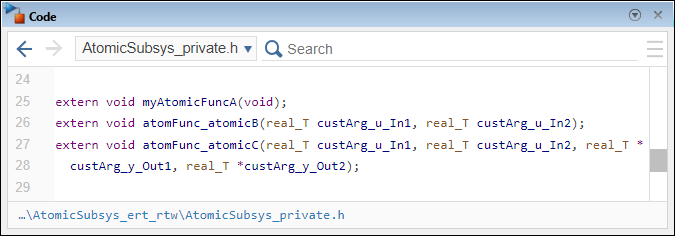
In the generated code:
Identifiers of the generated function arguments adhere to the naming rule you specified configuration parameter Subsystem method arguments.
In arguments that correspond to subsystem block inports, the macro
$Iis replaced by the letteru.In arguments that correspond to subsystem block outports, the macro
$Iis replaced by the lettery.
See Also
Atomic
Subsystem | set_param | get_param | Subsystem methods | slbuild | evalc

