Code Generation from Simulink Models with GPU Coder
R2026bYou can use GPU Coder™ to generate optimized CUDA® code from Simulink® models that contain MATLAB Function blocks. You can use the generated code and executable for rapid prototyping on NVIDIA® GPUs. Code generation reports and traceability enable you to view and analyze the generated code. For more information about code generation reports, see Reports for Code Generation (Simulink Coder).
To create CUDA kernels in the generated code, design the model to use MATLAB Function blocks for computationally intensive parts of the application. During code generation, GPU Coder analyzes the MATLAB® functions to try to map computations to kernels on the GPU.
To generate CUDA code, you:
Create or open a model. Design the model with computationally intensive portions of your application in MATLAB Function blocks.
Set the model Solver and Type configuration parameters to use a fixed-step solver.
Set the hardware implementation parameters for a Windows® or Linux® operating system.
Set the code generation Language parameter to
C++, and enable the Generate GPU Code parameter.Optionally, configure other GPU-specific configuration parameters.
Build the model using the Simulink Coder™ app or the
slbuildfunction.
Generate CUDA Code for Sobel Edge Detection
This example shows how to generate CUDA® code for a Sobel edge detection model. The example model uses MATLAB Function blocks to implement the detection algorithm. Configure the model to enable GPU code generation and generate CUDA code for the edge detection algorithm.
Examine Sobel Edge Detection Algorithm
In this example, you create a model that performs Sobel edge detection using a 2-D spatial gradient operation on a grayscale image. This algorithm emphasizes the high spatial frequency regions that correspond to the edges of the input image.
The Sobel edge algorithm computes the horizontal gradient, H and the vertical gradient, V of the input image by using two orthogonal filter kernels, k and k'. After the filtering operation, the algorithm computes the gradient magnitude and applies a threshold to find the regions of the images identified as edges.
Load the image file peppers.png into a variable named img.
img = imread("peppers.png");
Run the Sobel edge detection algorithm on the image.
threshold = 100;
k = single([1 2 1; 0 0 0; -1 -2 -1]);
H = conv2(img(:,:,2),k, "same");
V = conv2(img(:,:,2),k',"same");
E = sqrt(H.*H + V.*V);
edgeImage = uint8((E > threshold) * 255);
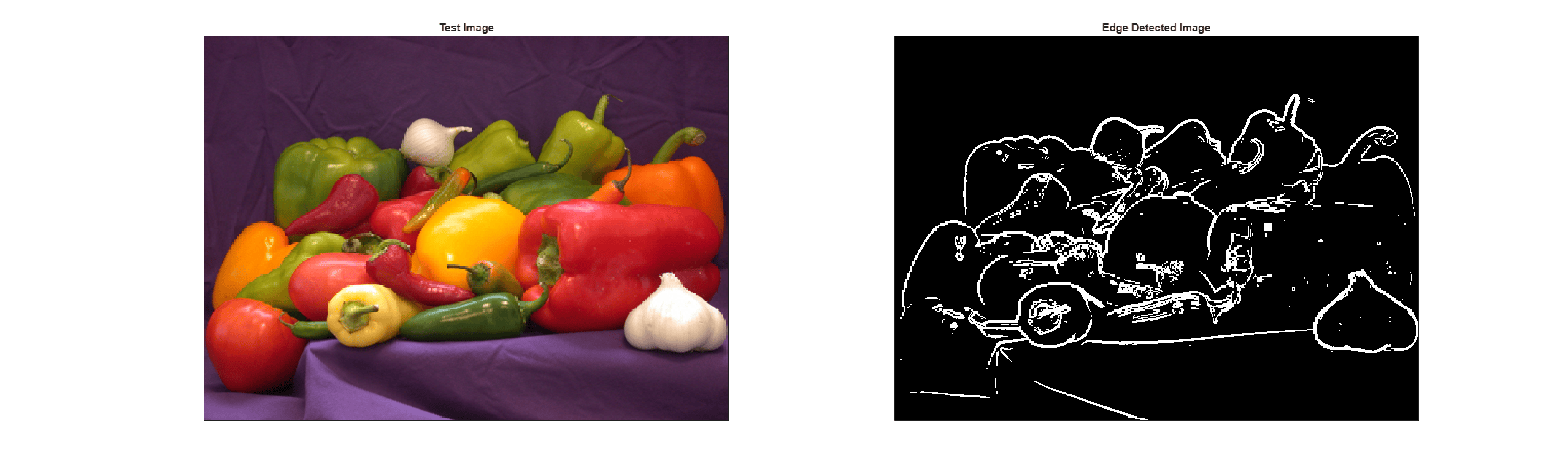
Plot the resulting image next to the original image using MATLAB.
h = figure;
h.Position(3) = 2*h.Position(3);
ax1 = subplot(1,2,1);
ax2 = subplot(1,2,2);

image(ax1,img);
xticks(ax1,[]);
yticks(ax1,[])
title(ax1,"Test Image")

image(ax2,repmat(edgeImage,[1 1 3]));
xticks(ax2,[]);
yticks(ax2,[])
title(ax2,"Edge Detected Image")
Create Edge Detection Model
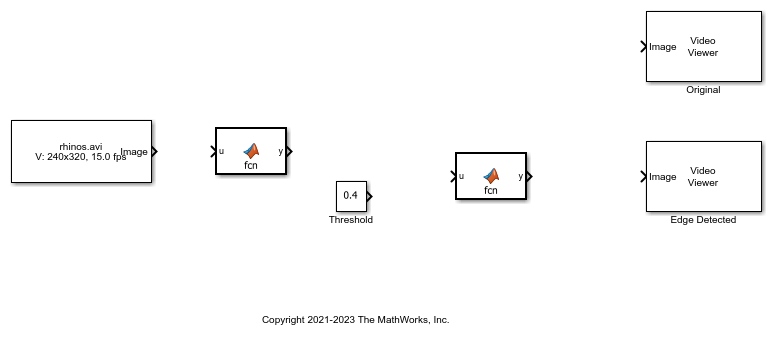
1. Create a Simulink model and add two MATLAB Function blocks from the User-Defined Functions library.
2. Add a Constant block and set its value to 0.4.
3. Add a From Multimedia File block from the Computer Vision Toolbox™ library.
4. Open the From Multimedia File block and set the File name parameter to rhinos.avi. Set the Image signal parameter to One multidimensional signal.
5. Add two Video Viewer blocks from the Computer Vision Toolbox library to the model.
To open a model that contains these blocks, enter:
open_system("edgeDetectionInitial")
6. Double-click one of the MATLAB Function blocks. The MATLAB Function Block Editor opens and displays a default function signature.
7. Define a function called sobel that implements the Sobel edge detection algorithm. The function header declares grayImage and threshold as input arguments to the sobel function and edgeImage as the return value.
function edgeImage = sobel(grayImage,threshold) %#codegen
% Define Kernel for Sobel edge detection
k = single([1 2 1; 0 0 0; -1 -2 -1]);
% Detect Edge
H = conv2(single(grayImage),k, "same");
V = conv2(single(grayImage),k',"same");
E = sqrt(H.*H + V.*V);
edgeImage = uint8((E > threshold) * 255);
end
8. In the top model, right-click the MATLAB Function block for the sobel function. In the context menu, in the Parameters section, click the Block Parameters button. On the Code Generation tab, set the Function packaging parameter to Reusable function. If the Function packaging parameter is any other value, GPU Coder may not generate CUDA kernels.
9. Modify the other MATLAB Function block to implement the RGB-to-grayscale conversion. Set the Function packaging parameter of the MATLAB Function block to Reusable function.
function gray = RGB2gray(RGB) %#codegen
% Convert color image to gray image
gray = (0.2989 * double(RGB(:,:,1)) + ...
        0.5870 * double(RGB(:,:,2)) + ...
        0.1140 * double(RGB(:,:,3)));
end
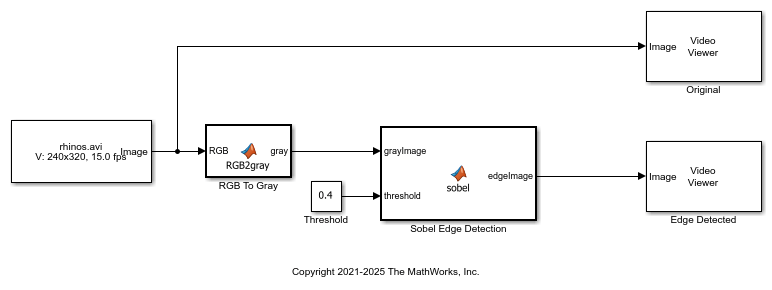
10. Connect the blocks as shown in the diagram. Save the model as edgeDetection.slx. To open a preconfigured model, enter:
open_system("edgeDetection");
11. To test the model for errors, simulate the model. In the Simulink Toolstrip, click Run. Alternatively, enter this code:
set_param("edgeDetection","SimulationMode","Normal");
sim("edgeDetection");
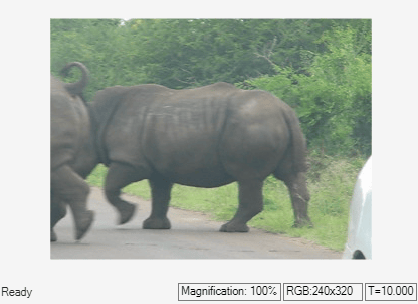
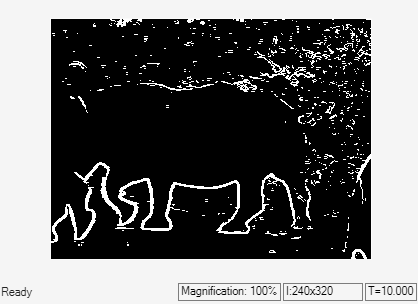
To see all video frames during simulation, open the Video Viewer blocks and disable Simulation > Drop Frames to Improve Performance.
Configure Model for Code Generation
To generate code from the model, set the model configuration parameters to generate code on your host computer. Enable GPU code generation and customize the build process.
1. Open the Configuration Parameters dialog box. Open the Solver pane. To generate CUDA code, configure the model to use a fixed-step solver. Set the Type parameter to Fixed-step and the Solver parameter to discrete (no continuous states).
2. In the left pane, click Hardware Implementation. Set the Device type parameter for your host machine. For Linux platforms, set Device type to x86-64 (Linux 64). For Windows® systems, select x86-64 (Windows64).
3. In the Device details section, select Support long long.
4. In the left pane, click Code Generation, then set System target file to grt.tlc. You can also use the Embedded Coder® target file ert.tlc or a custom system target file. For information on developing a custom target file, see Customize System Target Files (Simulink Coder).
5. Set Language to C++.
6. Select Generate GPU code.
7. Select Generate code only.
8. Set the Toolchain parameter. For Linux® platforms, set this parameter to NVIDIA CUDA | gmake (64-bit Linux). For Windows® systems, set this parameter to NVIDIA CUDA(w/Microsoft Visual C++ 2022) | nmake (64-bit windows). Alternatively, use the NVIDIA CUDA setting that matches your version of Microsoft Visual C++.
When using a custom system target file, you must set the build controls for the toolchain approach. To learn more, see Support Toolchain Approach with Custom Target (Simulink Coder).
9. In the Code Generation > Interface pane, disable MAT-file logging.
10. In the Code Generation > Report pane, select Create code generation report and Open report automatically.
Optionally, open the Code Generation > GPU Code pane to view and edit the GPU-specific options. For this example, use the default values of these parameters.
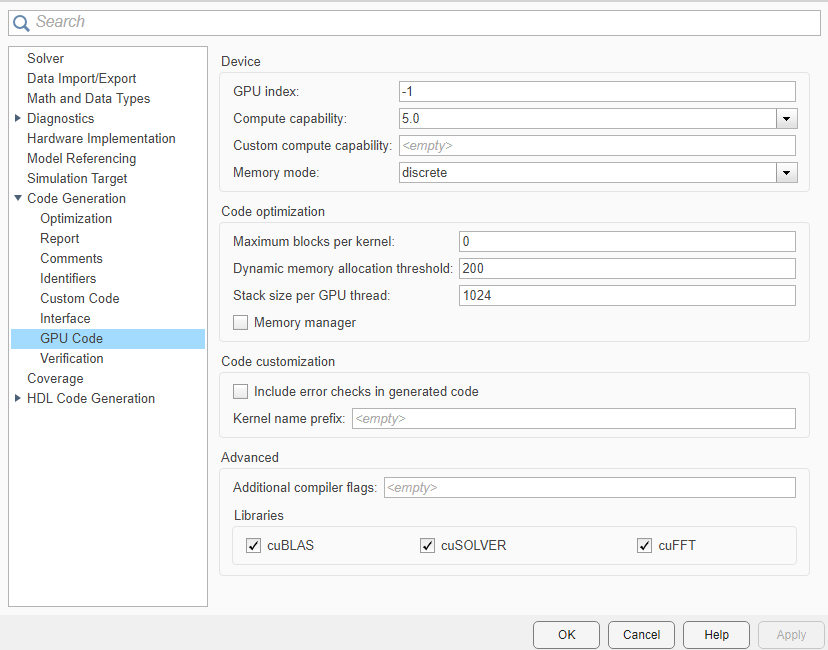
Alternatively, use the set_param function to configure the model parameters programmatically. For example, use set_param to enable CUDA code generation.
set_param("edgeDetection","GenerateGPUCode","CUDA");
You can also use set_param to set the hardware configuration parameters, depending on the operating system. Use set_param to set the ProdHWDeviceType for the correct OS and to enable support for the long long data type.
if ispc
    set_param("edgeDetection","ProdHWDeviceType","Intel->x86-64 (Windows64)")
elseif isunix
    set_param("edgeDetection","ProdHWDeviceType","Intel->x86-64 (Linux 64)")
end
set_param("edgeDetection","ProdLongLongMode","on");
Generate CUDA Code for the Model
To generate code, in the Simulink Toolstrip, open the Apps tab. Under Code Generation, click Simulink Coder. In the C++ Code tab, click Generate code. Alternatively, use the slbuild function to build the model.
slbuild("edgeDetection");
### Unable to find Simulink cache file "edgeDetection.slxc".
### Searching for referenced models in model 'edgeDetection'.
### Total of 1 models to build.
### Starting build procedure for: edgeDetection
### Generating code and artifacts to 'Model specific' folder structure
### Generating code into build folder: C:\Users\user\OneDrive - MathWorks\Documents\MATLAB\ExampleManager\user.Bdoc\gpucoder-ex36902800\edgeDetection_grt_rtw
### Invoking Target Language Compiler on edgeDetection.rtw
### Using System Target File: A:\12\user.Bdoc.j3111876\runnable\matlab\rtw\c\grt\grt.tlc
### Loading TLC function libraries
........
### Initial pass through model to cache user defined code
.
### Caching model source code
...............................................................................
### Writing header file edgeDetection_types.h
### Writing source file edgeDetection.cu
### Writing header file edgeDetection_private.h
### Writing header file edgeDetection.h
.
### Writing header file rtwtypes.h
### Writing header file multiword_types.h
### Writing header file rtmodel.h
### Writing source file edgeDetection_data.cu
### TLC code generation complete (took 14.063s).
### Creating HTML report file <a href="matlab:rtw.report.open('edgeDetection','C:\Users\user\OneDrive - MathWorks\Documents\MATLAB\ExampleManager\user.Bdoc\gpucoder-ex36902800\edgeDetection_grt_rtw')">index.html</a>
### Saving binary information cache.
Warning: In build information, source files (edgeDetection.cu,
edgeDetection_data.cu) have extensions that are not registered with toolchain
(MinGW64 | gmake (64-bit Windows)). Registered file extensions are .c, .cpp,
.cc, .cp, .cxx, .CPP, .c++, .C. Register source file extensions by updating
toolchain definition or change source file names.
### Using toolchain: MinGW64 | gmake (64-bit Windows)
### Creating 'C:\Users\user\OneDrive - MathWorks\Documents\MATLAB\ExampleManager\user.Bdoc\gpucoder-ex36902800\edgeDetection_grt_rtw\edgeDetection.mk' ...
### Successful completion of code generation for: edgeDetection
### Simulink cache artifacts for 'edgeDetection' were created in 'C:\Users\user\OneDrive - MathWorks\Documents\MATLAB\ExampleManager\user.Bdoc\gpucoder-ex36902800\edgeDetection.slxc'.

Build Summary

Top model targets:

Model          Build Reason                                         Status           Build Duration
===================================================================================================
edgeDetection  Information cache folder or artifacts were missing.  Code generated.  0h 1m 42.321s

1 of 1 models built (0 models already up to date)
Build duration: 0h 1m 46.553s
The code generator produces CUDA source and header files, and an HTML code generation report. The code generator places the files in a build folder which is a subfolder named edgeDetection_grt_rtw in your current working folder.
Limitations
GPU Coder does not support GPU code generation for MATLAB functions in Stateflow® charts.
The MATLAB Function block does not support some data types from the MATLAB language. For supported data types, see MATLAB Function (Simulink).
For GPU code generation, the custom target file must be based on
grt.tlcorert.tlc.
See Also
Functions
coder.gpu.kernelfun|set_param(Simulink) |sim(Simulink) |slbuild(Simulink)
Blocks
- MATLAB Function (Simulink)
Topics
- Accelerate Simulation Speed by Using GPU Coder
- GPU Code Generation for Deep Learning Networks Using MATLAB Function Block
- GPU Code Generation for Blocks from the Deep Neural Networks Library
- Targeting NVIDIA Embedded Boards
- Numerical Equivalence Testing
- Parameter Tuning and Signal Monitoring Using External Mode
- GPU Code Generation for Lane Detection in Simulink
- GPU Code Generation for a Fog Rectification Simulink Model

