Contenuto principale

Cylinder Cushion (IL-PB)

R2026b

Position-based cylinder cushion in isothermal liquid systems

Since R2026a

Libraries:
Simscape / Fluids / Isothermal Liquid / Actuators / Auxiliary Components

Description

The Cylinder Cushion (IL-PB) block models a position-based cylinder cushion in an isothermal liquid network. The cushion decelerates the cylinder rod as it approaches the end of a stroke by restricting the flow rate leaving the cylinder chamber. This figure shows a typical cylinder cushion design.

As the piston moves toward the cap, which is to the left in the figure, the cushioning bush, or plunger, enters the chamber in the cap and creates an additional resistance to the fluid leaving the cylinder chamber. The piston deceleration starts when the plunger enters the opening in the cap and closes the main fluid exit. In this state, the fluid flows through a check valve in the gap between the cylinder and the cap The valve restricts the flow rate leaving the cylinder chamber and reduces the initial speed of the piston.

You can use the Cylinder Cushion (IL-PB) block to model actuators. A single-acting or double-acting actuator can include cylinder cushions to slow piston motion near the ends of the stroke. The cylinder cushion prevents extreme impacts when the piston is stopped by the end caps.

Block Structure

The Cylinder Cushion (IL-PB) block is a composite component that consists of these blocks:

Diagram of composite component for block

The variable orifice provides a variable opening between the plunger and end cap cavity. The local restriction connects the piston chamber to the cushion chamber. The check valve provides a flow path between the cushion chamber and the piston chamber only during piston retraction.

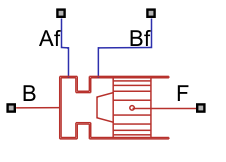
Ports Af and Bf are isothermal liquid conserving ports associated with the chamber inlet and outlet, respectively. The block cushions the flow rate from port Bf to port Af. The check valve in the block is oriented from port Af to port Bf. Ports B and F are position-based translational conserving ports. When Modeling option is Port F connected to piston, port F is associated with the piston plunger and port B is associated with the cylinder clamping structure.

When Modeling option is Port B connected to piston, port F is associated with the cylinder clamping structure and port B is associated with the piston plunger.

Ports

Conserving

expand all

Isothermal liquid conserving port associated with the liquid entry port to the cushion chamber.

Programmatic Use

Port: Af

Isothermal liquid conserving port associated with the liquid exit port of the cushion chamber.

Programmatic Use

Port: Bf

Position-based translational conserving port. When Modeling option is Port B connected to piston, port B is associated with the piston plunger. When Modeling option is Port F connected to piston, port B is associated with the cylinder clamping structure.

Programmatic Use

Port: B

Position-based translational conserving port. When Modeling option is Port F connected to piston, port F is associated with the piston plunger. When Modeling option is Port B connected to piston, port F is associated with the cylinder clamping structure.

Programmatic Use

Port: F

Parameters

expand all

Whether port B or F connects to the piston.

  • When Modeling option is Port F connected to piston, port F is associated with the piston plunger and port B is associated with the cylinder clamping structure.

  • When Modeling option is Port B connected to piston, port F is associated with the cylinder clamping structure and port B is associated with the piston plunger.

Programmatic Use

Parameter: ComponentPath
Values: "fluids.isothermal_liquid.actuators.auxiliary_components.cylinder_cushion_F_IL_PB" | "fluids.isothermal_liquid.actuators.auxiliary_components.cylinder_cushion_B_IL_PB"

Cushion Plunger

Area of the cross-section of the cushion plunger. The area is πDplunger2/4, where Dplunger is the diameter of the circular plunger.

Programmatic Use

Parameter: area_plunger

Length of the cushion plunger.

Programmatic Use

Parameter: length_plunger

Valves

Constant orifice area of the valve through which the fluid flows. The fluid flows from the cylinder chamber to the cap chamber when the plunger is inside the opening in the cap.

Programmatic Use

Parameter: area_cushion_orifice

Total area of possible leaks when the plunger is inside the cap opening or the cushion sleeve. When the displacement of the piston is less than or equal to the value of the Cushion plunger length parameter, the area of the variable orifice that models the gap between the plunger and the cushion sleeve equals the value of this parameter.

Programmatic Use

Parameter: area_leak_plunger

Minimum pressure differential across the check valve at which the valve starts to open. The check valve allows free flow of the liquid from the cushion chamber to the piston chamber, but does not allow flow in the opposite direction.

Programmatic Use

Parameter: p_crack_differential

Pressure differential across the check valve needed to fully open the valve. The value of this parameter must be greater than the Check valve cracking pressure differential parameter. The check valve allows free flow of the liquid from the cushion chamber to the piston chamber, but does not allow flow in the opposite direction.

Programmatic Use

Parameter: press_max_differential

Passage area of the check valve when the valve is fully open.

Programmatic Use

Parameter: check_valve_area_max

Total area of possible leaks when the check valve is fully closed.

Programmatic Use

Parameter: check_valve_area_leak

Continuous smoothing factor that introduces a layer of gradual change to the flow response when the valve is in near-open or near-closed positions. Set this parameter to a nonzero value less than one to increase the stability of your simulation in these regimes.

Programmatic Use

Parameter: smoothing_factor

References

[1] Rohner, P. Industrial Hydraulic Control. Fourth edition. Brisbane: John Wiley & Sons, 1995.

Extended Capabilities

expand all

C/C++ Code Generation
Generate C and C++ code using Simulink® Coder™.

Version History

Introduced in R2026a