What Is Lidar-Camera Calibration?
Lidar-camera calibration establishes correspondences between 3-D lidar points and 2-D camera data to fuse the lidar and camera outputs.
Lidar sensors and cameras are widely used together for 3-D scene reconstruction in applications such as autonomous driving, robotics, and navigation. While a lidar sensor captures the 3-D structural information of the environment, a camera captures the color, texture, and appearance information.
The lidar sensor and camera each capture data with respect to their own coordinate system. Lidar-camera calibration consists of converting the data from a lidar sensor and a camera into the same coordinate system. This enables you to fuse the data from both sensors for workflows like object detection. This figure shows the fused data.

Lidar-camera calibration consists of intrinsic calibration and extrinsic calibration.
Intrinsic calibration — Estimate the internal parameters of the sensors.
Lidar intrinsics — Manufacturers calibrate the intrinsic parameters of the sensors in advance.
Camera intrinsics — Use the Camera Calibrator app to interactively estimate the camera intrinsic parameters such as focal length, lens distortion, and skew. Alternatively, you can use the
estimateCameraParametersfunction to calibrate the camera. For more information, see the Single Camera Calibration example.
Extrinsic calibration — To interactively estimate the transformation between the lidar sensor frame and the camera frame, use the Lidar Camera Calibrator app. Alternatively, you can use the
estimateLidarCameraTransformfunction for calibration.
Extrinsic Calibration of Lidar and Camera
Lidar-camera calibration refers to the extrinsic calibration of these sensors given a known camera intrinsics. It is the process of estimating the rigid transformation between the coordinate frames of these sensors. This process uses standard calibration objects, such as a calibration board with checkerboard, ChArUco, or AprilGrid patterns.
This diagram shows the extrinsic calibration process for a lidar sensor and camera using a checkerboard.
To interactively perform lidar-camera calibration, use the Lidar Camera Calibrator app. Alternatively, follow this programmatic workflow:
Detect the calibration board corners in both the camera and lidar data.
Camera corners — To detect the 2-D corners in the images, use the appropriate image keypoint detector, such as
detectCheckerboardPoints,detectCharucoBoardPoints, ordetectAprilGridPoints. Then, estimate the 3-D corners in the camera frame using theestimateBoardCornersCamerafunction.Lidar corners — To estimate the calibration board corners in the lidar frame, use the
estimateBoardCornersLidarfunction.
Use the calibration board corners to estimate the rigid transformation matrix between the sensors. This transformation consists of a rotation R and translation t. You can estimate the rigid transformation matrix by using the
estimateLidarCameraTransformfunction. The function returns the transformation as arigidtform3dobject.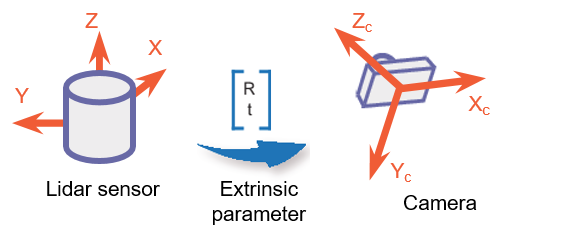
You can use the transformation matrix to:
Evaluate the accuracy of your calibration by calculating the error. You can do this interactively using the Lidar Camera Calibrator app, or programmatically, using
estimateLidarCameraTransformfunction.
Project lidar points onto an image by using the
projectLidarPointsOnImagefunction, as shown in this figure.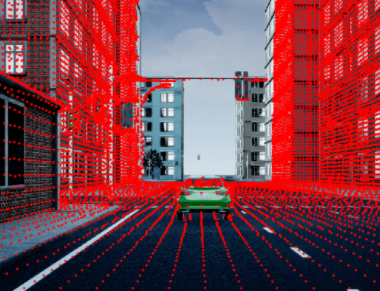
Fuse the lidar and camera outputs by using the
fuseCameraToLidarfunction.
Estimate the 3-D bounding boxes in a point cloud based on the 2-D bounding boxes in the corresponding image using the
bboxCameraToLidarfunction. For more information, see Detect Vehicles in Lidar Using Image Labels. You can also estimate 2-D bounding boxes in a camera frame based on the 3-D bounding boxes in the corresponding lidar frame using thebboxLidarToCamerafunction.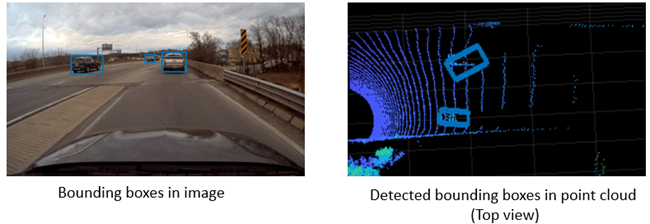
References
[1] Zhou, Lipu, Zimo Li, and Michael Kaess. “Automatic Extrinsic Calibration of a Camera and a 3D LiDAR Using Line and Plane Correspondences.” In 2018 IEEE/RSJ International Conference on Intelligent Robots and Systems (IROS), 5562–69. Madrid: IEEE, 2018. https://doi.org/10.1109/IROS.2018.8593660.
See Also
estimateBoardCornersLidar | estimateBoardCornersCamera | estimateLidarCameraTransform | projectLidarPointsOnImage | fuseCameraToLidar | bboxCameraToLidar | bboxLidarToCamera

