Modify Your WMS Map Request
R2026bSet Map Request Geographic Limits and Time
A WMSMapRequest object contains properties to modify the geographic extent and time of the requested map. This example shows how to modify your map request to read sea surface temperatures for a region surrounding Australia. For a complete list of properties, see WMSMapRequest.
Create a WebMapServer object using a server URL from NOAA's Environmental Research Division Data Access Program (ERDDAP).
serverURL = "https://coastwatch.pfeg.noaa.gov/erddap/wms/NOAA_DHW/request?";
server = WebMapServer(serverURL);
Get a list of layers from the server by accessing the capabilities document.
capabilities = getCapabilities(server);
layers = capabilities.Layer;
Refine the list to include sea surface temperatures and a land mask.
sst = refine(layers,"dhw_5km:CRW_SST",MatchType="exact");
mask = refine(layers,"LandMask",MatchType="exact");
sstMasked = [sst mask];
Create a WebMapRequest object from the layers and the web map server.
mapRequest = WMSMapRequest(sstMasked,server);
Get the latitude-longitude limits of a region surrounding Australia. Set the limits of the map request by using the Latlim and Lonlim properties.
australia = geocode("Australia","region");
[latlim,lonlim] = bounds(australia.Shape);
mapRequest.Latlim = latlim;
mapRequest.Lonlim = lonlim;
Set the time of the map request to March 1, 2009 by using the Time property.
mapRequest.Time = "2009-03-01";Read the requested map from the server by using the getMap function. Get a raster reference object for the map by querying the RasterReference property of the map request object.
A = getMap(server,mapRequest.RequestURL);
R = mapRequest.RasterReference;
Display the image on a map.
figure
worldmap(A,R)
geoshow(A,R)
mlabel south
Add a title and subtitle.
title("Sea Surface Temperature")
subtitle(mapRequest.Time)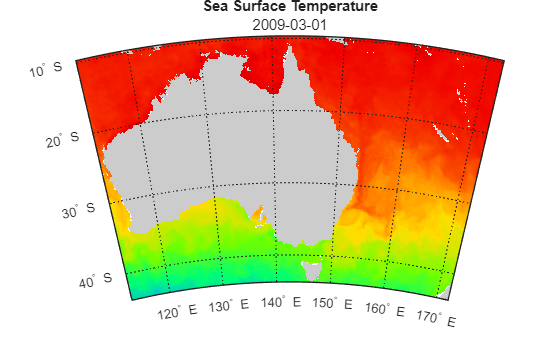
Manually Edit Web Map Request URL
You can modify a map request URL manually.
Search the WMS Database for a layer containing terrain elevation data from the WMS server hosted by MathWorks®. Get the map request URL for the layer.
layers = wmsfind("mathworks","SearchField","serverurl");
layer = refine(layers,"elevation");
mapRequest = WMSMapRequest(layer);
Set the map request URL to a variable.
mapURL = mapRequest.RequestURL;
Specify a background color and request data for the southern hemisphere by manually editing the map request URL. To do this, copy and paste the contents of mapURL into a new variable. Then, change the background color section of the URL to &BGCOLOR=0x2DC1D2 and change the bounding box section of the URL to &BBOX=-90.0,-180,0,180.0.
modifiedURL = ['https://wms.mathworks.com?SERVICE=WMS' ...
                '&LAYERS=terrain&CRS=EPSG:4326&FORMAT=image/png' ...
                '&TRANSPARENT=FALSE&HEIGHT=256&BGCOLOR=0x2DC1D2' ...
                '&REQUEST=GetMap&WIDTH=512&BBOX=-90.0,-180,0,180.0' ...
                '&STYLES=&VERSION=1.3.0'];
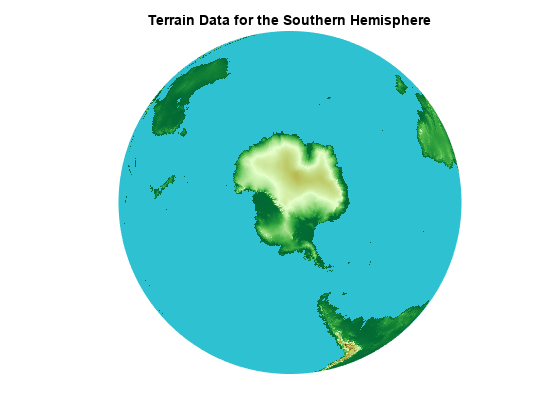
Read and display the modified map.
[A,R] = wmsread(modifiedURL);
figure
axesm globe
axis off
geoshow(A,R)
title("Terrain Data for the Southern Hemisphere")