imtile
R2026bCombine multiple image frames into one rectangular tiled image
Syntax
Description
out = imtile(filenames)filenames.
By default, the imtile function arranges the images so that they
roughly form a square. You can change the arrangement using optional name-value arguments.
The images can have different sizes and data types.
If you specify an indexed image, then the
imtilefunction converts it to RGB using the colormap present in the file.If there is a data type mismatch between images, then the
imtilefunction converts all images to data typedoubleusing theim2doublefunction.
out = imtile(imds)imds. For information about image datastores, see ImageDatastore.
out = imtile(___,map)map. You can specify input images using the input
argument of any of the preceding syntaxes. Note that if you specify images using file names
filenames, and also specify the colormap, then
map overrides any internal colormap present in the image
files.
out = imtile(___,Name=Value)
Examples
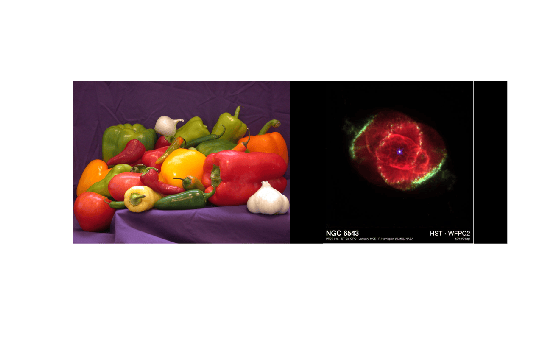
Specify two image files, then create a tiled image containing the images.
files = ["peppers.png","ngc6543a.jpg"];
out = imtile(files);
Display the tiled image.
imshow(out)
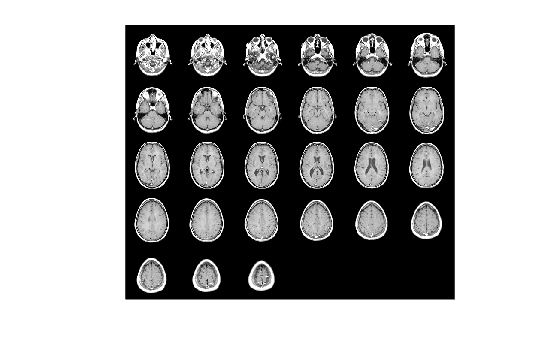
Load the MRI data set that contains a volumetric image and a colormap.
load mriCreate a tiled image from all slices in the image volume.
out = imtile(D,map);
imshow(out)
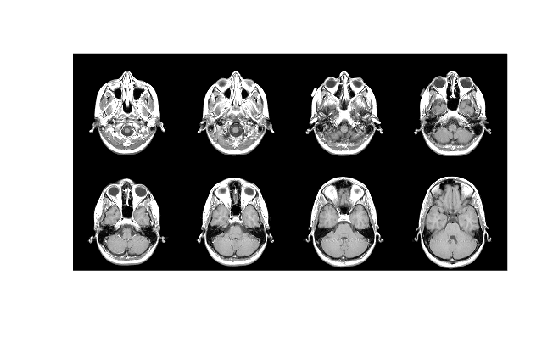
Create a tiled image containing only the first eight images in the data set. Arrange the images in a 2-by-4 grid by using the GridSize name-value argument.
out = imtile(D,map,Frames=1:8,GridSize=[2 4]);
imshow(out)
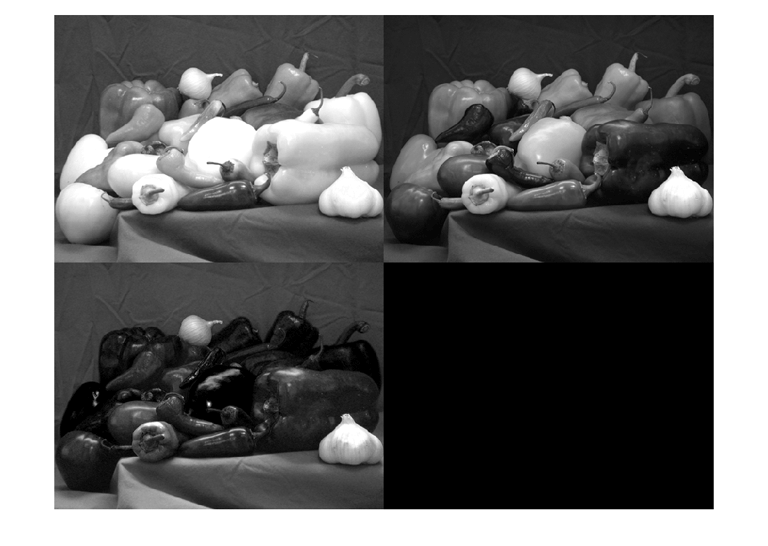
Read an RGB image into the workspace.
imRGB = imread('peppers.png');Create a tiled image containing each of the three planes of the RGB image. Display the tiled image.
out = imtile(imRGB);
imshow(out)
From an image datastore, create and customize a tiled image.
Create an image datastore containing all the files with the file extension "tif" or "png" in the specified folder.
fileFolder = fullfile(matlabroot,"toolbox","matlab","matlab_images");
imds = imageDatastore(fileFolder,IncludeSubfolders=true, ...
    FileExtensions=[".tif",".png"]);
Create a tiled image containing the images in the datastore.
out1 = imtile(imds);
imshow(out1)

Add a blue border to the tiled image by using the BorderSize and BackgroundColor name-value arguments.
out2 = imtile(imds,BorderSize=10,BackgroundColor="b");
figure
imshow(out2)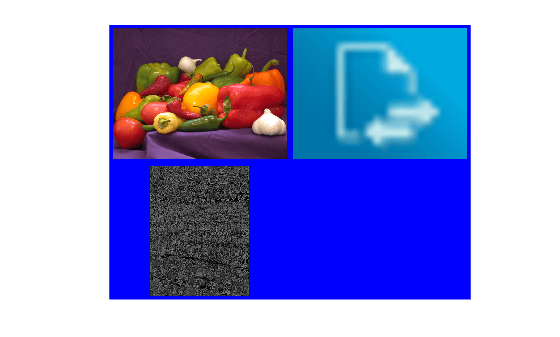
Input Arguments
Name-Value Arguments
Specify optional pairs of arguments as
Name1=Value1,...,NameN=ValueN, where Name is
the argument name and Value is the corresponding value.
Name-value arguments must appear after other arguments, but the order of the
pairs does not matter.
Example: imtile(imds,BackgroundColor="g"); specifies a green
background color.
Before R2021a, use commas to separate each name and value, and enclose
Name in quotes.
Example: imtile(imds,"BackgroundColor","g");
Color of the background, specified as an RGB triplet, a hexadecimal color code, a
color name, or a short name. The imtile function fills all blank
spaces with this color, including the space specified by
BorderSize.
For a custom color, specify an RGB triplet or a hexadecimal color code.
An RGB triplet is a three-element row vector whose elements specify the intensities of the red, green, and blue components of the color. The intensities must be in the range
[0,1], for example,[0.4 0.6 0.7].A hexadecimal color code is a string scalar or character vector that starts with a hash symbol (
#) followed by three or six hexadecimal digits, which can range from0toF. The values are not case sensitive. Therefore, the color codes"#FF8800","#ff8800","#F80", and"#f80"are equivalent.
Alternatively, you can specify some common colors by name. This table lists the named color options, the equivalent RGB triplets, and the hexadecimal color codes.
| Color Name | Short Name | RGB Triplet | Hexadecimal Color Code | Appearance |
|---|---|---|---|---|
"red" | "r" | [1 0 0] | "#FF0000" |
|
"green" | "g" | [0 1 0] | "#00FF00" |
|
"blue" | "b" | [0 0 1] | "#0000FF" |
|
"cyan"
| "c" | [0 1 1] | "#00FFFF" |
|
"magenta" | "m" | [1 0 1] | "#FF00FF" |
|
"yellow" | "y" | [1 1 0] | "#FFFF00" |
|
"black" | "k" | [0 0 0] | "#000000" |
|
"white" | "w" | [1 1 1] | "#FFFFFF" |
|


This table lists the default color palettes for plots in the light and dark themes.
| Palette | Palette Colors |
|---|---|
Before R2025a: Most plots use these colors by default. |
|
|
|


You can get the RGB triplets and hexadecimal color codes for these palettes using
the orderedcolors and rgb2hex
functions. For example, get the RGB triplets for the "gem" palette
and convert them to hexadecimal color
codes.
RGB = orderedcolors("gem");
H = rgb2hex(RGB);
Before R2023b: Get the RGB triplets using RGB =
get(groot,"FactoryAxesColorOrder").
Example: BackgroundColor="r"
Example: BackgroundColor="green"
Example: BackgroundColor=[0 0.4470 0.7410]
Example: BackgroundColor="#00FFFF"
Padding around each thumbnail image, specified as a numeric scalar or 1-by-2
numeric vector of the form [brows bcols]. The
imtile function pads the borders of each image with the
background color.
Frames to include, specified as a numeric array or a logical mask. The
imtile function interprets the values as indices into the image
array or cell array. The following examples create a tiled image containing the first
three image frames.
Example: out = imtile(I,Frames=1:3);
Example: out = imtile(I,Frames=[true true true
false]);
Number of rows and columns of thumbnails in the tiled image, specified as a
two-element vector of the form [nrows ncols].
nrows specifies the number of rows in the grid and
ncols specifies the number of columns in the grid. Use
NaNs or Infs to have
imtile calculate the size in a particular dimension in a way
that includes all the images.
If
GridSizeis[2 NaN], thenimtilecreates a tiled image with two rows and the number of columns necessary to include all the images.If both the elements are
NaNorInf, thenimtilecalculates the grid size to form a square.imtilereturns the images horizontally across columns.If there is a mismatch between
GridSizeand number of images (frames), thenimtilecreates the tiled image based onGridSize.
Interpolation method to resize images for thumbnails, specified as one of these values.
| Method | Description |
|---|---|
| Nearest-neighbor interpolation, performed using a box-shaped interpolation kernel. The output pixel is assigned the value of the pixel that the point falls within. No other pixels are considered. |
| Bilinear interpolation, performed using a triangular interpolation kernel. The output pixel value is a weighted average of pixels in the nearest 2-by-2 neighborhood. |
| Bicubic interpolation, performed using a piecewise cubic interpolation kernel. The output pixel value is a weighted average of pixels in the nearest 4-by-4 neighborhood.
Note Bicubic interpolation can produce pixel values outside the original range.
|
"lanczos2" | Interpolation using a Lanczos-2 kernel. |
"lanczos3" | Interpolation using a Lanczos-3 kernel. |
The default resizing method, "bicubic", typically works well
when the images are larger than the thumbnails. If the size of your images is smaller
than the thumbnails and you want to avoid smoothing the pixel values, then consider
setting ThumbnailInterpolation as
"nearest".
Data Types: char | string
Size of thumbnails, specified as a two-element vector of the form [trows
tcols], in pixels. The imtile function preserves the
aspect ratio of the original image by zero-padding the boundary.
If you specify a
NaNorInf, then theimtilefunction calculates the corresponding value automatically to preserve the aspect ratio of the first image.If you specify an empty array (
[]), then theimtilefunction uses the full size of the first image as the thumbnail size.

