Box-Cox Transformation
R2026bYou can apply a Box-Cox transform to any one-stage or response feature model node (any models with a global icon) by selecting Model > Set Up and entering a number for lambda in the Box-Cox edit box.
For Gaussian process models (GPMs) and linear models (polynomials, polynomial splines, and RBFs) you can also use the Box-Cox Transformation dialog box described in the following section, by using the toolbar button or Model menu item Box-Cox Transform.
You might want to transform a response feature either to correct for nonnormality and/or a
heteroscedastic variance structure. A useful class of transformations for this purpose is the
power transform  , where λ is a parameter to be determined. Box and Cox (1964) showed how λ
and the regression coefficients themselves could be estimated simultaneously using the method
of maximum likelihood. The procedure consists of conducting a standard least squares fit
using
, where λ is a parameter to be determined. Box and Cox (1964) showed how λ
and the regression coefficients themselves could be estimated simultaneously using the method
of maximum likelihood. The procedure consists of conducting a standard least squares fit
using
 for
for  λ
λ
 for
for 
where the so called geometric mean of the observations is given by
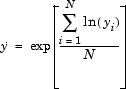
The maximum likelihood estimate of λ corresponds to the value for which the SSE(λ) from the fitted model is a minimum. This value of λ is determined by fitting a model (assumed throughout to be defined by the regression matrix for the full model - X) for various levels of λ and choosing the value corresponding to the minimum SSE(λ). A plot of SSE(λ) versus λ is often used to facilitate this choice.
The parameter λ is swept between the range of -3 to 3 in increments of 0.5.
You can enter a value for lambda in the edit box that approaches the point on the plot with the smallest SSE.
Although SSE(λ) is a continuous function of λ, simple choices for λ are recommended. This is because the practical difference between 0.5 and 0.593, say, is likely to be very small but a simple transform like 0.5 is much easier to interpret.
You can also find an approximate 100(1- ) confidence interval on l by computing

where is the number of residual degrees of freedom equal to (N-q).
In this formula λ is understood to be the value that minimizes SSE(λ). Note that this confidence interval might encompass more than one incremental value for λ. In this case, any of these values is as valid as any other and you can select any of these transformations from which to develop trial models.
You should always look at the residuals plots at the top to see the effect of different transforms.
You can create several child nodes of a single model and choose different transforms for each to compare them using the rest of the Model Browser tools.
For the sake of clarity, consider the following example, which illustrates the results of applying the Box-Cox algorithm to a polyspline torque model.

In this example the minimum value of SSE(λ) occurs near to λ=0. The minimum is marked in
green. The 95% confidence limit has been calculated and drawn on the figure as a red solid
line. It is apparent in this example that, after rounding to the nearest incremental value
contained within the confidence interval, any λ in the range  is appropriate. Of the three possible increments, 0, 0.5, and 1, λ = 0.5
is the closest to the minimum SSE.
is appropriate. Of the three possible increments, 0, 0.5, and 1, λ = 0.5
is the closest to the minimum SSE.
You can select any point on the plot by clicking. The chosen point (current lambda) is then outlined in red. You can also enter values of lambda directly in the edit box and press Enter.

