plotResponse
System object: phased.CustomAntennaElement
Namespace: phased
Plot response pattern of antenna
Syntax
plotResponse(H,FREQ)
plotResponse(H,FREQ,Name,Value)
hPlot = plotResponse(___)
Description
plotResponse( plots
the element response pattern along the azimuth cut, where the elevation
angle is 0. The operating frequency is specified in H,FREQ)FREQ.
plotResponse(
plots the element response with additional options specified by one
or more H,FREQ,Name,Value)Name,Value pair arguments.
returns handles of the lines or surface in the figure window, using
any of the input arguments in the previous syntaxes.hPlot = plotResponse(___)
Input Arguments
| Element System object™ |
| Operating frequency in Hertz specified as a scalar or 1–by-K row
vector. |
Name-Value Arguments
Specify optional pairs of arguments as
Name1=Value1,...,NameN=ValueN, where Name is
the argument name and Value is the corresponding value.
Name-value arguments must appear after other arguments, but the order of the
pairs does not matter.
Before R2021a, use commas to separate each name and value, and enclose
Name in quotes.
| Cut angle specified as a scalar. This argument is applicable
only when Default: | ||||||||||
| Format of the plot, using one of Default: | ||||||||||
| Set this value to Default: | ||||||||||
| Set this value to This parameter applies only when Default: | ||||||||||
| Specify the polarization options for plotting the antenna response
pattern. The allowable values are
For antennas that do not support polarization, the
only allowed value is Default: | ||||||||||
| Cut of the response. Valid values depend on
If you set | ||||||||||
| The unit of the plot. Valid values are
Default: | ||||||||||
| Azimuth angles for plotting element response, specified as a
row vector. The Default: | ||||||||||
| Elevation angles for plotting element response, specified as
a row vector. The Default: | ||||||||||
| U coordinate values for plotting element
response, specified as a row vector. The Default: | ||||||||||
| V coordinate values for plotting element
response, specified as a row vector. The Default: |
Examples
Create a custom antenna with a cosine pattern. Then, plot the antenna's response.
Create the antenna and calculate the response. The user-defined pattern is omnidirectional in the azimuth direction and has a cosine pattern in the elevation direction. Assume the antenna works at 1 GHz.
fc = 1e9; azang = [-180:180]; elang = [-90:90]; magpattern = mag2db(repmat(cosd(elang)',1,numel(azang))); phasepattern = zeros(size(magpattern)); antenna = phased.CustomAntennaElement('AzimuthAngles',azang, ... 'ElevationAngles',elang,'MagnitudePattern',magpattern, ... 'PhasePattern',phasepattern);
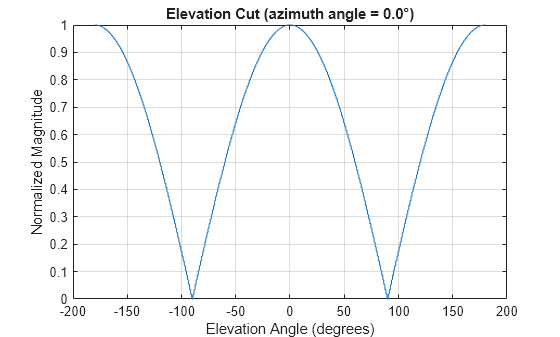
Plot an elevation cut of the magnitude response as a line plot.
plotResponse(antenna,fc,'RespCut','El','ElevationAngles',[-90:0.1:90],... 'Format','Line','Unit','mag')
Plot an elevation cut of the directivity as a line plot, showing that the maximum directivity is approximately 2 dB.
plotResponse(antenna,fc,'RespCut','El','ElevationAngles',[-90:0.1:90],... 'Format','Line','Unit','dbi')

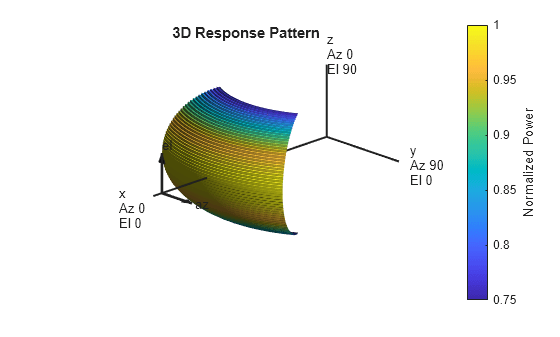
Create an antenna with a custom response. The user-defined pattern is omnidirectional in the azimuth direction and has a cosine pattern in the elevation direction. Assume the antenna operates at a frequency of 1 GHz. Display the 3-D response for a 60 degree range of azimuth and elevation angles centered at 0 degrees azimuth and 0 degrees elevation in 0.1 degree increments.
fc = 1e9; azang = [-180:180]; elang = [-90:90]; magpattern = mag2db(repmat(cosd(elang)',1,numel(azang))); phasepattern = zeros(size(magpattern)); antenna = phased.CustomAntennaElement('AzimuthAngles',azang, ... 'ElevationAngles',elang,'MagnitudePattern',magpattern, ... 'PhasePattern',phasepattern); resp = antenna(fc,[0;0]); plotResponse(antenna,fc,'RespCut','3D','AzimuthAngles',[-30:0.1:30],... 'ElevationAngles',[-30:0.1:30],'Format','Polar','Unit','pow')
MATLAB Command
You clicked a link that corresponds to this MATLAB command:
Run the command by entering it in the MATLAB Command Window. Web browsers do not support MATLAB commands.
Seleziona un sito web
Seleziona un sito web per visualizzare contenuto tradotto dove disponibile e vedere eventi e offerte locali. In base alla tua area geografica, ti consigliamo di selezionare: .
Puoi anche selezionare un sito web dal seguente elenco:
Come ottenere le migliori prestazioni del sito
Per ottenere le migliori prestazioni del sito, seleziona il sito cinese (in cinese o in inglese). I siti MathWorks per gli altri paesi non sono ottimizzati per essere visitati dalla tua area geografica.
Americhe
- América Latina (Español)
- Canada (English)
- United States (English)
Europa
- Belgium (English)
- Denmark (English)
- Deutschland (Deutsch)
- España (Español)
- Finland (English)
- France (Français)
- Ireland (English)
- Italia (Italiano)
- Luxembourg (English)
- Netherlands (English)
- Norway (English)
- Österreich (Deutsch)
- Portugal (English)
- Sweden (English)
- Switzerland
- United Kingdom (English)