Contenuto principale

Camera

R2026b

Display and modify cameras in pcviewer

Since R2026b

    Description

    A Camera object represents a camera in a pcviewer scene. The addCamera object function returns a Camera object when you add one or more cameras to a pcviewer object. You can use the properties of the Camera object to control the appearance and behavior of the cameras in the scene.

    Properties

    expand all

    Camera pose, specified as a rigidtform3d (Image Processing Toolbox) object.

    Camera size, specified as a positive scalar.

    Camera label, specified as a string scalar.

    Camera color, specified as an RGB triplet.

    Transformation applied to the point cloud in the scene, specified as a rigidtform3d (Image Processing Toolbox), affinetform3d (Image Processing Toolbox), simtform3d (Image Processing Toolbox), or transltform3d (Image Processing Toolbox).

    Transparency of camera faces, specified as a numeric scalar in the range [0,1]. For cameras displayed using the "frustrum" style, this property controls the transparency of the far plane.

    Display point cloud in scene, specified as "on" or "off", or as a numeric or logical 0 (false) or 1 (true). A value of "on" is equivalent to true and shows the points magnified. A value of "off" is equivalent to false and shows points unmagnified, as they would appear from the position of the camera.

    Camera axis visibility, specified as "on" or "off", or as a numeric or logical 1 (true) or 0 (false). The visibility value applies to all cameras. A value of "on" is equivalent to true, and "off" is equivalent to false. Thus, you can use the value of the property set by this argument as a logical value. The value is stored as an on/off logical value of type OnOffSwitchState.

    Camera principal axes visibility, specified as "on" or "off", or as a numeric or logical 1 (true) or 0 (false). The visibility value applies to all cameras. A value of "on" is equivalent to true, and "off" is equivalent to false. Thus, you can use the value of the property set by this argument as a logical value. The value is stored as an on/off logical value of type OnOffSwitchState.

    Examples

    collapse all

    Load a point cloud and camera poses from MAT files. The three cameras are placed in orbit around the point cloud, each looking toward its center.

    load("object3d.mat");
    load("cameraPoses.mat");

    Display the point cloud in pcviewer and add the cameras using addCamera.

    pcview = pcviewer(ptCloud);
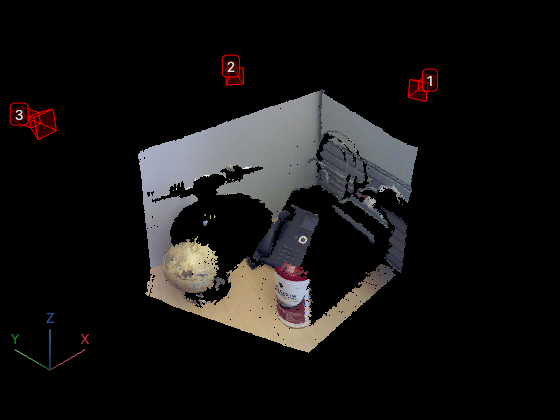
    cameras = addCamera(pcview,cameraPoses,Size=0.1,Color=[1 0 0],Label=[1 2 3]);

    Version History

    Introduced in R2026b

    See Also

    Objects

    Functions