Contenuto principale

vision.labeler.loading.OusterLidarSource Class

R2026b

Namespace: vision.labeler.loading
Superclasses: vision.labeler.loading.MultiSignalSource

Load signals from Ouster lidar sources into Multi-Sensor Labeler app

Since R2026b

Description

The vision.labeler.loading.OusterLidarSource class creates an interface for loading a signal from a Ouster packet capture (PCAP) lidar data source into the Multi-Sensor Labeler app. In the Add Signal dialog box of the app, when Source Type is set to Ouster Lidar, this class controls the parameters in that dialog box.
Add Signal dialog box with Source Type set to Ouster Lidar

To access this dialog box, in the app, select Import > Add Signal.

This class loads Ouster PCAP files from the device models accepted by the ousterFileReader function.

The vision.labeler.loading.OusterLidarSource class is a handle class.

Creation

When you export labels from a Multi-Sensor Labeler app session that contains a Ouster lidar source, the exported groundTruthMultiSensor object stores an instance of this class in its DataSource property.

To create a OusterLidarSource object programmatically, such as when programmatically creating a groundTruthMultiSensor object, use the vision.labeler.loading.OusterLidarSource function (described here).

Description

ousterSource = vision.labeler.loading.OusterLidarSource creates a OusterLidarSource object for loading a signal from a Ouster lidar data source. To specify the data source and the parameters required to load the source, use the loadSource method.

Properties

expand all

Name of the type of source that this class loads, specified as a string scalar.

Attributes:

GetAccess
public
Constant
true
NonCopyable
true

Description of the functionality that this class provides, specified as a string scalar.

Attributes:

GetAccess
public
Constant
true
NonCopyable
true

Name of the data source, specified as a string scalar. Typically, SourceName is the name of the file from which the signal is loaded.

Attributes:

GetAccess
public
SetAccess
protected

Parameters for loading a Ouster lidar signal from a data source, specified as a structure.

This table describes the required and optional fields of the SourceParams structure.

FieldDescriptionRequired or Optional
Timestamps

Timestamps for the Velodyne® lidar signal, specified as a cell array containing a single duration vector of timestamps.

In the Add Signal dialog box of the app, if you set the Timestamps parameter to From Workspace and read the timestamps from a variable in the MATLAB® workspace, then the SourceParams property stores these timestamps in the Timestamps field.

Optional

In the Add Signal dialog box of the app, if you set the Timestamps parameter to From File and read the timestamps from the Ouster PCAP file, then the structure does not include this field.

DeviceModel

Ouster device model name, specified as one of these options.

  • 'VLP16' (default) — VLP-16 device model

  • 'PuckLITE' — Puck LITE device model

  • 'PuckHiRes' — Puck Hi-Res device model

  • 'VLP32C' — VLP-32C device model

  • 'HDL32E' — HDL-32E device model

  • 'HDL64E' — HDL-64E device model

If you specify the incorrect device model for your Ouster PCAP file, the app loads an improperly calibrated point cloud.

In the Add Signal dialog box of the app, select the device model from the Device Model parameter. The Calibration File parameter updates to the calibration file of the selected device model.

Required

CalibrationFile

Name of the Ouster calibration XML file, specified as a character vector or string scalar.

To specify one of the calibration files included with your MATLAB installation, at the MATLAB command prompt, enter this code. Replace <DeviceModel> with the name of the device model that you specify in the DeviceModel field of this structure (without quotes).

calibrationFile = fullfile( ...
    matlabroot,'toolbox', ...
    'shared','pointclouds','utilities', ...
    'ousterFileReaderConfiguration', ...
    '<DeviceModel>.xml')
By default, the CalibrationFile field is set to the full path to the VLP16.xml file, which is the calibration file for the VLP-16 device model.

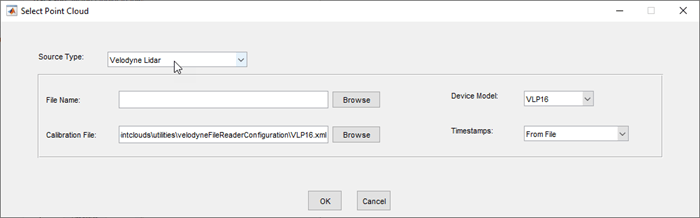
In the Select Point Cloud dialog box of the app, when you change the Device Model parameter selection, the Calibration File parameter updates to the corresponding calibration file for the selected device model. You can also browse for or enter a path to a different calibration file in the Calibration File box.

Required

For more details on device models and calibration files, see the ousterFileReader object reference page.

Attributes:

GetAccess
public
SetAccess
protected

Names of the signals that can be loaded from the data source, specified as a string vector.

Attributes:

GetAccess
public
SetAccess
protected

Types of the signals that can be loaded from the data source, specified as a vector of vision.labeler.loading.SignalType enumerations. Each signal listed in the SignalName property is of the type in the corresponding position of SignalType.

Attributes:

GetAccess
public
SetAccess
protected

Timestamps of the signals that can be loaded from the data source, specified as a cell array of duration vectors. Each signal listed in the SignalName property has the timestamps in the corresponding position of Timestamp.

Attributes:

GetAccess
public
SetAccess
protected

Number of signals that can be read from the data source, specified as a nonnegative integer. NumSignals is equal to the number of signals in the SignalName property.

Attributes:

GetAccess
public
SetAccess
public
Dependent
true
NonCopyable
true

Methods

expand all

Version History

Introduced in R2026b