Automated Parking Valet with ROS in MATLAB
R2026bThis example shows how to distribute the Automated Parking Valet (Automated Driving Toolbox) application among various nodes in a ROS network. Depending on your system, this example is provided for ROS and ROS 2 networks using either MATLAB® or Simulink®. The example shown here uses ROS and MATLAB. For the other examples, see:
Overview
This example is an extension of the Automated Parking Valet (Automated Driving Toolbox) example in Automated Driving Toolbox™. A typical autonomous application has the following components.
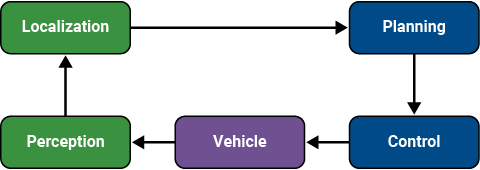
For simplicity, this example concentrates on Planning, Control, and a simplified Vehicle Model. The example uses prerecorded data to substitute localization information.
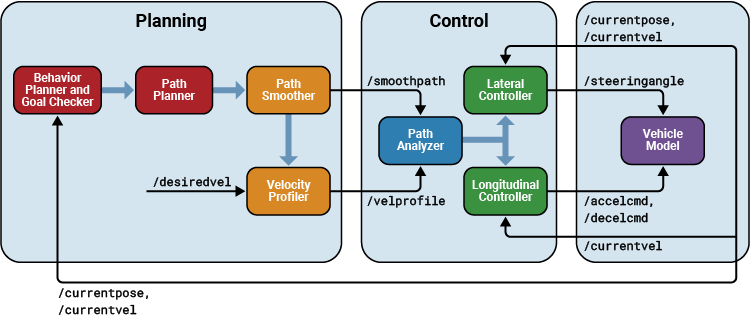
This application demonstrates a typical split of various functions into ROS nodes. The following picture shows how the above example is split into various nodes. Each node: Planning, Control and Vehicle is a ROS node implementing the functionalities shown as below. The interconnections between the nodes show the topics used on each interconnection of the nodes.
Setup
First, load a route plan and a given costmap used by the behavior planner and path analyzer. Behavior Planner, Path Planner, Path Analyzer, Lateral and Longitudinal Controllers are implemented by helper classes, which are setup with this example helper function call.
exampleHelperROSValetSetupGlobals;
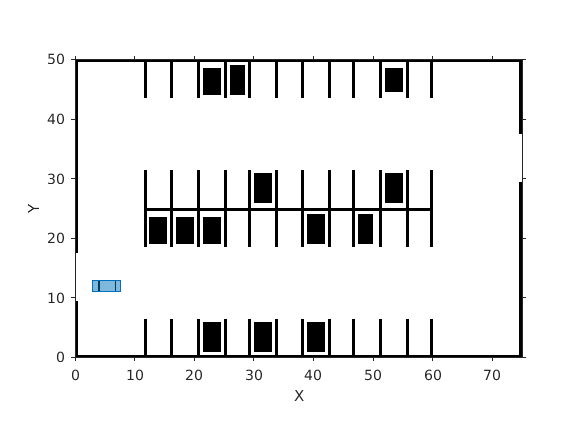
The initialized globals are organized as fields in the global structure, valet.
disp(valet)
            mapLayers: [1×1 struct]
              costmap: [1×1 vehicleCostmap]
          vehicleDims: [1×1 vehicleDimensions]
     maxSteeringAngle: 35
                 data: [1×1 struct]
            routePlan: [4×3 table]
          currentPose: [4 12 0]
           vehicleSim: [1×1 ExampleHelperROSValetVehicleSimulator]
    behavioralPlanner: [1×1 ExampleHelperROSValetBehavioralPlanner]
        motionPlanner: [1×1 pathPlannerRRT]
             goalPose: [56 11 0]
              refPath: [1×1 driving.Path]
      transitionPoses: [14×3 double]
           directions: [522×1 double]
           currentVel: 0
     approxSeparation: 0.1000
       numSmoothPoses: 522
             maxSpeed: 5
           startSpeed: 0
             endSpeed: 0
             refPoses: [522×3 double]
           cumLengths: [522×1 double]
           curvatures: [522×1 double]
        refVelocities: [522×1 double]
           sampleTime: 0.1000
        lonController: [1×1 ExampleHelperROSValetLongitudinalController]
          controlRate: [1×1 ExampleHelperROSValetFixedRate]
         pathAnalyzer: [1×1 ExampleHelperROSValetPathAnalyzer]
             parkPose: [36 44 90]
Initialize the ROS network.
rosinit;
Launching ROS Core...
........Done in 9.0577 seconds.
Initializing ROS master on http://172.18.230.188:11311.
Initializing global node /matlab_global_node_80097 with NodeURI http://mathworks-szlnm:51740/ and MasterURI http://localhost:11311.
masterHost = 'localhost';The functions in the application are distributed amongst ROS nodes. This example uses three ROS nodes: planningNode, controlNode, and vehicleNode.
Each node creates the publishers and subscribers of its topics. The three subscribers that run the simulation, GoalReachSub, VelProfSub, and SteeringSub, are created without a callback function here. The Initialize Simulation section assigns their callback functions, after checking that all topics exchange data.
Planning
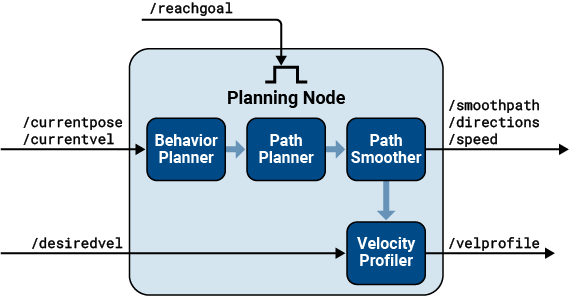
The Planning node calculates each path segment based on the current vehicle position. This node is responsible for generating the smooth path and publishes the path to the network.
This node publishes these topics:
/smoothpath/velprofile/directions/speed/nextgoal
The node subscribes to these topics:
/currentvel/currentpose/desiredvel/reachgoal
On receiving a /reachgoal message, the node runs the exampleHelperROS2ValetPlannerCallback callback, which plans the next segment.
Create the planning node.
planningNode = ros.Node('planning', masterHost);Create publishers for planning node. Specify the message types for the publisher or subscriber for a topic that is not present on ROS network.
planning.PathPub = ros.Publisher(planningNode, '/smoothpath', 'std_msgs/Float64MultiArray','DataFormat','struct');
planning.VelPub = ros.Publisher(planningNode, '/velprofile', 'std_msgs/Float64MultiArray','DataFormat','struct');
planning.DirPub = ros.Publisher(planningNode, '/directions', 'std_msgs/Float64MultiArray','DataFormat','struct');
planning.SpeedPub = ros.Publisher(planningNode,'/speed','std_msgs/Float64MultiArray','DataFormat','struct');
planning.NxtPub = ros.Publisher(planningNode, '/nextgoal', 'geometry_msgs/Pose2D','DataFormat','struct');
Create the subscribers for the planner, planningNode.
planning.CurVelSub = ros.Subscriber(planningNode, '/currentvel', 'std_msgs/Float64','DataFormat','struct');
planning.CurPoseSub = ros.Subscriber(planningNode, '/currentpose', 'geometry_msgs/Pose2D','DataFormat','struct');
planning.DesrVelSub = ros.Subscriber(planningNode, '/desiredvel', 'std_msgs/Float64','DataFormat','struct');
Create a subscriber, GoalReachSub, to listen to the /reachgoal topic of the planning node. Its callback function is assigned later.
GoalReachSub = ros.Subscriber(planningNode, '/reachgoal', 'std_msgs/Bool','DataFormat','struct');
Control
The Control node is responsible for longitudinal and lateral controllers. This node publishes these topics:
/steeringangle/accelcmd/decelcmd/vehdir/reachgoal
The node subscribes to these topics:
/smoothpath/directions/speed/currentpose/currentvel/nextgoal/velprofile
On receiving a /velprofile message, the node runs the exampleHelperROS2ValetControlCallback callback, which sends control messages to the vehicle.
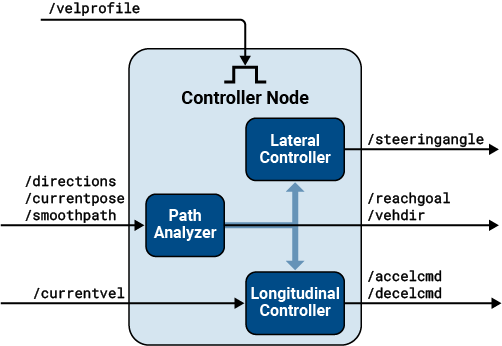
Create the controller, controlNode, and set up the publishers and subscribers in the node.
controlNode = ros.Node('control', masterHost);

% Publishers for controlNode
control.SteeringPub = ros.Publisher(controlNode, '/steeringangle', 'std_msgs/Float64','DataFormat','struct');
control.AccelPub = ros.Publisher(controlNode, '/accelcmd', 'std_msgs/Float64','DataFormat','struct');
control.DecelPub = ros.Publisher(controlNode, '/decelcmd', 'std_msgs/Float64','DataFormat','struct');
control.VehDirPub = ros.Publisher(controlNode, '/vehdir', 'std_msgs/Float64','DataFormat','struct');
control.VehGoalReachPub = ros.Publisher(controlNode, '/reachgoal','DataFormat','struct');

% Subscribers for controlNode
control.PathSub = ros.Subscriber(controlNode, '/smoothpath','DataFormat','struct');
control.DirSub = ros.Subscriber(controlNode, '/directions','DataFormat','struct');
control.SpeedSub = ros.Subscriber(controlNode, '/speed','DataFormat','struct');
control.CurPoseSub = ros.Subscriber(controlNode, '/currentpose','DataFormat','struct');
control.CurVelSub = ros.Subscriber(controlNode, '/currentvel','DataFormat','struct');
control.NextGoalSub = ros.Subscriber(controlNode, '/nextgoal','DataFormat','struct');

% Create a subscriber for the /velprofile topic on the control node. Its
% callback function is assigned later.
VelProfSub = ros.Subscriber(controlNode, '/velprofile','DataFormat','struct');
Vehicle
The Vehicle node is responsible for simulating the vehicle model. This node publishes these topics:
/currentvel/currentpose
The node subscribes to these topics:
/accelcmd/decelcmd/vehdir/steeringangle
On receiving a /steeringangle message, the vehicle simulator is run in the callback function, exampleHelperROSValetVehicleCallback.
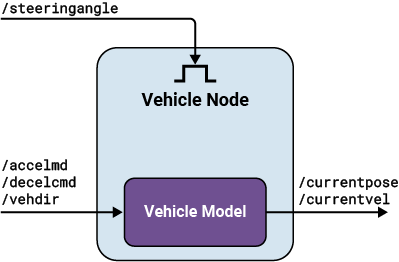
% Create vehicle node.
vehicleNode = ros.Node('vehicle', masterHost);

% Create publishers for vehicle node.
vehicle.CurVelPub = ros.Publisher(vehicleNode, '/currentvel','DataFormat','struct');
vehicle.CurPosePub = ros.Publisher(vehicleNode, '/currentpose','DataFormat','struct');

% Create subscribers for vehicle node.
vehicle.AccelSub = ros.Subscriber(vehicleNode, '/accelcmd','DataFormat','struct');
vehicle.DecelSub = ros.Subscriber(vehicleNode, '/decelcmd','DataFormat','struct');
vehicle.DirSub = ros.Subscriber(vehicleNode, '/vehdir','DataFormat','struct');

% Create a subscriber for the /steeringangle topic, which runs the vehicle
% simulator callback. Its callback function is assigned later.
SteeringSub = ros.Subscriber(vehicleNode, '/steeringangle','DataFormat','struct');
Initialize Simulation
Create the first velocity and current pose messages, which describe the initial state of the vehicle.
curVelMsg = getROSMessage(vehicle.CurVelPub.MessageType);
curVelMsg.Data = valet.vehicleSim.getVehicleVelocity;

curPoseMsg = getROSMessage(vehicle.CurPosePub.MessageType);
curPoseMsg.X = valet.currentPose(1);
curPoseMsg.Y = valet.currentPose(2);
curPoseMsg.Theta = valet.currentPose(3);
The TCP connection between a publisher and a subscriber is not established immediately, and a message published before it is ready is dropped. Before starting the algorithm, check that every publisher and subscriber can exchange data. The exampleHelperROSValetEstablishConnections helper function publishes a message on each topic and waits for the subscribers of that topic to receive it.
exampleHelperROSValetEstablishConnections(planning, control, vehicle, ...
    VelProfSub, SteeringSub, GoalReachSub, curPoseMsg, curVelMsg);
Assign the callback functions that run the simulation. Assigning them earlier would cause them to fire on the messages published above.
VelProfSub.NewMessageFcn = @(~,msg)exampleHelperROSValetControlCallback(msg, control, valet);
SteeringSub.NewMessageFcn = @(~,msg)exampleHelperROSValetVehicleCallback(msg, vehicle, valet);
GoalReachSub.NewMessageFcn = @(~,msg)exampleHelperROSValetPlannerCallback(msg, planning, valet);
Start the planning loop, now that every node can act on the messages it receives.
reachMsg = getROSMessage(control.VehGoalReachPub.MessageType);
reachMsg.Data = true;
send(control.VehGoalReachPub, reachMsg);
Wait for Vehicle to Reach Prepark Position
Show the vehicle simulation figure, so that the vehicle is visible while it drives to the prepark position.
showFigure(valet.vehicleSim);
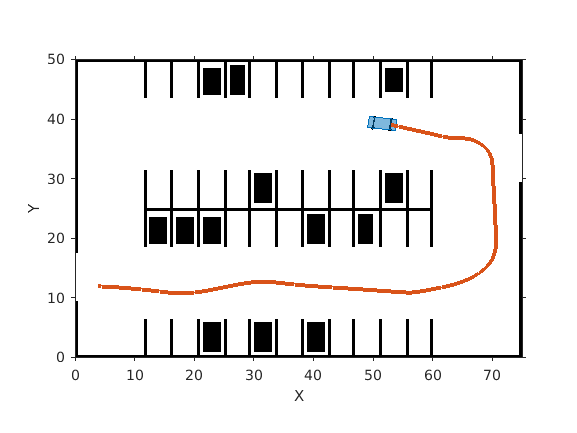
Wait for the behavioralPlanner to indicate that the vehicle reached the prepark position.
while ~reachedDestination(valet.behavioralPlanner)
    pause(1);
end
Park Maneuver
The parking maneuver callbacks are slightly different from the normal driving maneuver. Replace the callbacks for the /velprofile and /reachgoal subscribers.
VelProfSub.NewMessageFcn = @(~,msg)exampleHelperROSValetParkControlCallback(msg, control, valet);
GoalReachSub.NewMessageFcn = @(~,msg)exampleHelperROSValetParkManeuver(msg, planning, valet);

pause(1);
reachMsg = getROSMessage(control.VehGoalReachPub.MessageType);
reachMsg.Data = false;
send(control.VehGoalReachPub, reachMsg);

% Receive a message from the /reachgoal topic using the subscriber. This
% waits until a new message is received. Display the figure. The vehicle
% has completed the full automated valet maneuver.
receive(GoalReachSub);

exampleHelperROSValetCloseFigures;
snapnow;
Delete the simulator and shutdown all the nodes by clearing publishers, subscribers and node handles.
delete(valet.vehicleSim);

% Clear variables that were created above.
clear('valet');

GoalReachSub.NewMessageFcn = [];
VelProfSub.NewMessageFcn = [];
SteeringSub.NewMessageFcn = [];

clear('planning', 'planningNode', 'GoalReachSub');
clear('control', 'controlNode', 'VelProfSub');
clear('vehicle', 'vehicleNode', 'SteeringSub');
clear('curPoseMsg', 'curVelMsg', 'reachMsg');
clear('masterHost');

% Shutdown the ROS network.
rosshutdown;
Shutting down global node /matlab_global_node_80097 with NodeURI http://mathworks-szlnm:51740/ and MasterURI http://localhost:11311.
Shutting down ROS master on http://172.18.230.188:11311.

