Using Custom Visualization for Entities
R2026bOverview
These examples show how you can create MATLAB®-based custom visualization for entities. The example illustrates the visualization of a restaurant layout with customer entities entering, dining, and leaving.
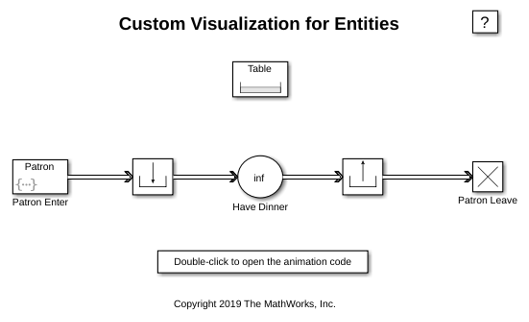
Structure of Model
The model contains the following major components:
The Resource Pool block models the tables in the restaurant. Since there are 10 tables in the restaurant, the resource amount is 10.
The Entity Generator block (Patron Enter) generates entities representing customers. They enter a waiting area, represented by a Resource Acquire. Here they wait for a free table.
When a table is available for a customer, he can move to the Entity Server block which models the duration of eating.
When the customer is done eating, he releases the table back to the pool and exits the restaurant.
modelname = 'seCustomVisualization';
open_system(modelname);
Visualizing the Restaurant
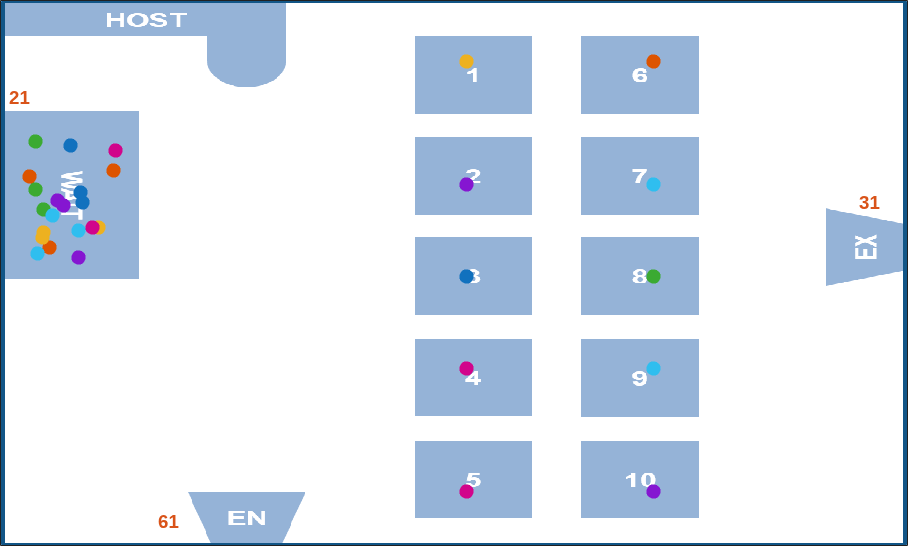
seRestaurantAnimator visualizes the restaurant as follows:
seRestaurantAnimator provides the visualization of the restaurant layout for the model.
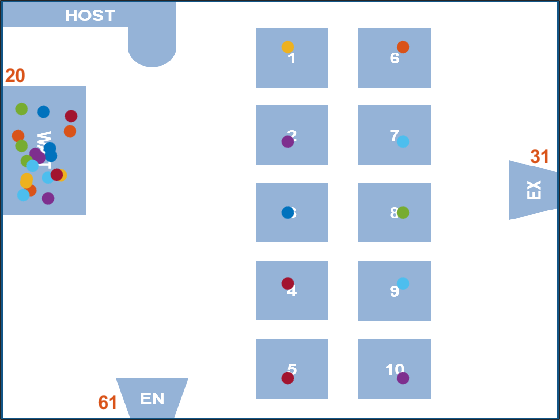
It generates the figure containing the layout of a restaurant with an entrance, a waiting area, 10 dining tables, and an exit.
As entities move during the simulation, it creates a marker (glyph) for each entity in the figure and programs motion for the marker so that it appears to move from one point to another.
The animator assigns a table ID for each waiting customer and shows the customer moving to the table.
To inspect the attributes of the customer entity, pause the model and click a customer entity glyph. The figure displays the TimeToDine attribute.
To make the motion appear continuous, it uses a MATLAB timer to periodically execute a function that incrementally moves each entity towards its destination.
It uses MATLAB graphics to display statistics on the figure about the number of entities entering, waiting, and leaving.
Clicking an entity in the visualization displays the attributes that it contains. It uses a MATLAB graphics callback to program a ButtonDownFcn on each entity marker.
animator = seRestaurantAnimator;
To simulate the model, enter:
sim(modelname);
Warning: Error occurred while executing the listener callback for event
PostEntry defined for class simevents.Storage:
Error using indexing
The specified key is not present in this container.

Error in seRestaurantAnimator/scheduleMotion (line 318)
                motionData = this.mTimerData(num2str(entity.ID));
                             ^^^^^^^^^^^^^^^^^^^^^^^^^^^^^^^^^^^
Error in seRestaurantAnimator/postEntry (line 217)
                this.scheduleMotion(entity, target);
                ^^^^^^^^^^^^^^^^^^^^^^^^^^^^^^^^^^^
Error in slde.SimulationStorageObserverHelper/postEntry

Error in
slde.SimulationStorageObserverHelper>@(e,a)postEntry(objWeakRef.Handle,e,a)

Error in CustomVisualizationExample (line 42)
sim(modelname);
^^^^^^^^^^^^^^
Error in evalmxdom>instrumentAndRun (line 119)
text = evalc(evalstr);
       ^^^^^^^^^^^^^^
Error in evalmxdom (line 24)
[data,text,laste] =
instrumentAndRun(file,cellBoundaries,imageDir,imagePrefix,options);
                    ^^^^^^^^^^^^^^^^^^^^^^^^^^^^^^^^^^^^^^^^^^^^^^^^^^^^^^^^^^^^^^^^^^
Error in publish (line 166)
    dom = evalmxdom(file,dom,cellBoundaries,prefix,imageDir,outputDir,options);
    ^^^^^^^^^^^^^^^^^^^^^^^^^^^^^^^^^^^^^^^^^^^^^^^^^^^^^^^^^^^^^^^^^^^^^^^^^^^
Error in mwtools.publishExample (line 115)
    publish(name, opts);
    ^^^^^^^^^^^^^^^^^^^
Error in publish_examples1 (line 37)
mwtools.publishExample('CustomVisualizationExample')
^^^^^^^^^^^^^^^^^^^^^^^^^^^^^^^^^^^^^^^^^^^^^^^^^^^^
Error in BML (line 13)
        evalin('base', s);
        ^^^^^^^^^^^^^^^^^
close(animator.getFigureHandle);
close_system(modelname);
clear modelname animator
See Also
Entity Generator | Queue | Entity Terminator

