Analyze System Energy Flow for BEV with Motor Cooling
R2026bThis example shows how to analyze energy and power flows in a battery electric vehicle (BEV) model with and without motor cooling. You get information about energy usage of specific blocks from the logged simulation data using the getEnergyInfo function. You then process the extracted data to analyze the system energy flow. With motor cooling, electrical energy from the battery converts into other type of energy and dissipates efficiently, maintaining motor temperature stability. Without cooling, thermal energy accumulates in the motor, leading to overheating.
Open Model
Open the AnalyzeSystemEnergyFlowForCooledBEV model.
modelName = "AnalyzeSystemEnergyFlowForCooledBEV";
open_system(modelName);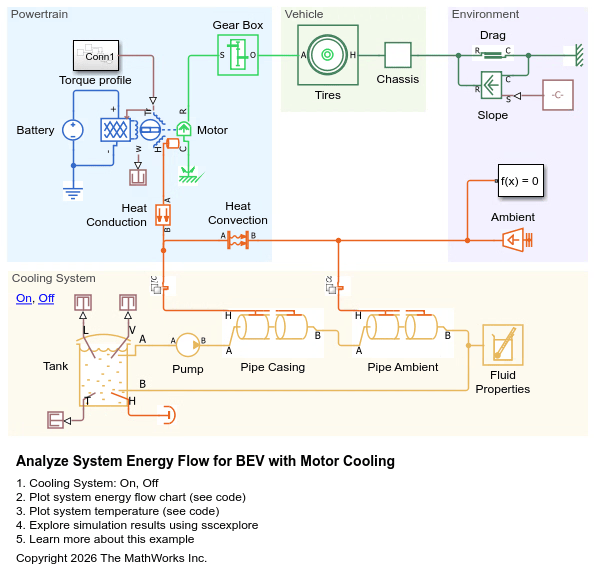
The two Variant Connector blocks form a bounded region that allows you to activate or deactivate the flow of heat around the cooling system. Variant choices allow you to exclude some components from the simulation without physically removing the components from the physical network.
Simulate BEV with Cooling System
Set the cooling system to be active.
Cooling_On = AnalyzeSystemEnergyFlowForCooledBEVSetCoolingSystem(modelName, 1);
Run the model.
sim(modelName);
Retrieve the energy information using the getEnergyInfo function. You can use the getEnergyInfo function to get energy and power usage for a specific block from the logged simulation data. Before you call this function, you must enable energy accounting and simulate the model with Simscape™ data logging turned on either for the whole model or for specific blocks of interest. To enable energy accounting, in the Configuration Parameters dialog box, at the bottom of the Simscape pane, under Advanced Parameters, select the Enable energy accounting check box. You can also use the equivalent command-line interface to set the model configuration parameter:
set_param(modelName,'SimscapeUseEnergyAccounting','on');
To get energy and power usage for the Motor & Drive (System Level) block labeled Motor, you can run:
MotorEnergyInfo = getEnergyInfo(simlog_AnalyzeSystemEnergyFlowForCooledBEV.Motor);
In this example, run the AnalyzeSystemEnergyFlowForCooledBEVGetEnergyInfo helper script to get energy and power usage for all the blocks in the model.
AnalyzeSystemEnergyFlowForCooledBEVGetEnergyInfo
View the energy usage summary for the Motor block.
MotorEnergyInfo.Summary
The Ports column shows the energy flowing into a block through its conserving ports. Positive values indicate that the energy enters the block, and negative values indicate that the energy exits the block. Electrical energy enters the motor from the battery. Mechanical energy exits the motor towards the gear box. Thermal energy exits the motor towards the cooling system and Temperature Source block labeled Ambient which models the environmental temperature.
The External column shows the energy flowing into a block through external environmental sources that you have not modeled in your Simscape network. Positive values indicate the block behaves as an ideal energy source and negative values indicate that the energy is dissipated. The motor does not behave as an ideal source or dissipate energy so all the values in the External column are zero.
The Converted column shows the energy flowing from one type of energy to another within the block. Positive values indicate the energy converts into that type of energy and negative values indicate that energy converts from that type of energy. The motor converts electrical energy into kinetic, mechanical, and thermal energy.
The Accumulated column shows the energy stored in a block since the start of the simulation. During the simulation, energy accumulates in the motor as thermal and kinetic energy.
Conservation of energy means that, for each type of energy, the accumulated energy must equal the sum of the ports, external, and converted energy. Looking at each row of the table, you can see that:
All the electrical energy flowing into the electrical conserving ports converts into other energy types.
A small amount of energy converts into kinetic energy and accumulates within the motor.
All the energy that converts into mechanical energy exits through the mechanical rotational conserving ports.
Most of the energy that converts into thermal energy exits the block through the thermal conserving port. A small amount of thermal energy accumulates, increasing the temperature of the block.
Now check the Chassis energy summary.
ChassisEnergyInfo.Summary
The chassis converts mechanical energy into kinetic energy, which accumulates via inertia.
Plot the energy flows.
AnalyzeSystemEnergyFlowForCooledBEVPlotEnergyFlow
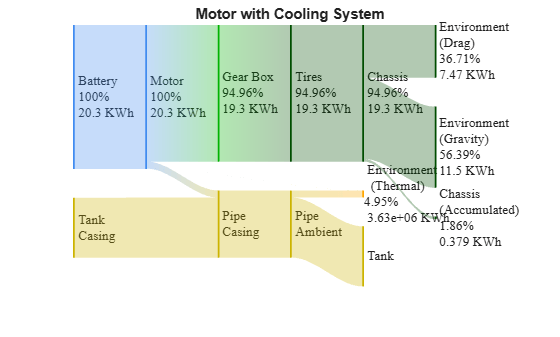
The main source of energy in the system is the battery, which powers the motor. The battery transmits all its energy to the motor. The percentages on the diagram represent the proportion of energy supplied by the battery that arrives in each part of the network. The motor transfers energy to the gearbox, cooling system, and environment. The gear box transmits energy to the tires, and to the chassis. The chassis accumulates some energy as inertia and uses the rest to overcome the drag and gravity due to the slope. Most of the thermal energy from the motor flows into the pipe casing and not to the environment.
The tank transmits thermal energy, stored in the fluid, to the pipe casing. This fluid increases its energy because it absorbs heat from the motor. This thermal energy flows to the pipe environment, which dissipates the heat to the environment. The rest of the energy returns to the tank. The accumulated thermal energy in the motor is not visible in the plot because it represents only a small proportion of the thermal energy of the motor. The motor temperature is therefore stable, so the motor does not overheat.
Plot the temperature of the system.
AnalyzeSystemEnergyFlowForCooledBEVPlotTemperatures
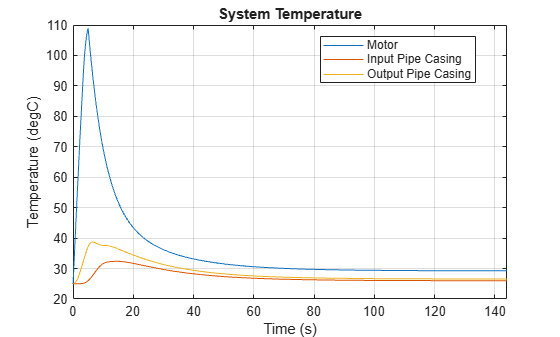
The motor temperature increases initially but it eventually cools down because most of the thermal energy dissipates through the cooling system instead of being stored in the motor.
Simulate BEV without Cooling System
Set the cooling system to be inactive.
Cooling_On = AnalyzeSystemEnergyFlowForCooledBEVSetCoolingSystem(modelName, 0);
Run the simulation.
sim(modelName);
Retrieve the energy information using the getEnergyInfo function and asses some of the data from the summary.
AnalyzeSystemEnergyFlowForCooledBEVGetEnergyInfo
Look at the energy information summary of the Motor block.
MotorEnergyInfo.Summary
As in the case with cooling, electrical energy enters the motor through the conserving ports and converts into:
Kinetic energy which accumulates in the block.
Mechanical energy which exits the block through the conserving ports.
Thermal energy: some of which exits through the conserving ports and some of which accumulates.
However, the proportion of the thermal energy that exits the motor is far below the system with cooling. The motor can only dissipate heat via convection to the Ambient block. This causes the motor temperature to increase.
Plot the energy flows.
AnalyzeSystemEnergyFlowForCooledBEVPlotEnergyFlow
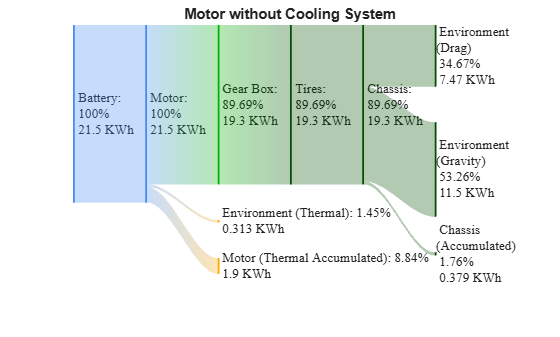
Without a cooling system, most of the thermal energy accumulates in the motor, while only a small part dissipates to the environment.
Plot the temperature of the motor.
AnalyzeSystemEnergyFlowForCooledBEVPlotTemperatures
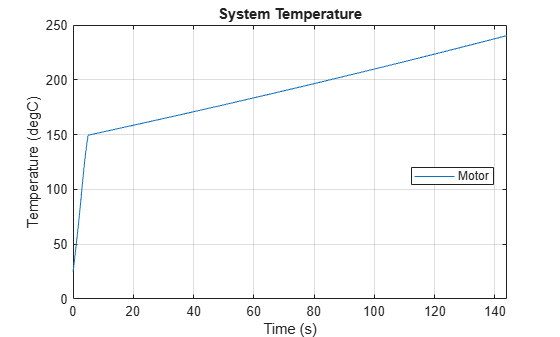
Now the motor stores more thermal energy than it dissipates to the environment, the motor temperature increases throughout all the simulation.

