Disable Dynamic Compressibility in Closed-Loop Models
R2026bThis example shows the effect of disabling dynamic compressibility in a closed-loop model. Closed-loop models introduce constraints that may lead to unexpected model results. Modeling dynamic compressibility can help prevent these results. In a closed-loop model, if a block has an option for modeling dynamic compressibility, it is usually best practice to enable it. Only clear the Enable dynamic compressibility parameter in a block if the liquid mass in that block is a negligible fraction of the total liquid mass in the system.
Examine the Model
Open the ClosedLoopCompressibility model. This model is a simple representation of a perfectly insulated closed-loop system. A Flow Rate Source (TL) block drives the fluid through a Pipe (TL), Flow Resistance (TL), and Constant Volume Chamber (TL) block before it recirculates the fluid.
open_system("ClosedLoopCompressibility");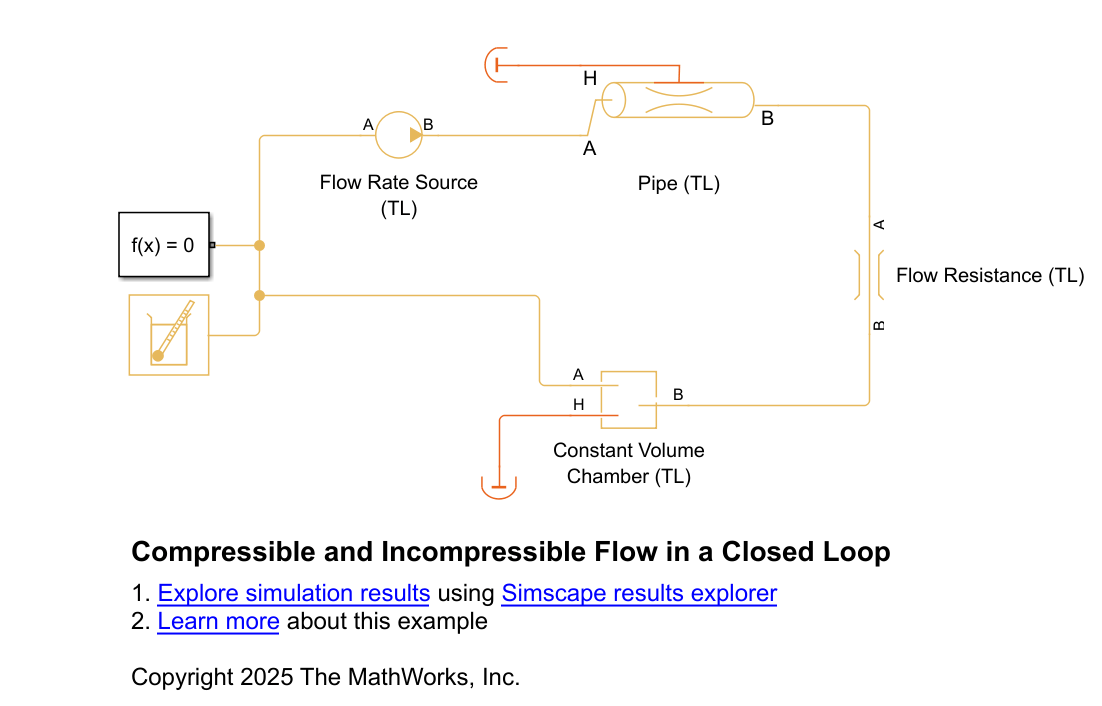
In a closed loop, there is a fixed total volume and mass, so the average density in the system is also fixed. At higher temperatures, the pressure must also rise for the system to maintain the average density. Because liquids are highly incompressible, a large pressure change is required to cause a small density change. The fixed density constraint causes the system to be very stiff and sensitive to temperature variations. If you clear the Enable dynamic compressibility parameter in blocks that model it, such as the Pipe (TL) block, it makes the system even stiffer.
In this model, the initial temperature in the pipe is 300 K and the initial temperature in the chamber is 293.15 K. As the liquid flows, the temperature that leaves the pipe is warmer, which raises the temperature in the chamber and forces the pressure to rise. Simulate the model, then run the ClosedLoopCompressibilityPlotPressureAndTemperature function to plot the results. This function plots the internal pressure in the chamber block, and the internal temperature in the pipe and chamber blocks, when you clear the Enable dynamic compressibility parameter in the pipe block.
sim("ClosedLoopCompressibility");
ClosedLoopCompressibilityPlotPressureAndTemperature;![Figure contains an axes object. The axes object with title Chamber internal pressure with no compressibility, xlabel Time [s], ylabel Chamber internal pressure [MPa] contains an object of type line.](../../examples/simscape/ClosedLoopCompressibilityExample_02.png)
![Figure contains an axes object. The axes object with title Block internal temperature with no compressibility, xlabel Time [s], ylabel Temperature [K] contains 2 objects of type line. These objects represent Pipe interal temperature, Chamber internal temperature.](../../examples/simscape/ClosedLoopCompressibilityExample_03.png)
When you simulate this model, the pressure in the chamber grows quickly to account for the rising temperature. This result is physically valid but may be unexpected.
Because dynamic compressibility is disabled, the Pipe (TL) block assumes that the fluid that enters and exits the pipe spends negligible time in the pipe and that the mass of fluid in the pipe does change. The assumption is only acceptable when the pipe makes up a small fraction of the system volume. In this model, the only blocks that model volume are the Pipe (TL) and the Constant Volume Chamber (TL). If the pipe is 20 m long, the total system volume is about 1.16 m, which is the sum of the value of the Chamber volume parameter and the pipe volume, . The fluid volume in the pipe makes up about 13% of the total system volume, which is not a negligible amount.
Model Dynamic Compressibility
Run the ClosedLoopCompressibilityPlotPressureComparison helper function. This function runs the model with each of these configurations once:
About 13% pipe to total volume ratio without Enable dynamic compressibility selected in the pipe block.
About 13% pipe to total volume ratio with Enable dynamic compressibility selected in the pipe block.
About 0.7% pipe to total volume ratio without Enable dynamic compressibility selected in the pipe block.
About 0.7% pipe to total volume ratio with Enable dynamic compressibility selected in the pipe block.
This figure compares the pressure in the chamber for all four model runs.
ClosedLoopCompressibilityPlotPressureComparison;
![Figure contains an axes object. The axes object with title Chamber pressure with and without compressibility, xlabel Time [s], ylabel Chamber pressure [MPa] contains 4 objects of type line. These objects represent Compressibility off, Pipe to total volume ratio = 0.13576, Compressibility on, Pipe to total volume ratio = 0.13576, Compressibility off, Pipe to total volume ratio = 0.0077928, Compressibility on, Pipe to total volume ratio = 0.0077928.](../../examples/simscape/ClosedLoopCompressibilityExample_04.png)
The difference in the results of about 0.3 MPa indicates that compressibility has a significant effect on pressure when the pipe volume is a large fraction of the total volume. Conversely, the model results are comparable for both dynamic compressibility settings when the pipe is a small fraction of the total volume. This behavior occurs because when you select Enable dynamic compressibility in the pipe, the bulk modulus of the fluid provides some compliance and allows the volume to accumulate mass to alleviate pressure. In this case, it is not important for the pipe to be a small fraction of the total volume.
Adding Liquid Storage
In addition to selecting Enable dynamic compressibility in all blocks that model it, you can also add a block that models liquid storage to your model to prevent pressure growth. Because liquid is stiff, adding a block that models a gas volume can add compliance to the model if you size it properly. For example, you can add a Tank (G-TL) or a Gas-Charged Accumulator block to this model the stabilize the pressure.

