Data Typing in Simulink
R2026bThis example shows how to use data types in Simulink®. To simulate the mathematical behavior of computer hardware, or to generate efficient code from a model, you can control the numeric data types of signals in your model. In this example, the datatypedemo model demonstrates how to use Data Type Conversion blocks to convert a double-precision sine wave with an amplitude of 150 to various data types, including floating-point, integer, fixed-point, and enumerated data types. The converted signals are then displayed on two scopes.
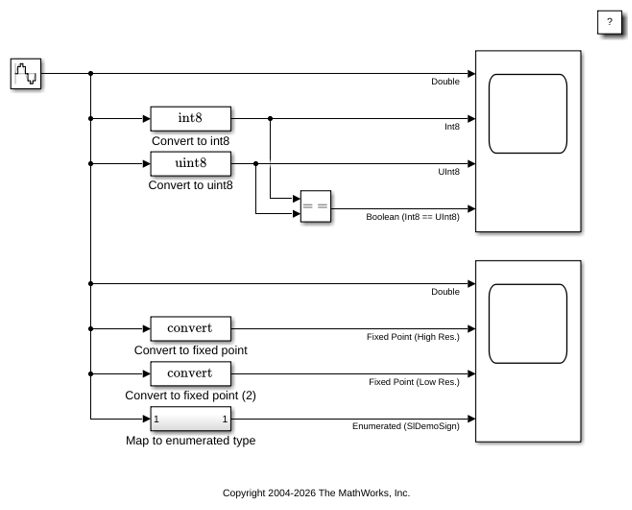
The first two Data Type Conversion blocks specify the Output data type parameter as int8 and uint8, corresponding to signed and unsigned 8-bit integer data types, respectively. The Saturate on integer overflow parameter is enabled for these two Data Type Conversion blocks. When this parameter is enabled, overflows saturate to either the minimum or maximum value that the data type can represent.
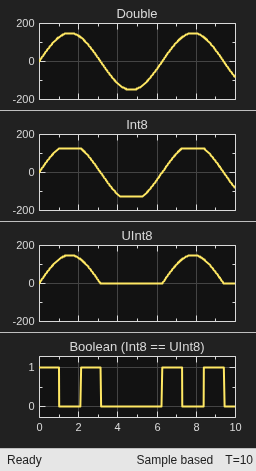
The first scope shows the original double-precision sine wave and the result of converting the sine wave signal to signed and unsigned 8-bit integer data types with the Saturate on integer overflow parameter enabled. The bottom axis shows the Boolean results of comparing the signed and unsigned integer values. Here, you can compare the impact of different data types on the resulting signals. For the signed 8-bit integer int8, the maximum value that this data type can represent is 127. In this example, the amplitude of the sine wave is 150, which causes an overflow. Because saturation is enabled, the overflows saturate to the maximum value of the data type, 127. Similarly, the minimum value saturates at -128. For the unsigned 8-bit integer uint8, the range of the data type is 0 to 255. In the scope, you can see that negative values saturate to zero and positive values do not overflow.
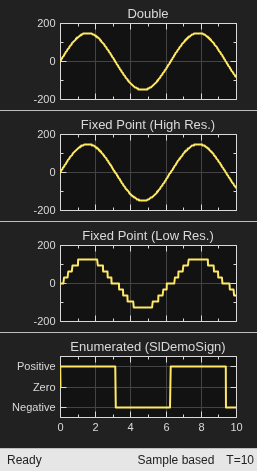
The second scope shows the original sine wave and the result of converting this signal to two fixed-point data types: one high-resolution, and one lower resolution. To specify a fixed-point data type in Simulink, use the fixdt function to describe the properties of the fixed-point data type, including signedness, word length, and fraction length. In this example, the Data Type Conversion blocks specify two fixed-point data types: fixdt(1,8,-1) and fixdt(1,8,-5). For additional help with specifying fixed-point data types, open the Data Type Assistant by clicking the Show data type assistant button in the Block Parameters dialog box to open the Data Type Assistant. After you specify a fixed-point data type in the dialog box, click the Fixed-point details link to display additional information about the fixed-point data type, including representable minimum and maximum values and the precision of the data type. Compare the scope output for these two data types applied to the sine wave signal to the data displayed in the Data Type Assistant.
The bottom axis of the second scope shows the result of mapping the sine wave to an enumerated data type, which allows the signal to use only a set of values that you specify. The enumerated data type requires a class file or data dictionary entry. In this example, the SlDemoSign class specifies allowable values that indicate whether the signal is positive, negative, or zero.
Similar data type support is available for parameters and states. Simulink also supports other integer and floating-point data types such as single, int16, and uint32, and various fixed-point types with binary-point or slope and bias scaling. You can also define types for buses and aliases for existing types.
A Fixed-Point Designer™ license is required for most actions involving fixed-point data types in Simulink. If you do not have a Fixed-Point Designer™ license, you can uses data type override to simulate the model using the double-precision data type. For more information, see Overriding Fixed-Point Specifications.
See Also
About Data Types in Simulink | Control Data Types of Signals | Specify Fixed-Point Data Types | Specify Data Types Using Data Type Assistant | Use Enumerated Data in Simulink Models

