Determine Port Signal Attributes Programmatically
R2026bThis example shows how to determine block port signal attributes programmatically in a compiled model. You can use block property APIs and the get_param function to obtain the signal attribute values.
Open and Compile Model
Use the open_system function to open the model slexCompiledPortAttributes. Compile the model using the compile argument of the feval function.
open_system('slexCompiledPortAttributes.slx')
feval(gcs,[],[],[],"compile");
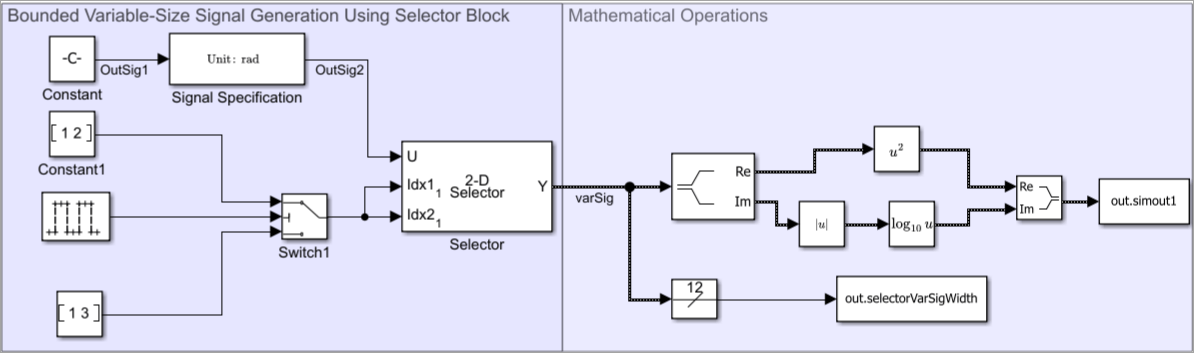
Determine Signal Attributes
This section explains how to determine different attributes of the Constant block output signal OutSig1, and the Signal Specification block output signal OutSig2.
Complexity
Use the CompiledPortComplexSignals property to determine the complexity of the Constant block port signals. The function returns a structure array, cs, whose fields represent complexity of different port signals. A value of 1 indicates that the signal is complex. A value of 0 indicates that the signal contains a real value. An empty array [] indicates that the Constant block does not contain that port.
To view the complexity of the output signal outSig1, extract the Outport field value of the structure array cs.
constBlk  = 'slexCompiledPortAttributes/Constant';
cs = get_param(constBlk,"CompiledPortComplexSignals");
isComplex = cs.Outport
isComplex =
1
Data Type
Use the CompiledPortDataTypes property to determine the data type of the Constant block signals. The function returns a structure array, dt, whose fields represent different port signal data types. An empty array [] indicates that the Constant block does not contain that port.
To view the data type of the output signal outSig1, extract the Outport field value of the structure array dt.
constBlk  = 'slexCompiledPortAttributes/Constant';
dt = get_param(constBlk,"CompiledPortDataTypes");
DataType = dt.Outport
DataType = 1×1 cell array
    {'double'}
Width
The signal width indicates the number of elements a signal contains. For a multidimensional array with dimension m-by-n-by-p, the signal width value is m x n x p.
Use the CompiledPortWidths property to determine the width of the Constant block signals. The function returns a structure array, width, whose fields represent different port signal widths. An empty array [] indicates that the Constant block does not contain that port.
To view the width of the output signal outSig1, extract the Outport field value of the structure array width.
constBlk  = 'slexCompiledPortAttributes/Constant';
width = get_param(constBlk,"CompiledPortWidths");
PortWidth = width.Outport
PortWidth =
12
Dimension Mode
The dimension mode of a signal indicates whether the signal has fixed or variable dimensions.
Use the CompiledPortDimensionsMode property to determine the dimension mode of the output signal outSig1. The function returns either 0 or 1. A value of 1 indicates that the signal has variable dimensions. A value of 0 indicates that the signal has fixed dimensions.
constBlk  = 'slexCompiledPortAttributes/Constant';
constBlkPorts = get_param(constBlk,'PortHandles');
IsVarable = get_param(constBlkPorts.Outport,"CompiledPortDimensionsMode")
IsVarable =
0
Design Ranges
The design range of a signal indicates the maximum and minimum values of the signal.
Use the CompiledPortDesignMin and CompiledPortDesignMax properties to determine the design range of the output signal outSig1. The variables MinValue and MaxValue represent the minimum and maximum values of the signal, respectively.
constBlk  = 'slexCompiledPortAttributes/Constant';
constBlkPorts = get_param(constBlk,'PortHandles');
MinValue = get_param(constBlkPorts.Outport,"CompiledPortDesignMin")
MinValue =
-1
MaxValue = get_param(constBlkPorts.Outport,"CompiledPortDesignMax")MaxValue = 1
Unit
Use the CompiledPortUnits property to determine units of the Signal Specification block signals. The function returns the structure array units, whose fields represent different port signal units. An empty array [] indicates that the Signal Specification block does not contain that port.
To view the unit of the output signal outSig2, extract the Outport field value of the structure array units.
sigSpecBlk = 'slexCompiledPortAttributes/Signal Specification';
units = get_param(sigSpecBlk,"CompiledPortUnits");
PortUnit = units.Outport
PortUnit = 1×1 cell array
    {'rad'}
Terminate Compilation
Terminate model compilation using the term argument of the feval function.
feval(gcs,[],[],[],"term");See Also
Constant | Signal Specification

