Achieve Missing Coverage in Generated Code of RLS
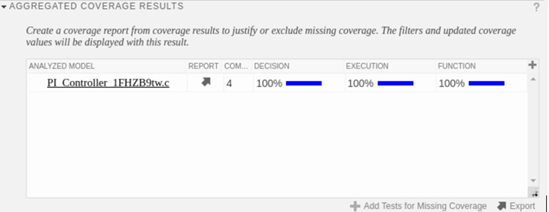
R2026bThis example shows you how to use Simulink® Design Verifier™ to generate test cases that achieve full coverage. If you simulate a harness of a reusable library subsystem (RLS) in the software-in-the-loop (SIL) simulation mode, then coverage of the generated code of the RLS is reported. Using Simulink® Test Manager™, you can easily achieve full coverage by using the following steps:
Generate the top-model code before invoking simulation on the harness of the RLS. Before generating the code, you need to set up the code generation target environment. For more information on how to set up the code generation environment, see Generate Test Cases for a Reusable Library Subsystem. After code generation, open the test file.
Open the test file.
 orig = Simulink.fileGenControl('get','CodeGenFolderStructure');
 Simulink.fileGenControl('set','CodeGenFolderStructure', Simulink.filegen.CodeGenFolderStructure.TargetEnvironmentSubfolder) ;
 model = 'mRLS_zip';
 load_system('mRLS_zip');
 slbuild('mRLS_zip');
 testFile = 'dTest_TopOffCoverage_Controller.mldatx';
 sltest.testmanager.load(testFile);
 sltest.testmanager.view;
### Unable to find Simulink cache file "mRLS_zip.slxc".
### Starting top model code generation target build for: mRLS_zip
### Build reason: "mRLS_zip.c" did not exist.
### Searching for referenced models in model 'Controller_CodeSpecification1'.
### Total of 1 models to build.
### Starting top model code generation target build for: Controller_CodeSpecification1
### Build reason: "Controller_CodeSpecification1.c" did not exist.
### Build folder for generated code: /tmp/Bdoc26b_3351752_1680723/tp6eb52b93/sldv-ex86252898/IntelWin64/Controller_CodeSpecification1
### Invoking Target Language Compiler on Controller_CodeSpecification1.rtw
### Using System Target File: /mathworks/devel/bat/filer/batfs2566-0/Bdoc26b.3351752/build/runnable/matlab/rtw/c/ert/ert.tlc
### Loading TLC function libraries
.......
### Initial pass through model to cache user defined code
.
### Caching model source code
...............................................
### Writing source file Controller_8O5rZQRL.c
### Writing header file Controller_CodeSpecification1_types.h
### Writing header file Controller_CodeSpecification1.h
.
### Writing header file rtwtypes.h
### Writing header file Controller_8O5rZQRL.h
### Writing source file Controller_CodeSpecification1.c
### Writing header file Controller_CodeSpecification1_private.h
### Writing source file ert_main.c
### TLC code generation complete (took 2.781s).
.### Saving binary information cache.
### Using toolchain: GNU gcc/g++ | gmake (64-bit Linux)
### Creating '/tmp/Bdoc26b_3351752_1680723/tp6eb52b93/sldv-ex86252898/IntelWin64/_shared/rtwshared.mk' ...
### Using toolchain: GNU gcc/g++ | gmake (64-bit Linux)
### Creating '/tmp/Bdoc26b_3351752_1680723/tp6eb52b93/sldv-ex86252898/IntelWin64/Controller_CodeSpecification1/Controller_CodeSpecification1.mk' ...
### Successful completion of code generation for: Controller_CodeSpecification1

The following files will be copied from IntelWin64/_shared to /tmp/Bdoc26b_3351752_1680723/tp6eb52b93/sldv-ex86252898/IntelWin64/mRLS_zip/R2026b:

    Controller_8O5rZQRL.c
    Controller_8O5rZQRL.h
    shared_file.dmr

Files copied from IntelWin64/_shared to /tmp/Bdoc26b_3351752_1680723/tp6eb52b93/sldv-ex86252898/IntelWin64/mRLS_zip/R2026b.
2. Simulate the test file and observe the coverage value.
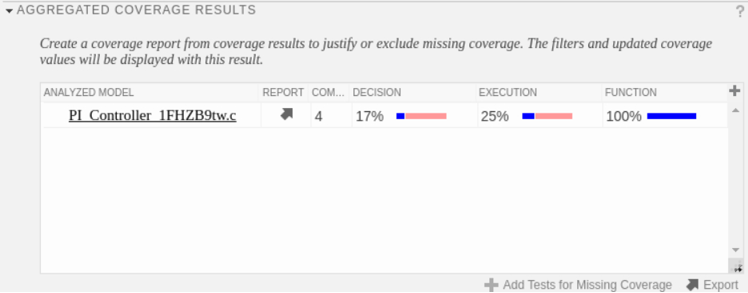
3. Click Add Tests for Missing Coverage as coverage of the generated code for the RLS is not 100%.
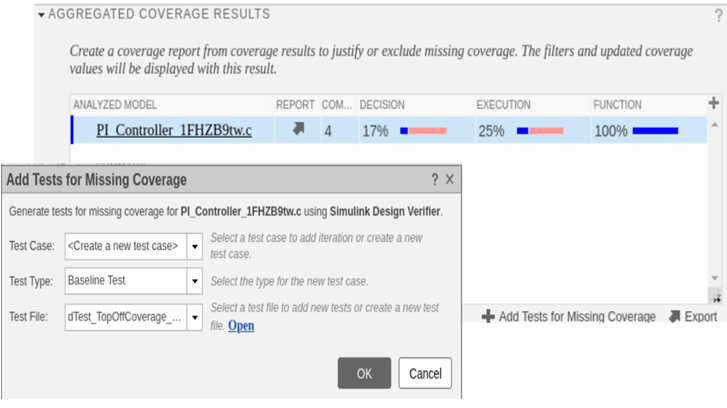
This workflow invokes Simulink® Design Verifier™ to generate additional testcases.
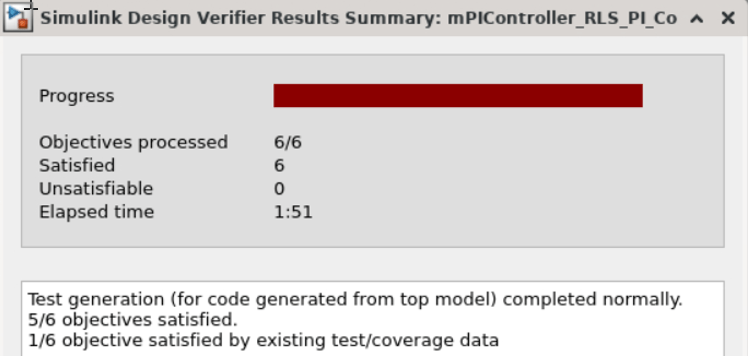
New test cases are added to the test file.
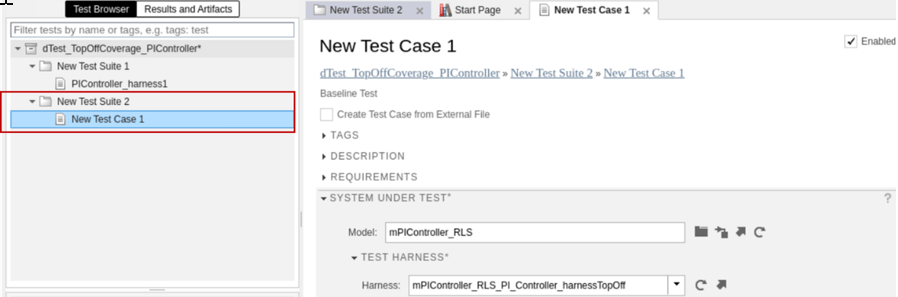
4. Simulate the overall test file and check if you now have full coverage for the generated code for the RLS.