Automatic Multithreaded Analysis in Simulink Design Verifier
R2026bSimulink® Design Verifier™ speeds up long-running analyses by automatically using built-in multithreading on multicore machines. Simulink Design Verifier dynamically adjusts how much parallelism it uses based on available system resources, balancing analysis performance with system stability. For more information on analyzing large and complex models, see Perform Analysis on Large and Complex Models.
Depending on model structure and available resources, you may observe substantial reductions in elapsed time of the analysis.
Understanding Analysis Timing
When you run an analysis, the Results Summary shows Total process time and Elapsed time.
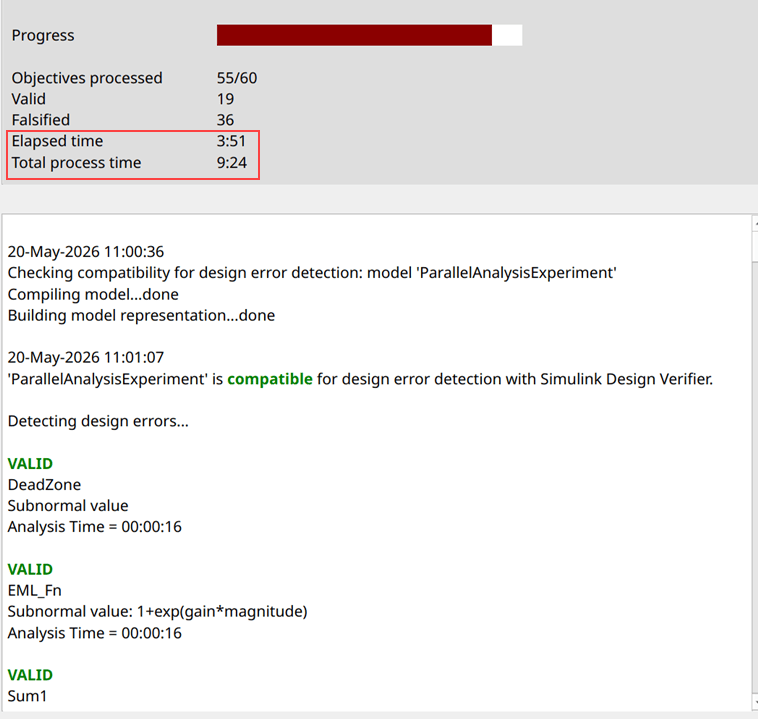
Elapsed time is the total time between when analysis starts and when it finishes or stops. This is the real time that passes while you wait for results.
When analysis uses multiple cores, Total process time is the sum of the analysis times across all cores used. Because multiple cores work simultaneously, Total process time is always greater than or equal to Elapsed time. In parallel runs, total process time grows faster than elapsed time. For a given total process time, a shorter elapsed time indicates effective parallelization. For more information, see Analysis Information Chapter.
You can set the Maximum analysis time parameter to set a
timeout for the analysis. This timeout is based on the total process time, not the
elapsed time. As a result, the analysis might stop before the elapsed time exceeds
the timeout specified in Maximum analysis time. For example, if
Maximum analysis time is set to 3600
seconds, or 60 minutes, and the analysis uses four cores, the analysis may stop
after approximately 15 minutes of elapsed time. The Results Summary shows
Total process time reaching 60 minutes while
Elapsed time time is approximately 15 minutes. For more
information on Maximum analysis time, see Maximum analysis time.
Considerations
During multithreaded analysis, utilization of computing resources may be high, and total memory usage is higher than in single-core analysis. Very large models may approach system memory limits sooner than smaller models when running multithreaded analyses. Simulink Design Verifier automatically balances resource usage to maintain system responsiveness. If other applications are already consuming significant memory resources, the analysis might run on a single core.
Multithreaded analysis runs on a single computer and is not distributed across multiple machines. For a given analysis duration, the set of analyzed objectives and the interpretation of results are equivalent to those from single-core analysis.
Multithreaded analysis is not supported when you perform:
Test generation analysis with
TestSuiteOptimizationset toLongTestcasesorExtendExistingTestsis set toOnDesign error detection analysis with
DefectCheckerset toOn

