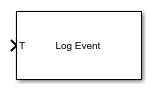
Log Event
Log an execution profiling event
Libraries:
Simulink Real-Time /
Profiling
Description
The Log Event block inserts a user-defined event into the execution profiling event stream when triggered. The user-defined event includes a channel ID, a code number, and a value number.
Examples
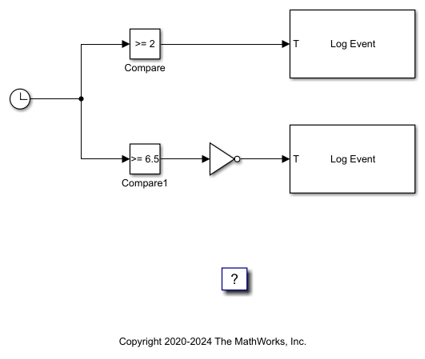
Insert Event into Execution Profiling Stream
Use the Log Event block to insert a user-defined event into the execution profiling event stream.
Ports
Input
When the T (trigger input) changes from 0 to 1 (Rising) or from 1 to 0 (Falling), the block inserts a user-defined simple event defined by the parameters Channel, Code, and Value into the execution profiling event stream.
Parameters
To edit block parameters interactively, use the Property Inspector. From the Simulink® Toolstrip, on the Simulation tab, in the Prepare gallery, select Property Inspector.
Specify the event channel ID. The channel ID ranges from 0 to 1023.
Programmatic Use
To set the block parameter value programmatically, use
the set_param function.
To get the block parameter value
programmatically, use the get_param function.
| Parameter: | channel |
| Values: | 0 (default) | int |
Example: set_param(gcb,'channel','500')
Select the type of signal change that triggers the block. When the input T changes from 0 to 1 (Rising) or from 1 to 9 (Falling), the block inserts a user-defined simple event defined by the parameters Channel, Code, and Value into the execution profiling event stream.
Programmatic Use
To set the block parameter value programmatically, use
the set_param function.
To get the block parameter value
programmatically, use the get_param function.
| Parameter: | trigger |
| Values: | Rising edge (default) | Falling edge | Either edge |
Example: set_param(gcb,'trigger','Falling
edge')
Extended Capabilities
C/C++ Code Generation
Generate C and C++ code using Simulink® Coder™.
Version History
Introduced in R2020b
MATLAB Command
You clicked a link that corresponds to this MATLAB command:
Run the command by entering it in the MATLAB Command Window. Web browsers do not support MATLAB commands.
Seleziona un sito web
Seleziona un sito web per visualizzare contenuto tradotto dove disponibile e vedere eventi e offerte locali. In base alla tua area geografica, ti consigliamo di selezionare: .
Puoi anche selezionare un sito web dal seguente elenco:
Come ottenere le migliori prestazioni del sito
Per ottenere le migliori prestazioni del sito, seleziona il sito cinese (in cinese o in inglese). I siti MathWorks per gli altri paesi non sono ottimizzati per essere visitati dalla tua area geografica.
Americhe
- América Latina (Español)
- Canada (English)
- United States (English)
Europa
- Belgium (English)
- Denmark (English)
- Deutschland (Deutsch)
- España (Español)
- Finland (English)
- France (Français)
- Ireland (English)
- Italia (Italiano)
- Luxembourg (English)
- Netherlands (English)
- Norway (English)
- Österreich (Deutsch)
- Portugal (English)
- Sweden (English)
- Switzerland
- United Kingdom (English)