Import File Log Data as Parquet Format Files Using Simulink Real-Time
R2026bThis example shows how to import Simulink® Real-Time™ file log data as Parquet format files by using the Import File Log user interface or by using the importToFolder function. After importing to the development computer, the example also shows how to use the MATLAB® parquetread function to view the signal log data.
This approach is useful for direct access to the recorded Parquet format file logs and for performing data analysis by using the parquetread function or by using third-party tools that support Parquet, instead of using the Simulation Data Inspector. For an overview of ways to import file log data, see Import File Log Data from Speedgoat Target Computer.
Generate File Logs for Import
Create a Target object for the default target computer and connect to the target computer. In the MATLAB Command Window, type:
tg = slrealtime;
connect(tg);
Open the model slrt_ex_osc. Configure the model for the connected target computer.
model = 'slrt_ex_osc';
open_system(model);
modelSTF = getSTFName(tg);
set_param(model,'SystemTargetFile',modelSTF);
Build the model.
evalc('slbuild(model)');Using the Target object tg, load and start the real-time application for multiple runs with different values for the Transfer Fcn block C parameter. Set the maximum number of logs to be retained and suppress automatic import the generated file logs.
load(tg,model);
start(tg,AutoImportFileLog=false,FileLogMaxRuns=4);
while ~strcmp(tg.status,'stopped')
    pause(0.1);
end
load(tg,model);
setparam(tg,'slrt_ex_osc/Transfer Fcn','C',-100);
start(tg,AutoImportFileLog=false,FileLogMaxRuns=4);
while ~strcmp(tg.status,'stopped')
    pause(0.1);
end
load(tg,model);
setparam(tg,'slrt_ex_osc/Transfer Fcn','C',-50);
start(tg,AutoImportFileLog=false,FileLogMaxRuns=4);
while ~strcmp(tg.status,'stopped')
    pause(0.1);
end
List and Inspect Available File Logs on Target
Open the Import File Log dialog box. In the Simulink editor, click Import File Log from the Review Results section of the Real-Time tab. Or, in the MATLAB Command Window, type: openImportDialog(tg.FileLog)
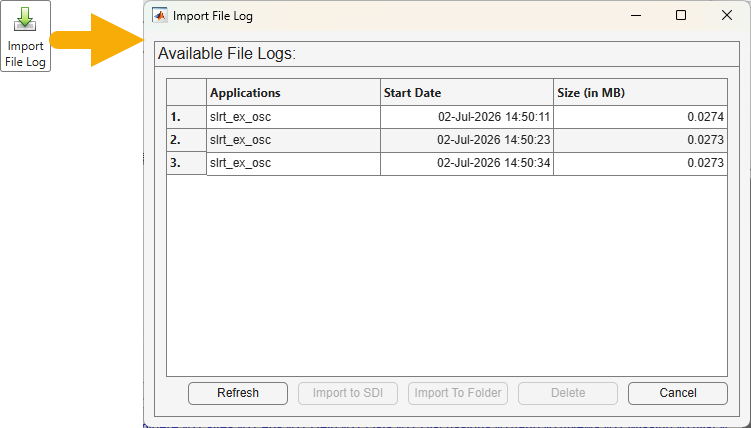
The Import Log File dialog box displays the available log files, including their recording start date and size. Alternatively, inspect the file logs available on the target by using the list function.
my_run_info = list(tg.FileLog)
my_run_info = 3×3 table
           Application          StartDate          Size (in MB)
          _____________    ____________________    ____________

    1.    "slrt_ex_osc"    08-Jul-2026 20:09:55      0.040672
    2.    "slrt_ex_osc"    08-Jul-2026 20:10:01      0.040639
    3.    "slrt_ex_osc"    08-Jul-2026 20:10:11      0.040648
Import Logs to Folders on Development Computer
To import logs to folders on the development computer using the Import Log File dialog box, select one or more logs to import and click Import to Folder. For this example, select folder C:\work\my_logdata\.
To complete this operation programmatically, you can use the importToFolder function. For example:
baseDir = "C:\work\my_logdata\";
importToFolder(tg.FileLog,model,baseDir);
Importing Log file 1 of 3 ... Importing Log file 2 of 3 ... Importing Log file 3 of 3 ...
The logs are imported to the selected folders on the development computer.
Read Parquet Format Log Files in MATLAB
To read the file logs from the three runs in Parquet format, in the MATLAB Command Window, type:
dataDir = fullfile(baseDir,model);
dataRun1 = parquetread(fullfile(dataDir,"run_1","FL_001.parquet"));
dataRun2 = parquetread(fullfile(dataDir,"run_2","FL_001.parquet"));
dataRun3 = parquetread(fullfile(dataDir,"run_3","FL_001.parquet"));
Save the imported data runs into a single MAT file.
save('filelog.mat','dataRun1','dataRun2','dataRun3');
Delete File Logs from Target
In this example, the maximum number of logs to be retained on the target computer was set by using the start(tg) command FileLogMaxRuns option. To delete specific file logs from the target file system, select one or more logs in the Import Log File dialog box and click Delete. Alternatively, you could remove all file logs for the real-time application slrt_ex_osc by using the discard function:
discard(tg.FileLog,model);
See Also
import | openImportDialog | parquetread | start
Topics
- Direct File Log Import into the Simulation Data Inspector by Using Simulink Real-Time
- Import File Log Data as Parquet Format Files by Using MATLAB or Third-Party Tools
- Import File Log Data Manually into the Simulation Data Inspector by Using Simulink Real-Time
- Import File Log Data from Speedgoat Target Computer

