Disk
R2026bDisk block

To add a block to a model, double-click the canvas and start typing the block name. Then, select the block from the list.
Libraries:
Simscape /
Multibody /
Curves and Surfaces
Description
The Disk block creates a 2-D circular disk that you can use to model contact problems. You can model the contact between disk and many other geometries, including an infinite plane, brick, cylinder, ellipsoid, sphere, or convex hull.
The Disk block has two ports. The R port corresponds to the reference frame that is coincident with the origin of the disk geometry, and the disk lies on the xy-plane of the reference frame. The G port is a geometry port that represents the geometry of the disk.
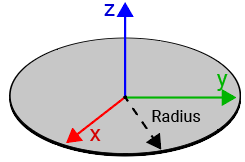
To specify the size of the disk, use the Radius parameter.
Ports
Frame
Geometry
Parameters
Programmatic Use: Add Block
To add the block programmatically, use the add_block function with one of these library block paths as the source.
"sm_lib/Curves and Surfaces/Disk"
Example: add_block("sm_lib/Curves and Surfaces/Disk","myModel/myBlock",MakeNameUnique="on")
Version History
Introduced in R2022a

