CORDIC co-processor
R2026bEnable hardware acceleration of trigonometric and hyperbolic mathematical functions
Since R2023b
CORDIC co-processor block
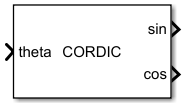
To add a block to a model, double-click the canvas and start typing the block name. Then, select the block from the list.
Libraries:
STM32 Microcontroller Blockset /
STM32G4xx Based Boards
STM32 Microcontroller Blockset /
STM32H7xx Based Boards
STM32 Microcontroller Blockset /
STM32H7RSxx Based Boards
STM32 Microcontroller Blockset /
STM32U5xx Based Boards
Description
The CORDIC co-processor block provides hardware acceleration of trigonometric and hyperbolic mathematical functions used in computationally intensive application to perform other tasks. The CORDIC co-processor block supports zero overhead mode.
Examples
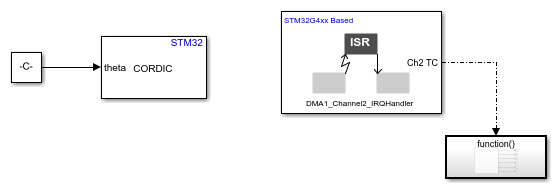
Using CORDIC Co-Processor Block with DMA in STMicroelectronics STM32 Processor Based Boards
Use and generate code for a CORDIC block in a Simulink® model for STMicroelectronics® NUCLEO-G431RB board to calculate SINE and COSINE values for given values of theta by using DMA.
Ports
Input
Theta is an angle in radians divided by ᴨ (pi), [-1,1] for sin or cos function.
Theta is hyperbolic angle for hyperbolic functions [-0.559, 0.559]. For hyperbolic function the input values exceeding the range are saturated.
Dependencies
To enable this port, set Function to either
sin, cos, sin and
cos or sinh and cosh.
Data Types: fixdt(1,32,31) | int32
x- x coordinatey- y coordinate
The range is [-1, 1].
Dependencies
To enable this port, set Function to either
atan2, mod, atan2 and
mod.
Data Types: fixdt(1,32,31) | int32
Output
The block outputs the result of the selected function. For example, if you
select function as sin and cos, the block outputs the result
of sin and cos function.
Note
For hyperbolic function sinh or
cosh, a gain of 2 must be added to the
output.
Data Types: fixdt(1,32,31)
The block outputs CORDIC execution status.
0- Successful1- Unsuccessful
Dependencies
To enable this port, select the Output status parameter.
Data Types: Boolean
The block outputs CORDIC execution function status.
The executed CORDIC function provides the following status:
0- cos1- sin or sin and cos2- atan2 or atan2 and mod3- mod5- cosh6- sinh or sinh and cosh
Dependencies
To enable this port, set DMA mode to Read only and select the Execution function parameter.
Data Types: int32
The block outputs the executed iterations in the previous calculation.
The executed CORDIC iteration provides the following status:
0- cos1- sin or sin and cos2- atan2 or atan2 and mod3- mod5- cosh6- sinh or sinh and cosh
Dependencies
To enable this port, set DMA mode to Read only and select the Execution iteration parameter.
Data Types: int32
The block outputs the executed array size in the previous calculation.
The executed CORDIC array size provides the following status:
0- cos1- sin or sin and cos2- atan2 or atan2 and mod3- mod5- cosh6- sinh or sinh and cosh
Dependencies
To enable this port, set DMA mode to Read only and select the Execution array size parameter.
Data Types: int32
Parameters
Select the trigonometric or hyperbolic function.
Programmatic Use
Block Parameter:
Func |
Select the iterations to improve the precision of the result.
Programmatic Use
Block Parameter:
NumIters |
Select DMA or Zero overhead as CORDIC mode.
Zero overhead- The data is written and read from the CORDIC co-processor individually.DMA- The process of looping through the array of element is accomplished by DMA.
Programmatic Use
Block Parameter:
CordicMode |
Enables user to perform write and read operations of DMA from a single block.
Write only- perform write operation of DMARead- perform read operation of DMA
Dependencies
To enable this parameter, set the CORDIC mode to DMA.
Programmatic Use
Block Parameter:
DMAmode |
Specify the output data type for CORDIC co-processor.
Dependencies
To enable this parameter, set the DMA mode to Read only.
Programmatic Use
Block Parameter:
OutputDataType |
Specify the input size for the CORDIC co-processor.
The user obtains a valid output when this parameter aligns with the input size of the write block.
Dependencies
To enable this parameter, set the DMA mode to Read only.
Programmatic Use
Block Parameter:
InpSize |
When you select this parameter, the block configures Executed func output port. The port outputs the executed function in a previous step.
Dependencies
To enable this parameter, set the DMA mode to Read only.
Programmatic Use
Block Parameter:
ExecutedFunc |
When you select this parameter, the block configures Executed iters output port. The port outputs the executed iterations in a previous step.
Dependencies
To enable this parameter, set the DMA mode to Read only.
Programmatic Use
Block Parameter:
ExecutedIterations |
When you select this parameter, the block configures Executed array size output port. The port outputs the executed array size in a previous step.
Dependencies
To enable this parameter, set the DMA mode to Read only.
Programmatic Use
Block Parameter:
ExecutedArraySize |
Specify how often (in seconds) the block reads the pin value. Enter a value greater than zero. When you specify this parameter as -1, Simulink determines the best sample time for the block based on the block context within the model.
Dependencies
To enable this parameter, set the DMA mode to Read only.
Programmatic Use
Block Parameter:
SampleTime |
Specify the DMA timeout in microseconds.
Programmatic Use
Block Parameter:
TimeOut |
Select to enable the preemption.
Programmatic Use
Block Parameter:
EnablePreemption |
When you select this parameter, the block configures Status output port. The Status port outputs the status of execution.
Programmatic Use
Block Parameter:
EnableStatus |
Version History
Introduced in R2023b
See Also
MATLAB Command
You clicked a link that corresponds to this MATLAB command:
Run the command by entering it in the MATLAB Command Window. Web browsers do not support MATLAB commands.


Seleziona un sito web
Seleziona un sito web per visualizzare contenuto tradotto dove disponibile e vedere eventi e offerte locali. In base alla tua area geografica, ti consigliamo di selezionare: .
Puoi anche selezionare un sito web dal seguente elenco:
Come ottenere le migliori prestazioni del sito
Per ottenere le migliori prestazioni del sito, seleziona il sito cinese (in cinese o in inglese). I siti MathWorks per gli altri paesi non sono ottimizzati per essere visitati dalla tua area geografica.
Americhe
- América Latina (Español)
- Canada (English)
- United States (English)
Europa
- Belgium (English)
- Denmark (English)
- Deutschland (Deutsch)
- España (Español)
- Finland (English)
- France (Français)
- Ireland (English)
- Italia (Italiano)
- Luxembourg (English)
- Netherlands (English)
- Norway (English)
- Österreich (Deutsch)
- Portugal (English)
- Sweden (English)
- Switzerland
- United Kingdom (English)