Contenuto principale

Simple Engine

Simplified engine model using lookup tables

Since R2021b

  • Simple Engine block

Libraries:
Powertrain Blockset / Propulsion / Combustion Engines
Vehicle Dynamics Blockset / Powertrain / Propulsion

Description

The Simple Engine block implements a simplified engine model that uses a table representing maximum engine torque as a function of engine speed to estimate engine torque for vehicle performance simulations. Fuel consumption is approximated using two scalar fuel property parameters and one scalar engine efficiency parameter. You can use the block for:

  • Hardware-in-the-loop (HIL) engine control design

  • Vehicle-level performance simulations

You can change the default maximum torque and engine speed breakpoints in the table to customize the model for a specific engine application. Double-click the block and, in the Block Parameters dialog box, expand the Maximum torque curve section. Enter values for the Engine maximum torque, f_tqmax and Breakpoints for engine speed input, f_tqmax_n_bpt parameters, and then click Apply or OK.
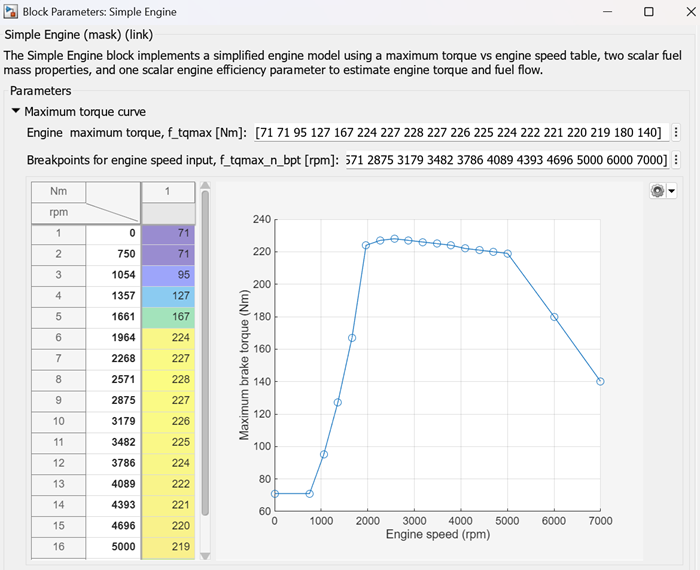
The Block Parameters dialog box shows a table of maximum engine torque as a function of engine speed

Ports

Input

expand all

Torque, in N·m.

Engine speed, in rpm.

Output

expand all

Bus that contains these block calculations.

SignalDescriptionUnits

FuelMassFlw

Engine fuel flow output

kg/s

FuelVolFlw

Volumetric fuel flow

m3/s

EngTrq

Engine torque output

N·m

EngSpd

Engine speed

rpm

Bsfc

Engine brake-specific fuel consumption (BSFC)

g/kWh

PwrInfoPwrTrnsfrdPwrCrkshft

Crankshaft power

W
PwrNotTrnsfrdPwrFuel

Fuel input power

W
PwrLoss

Power loss

W
PwrStored

Not used

Engine brake torque, in N·m.

Parameters

expand all

Maximum Torque Curve

Breakpoints, in N·m.

Programmatic Use

To set the block parameter value programmatically, use the set_param function.

To get the block parameter value programmatically, use the get_param function.

Parameter: f_tqmax
Values: 1-by-N vector
Data Types: double

Breakpoints, in rpm.

Programmatic Use

To set the block parameter value programmatically, use the set_param function.

To get the block parameter value programmatically, use the get_param function.

Parameter: f_tqmax_n_bpt
Values: 1-by-N vector
Data Types: double

Fuel and Efficiency

Fuel lower heating value, in J/kg.

Programmatic Use

To set the block parameter value programmatically, use the set_param function.

To get the block parameter value programmatically, use the get_param function.

Parameter: Lhv
Values: 4.6E+7 (default) | scalar
Data Types: double

Specific gravity of fuel, dimensionless.

Programmatic Use

To set the block parameter value programmatically, use the set_param function.

To get the block parameter value programmatically, use the get_param function.

Parameter: Sg
Values: 0.745 (default) | scalar
Data Types: double

Average brake specific fuel consumption, in g/kwh.

Programmatic Use

To set the block parameter value programmatically, use the set_param function.

To get the block parameter value programmatically, use the get_param function.

Parameter: BsfcAvg
Values: 350 (default) | scalar
Data Types: double

Extended Capabilities

expand all

C/C++ Code Generation
Generate C and C++ code using Simulink® Coder™.

Version History

Introduced in R2021b