Decode CAN Data from BLF Files
R2026bThis example shows you how to import and decode CAN data from BLF files in MATLAB® for analysis. The BLF file used in this example was generated from Vector CANoe™ using the "CAN - General System Configuration (CAN)" sample. This example also uses the CAN database file, PowerTrain_BLF.dbc, provided with the Vector sample configuration.
Open the DBC File
Open the database file describing the source CAN network using the canDatabase function.
canDB = canDatabase("PowerTrain_BLF.dbc")canDB =
Database with properties:
Name: 'PowerTrain_BLF'
Path: '/tmp/Bdoc26b_3351752_1659286/tp656ecf19/vnt-ex06202590/PowerTrain_BLF.dbc'
UTF8_File: '/tmp/Bdoc26b_3351752_1659286/tp656ecf19/vnt-ex06202590/PowerTrain_BLF.dbc'
Nodes: {2×1 cell}
NodeInfo: [2×1 struct]
Messages: {12×1 cell}
MessageInfo: [12×1 struct]
Attributes: {11×1 cell}
AttributeInfo: [11×1 struct]
UserData: []
Investigate the BLF File
Retrieve and view information about the BLF file. The blfinfo function parses general information about the format and contents of the Vector Binary Logging Format BLF file and returns the information as a structure.
binf = blfinfo("Logging_BLF.blf")binf = struct with fields:
Name: "Logging_BLF.blf"
Path: "/tmp/Bdoc26b_3351752_1659286/tp656ecf19/vnt-ex06202590/Logging_BLF.blf"
Application: "CANoe"
ApplicationVersion: "11.0.55"
Objects: 43344
StartTime: 01-Jul-2020 14:47:34.427
EndTime: 01-Jul-2020 14:48:33.487
ChannelList: [2×3 table]
binf.ChannelList
ans = 2×3 table
    ChannelID    Protocol    Objects
    _________    ________    _______

        1         "CAN"       8801
        2         "CAN"       7575
Read Data from BLF File
The data of interest was logged from the powertrain bus which is stored in channel 2 of the BLF file. Read the CAN data using the blfread function. You can also provide the DBC file to the function call which will enable message name lookup and signal value decoding.
blfData = blfread("Logging_BLF.blf", 2, "Database", canDB)
blfData = 7575×8 timetable
       Time        ID     Extended           Name                        Data                 Length      Signals       Error    Remote
    __________    ____    ________    __________________    ______________________________    ______    ____________    _____    ______

    2.2601 sec     103     false      {'Ignition_Info' }    {[                       1 0]}      2       {1×1 struct}    false    false
    2.2801 sec     103     false      {'Ignition_Info' }    {[                       1 0]}      2       {1×1 struct}    false    false
    2.3002 sec     100     false      {'EngineData'    }    {[      238 2 25 1 0 0 238 2]}      8       {1×1 struct}    false    false
    2.3005 sec     102     false      {'EngineDataIEEE'}    {[       0 128 59 68 0 0 0 0]}      8       {1×1 struct}    false    false
    2.3006 sec     103     false      {'Ignition_Info' }    {[                       1 0]}      2       {1×1 struct}    false    false
    2.3008 sec     201     false      {'ABSdata'       }    {[            0 0 0 0 172 38]}      6       {1×1 struct}    false    false
    2.3009 sec    1020     false      {'GearBoxInfo'   }    {[                         1]}      1       {1×1 struct}    false    false
    2.3201 sec     103     false      {'Ignition_Info' }    {[                       1 0]}      2       {1×1 struct}    false    false
    2.3401 sec     103     false      {'Ignition_Info' }    {[                       1 0]}      2       {1×1 struct}    false    false
    2.3502 sec     100     false      {'EngineData'    }    {[      4 0 25 2 119 1 238 2]}      8       {1×1 struct}    false    false
    2.3505 sec     102     false      {'EngineDataIEEE'}    {[53 127 119 64 0 128 187 67]}      8       {1×1 struct}    false    false
    2.3507 sec     201     false      {'ABSdata'       }    {[             0 0 0 0 35 40]}      6       {1×1 struct}    false    false
    2.3508 sec    1020     false      {'GearBoxInfo'   }    {[                         1]}      1       {1×1 struct}    false    false
    2.3601 sec     103     false      {'Ignition_Info' }    {[                       1 0]}      2       {1×1 struct}    false    false
    2.3801 sec     103     false      {'Ignition_Info' }    {[                       1 0]}      2       {1×1 struct}    false    false
    2.4002 sec     100     false      {'EngineData'    }    {[     10 0 25 3 119 1 238 2]}      8       {1×1 struct}    false    false
      ⋮
View signals from an "EngineData" message.
blfData.Signals{3}ans = struct with fields:
PetrolLevel: 1
EngPower: 7.5000
EngForce: 0
IdleRunning: 0
EngTemp: 0
EngSpeed: 750
Repackage and Visualize Signal Values of Interest
Use the canSignalTimetable function to repackage signal data from each unique message on the bus into a signal timetable. This example creates three individual signal timetables for the three messages of interest, "ABSdata", "EngineData" and "GearBoxInfo", from the CAN message timetable.
signalTimetable1 = canSignalTimetable(blfData, "ABSdata")signalTimetable1 = 1136×4 timetable
Time AccelerationForce Diagnostics GearLock CarSpeed
__________ _________________ ___________ ________ ________
2.3008 sec -100 0 0 0
2.3507 sec 275 0 0 0
2.4008 sec 275 0 0 0
2.4507 sec 275 0 0 0
2.5008 sec 275 0 0 0
2.5507 sec 275 0 0 0
2.6008 sec 275 0 0 0
2.6507 sec 275 0 0 0
2.7008 sec 350 0 0 0
2.7507 sec 425 0 0 0.5
2.8008 sec 425 0 0 0.5
2.8507 sec 500 0 0 0.5
2.9008 sec 575 0 0 0.5
2.9507 sec 575 0 0 0.5
3.0008 sec 650 0 0 0.5
3.0507 sec 725 0 0 0.5
⋮
signalTimetable2 = canSignalTimetable(blfData, "EngineData")signalTimetable2 = 1136×6 timetable
Time PetrolLevel EngPower EngForce IdleRunning EngTemp EngSpeed
__________ ___________ ________ ________ ___________ _______ ________
2.3002 sec 1 7.5 0 0 0 750
2.3502 sec 2 7.5 375 0 0 4
2.4002 sec 3 7.5 375 0 0 10
2.4502 sec 4 7.5 375 0 0 17
2.5002 sec 5 7.5 375 0 0 23
2.5502 sec 6 7.5 375 0 0 30
2.6002 sec 7 7.5 375 0 0 36
2.6502 sec 8 7.5 375 0 0 43
2.7002 sec 9 9 450 0 0 50
2.7502 sec 10 10.5 525 0 0 59
2.8002 sec 10 10.5 525 0 0 69
2.8502 sec 11 12 600 0 0 80
2.9002 sec 11 13.5 675 0 0 92
2.9502 sec 12 13.5 675 0 0 106
3.0002 sec 13 15 750 0 0 121
3.0502 sec 13 16.5 825 0 0 136
⋮
signalTimetable3 = canSignalTimetable(blfData, "GearBoxInfo")signalTimetable3 = 1136×3 timetable
Time EcoMode ShiftRequest Gear
__________ _______ ____________ ____
2.3009 sec 0 0 1
2.3508 sec 0 0 1
2.4009 sec 0 0 1
2.4508 sec 0 0 1
2.5009 sec 0 0 1
2.5508 sec 0 0 1
2.6009 sec 0 0 1
2.6508 sec 0 0 1
2.7009 sec 0 0 1
2.7508 sec 0 0 1
2.8009 sec 0 0 1
2.8508 sec 0 0 1
2.9009 sec 0 0 1
2.9508 sec 0 0 1
3.0009 sec 0 0 1
3.0508 sec 0 0 1
⋮
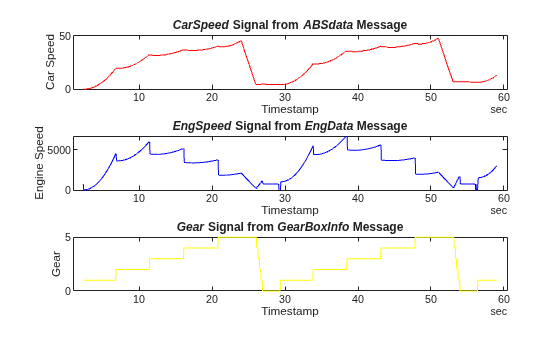
To visualize the signals of interest, columns from the signal timetables can be plotted over time for further analysis.
subplot(3, 1, 1)
plot(signalTimetable1.Time, signalTimetable1.CarSpeed, "r")
title("{\itCarSpeed} Signal from {\itABSdata} Message", "FontWeight", "bold")
xlabel("Timestamp")
ylabel("Car Speed")
subplot(3, 1, 2)
plot(signalTimetable2.Time, signalTimetable2.EngSpeed, "b")
title("{\itEngSpeed} Signal from {\itEngData} Message", "FontWeight", "bold")
xlabel("Timestamp")
ylabel("Engine Speed")
subplot(3, 1, 3)
plot(signalTimetable3.Time, signalTimetable3.Gear, "y")
title("{\itGear} Signal from {\itGearBoxInfo} Message", "FontWeight", "bold")
xlabel("Timestamp")
ylabel("Gear")
Read Subset of BLF File
So far, you have imported and visualized the entire CAN data set from the BLF file, which provides a comprehensive overview of the logged vehicle data. However, in many real-world scenarios, you may want to focus your analysis on a specific time window or event of interest, such as a sudden change in a signal value or an anomaly detected during a test drive.
For example, in the signal plots above, you can observe a rapid change in vehicle speed between 20 and 30 seconds. To investigate the CAN traffic and signal behavior in greater detail during this period, you can extract only the relevant portion of the data directly from the BLF file. Use the blfread function with the "TimeRange" name-value argument to extract all messages from channel 2 that occurred within this timeframe.
blfDataChannel2 = blfread("Logging_BLF.blf", 2, TimeRange = seconds([20, 30]))blfDataChannel2 = 1333×8 timetable
Time ID Extended Name Data Length Signals Error Remote
__________ ____ ________ __________ ______________________________ ______ ____________ _____ ______
20 sec 100 false {0×0 char} {[ 29 14 42 45 97 5 226 29]} 8 {0×0 struct} false false
20 sec 102 false {0×0 char} {[ 187 207 97 69 0 32 172 68]} 8 {0×0 struct} false false
20.001 sec 103 false {0×0 char} {[ 1 0]} 2 {0×0 struct} false false
20.001 sec 201 false {0×0 char} {[ 77 0 0 0 153 42]} 6 {0×0 struct} false false
20.001 sec 1020 false {0×0 char} {[ 4]} 1 {0×0 struct} false false
20.02 sec 103 false {0×0 char} {[ 1 0]} 2 {0×0 struct} false false
20.04 sec 103 false {0×0 char} {[ 1 0]} 2 {0×0 struct} false false
20.05 sec 100 false {0×0 char} {[ 38 14 42 45 124 5 120 30]} 8 {0×0 struct} false false
20.05 sec 102 false {0×0 char} {[ 41 88 98 69 0 128 175 68]} 8 {0×0 struct} false false
20.051 sec 201 false {0×0 char} {[ 77 0 0 0 178 42]} 6 {0×0 struct} false false
20.051 sec 1020 false {0×0 char} {[ 4]} 1 {0×0 struct} false false
20.06 sec 103 false {0×0 char} {[ 1 0]} 2 {0×0 struct} false false
20.08 sec 103 false {0×0 char} {[ 1 0]} 2 {0×0 struct} false false
20.1 sec 100 false {0×0 char} {[ 46 14 42 45 124 5 120 30]} 8 {0×0 struct} false false
20.1 sec 102 false {0×0 char} {[147 227 98 69 0 128 175 68]} 8 {0×0 struct} false false
20.101 sec 103 false {0×0 char} {[ 1 0]} 2 {0×0 struct} false false
⋮
Similarly, you might need to extract a specific number of messages from another channel. For example, to read the first 50 messages from channel 1, use the "IndexRange" name-value argument.
blfDataChannel1 = blfread("Logging_BLF.blf", 1, IndexRange = [1 50])blfDataChannel1 = 50×8 timetable
Time ID Extended Name Data Length Signals Error Remote
__________ ___ ________ __________ _______________________ ______ ____________ _____ ______
2.2002 sec 272 false {0×0 char} {[ 6 0 0]} 3 {0×0 struct} false false
2.2202 sec 416 false {0×0 char} {[ 0 0 0 32]} 4 {0×0 struct} false false
2.2203 sec 496 false {0×0 char} {[ 0]} 1 {0×0 struct} false false
2.2204 sec 497 false {0×0 char} {[ 0]} 1 {0×0 struct} false false
2.2402 sec 416 false {0×0 char} {[ 0 0 0 32]} 4 {0×0 struct} false false
2.2501 sec 496 false {0×0 char} {[ 0]} 1 {0×0 struct} false false
2.2502 sec 497 false {0×0 char} {[ 0]} 1 {0×0 struct} false false
2.2602 sec 416 false {0×0 char} {[ 0 0 0 32]} 4 {0×0 struct} false false
2.2802 sec 416 false {0×0 char} {[ 0 0 0 32]} 4 {0×0 struct} false false
2.2803 sec 496 false {0×0 char} {[ 0]} 1 {0×0 struct} false false
2.2804 sec 497 false {0×0 char} {[ 0]} 1 {0×0 struct} false false
2.3002 sec 272 false {0×0 char} {[ 135 0 0]} 3 {0×0 struct} false false
2.3003 sec 416 false {0×0 char} {[ 0 0 0 32]} 4 {0×0 struct} false false
2.3006 sec 273 false {0×0 char} {[0 0 0 238 2 1 120 0]} 8 {0×0 struct} false false
2.3101 sec 496 false {0×0 char} {[ 0]} 1 {0×0 struct} false false
2.3102 sec 497 false {0×0 char} {[ 0]} 1 {0×0 struct} false false
⋮
Write Data to BLF File
After extracting the relevant data subsets from both channels, you can save them to a new BLF file for later analysis or sharing. It is important to note that the blfwrite function cannot overwrite an existing BLF file. If the specified output file already exists, blfwrite returns an error. To avoid this, you should first check if the file exists and delete it if necessary before writing the new data.
outputFile = "SubsetLoggingBLF.blf";
if isfile(outputFile)
    delete(outputFile);
end
Once you have ensured that the output file does not exist, you can write your extracted CAN data subsets to the BLF file. The blfwrite function requires the data for each channel to be provided in a cell array. You also need to specify the channel numbers and their corresponding types. In this case, both channels are of the "CAN" type.
blfwrite(outputFile, {blfDataChannel1, blfDataChannel2}, [1 2], ["CAN", "CAN"])
