DaysProgressPlot

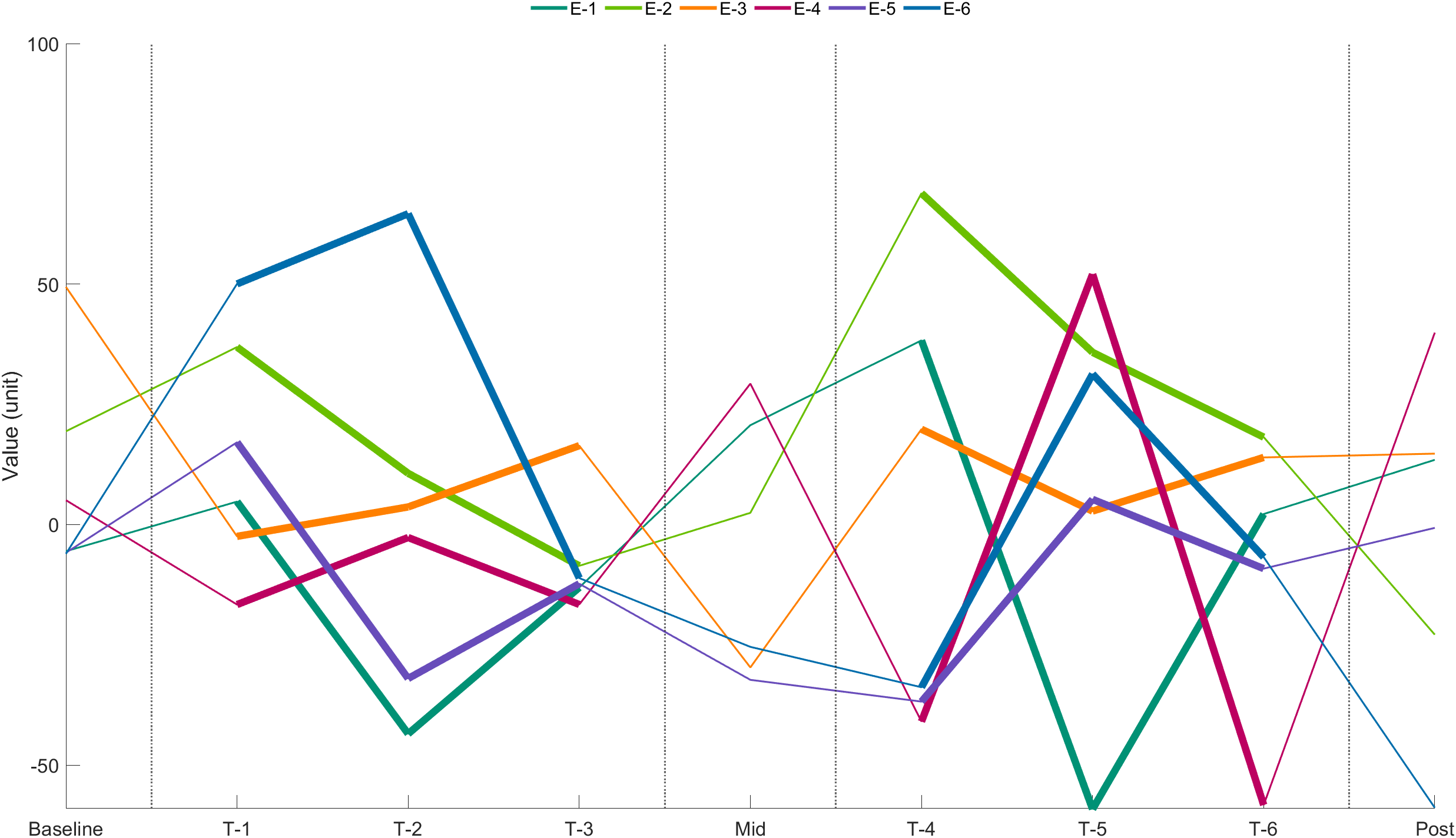
This function can be used to plot progress of a specific variable accorss days. use full for showing progress in clincial trials.
2 download
Aggiornato 10 nov 2025

Visualizza la licenza

%DAYSPROGRESSPLOT Plot subject-level progress across clinical-trial days with optional begin→end wings.
%
% SUMMARY
% General-purpose, subject-level plotting utility for clinical trials that span D ≥ 3 days.
% It lays out three ticks per day (PRE, CENTER, POST) via GenerateDaysTickValues and:
% • If ONLY dayBeginData is given → plots one trace per subject through CENTER ticks.
% • If dayEndData is also provided → plots traces through PRE ticks and draws per-day
% BEGIN→END “wings” on POST ticks. Thick therapy segments and thickened in-day wings
% are supported via thickDayIndex.
% When dayEndData exists, the axis shows all three ticks per day; labels appear on CENTER ticks.
%
% SYNTAX
% DaysProgressPlot(axObject, dayBeginData, dayEndData, thickDayIndex, ...
% verticalXlineIndex, yLabel, xTickLabels, subjectIDs, subjectColors)
%
% INPUTS
% axObject : axes handle; if empty/omitted, a new axes is created.
% dayBeginData : [N×D] (subjects × days), required.
% dayEndData : (optional) [N×D] same shape as begin; if empty ⇒ begin-only mode.
% thickDayIndex : vector of day numbers where BETWEEN-day segments are thickened
% (e.g., [2 3 4] thickens segments 2→3 and 3→4).
% verticalXlineIndex : vector of integers or fractionals marking condition changes:
% • k (integer) → draw at CENTER tick of day k.
% • v∈(k,k+1) → linear interpolation between CENTER(k) and CENTER(k+1).
% yLabel : (optional) string/char, default "Error (m)".
% xTickLabels : (optional) 1×D labels for CENTER ticks; when dayEndData exists,
% PRE/POST ticks are shown but remain unlabeled.
% subjectIDs : (optional) 1×N or N×1 cell/str/numeric; if provided, legend (color↔ID)
% is placed outside, top-right (northoutside, horizontal).
% subjectColors : (optional) [N×3] RGB; if omitted → EquiDistantColorGenerator(N,9742).
%
% OUTPUTS
% (none) – draws into axObject.
%
% DEPENDENCIES
% GenerateDaysTickValues.m
% EquiDistantColorGenerator.m
% PlotDayTrace.m (generalized version provided alongside this function)
%
% EXAMPLE
% % 6 subjects, 9 days; some END wings only on select blocks; therapy on 2..4 and 6..8
% N=6; D=9;
% beginVals = 35*randn(N,D);
% endVals = [nan(N,1), randn(N,3), nan(N,1), randn(N,3), nan(N,1)];
% DaysProgressPlot([], beginVals, endVals, [2:4,6:8], [1.5,4.5,5.5,8.5], ...
% "Value (unit)", {"Baseline","T-1","T-2","T-3","Mid","T-4","T-5","T-6","Post"}, ...
% "E-"+string(1:N), []);
%
% REVISION HISTORY
% • 2025-11-09: Added center/pre/post tick display when END exists; labeled centers only.
% Thickened in-day connectors on thick days (via PlotDayTrace).
%
% Written by Naveed Reza Aghamohammadi

Cita come

Naveed Reza Aghamohammadi (2025). DaysProgressPlot (https://it.mathworks.com/matlabcentral/fileexchange/182561-daysprogressplot), MATLAB Central File Exchange. Recuperato .

Compatibilità della release di MATLAB
Creato con R2022b
Compatibile con qualsiasi release
Compatibilità della piattaforma
Windows macOS Linux

Community Treasure Hunt

Find the treasures in MATLAB Central and discover how the community can help you!

Start Hunting!
Versione Pubblicato Note della release
1.0.0