Speech Command Recognition Code Generation on Desktop
R2026bThis example shows how to deploy feature extraction and a convolutional neural network (CNN) for speech command recognition. In this example, the generated code is a MATLAB executable (MEX) function, which is called by a MATLAB script that displays the predicted speech command along with the time domain signal and auditory spectrogram. For details about audio preprocessing and network training, see Train Deep Learning Network for Speech Command Recognition.
Streaming Demonstration in MATLAB
Use the same parameters for the feature extraction pipeline and classification as developed in Train Deep Learning Network for Speech Command Recognition.
Define the same sample rate the network was trained on (16 kHz). Define the classification rate and the number of audio samples input per frame. The feature input to the network is a Bark spectrogram that corresponds to 1 second of audio data. The Bark spectrogram is calculated for 25 ms windows with 10 ms hops.
fs = 16000;
classificationRate = 20;
samplesPerCapture = fs/classificationRate;

segmentDuration = 1;
segmentSamples = round(segmentDuration*fs);

frameDuration = 0.025;
frameSamples = round(frameDuration*fs);

hopDuration = 0.010;
hopSamples = round(hopDuration*fs);
Create an audioFeatureExtractor object to extract 50-band Bark spectrograms without window normalization.
afe = audioFeatureExtractor( ...
    SampleRate=fs, ...
    FFTLength=512, ...
    Window=hann(frameSamples,"periodic"), ...
    OverlapLength=frameSamples - hopSamples, ...
    barkSpectrum=true);

numBands = 50;
setExtractorParameters(afe,"barkSpectrum",NumBands=numBands,WindowNormalization=false);
Load the pretrained convolutional neural network and labels.
load("SpeechCommandRecognitionNetwork.mat")
numLabels = numel(labels);
backgroundIdx = find(labels == 'background');
Define buffers and decision thresholds to post process network predictions.
probBuffer = single(zeros([numLabels,classificationRate/2]));
YBuffer = single(numLabels * ones(1, classificationRate/2));

countThreshold = ceil(classificationRate*0.2);
probThreshold = single(0.7);
Create an audioDeviceReader object to read audio from your device. Create a dsp.AsyncBuffer object to buffer the audio into chunks.
adr = audioDeviceReader(SampleRate=fs,SamplesPerFrame=samplesPerCapture,OutputDataType='single');
audioBuffer = dsp.AsyncBuffer(fs);
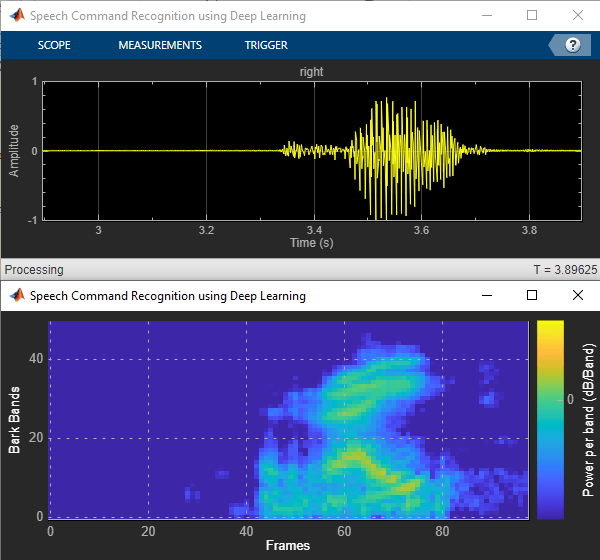
Create a dsp.MatrixViewer object and a timescope object to display the results.
matrixViewer = dsp.MatrixViewer( ...
    ColorBarLabel="Power per band (dB/Band)", ...
    XLabel="Frames", ...
    YLabel="Bark Bands", ...
    Position=[400 100 600 250], ...
    ColorLimits=[-4 2.6445], ...
    AxisOrigin="Lower left corner", ...
    Name="Speech Command Recognition Using Deep Learning");

timeScope = timescope( ...
    SampleRate=fs, ...
    YLimits=[-1 1], ...
    Position=[400 380 600 250], ...
    Name="Speech Command Recognition Using Deep Learning", ...
    TimeSpanSource="Property", ...
    TimeSpan=1, ...
    BufferLength=fs);

timeScope.YLabel = "Amplitude";
timeScope.ShowGrid = true;
Show the time scope and matrix viewer. Detect commands as long as both the time scope and matrix viewer are open or until the time limit is reached. To stop the live detection before the time limit is reached, close the time scope window or matrix viewer window.
show(timeScope)
show(matrixViewer)
timeLimit = 10;

tic
while isVisible(timeScope) && isVisible(matrixViewer) && toc < timeLimit
    % Capture Audio
    x = adr();
    write(audioBuffer,x);
    y = read(audioBuffer,fs,fs-samplesPerCapture);

    % Compute auditory features
    features = extract(afe,y);
    auditory_features = log10(features + 1e-6);

    % Transpose to get the auditory spectrum
    auditorySpectrum = auditory_features';

    % Perform prediction
    score = predict(net,auditory_features);
    [~,YPredicted] = max(score);

    % Perform statistical post processing
    YBuffer = [YBuffer(2:end),YPredicted];
    probBuffer = [probBuffer(:,2:end),score(:)];

    [YMode_idx, count] = mode(YBuffer);
    count = single(count);
    maxProb = max(probBuffer(YMode_idx,:));

    if (YMode_idx == single(backgroundIdx) || count < countThreshold || maxProb < probThreshold)
        speechCommandIdx = backgroundIdx;
    else
        speechCommandIdx = YMode_idx;
    end

    % Update plots
    matrixViewer(auditorySpectrum);
    timeScope(x);

    if (speechCommandIdx == backgroundIdx)
        timeScope.Title = ' ';
    else
        timeScope.Title = char(labels(speechCommandIdx));
    end
    drawnow
end
Hide the scopes.
hide(matrixViewer)
hide(timeScope)
Prepare MATLAB Code for Deployment
To create a function to perform feature extraction compatible with code generation, call generateMATLABFunction on the audioFeatureExtractor object. The generateMATLABFunction object function creates a standalone function that performs equivalent feature extraction and is compatible with code generation.
generateMATLABFunction(afe,"extractSpeechFeatures")The HelperSpeechCommandRecognition supporting function encapsulates the feature extraction and network prediction process demonstrated previously. So that the feature extraction is compatible with code generation, feature extraction is handled by the generated extractSpeechFeatures function. So that the network is compatible with code generation, the supporting function uses the coder.loadDeepLearningNetwork function to load the network.
Use the HelperSpeechCommandRecognition function to perform live detection of speech commands.
show(timeScope)
show(matrixViewer)
timeLimit = 10;

tic
while isVisible(timeScope) && isVisible(matrixViewer) && toc < timeLimit
    x = adr();

    [speechCommandIdx, auditorySpectrum] = HelperSpeechCommandRecognition(x);

    matrixViewer(auditorySpectrum);
    timeScope(x);

    if (speechCommandIdx == backgroundIdx)
        timeScope.Title = ' ';
    else
        timeScope.Title = char(labels(speechCommandIdx));
    end
    drawnow
end
Hide the scopes.
hide(timeScope)
hide(matrixViewer)
Generate MATLAB Executable
Create a code generation configuration object for generation of an executable program.
cfg = coder.config('mex');
cfg.LargeConstantGeneration = 'WriteOnlyDNNConstantsToDataFiles';
cfg.LargeConstantThreshold = 2^12;
Call codegen (MATLAB Coder) to generate C code for the HelperSpeechCommandRecognition function. Specify the configuration object and prototype arguments. A MEX file named HelperSpeechCommandRecognition_mex is generated to your current folder.
codegen HelperSpeechCommandRecognition -config cfg -args {rand(samplesPerCapture, 1, 'single')} -profile -report -v
Perform Speech Command Recognition Using Deployed Code
Show the time scope and matrix viewer. Detect commands using the generated MEX for as long as both the time scope and matrix viewer are open or until the time limit is reached. To stop the live detection before the time limit is reached, close the time scope window or matrix viewer window.
show(timeScope)
show(matrixViewer)

timeLimit = 10;

tic
while isVisible(timeScope) && isVisible(matrixViewer) && toc < timeLimit
    x = adr();

    [speechCommandIdx, auditorySpectrum] = HelperSpeechCommandRecognition_mex(x);

    matrixViewer(auditorySpectrum);
    timeScope(x);

    if (speechCommandIdx == backgroundIdx)
        timeScope.Title = ' ';
    else
        timeScope.Title = char(labels(speechCommandIdx));
    end
    drawnow
end

hide(matrixViewer)
hide(timeScope)
Evaluate MEX Execution Time
Use tic and toc to compare the execution time to run the simulation completely in MATLAB with the execution time of the MEX function.
Measure the performance of the simulation code.
testDur = 50e-3;
x = pinknoise(fs*testDur,'single');
numLoops = 100;
tic
for k = 1:numLoops
    [speechCommandIdx, auditory_features] = HelperSpeechCommandRecognition(x);
end
exeTime = toc;
fprintf('SIM execution time per 50 ms of audio = %0.4f ms\n',(exeTime/numLoops)*1000);
SIM execution time per 50 ms of audio = 6.4912 ms
Measure the performance of the MEX code.
tic
for k = 1:numLoops
    [speechCommandIdx, auditory_features] = HelperSpeechCommandRecognition_mex(x);
end
exeTimeMex = toc;
fprintf('MEX execution time per 50 ms of audio = %0.4f ms\n',(exeTimeMex/numLoops)*1000);
MEX execution time per 50 ms of audio = 2.1581 ms
Evaluate the performance gained from using the MEX function. This performance test is performed on a machine using Intel(R) Xeon(R) W-2133 CPU running at 3.60 GHz.
PerformanceGain = exeTime/exeTimeMex
PerformanceGain =
3.0079

