Automatically Define Input Types in the MATLAB Coder App
R2026bBecause variables in C and C++ are statically typed, the code generator must determine the types of all variables in your MATLAB® files when you generate code. You must specify the class, size, and other properties for all inputs to your entry-point functions. To specify input types in the MATLAB Coder™ app, you can either:
Instruct the app to automatically determine input types by calling your entry-point function in a test script or at the command line.
Specify properties directly.
In this step of the tutorial, you instruct the app to automatically determine input types by calling your entry-point function in a test script.
To set up the project file and add the entry-point function to the project, follow the previous step in this tutorial, Prepare MATLAB Function for Code Generation. Alternatively, run the script collatz_step2.m.
Examine and Run Test Script
Write a script that exercises your entry-point function. For this tutorial, examine the test script collatz_test.m.
type collatz_test.mrng(10)
nums = randi(100,1,10);
maxLen = 0;
numMax = 0;
for i = 1:numel(nums)
seq = collatz(nums(i));
if i == 1
minLen = numel(seq);
numMin = nums(i);
end
if numel(seq)>maxLen
maxLen = numel(seq);
numMax = nums(i);
end
if numel(seq)<minLen
minLen = numel(seq);
numMin = nums(i);
end
end
disp("Maximum steps: ");
disp(num2str(maxLen));
disp("For this random integer: ");
disp(num2str(numMax));
disp(newline);
disp("Minimum steps: ");
disp(num2str(minLen));
disp("For this random integer: ");
disp(num2str(numMin));
This script tests the Collatz conjecture for 10 randomly selected integers between 0 and 100 and outputs the integers that have the longest and shortest Collatz sequences. This script uses the rng function to generate replicable results. Run the script to test the collatz function in MATLAB.
collatz_test
Maximum steps:
36
For this random integer:
78


Minimum steps:
7
For this random integer:
64
Define Input Types by Using Test Script
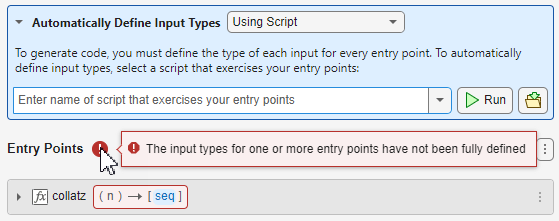
Open the Entry Points tab by clicking the Entry Points button in the MATLAB Coder tab. The app displays an error icon because the input types are not defined.
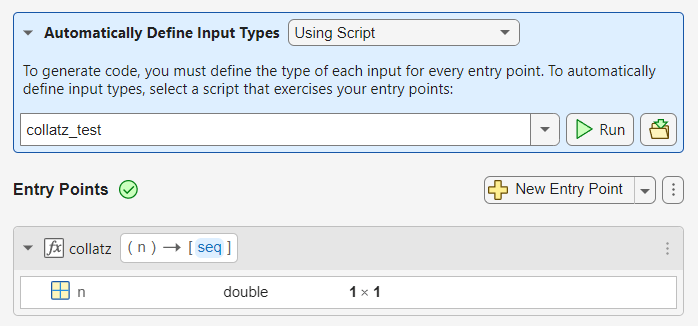
Set the Automatically Define Input Types parameter to Using Script and enter collatz_test as the test script. Click the Run button. The app runs the test script and defines the input argument n as a scalar double.
Next, check for issues in the MATLAB code by generating and running a MEX function.

