Generate Standalone C Static Library at the Command Line
R2026bThis example shows how to generate a standalone C static library from a MATLAB® function by using the codegen command. In this example, you prepare an entry-point function for code generation, determine the input types, generate a MEX function, and then generate a standalone C static library. To learn the basics of code generation, see Generate Deployable Standalone Code by Using the MATLAB Coder App.
Examine and Run MATLAB Function
Examine the MATLAB function euclidean_original. This function calculates the minimum and maximum Euclidean distances between a single point and an array of points. The input arguments to the function are point, which is a 3-by-1 array that represents a single point in three-dimensional Euclidean space, and point_array, which is a 3-by-n array that represents an arbitrary number of points in three-dimensional Euclidean space.
type euclidean_original.mfunction distance = euclidean_original(point,point_array)
% Initialize distance array with distance to first element of point_array
distance(1) = norm(point-point_array(:,1));
distance(2) = norm(point-point_array(:,1));
% Find the minimum and maximum distance to the point vector
for index = 2:size(point_array,2)
d = norm(point-point_array(:,index));
if d < distance(1)
distance(1) = d;
end
if d > distance(2)
distance(2) = d;
end
end
end
The image visualizes the arrays in this example. In this image, the points in point_array are blue and point is red.
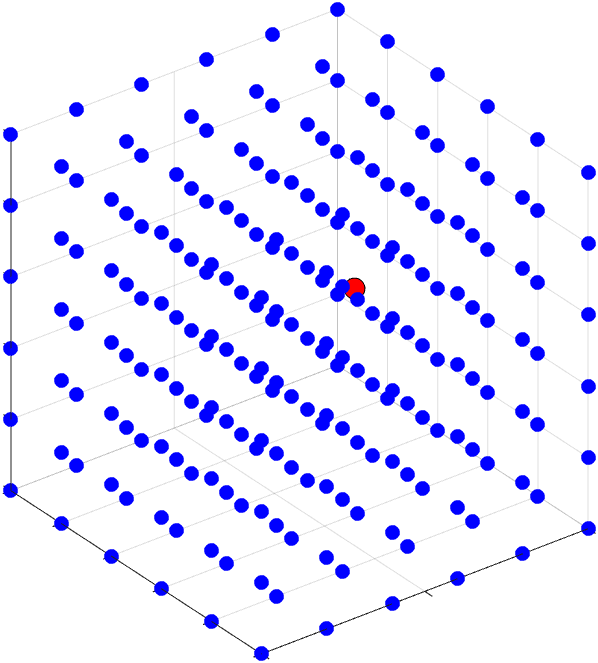
To run the euclidean_original function, load the point and point_array variables from the euclidean_data.mat file into the workspace. Then, call the euclidean_original function with these variables.
load euclidean_data.mat;
distance = euclidean_original(point,point_array)
distance = 1×2
0.0804 1.2923
Prepare Entry-Point Function for Code Generation
Next, prepare the entry-point function for code generation. An entry-point function is a top-level function that calls all of the other MATLAB functions for which you want to generate code. In this example, you use euclidean_original as the entry-point function.
To prepare euclidean_original for code generation, edit the function.
edit euclidean_originalAdd the %#codegen directive after the euclidean_original function declaration. This directive prompts the MATLAB Code Analyzer to identify warnings and errors specific to code generation. For more information about the checks performed by the Code Analyzer, see MATLAB for Code Generation Messages.
In this example, the Code Analyzer indicates that you must fully define the output argument distance before you use it.

The code generator must be able to determine the size and type of an array before you access an element of the array. In this example, before you update the first and second elements of the distance array, you must define the size and type of the array. Use the zeros function to indicate that distance is a 1-by-2 array of doubles. Add this line of code after the function declaration:
distance = zeros(1,2);
After you make this change, the Code Analyzer does not identify additional potential code generation errors in the code. The file euclidean_codegen.m contains the updated code.
type euclidean_codegen.mfunction distance = euclidean_codegen(point,point_array) %#codegen
% Use the ones function to allocate and preinitalize the distance array
distance = ones(1,2);
% Initialize the distance array with distance to first element of point_array
distance(1) = norm(point-point_array(:,1));
distance(2) = norm(point-point_array(:,1));
% Find the minimum and maximum distance to the point vector
for index = 2:size(point_array,2)
d = norm(point-point_array(:,index));
if d < distance(1)
distance(1) = d;
end
if d > distance(2)
distance(2) = d;
end
end
end
Use the coder.screener function to run the code generation readiness tool. Use this tool to check whether the MATLAB code includes functions or features that are not supported for code generation. For more information about the checks performed by this tool, see Code Generation Readiness Tool.
In this example, the code generation readiness tool does not find unsupported functions or features in the euclidean_codegen function.
coder.screener("euclidean_codegen")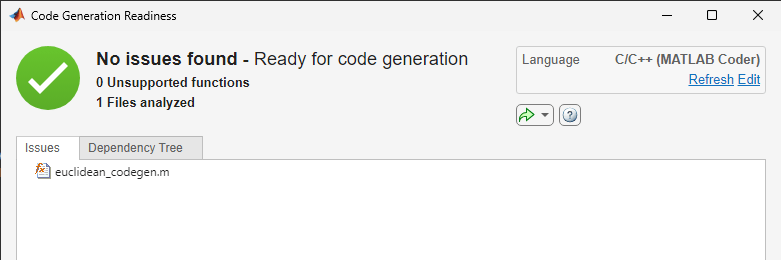
Decide How to Specify Input Types
Next, you must decide how to specify the types of the inputs to the entry-point function. Because C and C++ are statically typed languages, the code generator must determine the class and size of all variables in the generated code during code generation. One of the ways that you can specify input types is by using the -args option of the codegen command. To learn about other methods of input-type specification, see Specify Types of Entry-Point Function Inputs.
When you specify input types, you must indicate whether the input arguments are always the same size, or whether they can vary in size. For this example, point is always a 3-by-1 array, because it describes a single point in three-dimensional Euclidean space. By contrast, point_array can contain an arbitrary number of points in three-dimensional Euclidean space.
Use this syntax fragment to specify the types of the inputs to the euclidean_codegen function:
-args {point,coder.typeof(0,[3 Inf])}
In this syntax fragment,
Use
-argsto pass a cell array of input types to thecodegencommand.Use
pointas an example value to instruct the code generator to accept a 3-by-1 array.Use
coder.typeofto instruct the code generator to accept a 3-by-Infarray of doubles.
Generate and Run MEX Function
Generate a MEX function from the entry-point function. A MEX function is a C or C++ executable that you can run from inside MATLAB. Run the generated MEX function to check that the generated code has the same behavior as the original MATLAB code.
It is a best practice to perform this step because you can run the generated MEX function to detect run-time errors that are harder to diagnose in standalone code. For example, the MEX function includes memory integrity checks by default. These checks perform array bounds and dimension checking to detect violations of memory integrity in code generated for MATLAB functions.
By default, the codegen command generates a MEX function in C in the working folder. Specify input types by using the -args syntax fragment. Use the -report option to instruct the code generator to produce a code generation report.
codegen euclidean_codegen -args {point,coder.typeof(0,[3 Inf])} -report
Code generation successful: View report
Click the View Report link to inspect the code generator report. The input argument point is a 3x1 array of doubles, and the input argument point_array is a 3x:? array of doubles. The code generator uses the colon (:) to indicate a variable-size array dimension.
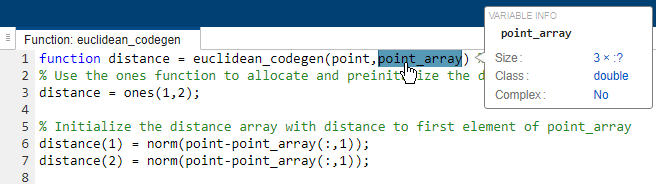
Test the MEX function with the same input that you passed to the original MATLAB function and compare the results. The MEX function produces the same output.
euclidean_codegen_mex(point,point_array)
ans = 1×2

    0.0804    1.2923
Generate and Inspect C Code
Instruct the code generator to generate a C static library by using the codegen command with the -config:lib option. Use the same -args syntax fragment that you used to generate the MEX function.
codegen euclidean_codegen -config:lib -args {point,coder.typeof(0,[3 Inf])} -report
Code generation successful: View report
The code generator saves the generated files in the codegen/lib/euclidean_codegen subfolder of the working folder. It defines the entry-point function interface in the file euclidean_codegen.c and declares the interface in the file euclidean_codegen.h. Examine the signature of the C function euclidean_codegen.
file = fullfile("codegen","lib","euclidean_codegen","euclidean_codegen.c");
coder.example.extractLines(file,"void euclidean_codegen","{",1,0)
void euclidean_codegen(const double point[3],
                       const emxArray_real_T *point_array, double distance[2])
The generated C function signature contains:
const double point[3], which corresponds to the input variablepointin the MATLAB code. The code generator fixes the size ofpointat 3 because this is the size of the example input you used when you generated code.const emxArray_real_T *point_array, which corresponds to the variable-size arraypoint_arrayin the MATLAB code. When generating C code for variable-size data, the code generator uses a data structure called anemxArray.double distance[2], which corresponds to the output argumentdistancein the MATLAB code. The code generator defines the size ofdistanceas 2 based on the definition of this variable in the MATLAB code.

