Generate Accelerated MEX Function at the Command Line
R2026bThis example shows how to generate an accelerated MEX function from a MATLAB® function by using the codegen command. In this example, you prepare an entry-point function for code generation, determine the input types, generate a MEX function, and then generate an accelerated MEX function. To learn the basics of code generation, see Generate Deployable Standalone Code by Using the MATLAB Coder App.
Examine and Run MATLAB Function
Examine the MATLAB function runSimulation(n), where n is a number of balls. This function generates n balls of random sizes in random locations in a 400-by-600 matrix, and then simulates the speed and trajectory of each ball, taking into account the energy lost to collisions and gravity, until all balls are stationary. The function returns an array of structures, where each structure represents the final location of a single ball. The MATLAB function seeds the random number generator so that the simulation and the returned array are identical every time the function executes.
The runSimulation function calls several other functions:
setInitialLocation, which returns an array containingnballs with random positions and velocities.isLocationValid, which returnsfalseif the ball is partially or fully outside the location matrix.iterate, which computes one iteration of the system. The function moves all balls at their respective velocities, manages collisions, and applies gravity.
To visualize the simulation in MATLAB, use the displaySimulation function. This function uses the same simulation algorithm and produces the same output as runSimulation, but also plots the movements of the balls on the screen. Specify a simulation of 50 balls.
ball_locations_display = displaySimulation(50);
Warning: Graphics acceleration hardware is unavailable. Graphics quality and performance might be diminished. See <a href="https://www.mathworks.com/support/requirements/matlab-system-requirements.html">MATLAB System Requirements</a>.

Call the runSimulation function at the command line, and confirm that this function produces the same array as displaySimulation for the same input value.
ball_locations = runSimulation(50);
isequal(ball_locations_display,ball_locations)
ans = logical
   1
Prepare Entry-Point Function for Code Generation
Next, prepare the entry-point function for code generation. An entry-point function is a top-level function that calls all of the other MATLAB functions. In this example, you use the runSimulation function as the entry-point function.
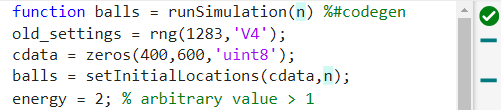
To prepare a function for code generation, add the %#codegen directive after the first function declaration in each MATLAB program file. This directive prompts the MATLAB Code Analyzer to identify warnings and errors specific to code generation. For more information about the checks performed by the Code Analyzer, see MATLAB for Code Generation Messages.
In this example, the %#codegen directive is already added to each program file used by runSimulation, and the Code Analyzer does not identify issues.
Use the coder.screener function to run the code generation readiness tool. Use this tool to check whether the MATLAB code includes functions or features that are not supported for code generation. For more information about the checks performed by this tool, see Code Generation Readiness Tool.
In this example, the code generation readiness tool does not does not find unsupported functions or features in the runSimulation function or any of the functions called by this function. In the code generation readiness tool, click the Dependency Tree tab to see how runSimulation calls the other functions.
coder.screener("runSimulation")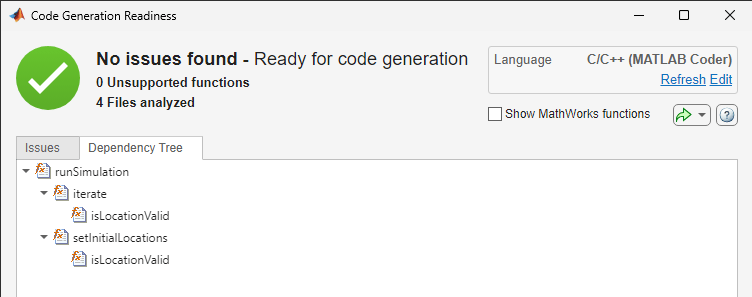
Decide How to Specify Input Types
Next, decide how to specify the types of the inputs to your entry-point function. Because C and C++ are statically typed languages, the code generator must determine the class and size of all variables in the generated code during code generation. One of the ways that you can specify input types is by using the -args option of the codegen command. To learn about other methods of input-type specification, see Specify Types of Entry-Point Function Inputs.
When you specify input types, you must decide whether the input arguments are always the same size, or whether they can vary in size. In this example, the input argument n is always a scalar double.
Use this syntax fragment to specify the types of the inputs to the runSimulation function:
-args {0}
In this syntax fragment,
Use
-argsto pass a cell array of input types to thecodegencommand.Use
0as an example value to instruct the code generator to accept a scalar double.
Generate and Run MEX Function
Generate a MEX function from your entry-point function. A MEX function is a C or C++ executable that you can run from inside MATLAB. Run the generated MEX function to check that the generated code has the same behavior as the original MATLAB code.
It is a best practice to perform this step because you can run the generated MEX function to detect run-time errors that are harder to diagnose in standalone code. For example, the MEX function includes memory integrity checks by default. These checks perform array bounds and dimension checking to detect violations of memory integrity in code generated for MATLAB functions.
By default, the codegen command generates a MEX function in C in the working folder. Specify input types by using the -args syntax fragment.
codegen runSimulation -args {0}
Code generation successful.
Test the MEX function by using the same input that you passed to the original MATLAB function and compare the results. The MEX function produces the same output.
ball_locations_mex = runSimulation_mex(50);
isequal(ball_locations,ball_locations_mex)
ans = logical
   1
Generate and Run Accelerated MEX Function
Because you tested the MEX function with run-time error checks enabled, you can disable these checks and generate an accelerated MEX function. Create a MEX code configuration object by using coder.config, and disable the configuration object properties IntegrityChecks and ResponsivenessChecks. For more information about controlling run-time error checking in MEX functions, see Control Run-Time Checks.
mexcfg = coder.config("mex");
mexcfg.IntegrityChecks = false;
mexcfg.ResponsivenessChecks = false;
To instruct the code generator to generate an accelerated MEX function, pass the mexcfg code configuration object to the -config option of the codegen command. Use the same -args syntax fragment that you used to generate the MEX function.
codegen -config mexcfg runSimulation -args {0}
Code generation successful.
Use coder.perfCompare to compare the performance of the runSimulation MATLAB function the accelerated MEX function. The coder.perfCompare function indicates that the MEX function is much faster than the MATLAB function.
coder.perfCompare("runSimulation",1,{50})==== Running (runSimulation, MATLAB) ====
- Running MATLAB script.
TimingResult with 10 Runtime Sample(s)
Statistical Overview:
mean = 1.30e+00 s max = 1.34e+00 s sd = 2.76e-02 s
median = 1.30e+00 s min = 1.26e+00 s 90th = 1.34e+00 s
==== Running (runSimulation, Codegen Mex) ====
- Generating code and building MEX.
- Running MEX.
TimingResult with 222 Runtime Sample(s)
Statistical Overview:
mean = 2.26e-03 s max = 3.97e-03 s sd = 5.19e-04 s
median = 2.07e-03 s min = 1.72e-03 s 90th = 3.07e-03 s
MATLAB Codegen Mex
_____________ ______________________________________________________
Runtime (sec) Runtime (sec) Speedup: MATLAB / Codegen Mex (times)
_____________ _____________ _____________________________________
runSimulation 1.2952 0.0020727 624.9
See Also
codegen | coder.perfCompare | coder.screener

