Resolve Error: Incorrect Size for Expression
R2026bIssue
If you generate MEX code and the size of an expression at run time is incompatible with the size that the code generator determined at code generation time, the MEX function produces one of these errors:
Incorrect size for expression '<output of
                    extrinsicFunction>': expected
                    specifiedSize but found
                    outputSize.
Incorrect size for expression 'inputArgument':
                expected specifiedSize but found
                    runtimeSize.
Possible Solutions
Depending on the error message, try one of these solutions:
If the error message refers to the output of an extrinsic function and you know the maximum size of the output array, specify a fixed-size output by preallocating the output variable or specify a bounded variable-size output by using
coder.varsize.If the error message refers to the output of an extrinsic function and you do not know the maximum size of the output array, specify an unbounded variable size output by using
coder.varsizeand initialize the output variable as an empty array.If the error message refers to an input argument, change either the size specification at code generation time or the size of the input value at run time.
Specify Maximum Size for Output of Extrinsic Function
If the output of an extrinsic function is fixed size or bounded variable size and
the size that you specified at code generation time differs from the size of the
output at run time, the generated MEX function produces an error. If the output
variable has a fixed size, resolve this error by preallocating the output array. If
the output variable has a bounded variable size, use coder.varsize to specify the upper bounds of the output
array.
For example, consider this MATLAB® function, which calls an extrinsic function. The size of the extrinsic
function output depends on the entry-point input argument n, but
it cannot be larger than
1-by-20.
function outNum = entryPointCallExtrinsic(n) %#codegen
coder.extrinsic("extrinsicNumFcn")
outNum = 0;
outNum = extrinsicNumFcn(n);
end
function out = extrinsicNumFcn(n)
if n<20
    out = zeros(1,n);
else
    out = zeros(1,20);
end
end
If you generate code for entryPointCallExtrinsic, the code
generation report shows that, because the initial size of outNum
is 1-by-1, the code generator defines both dimensions of outNum
with a fixed size of 1.
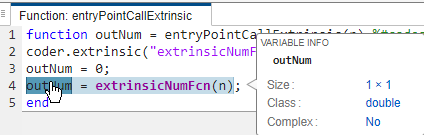
When you run the generated MEX function, it produces this error for input values larger than 1 because the output of the extrinsic function is larger than 1-by-1:
entryPointCallExtrinsic_mex(25)
Incorrect size for expression '<output of extrinsicNumFcn>': expected [1x1] but found [1x20].
To resolve the error, if you know that n is
always greater than or equal to 20, you can
preallocate outNum by using the zeros
function.
function outNum = entryPointCallExtrinsic_Preallocate(n) %#codegen
coder.extrinsic("extrinsicNumFcn")
outNum = zeros(1,20);
outNum = extrinsicNumFcn(n);
end
If you generate code for entryPointCallExtrinsic_Preallocate,
the code generation report shows that the code generator defines
outNum as a fixed-size 1-by-20 array.

The generated MEX function does not produce an error for values of
n greater than or equal to 20.
Alternatively, if you do not know the value of n, you can use
coder.varsize to specify that outNum is
a variable-length row vector with a maximum length of
20.
function outNum = entryPointCallExtrinsic_VarSizeBounded(n) %#codegen
coder.extrinsic("extrinsicNumFcn")
coder.varsize("outNum",[1 20],[false true]);
outNum = 0;
outNum = extrinsicNumFcn(n);
end
If you generate code for
entryPointCallExtrinsic_VarSizeBounded, the code generation
report shows that the first dimension of outNum has a fixed size
of 1 and the second dimension of outNum is variable size with an
upper bound of 20.
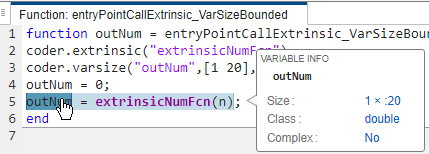
The generated MEX function does not produce an error.
Specify Unbounded Size for Output of Extrinsic Function
If the extrinsic function output is unknown or unbounded and the code generator
defines the output with a bounded size, the generated MEX function produces an
error. If you do not know the maximum size of one or more dimensions of an extrinsic
function output, you must force the code generator to recognize each unbounded
dimension by initializing the dimension with a size of 0 and using coder.varsize to define the dimension as unbounded. If you do not
initially set the size of the output dimension to 0, the code generator uses the
initial size of the dimension as an upper bound.
For example, consider this MATLAB function, which calls an extrinsic function and uses
coder.varsize without an upper bound to specify that the
output of the extrinsic function has a variable size. The function initializes
outChr as a scalar character, which is a 1-by-1
array.
function outChr = entryPointCallChrExtrinsic(n) %#codegen
coder.extrinsic("extrinsicChrFcn")
coder.varsize("outChr",[1 Inf]);
outChr = ' ';
outChr = extrinsicChrFcn(n);
end
function out = extrinsicChrFcn(n)
smiles = '';
for i=1:n
    smiles = [smiles ':-) '];
end
out = smiles;
end
If you generate code for entryPointCallChrExtrinsic, the code
generation report shows that, because the initial size of outChr
is 1-by-1, the code generator defines the second dimension of
outChr as variable size with an upper bound of 1.
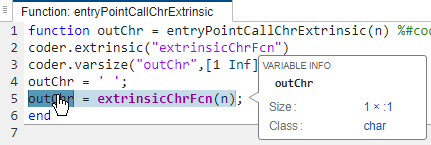
When you run the generated MEX function, it produces this error for input values larger than 0 because the output of the extrinsic function is larger than 1-by-1:
entryPointCallChrExtrinsic_mex(1)
Incorrect size for expression '<output of extrinsicChrFcn>': expected [1x:1] but found [1x4].
To resolve the error, initialize outChr as a 1-by-0 character
vector. Because the second dimension of outChr is initialized
with a size of 0, the code generator defines this dimension as
unbounded.
function outChr = entryPointCallExtrinsic_empty %#codegen
coder.extrinsic("extrinsicChrFcn")
coder.varsize("outChr",[1 Inf]);
outChr = char(zeros(1,0));
outChr = extrinsicChrFcn;
end
If you generate code for entryPointCallExtrinsic_empty, the
code generation report shows that the code generator defines the first dimension of
outChr with a fixed size of 1 and the second dimension of
outChr as unbounded.
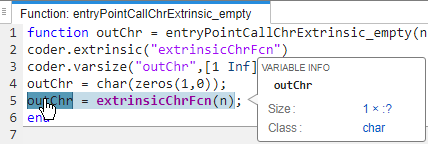
The generated MEX function does not produce an error.
Resolve Conflict Between Size of Array at Run Time and Code Generation Time
If the size of a variable that you supply at run time is inconsistent with the size that the code generator determined during code generation, the MEX function produces an error. This error occurs because the code generator must determine the sizes of the input arguments to an entry-point function at code generation time. To resolve this error, modify either the size specification at code generation time or the size of the input at run time. For example, consider this function, which returns the input value:
function out = returnVal(x)
out = x;
end
Generate code for returnVal at the command line by using the
codegen command and the
-args option with coder.typeof to specify that the first dimension of
x has a fixed size of 1 and the second dimension of
x is variable size with an upper bound of
10.
codegen returnVal -args {coder.typeof(0,[1 10],[false true])}
If you call the generated MEX function with an input array that is larger than 1-by-10, the MEX function produces an error.
returnVal_mex(1:20)
Incorrect size for expression 'x': expected [1x:10] but found [1x20].
To resolve this error, change either the size specification at code generation time or the size of the input value at run time. For example, to instruct the code generator to generate a MEX function that accepts row vectors with a maximum length of 20, use this command:
codegen returnVal -args {coder.typeof(0,[1 20],[false true])}
Alternatively, pass the MEX function an input value that is within the specified size:
returnVal_mex(1:10)
See Also
coder.extrinsic | coder.typeof | coder.varsize

