Generate Standalone C Code for Array of Structures
R2026bThis example shows how to generate standalone C code for a function that uses an array of structures.
In MATLAB, structures in an array must have the same field names, but the contents of the fields can have different data types. For code generation, corresponding fields in the structure array must have the same data type. In addition, you must fully specify the base structure, then replicate it to create the array. For additional guidelines that apply to structures in code generation, see Structure Limitations for Code Generation.
Examine MATLAB Function
Examine the constructStructArray MATLAB function, which takes three input arrays that represent student names, ID numbers, and test scores. The function constructs and returns an array of structures. Each structure in the array contains the data for one student. The function uses assert statements to require that the input arrays are the same length and uses the repmat function to create the fully specified structure array. Because the Name field can be an arbitrary length, the function uses coder.varsize to allow this field to vary in size. Finally, the function uses the coder.cstructname function to specify a name for the structure type in the generated code.
type constructStructArray.mfunction out = constructStructArray(names,ids,scores) %#codegen
n = numel(ids);
assert(n == numel(names));
assert(n == numel(scores));
template = struct("Name",'',"ID",0,"Scores",zeros(1,10));
coder.varsize("template.Name",[1 Inf]);
students = repmat(template,1,n);
coder.cstructname(students,"StudentStructType");
for i = 1:n
s = scores{i};
students(i).Name = names{i};
students(i).ID = ids(i);
students(i).Scores = s;
end
out = students;
end
Test the MATLAB function with data from two different groups of students.
class1Names = {'Akira','Beatriz','Chen','Dmitri','Elena'};
class1IDs   = [12345,23456,34567,45678,56789];
class1Scores = {
    [95 96 94 97 93 95 96 94 95 97],...
    [65 66 64 67 63 65 66 64 65 67],...
    [75 76 74 77 73 75 76 74 75 77],...
    [85 86 84 87 83 85 86 84 85 87],...
    [84 85 86 83 87 85 84 86 85 83]
    };
class1_ML = constructStructArray(class1Names,class1IDs,class1Scores);
class1_ML(1)
ans = struct with fields:
Name: 'Akira'
ID: 12345
Scores: [95 96 94 97 93 95 96 94 95 97]
class2Names = {'Farah','Gustavo','Hana','Ilya','Jamal','Kaori','Leila','Mateo','Noura','Otto'};
class2IDs = [301,302,303,304,305,306,307,308,309,310];
class2Scores = {
[95 96 94 97 93 95 96 94 95 97],...
[85 86 84 87 83 85 86 84 85 87],...
[75 76 74 77 73 75 76 74 75 77],...
[82 84 86 83 85 87 84 86 82 85],...
[93 94 95 96 92 94 95 93 96 94],...
[73 75 76 74 72 75 73 76 74 72],...
[65 66 64 67 63 65 66 64 65 67],...
[88 82 85 84 86 83 85 81 87 82],...
[70 72 74 76 78 75 73 71 77 74],...
[83 81 85 86 84 82 87 85 83 84]
};
class2_ML = constructStructArray(class2Names,class2IDs,class2Scores);
class2_ML(1)ans = struct with fields:
Name: 'Farah'
ID: 301
Scores: [95 96 94 97 93 95 96 94 95 97]
Generate and Run MEX Function
Generate a MEX function from the constructStructArray function by using the codegen command. A MEX function is a C or C++ executable that you can run from inside MATLAB. Run the generated MEX function to check that the generated code has the same behavior as the original MATLAB code.
First, create coder.Type objects that represent each input to the constructStructArray function. In this example, a class can have up to 35 students, each student has exactly 10 test scores, and student names can be arbitrarily long. Use coder.typeof to specify that:
nameis a 1-by-Infvector of characters.scoresis a 1-by-10 vector of doubles.idsis a variable-length 1-by-35 row vector of doubles.namesis a variable-length 1-by-35 cell array ofnamevectors.allScoresis a variable-length 1-by-35 cell array ofscoresvectors.
name = coder.typeof('',[1 Inf]);
scores = coder.typeof(0,[1 10]);
ids = coder.typeof(0,[1 35],[false true]);
names = coder.typeof({name},[1 35],[false true]);
allScores = coder.typeof({scores},[1 35],[false true]);By default, the codegen command generates a MEX function in C in the working folder. Specify the input arguments by using the -args option with the coder.Type objects names, ids, and allScores. For this example, use the -report option to generate a report.
codegen -report constructStructArray -args {names,ids,allScores}
Code generation successful: View report
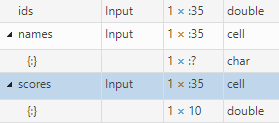
Open the code generation report and click the Variables tab. The code generator defines the ids array as a variable-length 1-by-35 array of doubles, the names array as a variable-length 1-by-35 cell array of 1-by-Inf character vectors, and the scores array is a variable-length 1-by-35 cell array of 1-by-10 arrays of doubles.
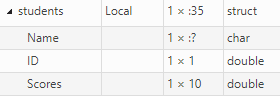
The code generator defines the students array as a variable-length 1-by-35 array of structures. Each structure has a Name field that is a 1-by-Inf character vector, an ID field that is a scalar double, and a Scores field that is a 1-by-10 array of doubles.
Test the MEX function with the same inputs that you passed to the original MATLAB function. The MEX function produces the same output.
class1_mex = constructStructArray_mex(class1Names,class1IDs,class1Scores); class2_mex = constructStructArray_mex(class2Names,class2IDs,class2Scores); class1_mex(1)
ans = struct with fields:
      Name: 'Akira'
        ID: 12345
    Scores: [95 96 94 97 93 95 96 94 95 97]
class2_mex(1)
ans = struct with fields:
      Name: 'Farah'
        ID: 301
    Scores: [95 96 94 97 93 95 96 94 95 97]
Generate and Inspect C Code
Generate a C static library by using the codegen command with the -config:lib option. Use the same -args syntax that you used to generate the MEX function.
codegen -config:lib constructStructArray -args {names,ids,allScores}
Code generation successful.
Examine the generated type definitions in the file constructStructArray_types.h. The code generator represents the students array by using the C structure type StudentStructType. It defines the ID and Scores fields of this structure type as a scalar double and a 1-by-10 vector of doubles, respectively. It defines Name as a pointer to an emxArray because, in C code, the code generator uses emxArrays to represent variable size arrays. See Use Dynamically Allocated C Arrays in the Generated Function Interfaces.
file = fullfile("codegen","lib","constructStructArray","constructStructArray_types.h");
coder.example.extractLines(file,"#ifndef typedef_StudentStructType","#endif",1,1)
#ifndef typedef_StudentStructType
#define typedef_StudentStructType
typedef struct {
  emxArray_char_T *Name;
  double ID;
  double Scores[10];
} StudentStructType;
#endif /* typedef_StudentStructType */
See Also
codegen | coder.cstructname | coder.typeof

