Manage Support Packages
R2026bMany MATLAB® toolboxes use support packages to interact with hardware or to provide additional processing capabilities. If the MATLAB code you want to package has support package dependencies, MATLAB Compiler™ may detect them automatically using a dependency analysis process.
The dependency analysis process creates a list of all installed support packages that your MATLAB code requires. The list is determined using these criteria:
MATLAB Compiler detects that your code has a dependency on the support package.
MATLAB Compiler detects a dependency on a product for which you have one or more support packages installed.
Your code is dependent on the base product of the support package.
For more information, see Dependency Analysis Using MATLAB Compiler.
You can modify the list of included support packages using one of the following workflows depending on your packaging method. For more information on selecting a packaging method, see Choose Deployment Option.
Some support packages require third-party drivers that the compiler cannot package. In this case, you are responsible for instructing end users to download and install the required drivers.
Using Compiler App
If your MATLAB code uses a toolbox with an installed support package, the compiler apps display the package in the Required Support Packages section.
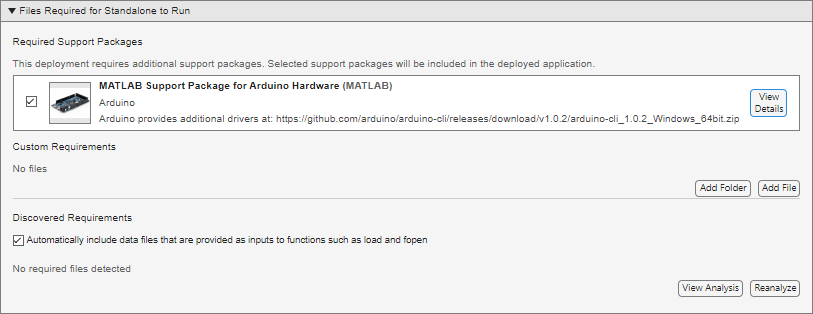
Deselect support packages that are not required by your application.
Some support packages require third-party drivers that the compiler cannot package. To inform end users of required dependencies, you can edit the installation notes in the Installer Notes section of the app.
Using compiler.build
You can use the SupportPackages option with functions in the
compiler.build family, such as compiler.build.standaloneApplication, to specify the method of including
support packages.
'autodetect'(default) — The dependency analysis process detects and includes the required support packages automatically. This is the default option.'none'— No support packages are included. Using this option can cause runtime errors.A string scalar, character vector, or cell array of character vectors — Only the specified support packages are included. To list installed support packages or those used by a specific file, see
compiler.codetools.deployableSupportPackages.For example, specify only the
Deep Learning Toolbox Converter for TensorFlow ModelsandDeep Learning Toolbox Model for Places365-GoogLeNet Networksupport packages usingcompiler.build.standaloneApplication.compiler.build.standaloneApplication('myapp.m', ... 'SupportPackages',{'Deep Learning Toolbox Converter for TensorFlow Models', ... 'Deep Learning Toolbox Model for Places365-GoogLeNet Network'})
Using mcc
If your MATLAB code uses a toolbox with an installed support package, use
the-a flag with mcc command when packaging
your MATLAB code to specify supporting files in the support package folder. For
example, if your function uses the OS Generic Video Interface support
package, run the following command:
mcc -m -v test.m -a C:\MATLAB\SupportPackages\R2026b\toolbox\daq\supportpackages\daqaudio ...
-a 'C:\MATLAB\SupportPackages\R2026b\resources\daqaudio'

