Write Metadata to TDMS File
R2026bThis example shows how to write file properties, channel group properties, and channel properties to a TDMS file.
The MAT file provided with this example contains revolution and electrical current measurements for a circular saw in a scenario where it stops upon detecting contact with skin. You can write these measurements to a new TDMS file, update the default properties, and add custom properties to the file, channel group, and channels.
Set Up Workspace
Read the data into the workspace and define the TDMS file channel group names.
load("sawstopper.mat")
fileName = "sawstopper.tdms";
channelGroup = "SawData";
channelRev = "Revolutions (1/min)";
channelCurrent = "Current (A)";
Create the TDMS file, and then read and view its data.
tdmswrite(fileName,circular_saw_data,ChannelGroupName=channelGroup,TimeChannel="none");
stackedplot(tdmsread(fileName,TimeStep=milliseconds(0.0028)))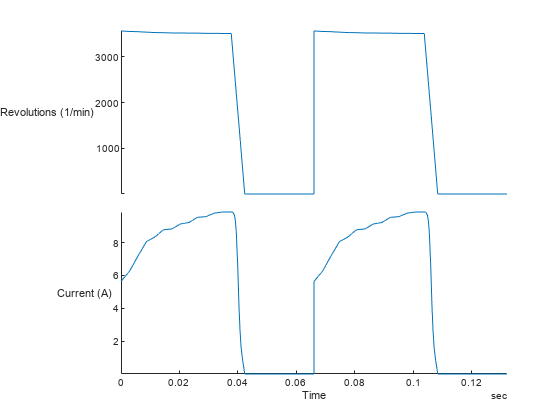
Write File Properties
Observe the default file properties.
tdmsreadprop(fileName)
ans = 1×5 table
    "sawstopper.tdms"    ""    "Saw Stopper Data"    ""    2022-04-26 13:14:31.675516000
Update the title property using tdmswriteprop, and add a new custom timestamp property set with the current datetime.
tdmswriteprop(fileName,"title","Saw Stopper Data");
tdmswriteprop(fileName,"timestamp",datetime("now"));
tdmsreadprop(fileName)
ans = 1×5 table
    "sawstopper.tdms"    ""    "Saw Stopper Data"    ""    2022-04-26 13:15:23.350898000
Write Channel Group Properties
Observe the default channel group properties.
tdmsreadprop(fileName,ChannelGroupName=channelGroup)
ans = 1×3 table
    "SawData"    "Circular Saw Measurements"    "Stop on detecting contact with skin"
Update the channel group property description. Then add a custom property scenario to the channel group.
tdmswriteprop(fileName,"description","Circular Saw Measurements",ChannelGroupName=channelGroup);
tdmswriteprop(fileName,"scenario","Stop on detecting contact with skin",ChannelGroupName=channelGroup);
tdmsreadprop(fileName,ChannelGroupName=channelGroup)
ans = 1×3 table
    "SawData"    "Circular Saw Measurements"    "Stop on detecting contact with skin"
Write Channel Properties
Similarly, you can update the channel properties such as unit_string by specifying the channel group name and channel name.
tdmsreadprop(fileName,ChannelGroupName=channelGroup,ChannelName=channelRev)
ans = 1×8 table
    "Revolutions (1/min)"    "Rotational speed of the circular saw"    "rpm"    2022-04-19 14:18:32.304446999    0    2.8000e-06    23572    "rpm = frequency(Hz)/60"
tdmswriteprop(fileName,"unit_string","rpm",ChannelGroupName=channelGroup,ChannelName=channelRev);
tdmswriteprop(fileName,"formula","rpm = frequency(Hz)/60",ChannelGroupName=channelGroup,ChannelName=channelRev);
tdmswriteprop(fileName,"description","Rotational speed of the circular saw",ChannelGroupName=channelGroup,ChannelName=channelRev);
tdmsreadprop(fileName,ChannelGroupName=channelGroup,ChannelName=channelRev)
ans = 1×8 table
    "Revolutions (1/min)"    "Rotational speed of the circular saw"    "rpm"    2022-04-19 14:18:32.304446999    0    2.8000e-06    23572    "rpm = frequency(Hz)/60"
You can also specify arrays of property names and values. If the property values have different data types, use a cell array.
tdmsreadprop(fileName,ChannelGroupName=channelGroup,ChannelName=channelCurrent)
ans = 1×7 table
    "Current (A)"    "Current in the circular saw"    "A"    2022-04-19 14:18:32.304446999    0    2.8000e-06    23572
tdmswriteprop(fileName,["description" "unit_string"],["Current in the circular saw" "A"], ...
    ChannelGroupName=channelGroup,ChannelName=channelCurrent);
tdmsreadprop(fileName,ChannelGroupName=channelGroup,ChannelName=channelCurrent)
ans = 1×7 table
    "Current (A)"    "Current in the circular saw"    "A"    2022-04-19 14:18:32.304446999    0    2.8000e-06    23572
Examine the property settings in the ChannelList display.
info = tdmsinfo(fileName);
info.ChannelList
ans = 2×8 table
    1    "SawData"    "Circular Saw Measurements"    "Revolutions (1/min)"    "Rotational speed of the circular saw"    "rpm"    "Double"    47144
    1    "SawData"    "Circular Saw Measurements"            "Current (A)"             "Current in the circular saw"      "A"    "Double"    47144

