Deep Learning HDL Output Format
R2026bConvert deep learning processor outputs in external memory into per-element data and indices
Since R2026b
Deep Learning HDL Output Format block
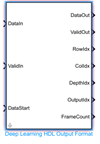
Description
The Deep Learning HDL Output Format block converts a stream of deep learning processor outputs in external memory into per element data and indices. Use the converted output data to implement post-processing algorithms in Simulink® or to generate HDL code.
To access the block open the dlhdlutils library. At the MATLAB® command line,
enter:
open_system("dlhdlutils")Ports
Input
Streaming input data from external memory, specified as a
single or int8 data type scalar.
Data Types: single | int8
Input valid data flag, specified as a Boolean scalar.
Data Types: Boolean
Trigger to start streaming input data, specified as a Boolean scalar.
Data Types: Boolean
Output
Formatted output data, returned as a single or
int8 data type scalar.
Data Types: single | int8
Trigger to read processed output data, returned as a Boolean scalar.
Data Types: Boolean
Row index of the formatted output data, returned as an uint16
data type scalar. To see which element the row index corresponds to, see Read Convolution Memory Format Data or Read Fully Connected Memory Format Data.
Data Types: uint16
Column index of the formatted output data, returned as an
uint16 data type scalar. To see which element the column index
corresponds to, see Read Convolution Memory Format Data or Read Fully Connected Memory Format Data.
Data Types: uint16
Depth index of the formatted output data, returned as an uint16
data type scalar. To see which element the depth index corresponds to, see Read Convolution Memory Format Data or Read Fully Connected Memory Format Data.
Data Types: uint16
Output selection index for multiple-output networks, returned as an
uint16 data type scalar.
Data Types: uint16
Number of output data frames, returned as an uint16 data type
scalar. To see which element the frame count corresponds to, see Read Convolution Memory Format Data or Read Fully Connected Memory Format Data.
Dependencies
To enable this port, select Enable FrameCount.
Data Types: uint16
Parameters
To edit block parameters interactively, use the Property Inspector. From the Simulink Toolstrip, on the Simulation tab, in the Prepare gallery, select Property Inspector.
Location of the network object to use in the block.
Network from MATLAB function— Provide the name of the MATLAB function that returns a network object.Network from MAT-file— Provide the path to the MAT file that stores the network object.
Programmatic Use
To set the block parameter value programmatically, use
the set_param (Simulink) function.
To get the block parameter value
programmatically, use the get_param (Simulink) function.
| Parameter: | networkOption |
| Values: | Network from MATLAB function (default) | Network from MAT-FILE |
Example: get_param(gcb,"networkOption")
Name of the MATLAB function that returns a network object.
Dependencies
To enable this parameter, set Network to
Network from MATLAB function.
Programmatic Use
To set the block parameter value programmatically, use
the set_param (Simulink) function.
To get the block parameter value
programmatically, use the get_param (Simulink) function.
| Parameter: | netFunction |
| Values: | getDigitsNetwork (default) |
Example: get_param(gcb,"netFunction")
Path to the MAT-file that contains the network object.
Dependencies
To enable this parameter, set Network to
Network from MAT-file.
Programmatic Use
To set the block parameter value programmatically, use
the set_param (Simulink) function.
To get the block parameter value
programmatically, use the get_param (Simulink) function.
| Parameter: | netFile |
| Values: | tinyyolov4.mat (default) |
Example: get_param(gcb,"netFile")
Name of a dlhdl.ProcessorConfig object or a MATLAB function that
returns a dlhdl.ProcessorConfig object. If you set
Network to MATLAB function, you must
enter the name of a MATLAB function that returns a
dlhdl.ProcessorConfig object. For example, this MATLAB function returns a dlhdl.ProcessorConfig object called
hPCinMATLAB.
function hPCinMATLAB = hPCinMATLAB() hPC = dlhdl.ProcessorConfig; hPC.RunTimeControl = "port"; hPCinMATLAB = hPC; end
Programmatic Use
To set the block parameter value programmatically, use
the set_param (Simulink) function.
To get the block parameter value
programmatically, use the get_param (Simulink) function.
| Parameter: | processorConfig |
| Values: | on (default) | off |
Example: get_param(gcb,"processorConfig")
Set this parameter to enable the FrameCount output port.
Programmatic Use
To set the block parameter value programmatically, use
the set_param (Simulink) function.
To get the block parameter value
programmatically, use the get_param (Simulink) function.
| Parameter: | enableFrameCount |
| Values: | on (default) | off |
Example: get_param(gcb,"enableFrameCount")
Algorithms
For layers that use the deep learning processor convolution module data format SSCB (spatial, spatial, channel, batch), the block outputs row, column, depth, and batch indices. This table shows how those indices correspond to the spatial, channel, and batch elements of the SSCB data format.
| Port Name | Corresponding Element |
|---|---|
| RowIdx | S (first spatial field) |
| ColIdx | S (second spatial field) |
| DepthIdx | C (channel field) |
| FrameCount | B (batch field) |
This timing diagram shows the block operation when reading convolution module format
data from external memory. The DataIn port is the data read from external
memory. When the input data is available, you must set the signal to the
ValidIn port to true and pulse the signal input to the
DataStart port to true to read the first valid data sample
from memory. The block then indicates that the data is ready to read by outputting a
true signal from the ValidOut port, sets the row, column,
and depth indices and outputs a value to the DataOut port. The input data to
the block is stored in memory as a one-dimensional vector. To learn how the data is
converted, see Convolution Module External Memory Data Format.
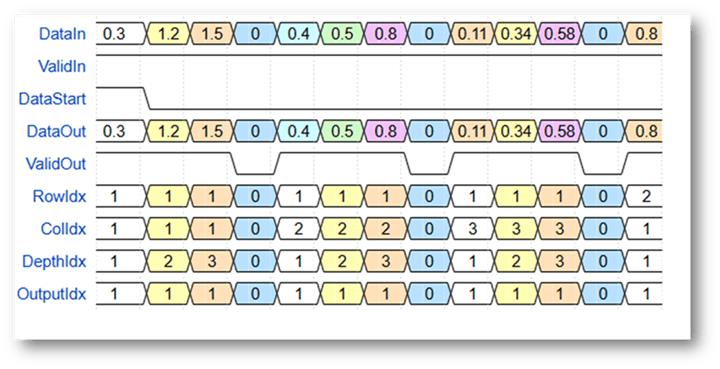
In this timing diagram, when you set the input signal to the ValidIn port
to true and you pulse the input signal to the DataStart
port, the block sets the ValidOut port signal to true to
indicate that the data is ready to read, sets the row index to 1, column
index to 1, depth index to 1, and outputs the first
data in the DataOut port. The block then keeps the row and column indices at
1, sets the depth index to 2, and outputs the next
data value into the DataOut port. After the block completes reading all the
channel elements for the first row and column, it continues to the next column and then
continues to the next row after completing the first row.
For layers that use the deep learning processor fully connected module data format TCB (time, channel, batch), or CB (channel, batch) the block outputs row, column, depth, and batch indices. This table shows how those indices correspond to the time, channel, batch of the TCB data format, or channel, batch of the CB data format.
| Port Name | Corresponding Element |
|---|---|
| RowIdx | 1 |
| ColIdx | 1 |
| DepthIdx | C (channel field) |
| FrameCount | T (time field in TCB) or B (batch field in CB) |
When the input data is available, you must set the signal to the ValidIn
port to true and pulse the signal input to the DataStart
port to true to read the first valid data sample from memory. The block
then indicates that the data is ready to read by outputting a true signal
from the ValidOut port, sets the row, column, and depth indices and outputs a
value to the DataOut port. The input data to the block is stored in memory as a
one-dimensional vector. For data in the fully connected memory data format, the row and
column indices are always
1. To learn how the data is converted, see Fully Connected Module External Memory Data Format.
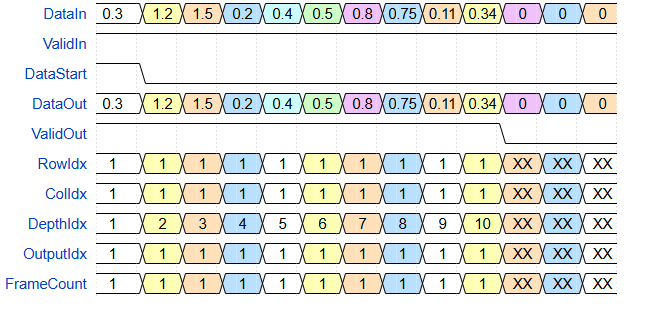
In this timing diagram, when you set the input signal to the ValidIn port to
true and you pulse the input signal to the DataStart port,
the block sets the ValidOut port signal to true to indicate
that the data is ready to read, sets the row index to 1, column index to
1, depth index to 1, and outputs the first data in
the DataOut port. The block then keeps the row and column indices at
1, sets the depth index to 2, and outputs the next
data value into the DataOut port. After the block completes reading all the
channel elements, it resets all the indices to 0.
Version History
Introduced in R2026b
MATLAB Command
You clicked a link that corresponds to this MATLAB command:
Run the command by entering it in the MATLAB Command Window. Web browsers do not support MATLAB commands.
Seleziona un sito web
Seleziona un sito web per visualizzare contenuto tradotto dove disponibile e vedere eventi e offerte locali. In base alla tua area geografica, ti consigliamo di selezionare: .
Puoi anche selezionare un sito web dal seguente elenco:
Come ottenere le migliori prestazioni del sito
Per ottenere le migliori prestazioni del sito, seleziona il sito cinese (in cinese o in inglese). I siti MathWorks per gli altri paesi non sono ottimizzati per essere visitati dalla tua area geografica.
Americhe
- América Latina (Español)
- Canada (English)
- United States (English)
Europa
- Belgium (English)
- Denmark (English)
- Deutschland (Deutsch)
- España (Español)
- Finland (English)
- France (Français)
- Ireland (English)
- Italia (Italiano)
- Luxembourg (English)
- Netherlands (English)
- Norway (English)
- Österreich (Deutsch)
- Portugal (English)
- Sweden (English)
- Switzerland
- United Kingdom (English)