Contenuto principale

Swish Layer

Swish layer

Since R2026a

  • Swish Layer block

Libraries:
Deep Learning Toolbox / Deep Learning Layers / Activation Layers

Description

The Swish Layer block applies the swish function on layer inputs.

The swish operation is given by f(x)=x1+ex.

The exportNetworkToSimulink function generates this block to represent a swishLayer object. Because it applies an element-wise operation, this block supports input data of any format and outputs data that has the same dimensions and format as the input.

Ports

Input

expand all

Input data on which to perform the swish operation.

Data Types: single | double | int8 | int16 | int32 | int64 | uint8 | uint16 | uint32 | uint64 | fixed point

Output

expand all

Output data from performing the swish operation.

Data Types: single | double | int8 | int16 | int32 | int64 | uint8 | uint16 | uint32 | uint64 | fixed point

Parameters

expand all

To edit block parameters interactively, use the Property Inspector. From the Simulink® Toolstrip, on the Simulation tab, in the Prepare gallery, select Property Inspector.

Data Types

Specify the type of approximation for computing the output.

Approximation MethodData Types SupportedWhen to Use This Method
None (default)

Floating-point

You are processing only floating-point data.

CORDIC

Floating-point (double and single) and fixed-point with a Bias value of 0 and a Slope value of a power of 2

You are processing fixed-point data and want to deploy to FPGA hardware.

Lookup

Floating-point and fixed-point

You are processing fixed-point data and want to generate C/C++ code.

For more information about the CORDIC approximation method, see cordictanh (Fixed-Point Designer).

Programmatic Use

Block Parameter: ApproximationMethod
Type: character vector
Values: 'none' | 'CORDIC' | 'Lookup'
Default: 'none'

Minimum value of the output range that the software checks.

The software uses the minimum value to perform:

Tips

Output minimum does not saturate or clip the actual output signal. Use the Saturation (Simulink) block instead.

Programmatic Use

To set the block parameter value programmatically, use the set_param (Simulink) function.

Parameter: OutMin
Values: '[]' (default) | scalar in quotes

Maximum value of the output range that the software checks.

The software uses the maximum value to perform:

Tips

Output maximum does not saturate or clip the actual output signal. Use the Saturation (Simulink) block instead.

Programmatic Use

To set the block parameter value programmatically, use the set_param (Simulink) function.

Parameter: OutMax
Values: '[]' (default) | scalar in quotes

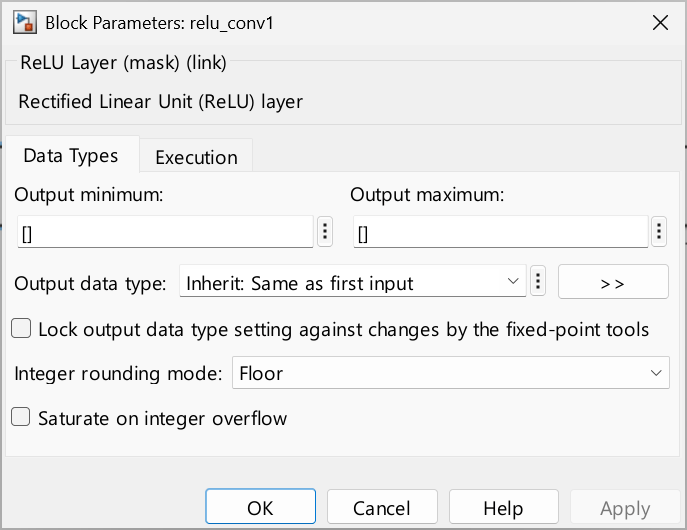
Choose the data type for the output. The type can be inherited, specified directly, or expressed as a data type object such as Simulink.NumericType. When you select Inherit: Inherit via internal rule, the software chooses a data type to balance numerical accuracy, performance, and generated code size, while taking into account the properties of the embedded target hardware.

Programmatic Use

To set the block parameter value programmatically, use the set_param (Simulink) function.

Parameter: OutDataTypeStr
Values: 'Inherit: Inherit via internal rule' (default) | 'Inherit: Keep MSB' | 'Inherit: Keep LSB' | 'Inherit: Inherit via back propagation' | 'Inherit: Same as first input' | 'Inherit: Same as accumulator' | <data type expression>

Select this parameter to prevent the fixed-point tools from overriding the Output data type you specify on the block. For more information, see Use Lock Output Data Type Setting (Fixed-Point Designer).

Programmatic Use

To set the block parameter value programmatically, use the set_param (Simulink) function.

Parameter: LockScale
Values: 'off' (default) | 'on'

Specify the rounding mode for fixed-point operations. For more information, see Rounding Modes (Fixed-Point Designer).

Block parameters always round to the nearest representable value. To control the rounding of a block parameter, enter an expression using a MATLAB® rounding function in the mask field.

Programmatic Use

To set the block parameter value programmatically, use the set_param (Simulink) function.

Parameter: RndMeth
Values: 'Floor' (default) | 'Ceiling' | 'Convergent' | 'Nearest' | 'Round' | 'Simplest' | 'Zero'

Specify whether integer overflows saturate or wrap.

  • on — Overflows saturate to either the minimum or maximum value that the data type can represent.

  • off — Overflows wrap to the appropriate value that the data type can represent.

For example, the maximum value that the signed 8-bit integer int8 can represent is 127. Any block operation result greater than the maximum value causes overflow of the 8-bit integer.

  • With this parameter selected, the block output saturates at 127. Similarly, the block output saturates at a minimum output value of –128.

  • With this parameter cleared, the software interprets the overflow-causing value as int8, which can produce an unintended result. For example, a block result of 130 (binary 1000 0010) expressed as int8 is –126.

Tips

  • Set this parameter to on when your model has a possible overflow and you want explicit saturation protection in the generated code.

  • To optimize the efficiency of your generated code, keep the default off setting for this parameter. Using the default setting also helps you avoid overspecifying how the block handles out-of-range signals. For more information, see Troubleshoot Signal Range Errors (Simulink).

  • When you select this parameter, saturation applies to every internal operation on the block, not just the output or the result.

  • In general, the code generation process can detect when overflow is not possible. In this case, the code generator does not produce saturation code.

Programmatic Use

To set the block parameter value programmatically, use the set_param (Simulink) function.

Parameter: SaturateOnIntegerOverflow
Values: 'off' (default) | 'on'

Choose the data type for the sigmoid output. The type can be inherited, specified directly, or expressed as a data type object such as Simulink.NumericType. When you select Inherit: Inherit via internal rule, the software chooses a data type to balance numerical accuracy, performance, and generated code size, while taking into account the properties of the embedded target hardware.

Programmatic Use

To set the block parameter value programmatically, use the set_param (Simulink) function.

Parameter: SigmoidOutDataTypeStr
Values: 'Inherit: Inherit via internal rule' (default) | <data type expression>

Choose the data type for the sigmoid output. The type can be inherited, specified directly, or expressed as a data type object such as Simulink.NumericType. When you select Inherit: Inherit via internal rule, the software chooses a data type to balance numerical accuracy, performance, and generated code size, while taking into account the properties of the embedded target hardware.

Programmatic Use

To set the block parameter value programmatically, use the set_param (Simulink) function.

Parameter: ProductOutDataTypeStr
Values: 'Inherit: Inherit via internal rule' (default) | <data type expression>

Execution

Specify the discrete interval between sample time hits or specify another type of sample time, such as continuous (0) or inherited (-1). For more options, see Types of Sample Time (Simulink).

By default, the block inherits its sample time based on the context of the block within the model.

Programmatic Use

To set the block parameter value programmatically, use the set_param (Simulink) function.

Parameter: SampleTime
Data Types: char
Values: '-1' (default) | scalar

Extended Capabilities

expand all

C/C++ Code Generation
Generate C and C++ code using Simulink® Coder™.

Version History

Introduced in R2026a