roadrunner.hdmap.ParkingSpace
R2026bDescription
A roadrunner.hdmap.ParkingSpace object defines a parking space
with boundary edges in a RoadRunner HD Map scene model. You define each parking space by using
references to the parking edges that form its boundary, and can include metadata for
additional properties.
Creation
Syntax
Description
parkingSpace = roadrunner.hdmap.ParkingSpace
parkingSpace = roadrunner.hdmap.ParkingSpace(PropertyName=Value) ID="ParkingSpace_1" sets the ID of the
parking space element to "ParkingSpace_1".
Properties
Examples
Create an empty RoadRunner HD Map.
rrMap = roadrunnerHDMap;
Define the dimensions and four corner points for the boundary of a parking space.
width = 2.5;
length = 5.0;

corners = [0      0     0;  % Bottom-left
           length 0     0;  % Bottom-right
           length width 0;  % Top-right
           0      width 0]; % Top-left
Create four parking edges, represented by roadrunner.hdmap.ParkingEdge objects. Set the bottom edge as open to allow vehicle entry, but keep the other three edges closed to form the parking space boundary.
rrMap.ParkingEdges(1) = roadrunner.hdmap.ParkingEdge(ID="Edge_Bottom",Geometry=corners([1,2],:),Open=true);
rrMap.ParkingEdges(2) = roadrunner.hdmap.ParkingEdge(ID="Edge_Right",Geometry=corners([2,3],:),Open=false);
rrMap.ParkingEdges(3) = roadrunner.hdmap.ParkingEdge(ID="Edge_Top",Geometry=corners([3,4],:),Open=false);
rrMap.ParkingEdges(4) = roadrunner.hdmap.ParkingEdge(ID="Edge_Left",Geometry=corners([4,1],:),Open=false);
Create references to the four parking edges.
edgeRefs = [roadrunner.hdmap.Reference(ID="Edge_Bottom");
            roadrunner.hdmap.Reference(ID="Edge_Right");
            roadrunner.hdmap.Reference(ID="Edge_Top");
            roadrunner.hdmap.Reference(ID="Edge_Left")];
Create the parking space represented by roadrunner.hdmap.ParkingSpace object, and assign the edge references.
rrMap.ParkingSpaces(1) = roadrunner.hdmap.ParkingSpace(ID="ParkingSpace_1",ParkingEdgeReferences=edgeRefs)rrMap =
roadrunnerHDMap with properties:
Author: ""
GeoReference: [0 0]
GeographicBoundary: []
Lanes: [0×1 roadrunner.hdmap.Lane]
SpeedLimits: [0×1 roadrunner.hdmap.SpeedLimit]
LaneBoundaries: [0×1 roadrunner.hdmap.LaneBoundary]
LaneGroups: [0×1 roadrunner.hdmap.LaneGroup]
LaneMarkings: [0×1 roadrunner.hdmap.LaneMarking]
Junctions: [0×1 roadrunner.hdmap.Junction]
BarrierTypes: [0×1 roadrunner.hdmap.BarrierType]
Barriers: [0×1 roadrunner.hdmap.Barrier]
SignTypes: [0×1 roadrunner.hdmap.SignType]
Signs: [0×1 roadrunner.hdmap.Sign]
StaticObjectTypes: [0×1 roadrunner.hdmap.StaticObjectType]
StaticObjects: [0×1 roadrunner.hdmap.StaticObject]
StencilMarkingTypes: [0×1 roadrunner.hdmap.StencilMarkingType]
StencilMarkings: [0×1 roadrunner.hdmap.StencilMarking]
CurveMarkingTypes: [0×1 roadrunner.hdmap.CurveMarkingType]
CurveMarkings: [0×1 roadrunner.hdmap.CurveMarking]
SignalTypes: [0×1 roadrunner.hdmap.SignalType]
Signals: [0×1 roadrunner.hdmap.Signal]
ParkingEdges: [4×1 roadrunner.hdmap.ParkingEdge]
ParkingSpaces: [1×1 roadrunner.hdmap.ParkingSpace]
Write the HD map to a file.
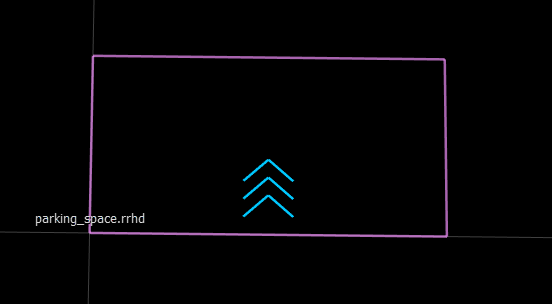
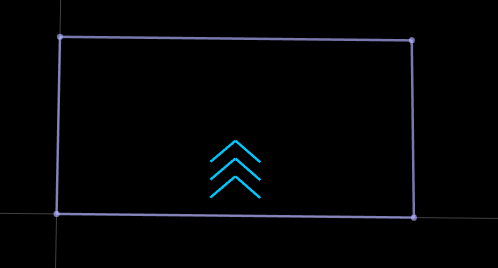
write(rrMap,"parking_space.rrhd");These figures show the parking space in RoadRunner HD Map view and the built scene in the RoadRunner canvas.
|
|
Create an empty RoadRunner HD Map.
rrMap = roadrunnerHDMap;
Create solid white and dashed white lane marking assets, and add them to the HD map.
pathSolid = roadrunner.hdmap.RelativeAssetPath(AssetPath="Assets/Markings/SolidSingleWhite.rrlms");
rrMap.LaneMarkings(1) = roadrunner.hdmap.LaneMarking(ID="SolidWhite",AssetPath=pathSolid);
pathDashed = roadrunner.hdmap.RelativeAssetPath(AssetPath="Assets/Markings/DashedSingleWhite.rrlms");
rrMap.LaneMarkings(2) = roadrunner.hdmap.LaneMarking(ID="DashedWhite",AssetPath=pathDashed);
Create marking references and a parametric attribution, and use them to apply markings along the full length of a lane boundary.
solidMarkingRef = roadrunner.hdmap.MarkingReference(MarkingID=roadrunner.hdmap.Reference(ID="SolidWhite"));
dashedMarkingRef = roadrunner.hdmap.MarkingReference(MarkingID=roadrunner.hdmap.Reference(ID="DashedWhite"));
markingSpan = [0 1];
dashedMarkingAttrib = roadrunner.hdmap.ParametricAttribution(MarkingReference=dashedMarkingRef,Span=markingSpan);
Define the dimensions for the road and parking space.
mainLaneWidth = 3.5;
accessLaneWidth = 6.0;
roadLength = 40;
parkingWidth = 2.5;
parkingDepth = 5.0;
Create a two-way main road with forward and backward lanes. Define the centerline geometry for both lanes.
forwardLaneCenterline = [0 mainLaneWidth/2 0; roadLength mainLaneWidth/2 0];
backwardLaneCenterline = [0 -mainLaneWidth/2 0; roadLength -mainLaneWidth/2 0];
Create lane boundaries for the main road. The center boundary has dashed markings to divide the two-way traffic, while the outer boundaries have no markings as they border the access lanes.
centerBoundary = roadrunner.hdmap.LaneBoundary(ID="CenterBoundary",Geometry=[0 0 0; roadLength 0 0]);
centerBoundary.ParametricAttributes=dashedMarkingAttrib;
leftOuterBoundary = roadrunner.hdmap.LaneBoundary(ID="LeftOuterBoundary",Geometry=[0 mainLaneWidth 0; roadLength mainLaneWidth 0]);
rightOuterBoundary = roadrunner.hdmap.LaneBoundary(ID="RightOuterBoundary",Geometry=[0 -mainLaneWidth 0; roadLength -mainLaneWidth 0]);
rrMap.LaneBoundaries(1) = centerBoundary;
rrMap.LaneBoundaries(2) = leftOuterBoundary;
rrMap.LaneBoundaries(3) = rightOuterBoundary;
Create the forward lane, represented by a roadrunner.hdmap.Lane object, assign its boundaries, and add it to the HD map.
forwardLane = roadrunner.hdmap.Lane(ID="ForwardLane",Geometry=forwardLaneCenterline,TravelDirection="Forward",LaneType="Driving");
leftBoundary(forwardLane,"LeftOuterBoundary",Alignment="Forward");
rightBoundary(forwardLane,"CenterBoundary",Alignment="Forward");
rrMap.Lanes(1) = forwardLane;
Create the backward lane, assign its boundaries, and add it to the HD map.
backwardLane = roadrunner.hdmap.Lane(ID="BackwardLane",Geometry=backwardLaneCenterline,TravelDirection="Backward",LaneType="Driving");
leftBoundary(backwardLane,"CenterBoundary",Alignment="Forward");
rightBoundary(backwardLane,"RightOuterBoundary",Alignment="Forward");
rrMap.Lanes(2) = backwardLane;
Define the centerline geometry and lane boundaries for the left access lane.
leftAccessOffset = mainLaneWidth + accessLaneWidth/2;
leftAccessCenterline = [0 leftAccessOffset 0; roadLength leftAccessOffset 0];
leftAccessInnerBoundary = roadrunner.hdmap.LaneBoundary(ID="LeftAccessInner",Geometry=[0 mainLaneWidth 0; roadLength mainLaneWidth 0]);
leftAccessOuterBoundary = roadrunner.hdmap.LaneBoundary(ID="LeftAccessOuter",Geometry=[0 mainLaneWidth+accessLaneWidth 0; roadLength mainLaneWidth+accessLaneWidth 0]);
rrMap.LaneBoundaries(end+1) = leftAccessInnerBoundary;
rrMap.LaneBoundaries(end+1) = leftAccessOuterBoundary;
Create the left access lane, assign its boundaries, and add it to the HD map.
leftAccessLane = roadrunner.hdmap.Lane(ID="LeftAccessLane",Geometry=leftAccessCenterline,TravelDirection="Forward",LaneType="None");
leftBoundary(leftAccessLane,"LeftAccessOuter",Alignment="Forward");
rightBoundary(leftAccessLane,"LeftAccessInner",Alignment="Forward");
rrMap.Lanes(end+1) = leftAccessLane;
Define the centerline geometry and lane boundaries for the right access lane.
rightAccessOffset = -(mainLaneWidth + accessLaneWidth/2);
rightAccessCenterline = [0 rightAccessOffset 0; roadLength rightAccessOffset 0];
rightAccessInnerBoundary = roadrunner.hdmap.LaneBoundary(ID="RightAccessInner",Geometry=[0 -mainLaneWidth 0; roadLength -mainLaneWidth 0]);
rightAccessOuterBoundary = roadrunner.hdmap.LaneBoundary(ID="RightAccessOuter",Geometry=[0 -(mainLaneWidth+accessLaneWidth) 0; roadLength -(mainLaneWidth+accessLaneWidth) 0]);
rrMap.LaneBoundaries(end+1) = rightAccessInnerBoundary;
rrMap.LaneBoundaries(end+1) = rightAccessOuterBoundary;
Create the right access lane, assign its boundaries, and add it to the HD map.
rightAccessLane = roadrunner.hdmap.Lane(ID="RightAccessLane",Geometry=rightAccessCenterline,TravelDirection="Backward",LaneType="None");
leftBoundary(rightAccessLane,"RightAccessInner",Alignment="Forward");
rightBoundary(rightAccessLane,"RightAccessOuter",Alignment="Forward");
rrMap.Lanes(end+1) = rightAccessLane;
Calculate the number of perpendicular parking spaces that can fit along the road length. Reduce the road length by 2 meters to calculate parking spaces based on a margin of 1 meter at each end of the road.
availableLength = roadLength - 2;
numParkingSpaces = floor(availableLength/parkingWidth);
Create shared vertical parking edges for the left side row of parking spaces. Adjacent parking spaces reuse these edges, with each edge serving as the right boundary of one space and the left boundary of the next space.
edgeIndex = 1;
spaceIndex = 1;
parkingStartY = mainLaneWidth + 0.2;
parkingEndY = parkingStartY + parkingDepth;
for i = 0:numParkingSpaces
    xPos = 1 + i*parkingWidth;
    if i == 0
        edgeID = "LeftSpace1_Left";
    elseif i == numParkingSpaces
        edgeID = sprintf("LeftSpace%d_Right",numParkingSpaces);
    else
        edgeID = sprintf("LeftShared_%d_%d",i,i+1);
    end
    rrMap.ParkingEdges(edgeIndex) = roadrunner.hdmap.ParkingEdge(ID=edgeID,Geometry=[xPos parkingStartY 0; xPos parkingEndY 0],Open=false,MarkingReference=solidMarkingRef);
    edgeIndex = edgeIndex + 1;
end
Create horizontal parking edges for each left-side parking space. The bottom edges are closed boundaries near the main road, while the top edges are open for vehicle entry from the access lane.
for i = 1:numParkingSpaces
    xStart = 1 + (i-1)*parkingWidth;
    xEnd = 1 + i*parkingWidth;
    rrMap.ParkingEdges(edgeIndex) = roadrunner.hdmap.ParkingEdge(ID=sprintf("LeftSpace%d_Bottom",i),Geometry=[xStart parkingStartY 0; xEnd parkingStartY 0],Open=true);
    edgeIndex = edgeIndex + 1;
    rrMap.ParkingEdges(edgeIndex) = roadrunner.hdmap.ParkingEdge(ID=sprintf("LeftSpace%d_Top",i),Geometry=[xEnd parkingEndY 0; xStart parkingEndY 0],Open=false,MarkingReference=solidMarkingRef);
    edgeIndex = edgeIndex + 1;
end
Create left-side parking spaces, represented by roadrunner.hdmap.ParkingSpace objects. Reference the shared vertical edges and horizontal edges, and add metadata indicating the parking type, such as perpendicular parking, along with other parking-space attributes.
for i = 1:numParkingSpaces
    bottomEdgeID = sprintf("LeftSpace%d_Bottom",i);
    topEdgeID = sprintf("LeftSpace%d_Top",i);
    if i == 1
        leftEdgeID = "LeftSpace1_Left";
        rightEdgeID = sprintf("LeftShared_%d_%d",i,i+1);
    elseif i == numParkingSpaces
        leftEdgeID = sprintf("LeftShared_%d_%d",i-1,i);
        rightEdgeID = sprintf("LeftSpace%d_Right",i);
    else
        leftEdgeID = sprintf("LeftShared_%d_%d",i-1,i);
        rightEdgeID = sprintf("LeftShared_%d_%d",i,i+1);
    end
    refs = [roadrunner.hdmap.Reference(ID=bottomEdgeID);
            roadrunner.hdmap.Reference(ID=rightEdgeID);
            roadrunner.hdmap.Reference(ID=topEdgeID);
            roadrunner.hdmap.Reference(ID=leftEdgeID)];
    if i == 1
        metadata = [roadrunner.hdmap.Metadata(Name="ParkingType",Value="Perpendicular");
                    roadrunner.hdmap.Metadata(Name="Reserved",Value="Disabled");
                    roadrunner.hdmap.Metadata(Name="MaxHeight",Value="2.5")];
    else
        metadata = [roadrunner.hdmap.Metadata(Name="ParkingType",Value="Perpendicular");
                    roadrunner.hdmap.Metadata(Name="MaxHeight",Value="2.5")];
    end
    rrMap.ParkingSpaces(spaceIndex) = roadrunner.hdmap.ParkingSpace(ID=sprintf("LeftParkingSpace_%d",i),ParkingEdgeReferences=refs,Metadata=metadata);
    spaceIndex = spaceIndex + 1;
end
Create shared vertical parking edges for the right side row of parking spaces. Adjacent parking spaces reuse these edges.
parkingStartYRight = -(mainLaneWidth+0.2);
parkingEndYRight = parkingStartYRight - parkingDepth;
for i = 0:numParkingSpaces
    xPos = 1 + i*parkingWidth;
    if i == 0
        edgeID = "RightSpace1_Left";
    elseif i == numParkingSpaces
        edgeID = sprintf("RightSpace%d_Right",numParkingSpaces);
    else
        edgeID = sprintf("RightShared_%d_%d",i,i+1);
    end
    rrMap.ParkingEdges(edgeIndex) = roadrunner.hdmap.ParkingEdge(ID=edgeID,Geometry=[xPos parkingStartYRight 0; xPos parkingEndYRight 0],Open=false,MarkingReference=solidMarkingRef);
    edgeIndex = edgeIndex + 1;
end
Create horizontal parking edges for each right-side parking space. The top edges are closed boundaries near the main road, while the bottom edges are open for vehicle entry from the access lane.
for i = 1:numParkingSpaces
    xStart = 1 + (i-1)*parkingWidth;
    xEnd = 1 + i*parkingWidth;
    rrMap.ParkingEdges(edgeIndex) = roadrunner.hdmap.ParkingEdge(ID=sprintf("RightSpace%d_Top",i),Geometry=[xStart parkingStartYRight 0; xEnd parkingStartYRight 0],Open=true);
    edgeIndex = edgeIndex + 1;
    rrMap.ParkingEdges(edgeIndex) = roadrunner.hdmap.ParkingEdge(ID=sprintf("RightSpace%d_Bottom",i),Geometry=[xEnd parkingEndYRight 0; xStart parkingEndYRight 0],Open=false,MarkingReference=solidMarkingRef);
    edgeIndex = edgeIndex + 1;
end
Create right-side parking spaces, represented by roadrunner.hdmap.ParkingSpace objects. Reference the shared vertical edges and horizontal edges, and add metadata.
for i = 1:numParkingSpaces
    topEdgeID = sprintf("RightSpace%d_Top",i);
    bottomEdgeID = sprintf("RightSpace%d_Bottom",i);
    if i == 1
        leftEdgeID = "RightSpace1_Left";
        rightEdgeID = sprintf("RightShared_%d_%d",i,i+1);
    elseif i == numParkingSpaces
        leftEdgeID = sprintf("RightShared_%d_%d",i-1,i);
        rightEdgeID = sprintf("RightSpace%d_Right",i);
    else
        leftEdgeID = sprintf("RightShared_%d_%d",i-1,i);
        rightEdgeID = sprintf("RightShared_%d_%d",i,i+1);
    end
    refs = [roadrunner.hdmap.Reference(ID=topEdgeID);
            roadrunner.hdmap.Reference(ID=rightEdgeID);
            roadrunner.hdmap.Reference(ID=bottomEdgeID);
            roadrunner.hdmap.Reference(ID=leftEdgeID)];
    if i== 1
        metadata = [roadrunner.hdmap.Metadata(Name="ParkingType",Value="Perpendicular");
                    roadrunner.hdmap.Metadata(Name="Reserved",Value="Disabled");
                    roadrunner.hdmap.Metadata(Name="MaxHeight",Value="2.5")];
    else
        metadata = [roadrunner.hdmap.Metadata(Name="ParkingType",Value="Perpendicular");
                    roadrunner.hdmap.Metadata(Name="MaxHeight",Value="2.5")];
    end
    rrMap.ParkingSpaces(spaceIndex) = roadrunner.hdmap.ParkingSpace(ID=sprintf("RightParkingSpace_%d",i),ParkingEdgeReferences=refs,Metadata=metadata);
    spaceIndex = spaceIndex + 1;
end
Write the HD map to a file.
filename = "perpendicular_parking_lot.rrhd";
write(rrMap,filename)
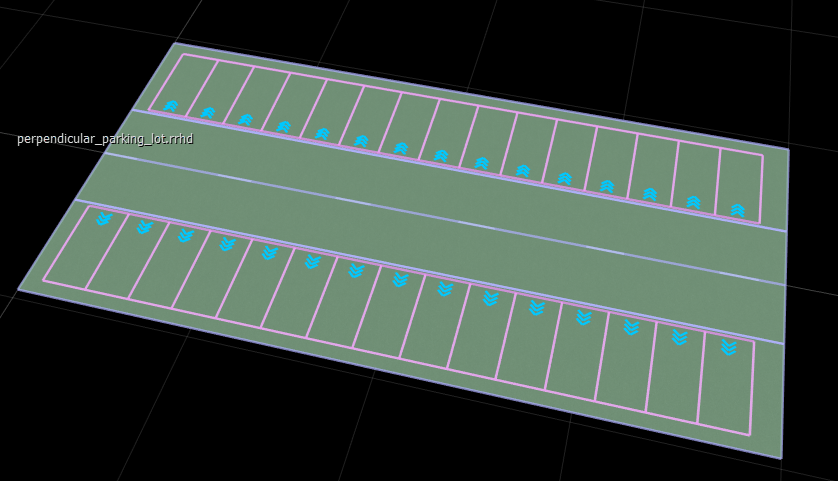
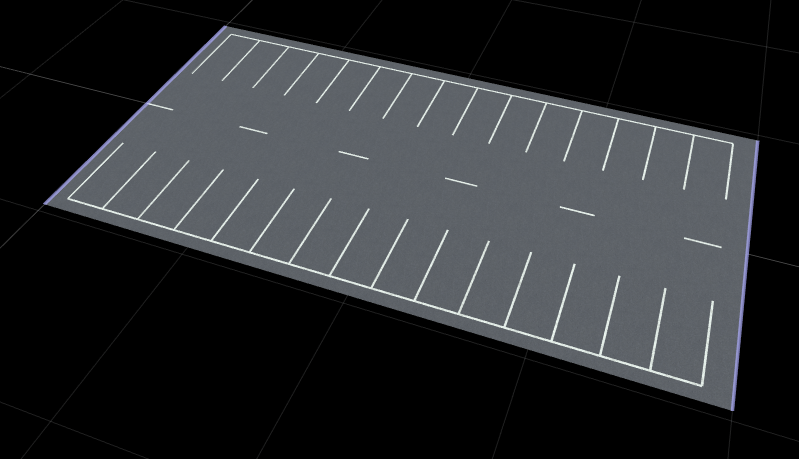
These figures show the parking space in RoadRunner HD Map view and the built scene in the RoadRunner canvas.
|
|
Note
When you explicitly define parking edges using
roadrunner.hdmap.ParkingEdge objects, set the LaneType property of associated lanes to
"None". If you set LaneType to
"Parking", RoadRunner Scene Builder automatically generates parking
spaces during the build process, which results in overlapping parking spaces in the
scene.
Version History
Introduced in R2026b

