smooth
Description
Add-On Required: This feature requires the Scenario Builder for Automated Driving Toolbox add-on.
smooth( smooths the trajectory data
in the input trajectory)Trajectory
object trajectory using a Savitzky-Golay filter.
smooth(
specifies options using one or more name-value arguments. For example,
trajectory,Name=Value)Method="movmedian" smooths the trajectory using the moving median
filter.
returns a smoothed trajectory object smoothedTrajectory = smooth(___)smoothedTrajectory using any
combination of input arguments from previous syntaxes.
Examples
Load recorded GPS data into the workspace.
load("recordedGPSData.mat","X","Y","Z","timestamps")
Create a trajectory object by using the loaded timestamps and xyz-coordinates.
traj = scenariobuilder.Trajectory(timestamps,X,Y,Z);
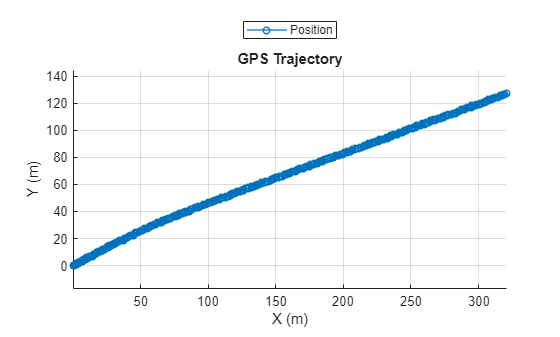
Plot the trajectory object.
plot(traj)
title("GPS Trajectory")
Smooth the trajectory in the trajectory object.
smoothedTrajectory1 = smooth(traj)
smoothedTrajectory1 =
Trajectory with properties:
Name: ''
NumSamples: 392
Duration: 19.5498
SampleRate: 20.0513
SampleTime: 0.0500
Timestamps: [392×1 double]
Position: [392×3 double]
Orientation: [392×3 double]
Velocity: [392×3 double]
Course: [392×1 double]
GroundSpeed: [392×1 double]
Acceleration: [392×3 double]
AngularVelocity: [392×3 double]
LocalOrigin: [0 0 0]
TimeOrigin: 0
Attributes: []
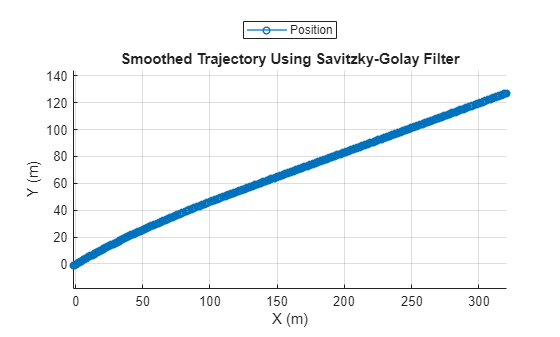
Plot the smoothed trajectory.
plot(smoothedTrajectory1)
title("Smoothed Trajectory Using Savitzky-Golay Filter")
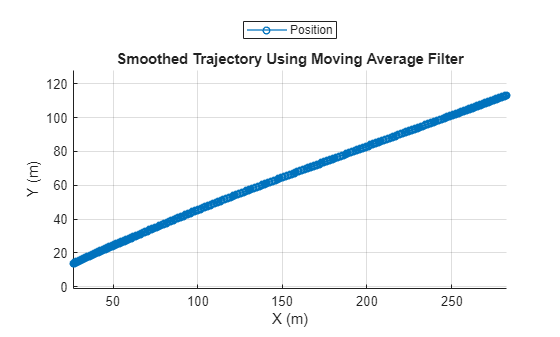
Smooth the trajectory using the moving average filter.
smooth(traj,Method="movmean")Plot the trajectory smoothed by the moving average filter.
plot(traj)
title("Smoothed Trajectory Using Moving Average Filter")
Input Arguments
Trajectory with timestamps and waypoints, specified as a Trajectory
object.
Name-Value Arguments
Specify optional pairs of arguments as
Name1=Value1,...,NameN=ValueN, where Name is
the argument name and Value is the corresponding value.
Name-value arguments must appear after other arguments, but the order of the
pairs does not matter.
Example: smooth(trajectory,Method="movmedian") smooths the trajectory
using the moving median filter.
Smoothing method, specified as one of these options:
"sgolay"— Savitzky-Golay filter, which smooths according to a quadratic polynomial fitted over each window. This method can be more effective than other methods when the data varies rapidly."movmean"— Moving average filter, useful for reducing periodic trends in data."movmedian"— Moving median filter, useful for reducing periodic trends in data when the data contains outliers."gaussian"— Gaussian-weighted average filter."lowess"— Window-based linear regression filter. This method can be computationally expensive, but results in fewer discontinuities than other methods."loess"— Window-based quadratic regression filter. This method is slightly more computationally expensive than"lowess"."rlowess"— Window based robust linear regression filter. This method is a more computationally expensive version of the"lowess"method, but it is more robust to outliers."rloess"— Window-based robust quadratic regression filter. This method is a more computationally expensive version of the"loess"method, but it is more robust to outliers."custom"— Specify a custom filter. When you use"custom", you must specify a custom function by using theSmoothingFcnname-value argument.
Window size factor, specified as a scalar in the range [0, 1]. Generally, the
value of SmoothingFactor adjusts the level of smoothing by scaling
the window size that the smooth function determines from the
entries in the input trajectory object trajectory. Values near 0
produce smaller moving window sizes, resulting in less smoothing. Values near 1
produce larger moving window sizes, resulting in more smoothing. In some cases,
depending on the entries that smooth uses to determine the window
size, the value of SmoothingFactor might not have a significant
impact on the window size.
Savitzky-Golay degree, specified as a nonnegative integer. To use this name-value
argument, you must specify Method as "sgolay".
The value of Degree corresponds to the degree of the polynomial in
the Savitzky-Golay filter that fits the data within each window.
The value of Degree must be less than the window size for
uniform sample points. For nonuniform sample points, the value must be less than the
maximum number of points in any window.
Custom smoothing function, specified as a function handle.
The function must support this syntax:
smoothedWaypoints = smoothingFunction(waypoints),
The
waypointsinput argument is specified as a real-valued N-by-3 matrix. N is the number of waypoints. Each row represents the x-, y-, and z-coordinates of a waypoint.The
smoothedWaypointsoutput argument is returned as a real-valued N-by-3 matrix. N is the number of waypoints. Each row represents the x-, y-, and z-coordinates of a waypoint.
Note
You must set the Method name-value argument to
"custom" to use the SmoothingFcn
name-value argument.
Output Arguments
Smoothed trajectory, returned as a Trajectory
object.
Version History
Introduced in R2024b
See Also
GPSData | Trajectory | CameraData | LidarData | recordedSensorData
MATLAB Command
You clicked a link that corresponds to this MATLAB command:
Run the command by entering it in the MATLAB Command Window. Web browsers do not support MATLAB commands.
Seleziona un sito web
Seleziona un sito web per visualizzare contenuto tradotto dove disponibile e vedere eventi e offerte locali. In base alla tua area geografica, ti consigliamo di selezionare: .
Puoi anche selezionare un sito web dal seguente elenco:
Come ottenere le migliori prestazioni del sito
Per ottenere le migliori prestazioni del sito, seleziona il sito cinese (in cinese o in inglese). I siti MathWorks per gli altri paesi non sono ottimizzati per essere visitati dalla tua area geografica.
Americhe
- América Latina (Español)
- Canada (English)
- United States (English)
Europa
- Belgium (English)
- Denmark (English)
- Deutschland (Deutsch)
- España (Español)
- Finland (English)
- France (Français)
- Ireland (English)
- Italia (Italiano)
- Luxembourg (English)
- Netherlands (English)
- Norway (English)
- Österreich (Deutsch)
- Portugal (English)
- Sweden (English)
- Switzerland
- United Kingdom (English)