Contenuto principale

generateFromText

R2026b

Generate 3D asset from text prompt

Since R2026b

Description

Add-On Required: This feature requires the 3D Asset Processing Library for MATLAB add-on.

meshObj = generateFromText(trellisObj,prompt) generates a 3D asset from a natural language text description, prompt, using a trellis object, trellisObj. The function returns the 3D asset as a Mesh object, meshObj.

example

meshObj = generateFromText(trellisObj,prompt,Name=Value) specifies one or more options using name-value arguments. For example, TextureSize=2048 sets the resolution of the generated texture image to 2048 pixels.

Note

This feature requires Deep Learning Toolbox™ and a GPU with at least 16 GB of memory and a CUDA® compute capability of 7.0 or higher.

Examples

collapse all

Note: This example requires Deep Learning Toolbox and a GPU with at least 16 GB of memory and a CUDA compute capability of 7.0 or higher.

Create a trellis object.

trellisObj = trellis;

Generate a 3D asset from a text description by using the generateFromText object function of the trellis object.

meshObj = generateFromText(trellisObj,"A red sedan car");

Display the generated 3D asset.

show(meshObj)
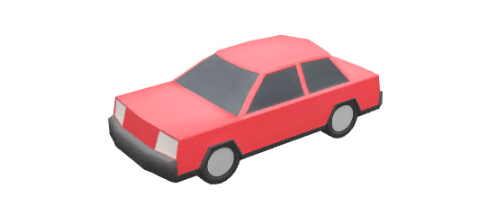
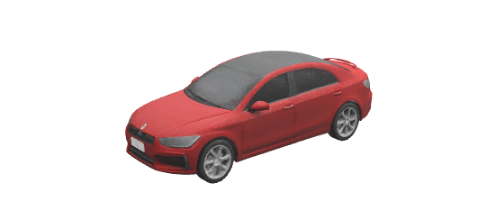
Generate a 3D asset using a detailed text description and custom generation parameters to produce a higher-quality mesh.

meshObj_custom = generateFromText(trellisObj,"A red sedan car with black roof",GeometryGenerationGuidanceStrength=9,...
    GeometryGenerationSamplingSteps=50,TextureGenerationGuidanceStrength=8,TextureGenerationSamplingSteps=50,...
    SimplifyRatio=0.9,TextureSize=1024,Seed=42);

Display the 3D asset generated using the custom parameters.

show(meshObj_custom)
Input Arguments

collapse all

Trellis 3D asset generator, specified as a trellis object.

Text description of the 3D asset to generate, specified as a string scalar or character vector.

Name-Value Arguments

collapse all

Specify optional pairs of arguments as Name1=Value1,...,NameN=ValueN, where Name is the argument name and Value is the corresponding value. Name-value arguments must appear after other arguments, but the order of the pairs does not matter.

Example: generateFromText(trellisObj,prompt,TextureSize=2048,Seed=42) sets the texture resolution to 2048 pixels and fixes the generation seed to 42.

Guidance strength for geometry generation, specified as a numeric scalar in the range [0, 10]. Use higher values to produce a 3D shape that more closely follows the text description. Use lower values to enable the model to rely more on its training data, which can be useful when the description is brief or does not fully specify the shape of the object.

Number of sampling steps for geometry generation, specified as an integer in the range [1, 50]. Higher values produce a more refined and stable 3D shape but increase generation time.

Guidance strength for texture generation, specified as a numeric scalar in the range [0, 10]. Use higher values when you want the generated texture to closely match the colors and surface details described in the text. If the output contains noise or visual artifacts, reduce this value to enable the model to rely more on its training data for a potentially cleaner result.

Number of sampling steps for texture generation, specified as an integer in the range [1, 50]. Higher values produce more refined and stable textures but increase generation time.

Mesh simplification ratio, specified as a numeric scalar in the range [0, 1]. Use higher values to produce a lighter mesh that is faster to render and easier to work with downstream. Use lower values to retain more geometric detail in the final mesh. For example, a value of 0.9 removes approximately 90% of the vertices while preserving the overall shape of the asset.

Size of the generated texture image, specified as an integer in the range [512, 2048]. Use higher values to increase the sharpness and detail of textures.

Random seed for generation, specified as a nonnegative integer. By default, the function uses a different random seed each time, which produces a different result for every call. Specify a fixed seed value to ensure repeatability each time you run the function with the same inputs and settings.

Display progress bar during object creation, specified as a logical 1 (true) or 0 (false). By default, the trellis function displays a progress bar while it initializes the object and sets up the model.

Output Arguments

collapse all

Generated 3D asset, returned as a Mesh object.

Limitations

macOS does not support generating 3D mesh assets from images or text prompts.

Version History

Introduced in R2026b