Model-Based BLDC Motor Control on Renesas RA6T2 Microcontroller Using Simulink
R2026bThis example shows how to use the Embedded Coder Support Package for Renesas RA Microcontrollers to implement and deploy sensorless Brushless DC (BLDC) motor control on a Renesas RA6T2 Microcontroller using model-based design in Simulink. You will simulate, generate code, and run both open-loop and closed-loop control strategies, leveraging the Renesas Flexible Motor Control Kit and the RA Smart Configurator (RASC) add-on
Prerequisites
Before you begin,
Complete the Simulink Onramp tutorial.
Review the MCB-RA6T2 User's Manual.
Complete the Hardware Setup for Embedded Coder Support Package for Renesas RA Microcontrollers.
Required Hardware
Renesas RA6T2 based Inverter for motor control
DC Power Supply (> 20V)
E2 emulator
BLDC motor
FTDI connector (optional).
Hardware Connections
Perform these steps to connect and configure your hardware before running the example.
1. Connect DC Power Supply.
Connect the positive (+) and negative (–) terminals of the DC power supply to the Inverter board.
Use a DC power supply rated for at least 20V.
2. Connect the Motor.
Connect the three motor phases to the U, V, and W terminals on the Inverter board
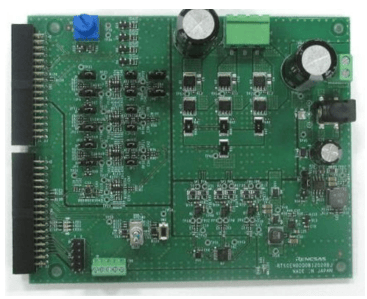
3. Connect the Inverter board to the MCU.
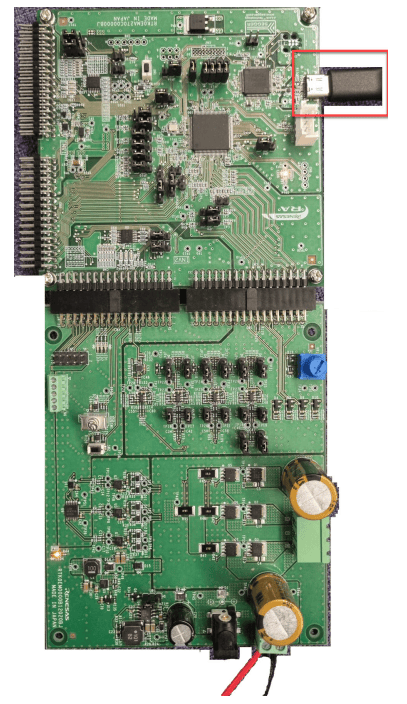
4. Plug the USB cable into the CPU board’s USB port.
System Overview
The system uses two main control loops, current control and speed control loops, which work together to achieve precise and efficient motor operation from startup through steady-state running.
Start MATLAB and Open Top-Level Simulink Model
The example includes a project having the top-level model that you can use for system-level simulation and two referenced models for current control and speed control.
Start MATLAB and open the MotorControlRH850Example.slx Simulink model.
modelName = "RAFOCExample";
open_system(modelName)
The top model RAFOCExample opens. The top-level model in this example comprises of two subsystems CurrentControl and SpeedControl.
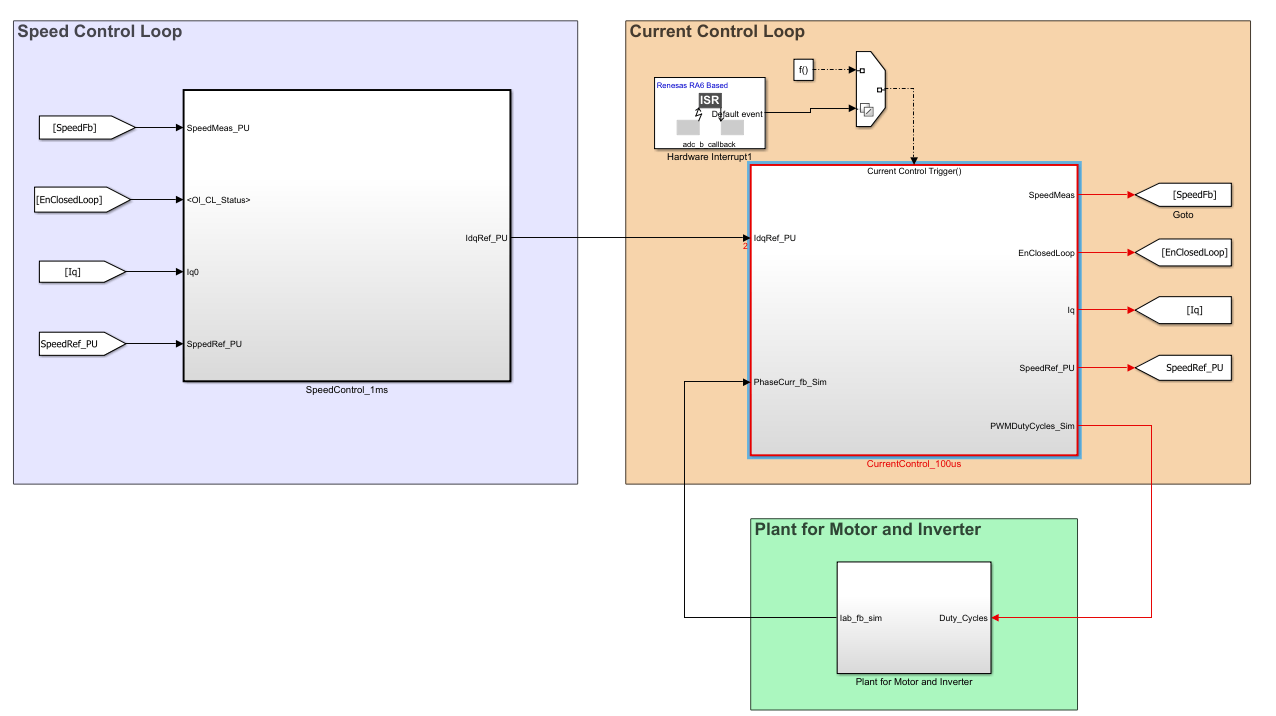
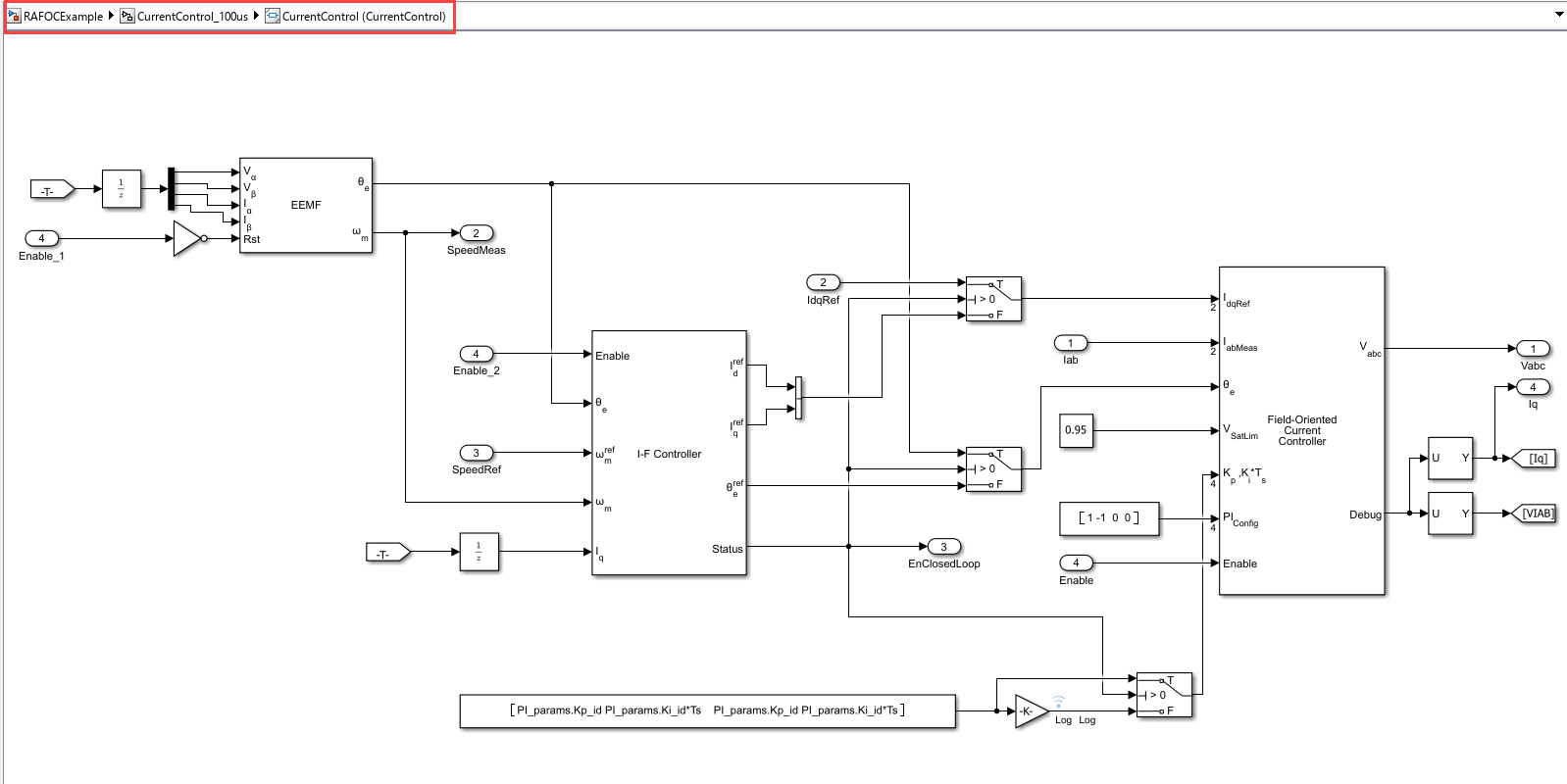
To view the current control model, navigate to RAFOCExample > CurrentControl_100us > CurrentControl model.
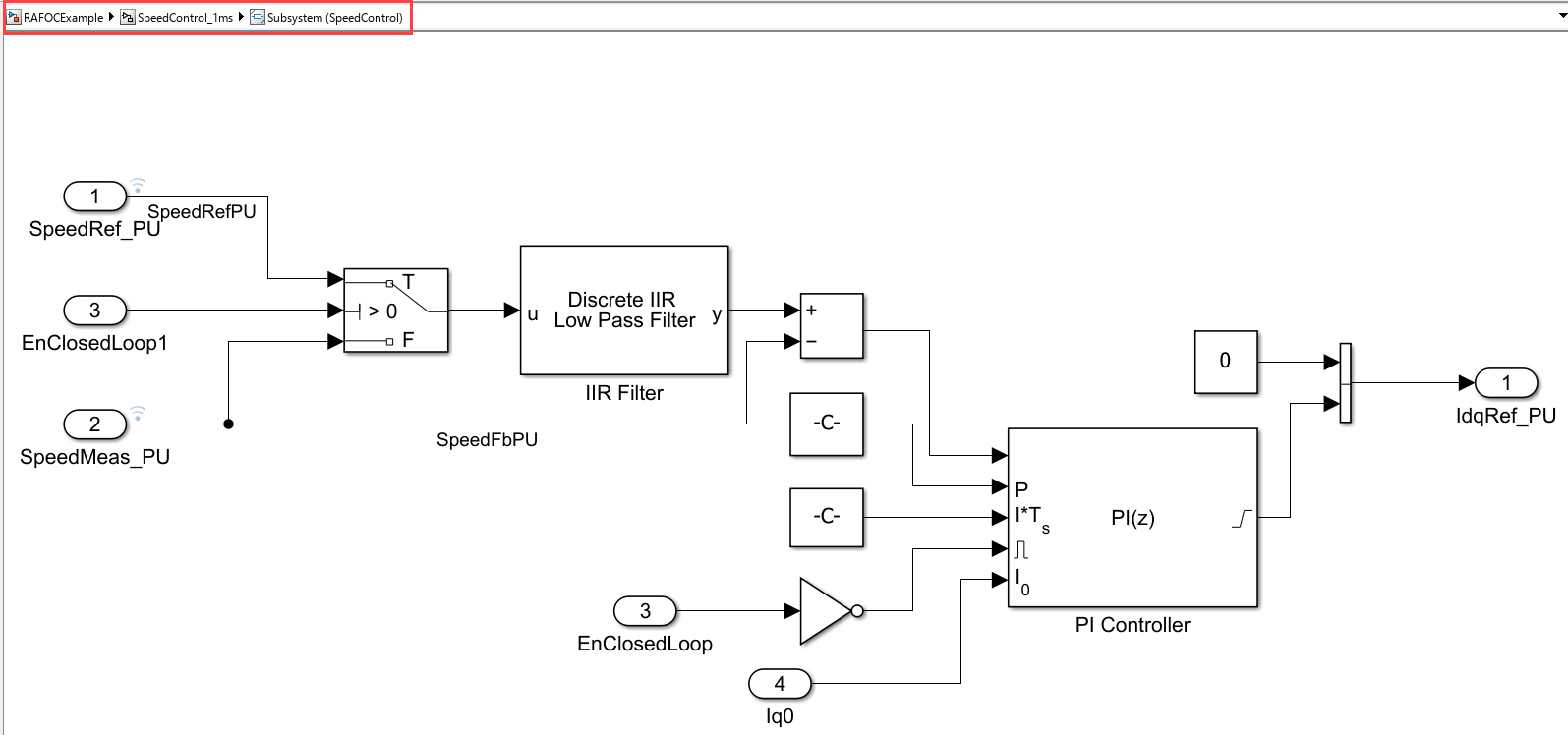
To view the speed control model, navigate to MotorControlRH850Example > SpeedControl_100us > SpeedControl model.
Configure Top Model
In the RAFOCExample model, press Ctrl+E or navigate to Modeling > Model Settings to open the Configuration Parameters dialog box.
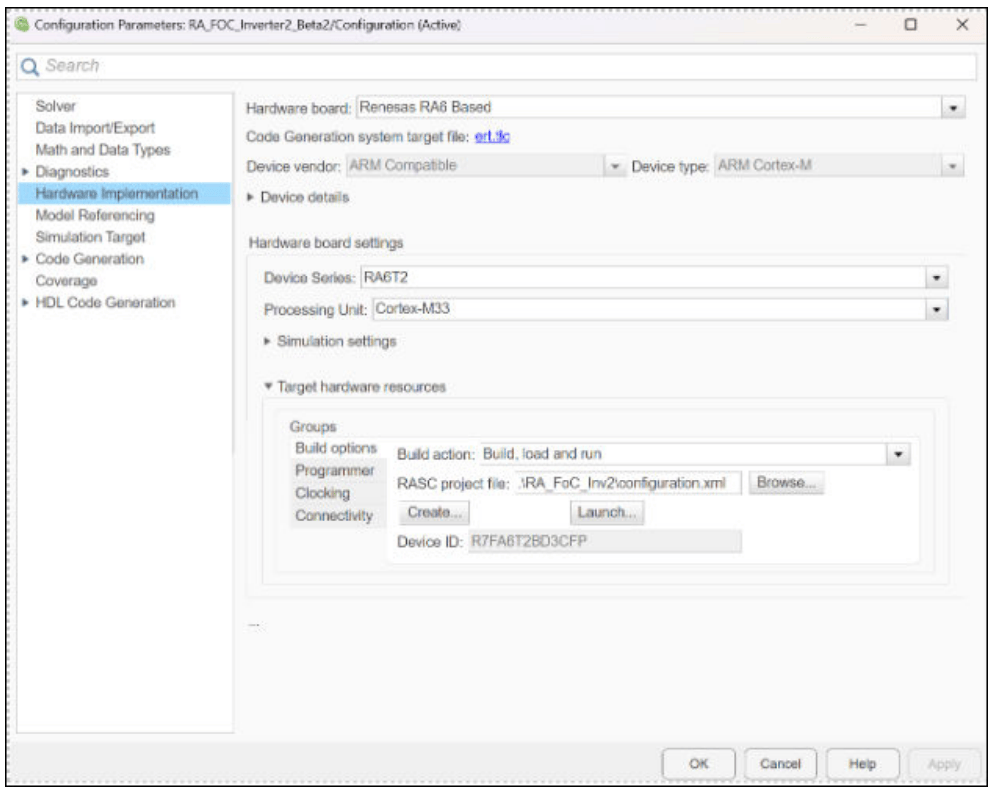
In the Hardware Implementation pane, set Hardware board to
Renesas RA6 Based, Device Series to RA6T2, and Processing Unit to Cortex-M33.Click Apply and OK.
Current Control Loop
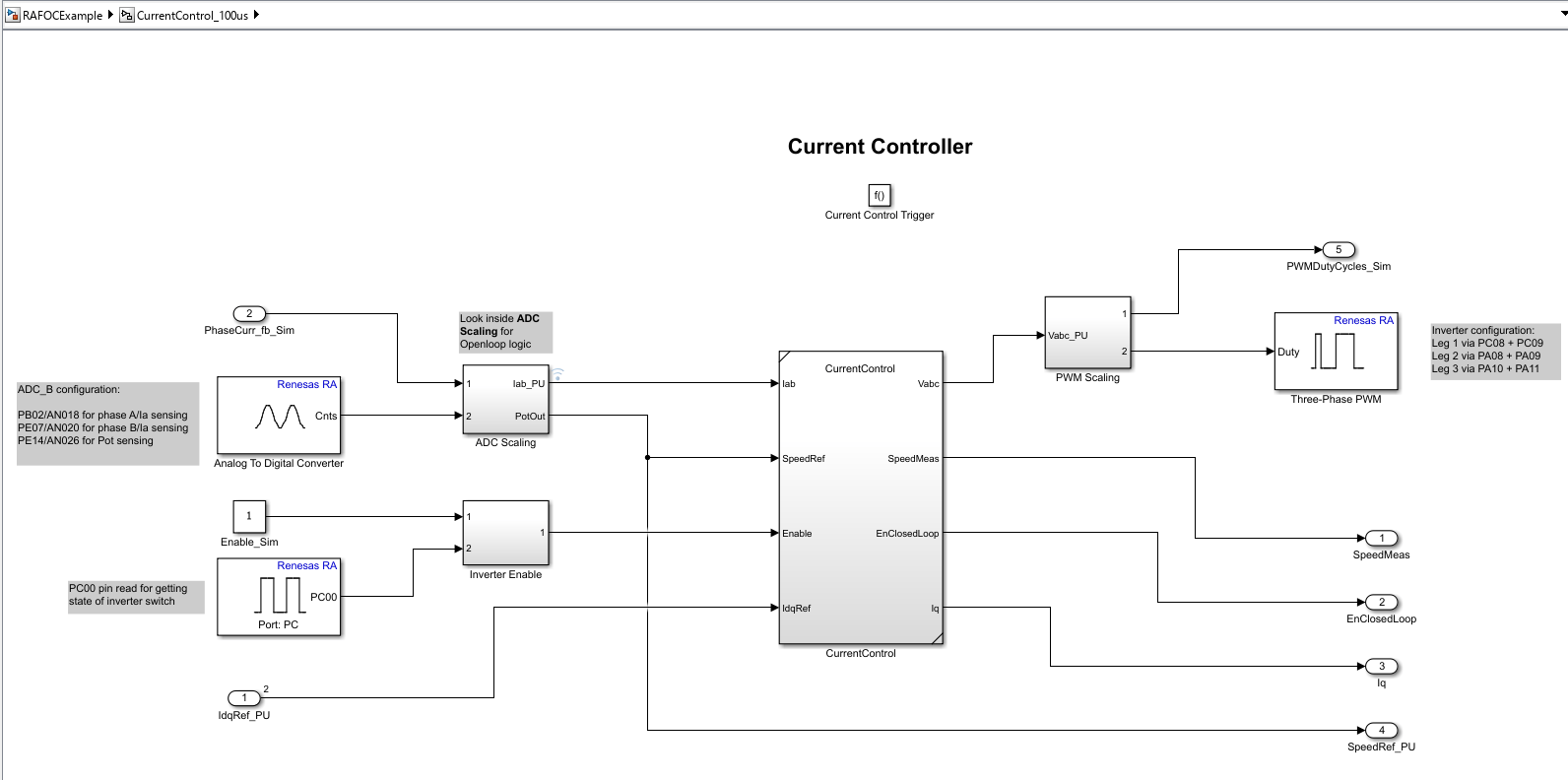
Runs at 10 kHz using the ADC interrupt for real-time responsiveness.
The ADC samples phase currents (Ia, Ib), which are offset-compensated for accuracy.
Supports both open-loop and closed-loop operation.
Closed-loop: Compensated currents are fed to a controller that computes voltage/current references for optimal performance. The selection between open- and closed-loop commands is managed within the control logic to generate the appropriate PWM duty cycles.
Open-loop: Used during startup to safely spin the motor and validate PWM generation before switching to closed-loop.
Position and Speed Estimation
An Extended EMF Observer estimates rotor position (Theta) and speed from measured voltages/currents, enabling sensorless operation—even at startup or low speeds.
Estimated position is used for both control modes; speed feedback is used in the speed control loop.
Switching Between Open and Closed-Loop Control
In this example, the motor control system automatically transitions from open-loop to closed-loop control within the controller block.
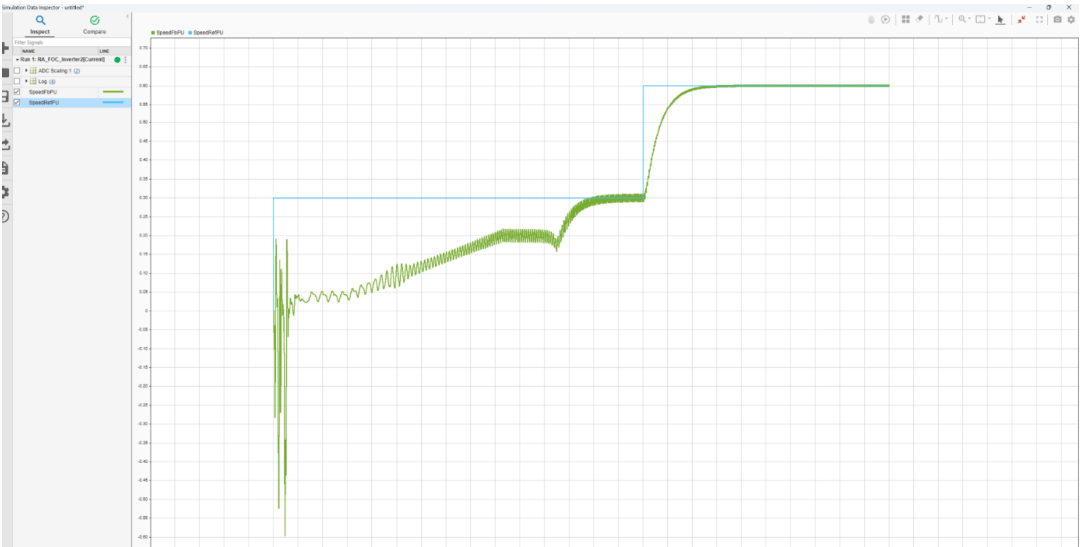
OpenLoop State: The system begins in open-loop state, using a fixed speed reference to reliably start the motor.
ClosedLoopTemp State: Once the motor reaches a predefined speed threshold, the controller briefly enters an intermediate state to stabilize operation and then switches to closed-loop mode.
ClosedLoop State: In closed-loop mode, real-time speed feedback is used for precise speed regulation.
No manual intervention is required. The transition between open- and closed-loop control is managed automatically by the controller block based on the configured speed threshold.
Speed Control Loop
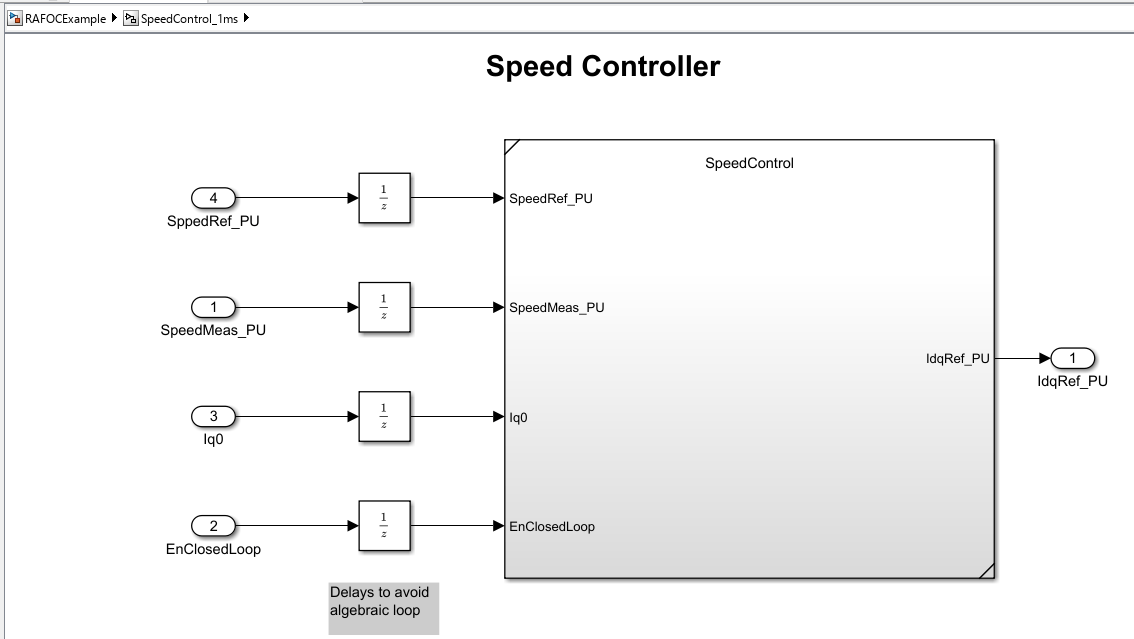
Runs at
1ms intervals to regulate motor speed.Implements a discrete PI controller with anti-windup and reset, generating current reference for the current control loop.
Transitions between open- and closed-loop modes are managed by a controller block.
Simulate Model
Open the
RAFOCExamplemodel.Click Run on the Simulation tab to simulate the model.
Click Data Inspector on the Simulation tab. The desired signal of interest can be logged and viewed in Simulink data inspector.
Generate Code, Deploy, and Run Model on Target Hardware
When you switch Simulink to build and deploy mode, the model automatically generates embedded code tailored for your Renesas hardware. This is achieved using driver blocks within the model, which abstract all low-level interactions with the Microcontroller. Once generated, the code is deployed directly to the target hardware.
Complete the following steps to generate code and run the FOC algorithm on the target hardware.
1. In the RAFOCExample model, click Build, Deploy & Start on the Hardware tab to deploy the target model to the hardware.

2. Follow the build process by opening the diagnostic viewer using the link provided at the bottom of the model canvas. You can observe the code generation report that contains code for model traceability. The code is deployed on to the Renesas hardware.
Start and Operate the Motor
After deploying the application to the hardware, configure the motor speed reference in the SpeedControl model and build and deploy the application. The speed control loop uses this reference to regulate the motor speed during operation.
Before operating the motor, verify that the motor, inverter board, power supply, and RA6T2 CPU board are connected as described in the Hardware Connections section. Turn on the DC power supply.
During startup, the controller operates the motor in open-loop mode using a fixed speed reference. When the motor reaches the configured speed threshold, the controller automatically transitions through an intermediate state and enters closed-loop operation. No manual intervention is required for this transition.
Stop the Motor
To stop motor operation, stop the deployed application and remove power from the hardware before modifying any motor or inverter connections.
Validate Motor Operation
Verify the following behavior:
The application runs on the hardware.
The controller transitions automatically from open-loop to closed-loop operation.
The motor reaches the configured speed reference.
The motor maintains closed-loop operation.
Integrated ADC and PWM Operation
The ADC block samples both phase currents (Ia, Ib) and the speed reference input, all within the current control loop. This dual use of the ADC enables efficient and synchronized data acquisition.
PWM blocks set the duty cycles for each motor phase, converting controller outputs into precise drive signals for the motor.
This integration of ADC and PWM within the control loop enables real-time, responsive motor control after deployment.
Configuring Hardware with RASC
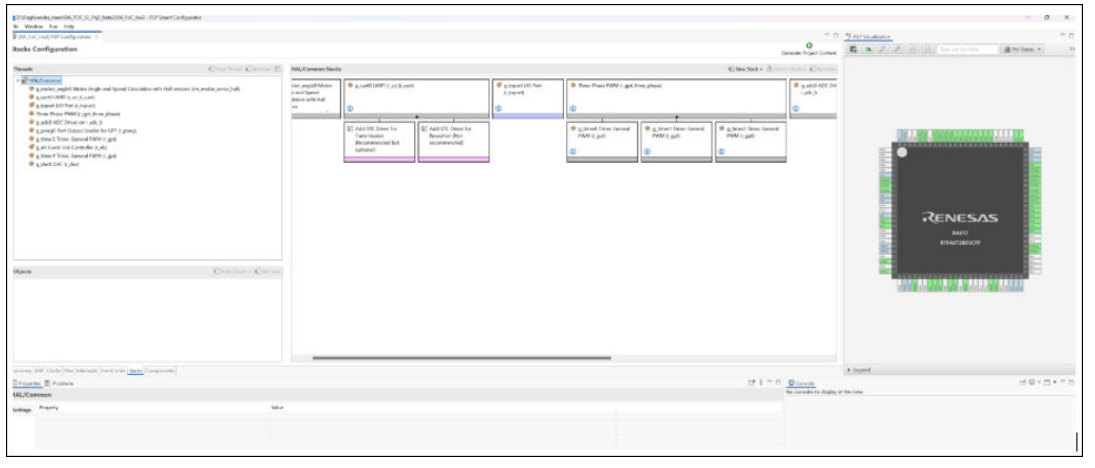
RASC (RA Smart Configurator) is used to set up Microcontroller peripherals, clocks, and interrupts. It works seamlessly with your Simulink model to configure the driver blocks.
Workflow
1. Associate a RASC Project: Link your Simulink model to a RASC project file (XML) via the model’s configuration settings.
2. Edit or Create RASC Projects: Use the Launch button in Simulink to open RASC directly. You can browse to an existing project or create a new one.
The project includes a configuration XML file with all necessary peripherals pre-configured for this example. You can use the provided configuration, browse for an existing RASC project, or create a new one if required. Additionally, the configuration set offers an option to launch the RASC project associated with the model directly.
ADC Block Configuration
ADC block is configured as shown in this image.
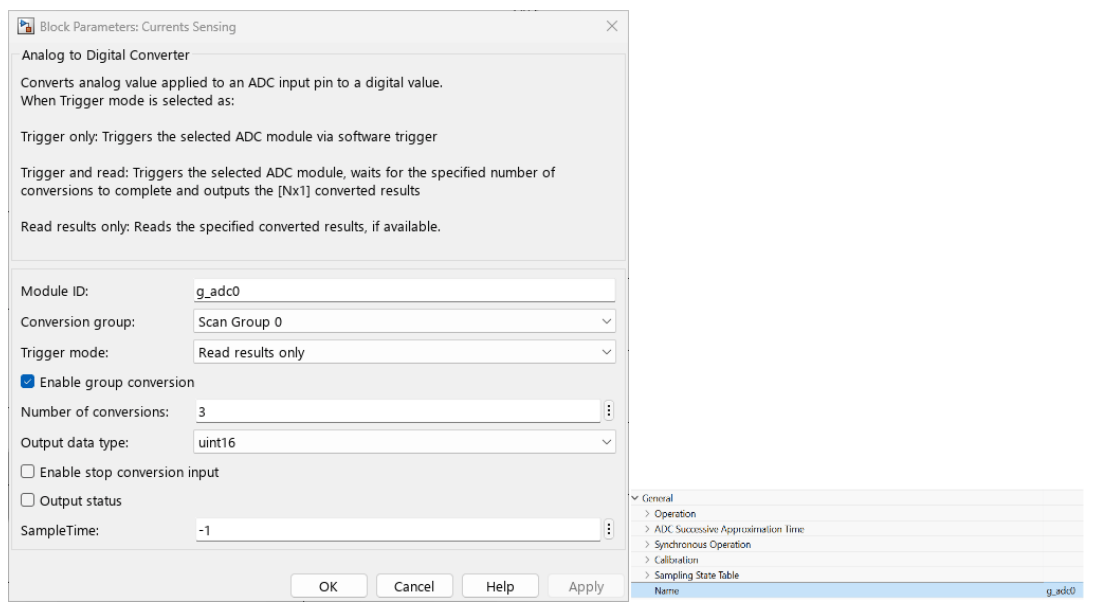
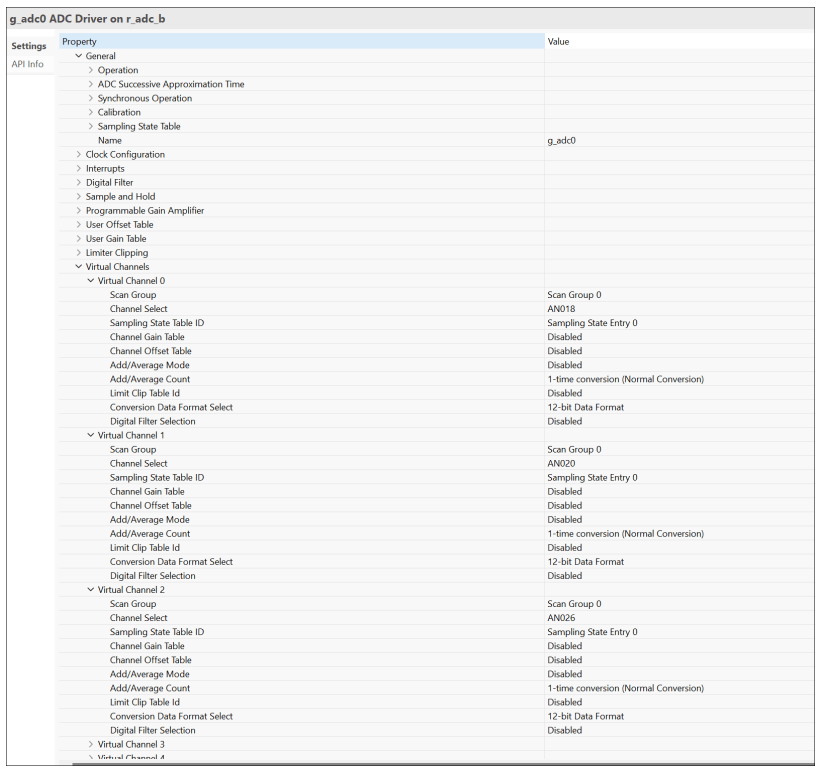
Module ID: Matches the ADC stack name in the RASC project.
Conversion Group: Refers to the scan group for current or speed sensing.
Number of Conversions: Specifies how many virtual channels are mapped to the scan group. For example, Ia, Ib, and speed, all in scan group 0.
Ensure the number of conversions matches the active virtual channels in your RASC configuration.
PWM Block Configuration
PWM block is configured as shown in this image.
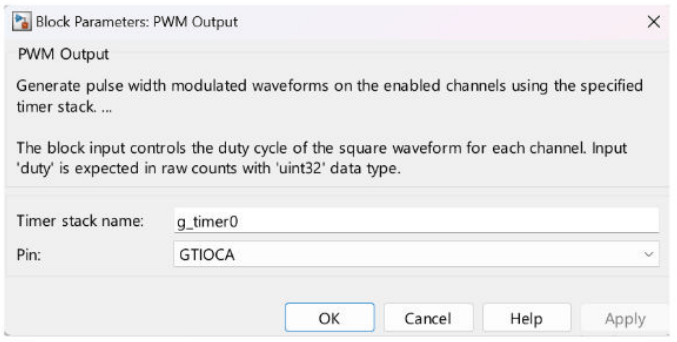
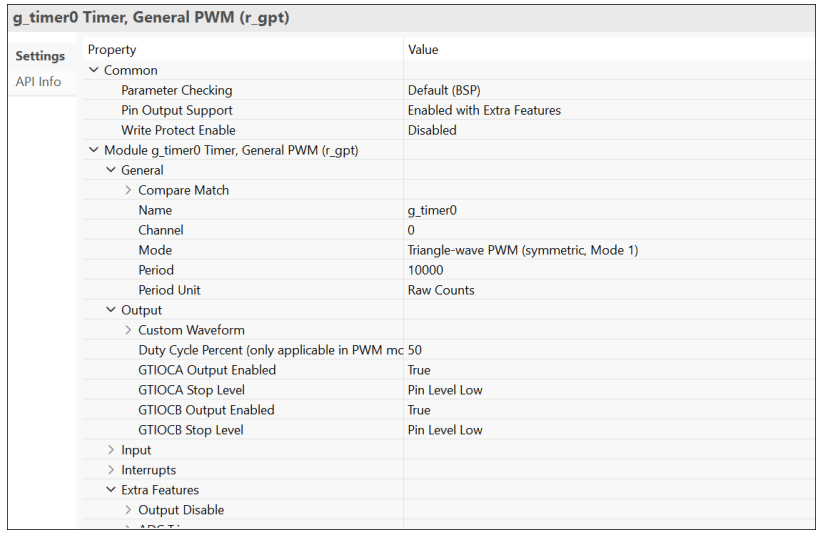
Timer Stack Name: Corresponds to GPT timers defined in RASC.
Duty Cycle Assignment: Set via input port and mapped to a specific pin.
Additional Settings: PWM period, dead time, and ADC-PWM synchronization are all configured in RASC.
Three-phase synchronization is currently handled as part of model initialization at the top model level.
Structure of Generated Code
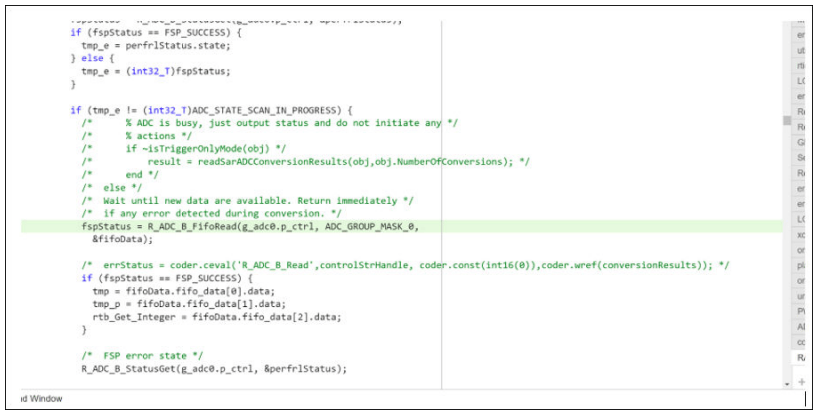
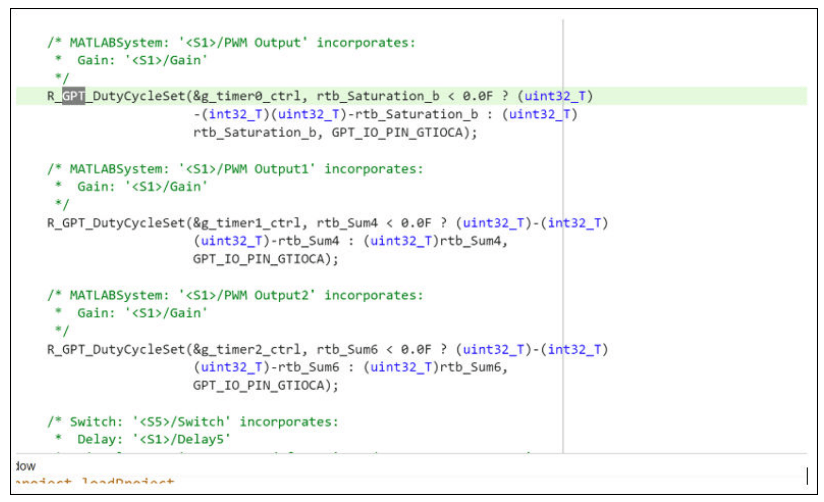
The generated code includes dedicated sections for each hardware driver configured in your model:
ADC: Code is generated to read analog signals, such as phase currents and speed reference, using the ADC.
PWM: Separate code sections control the duty cycle of each GPT channel for precise motor phase drive.
By combining robust peripheral configuration from RASC with model-based design in Simulink, the final embedded application is flexible, efficient and ready for real-time motor control on Renesas hardware.

