Generazione di codice sorgente
R2026aGenerare e verificare moduli di codice sorgente per la distribuzione e l'integrazione delle funzioni
Identificare come avviare la generazione di codice sorgente e quali sono i file e le cartelle prodotti dal generatore di codice. Per organizzare progetti di grandi dimensioni, utilizza il modello di progetto per la generazione di codice. I progetti consentono di individuare i file necessari, gestire e condividere file e impostazioni, interagire con il controllo della sorgente, generare codice del controller ed eseguire simulazioni di test harness.
È possibile iniziare con Generate Code by Using the Quick Start Tool.
App
| Embedded Coder | Generate readable, compact, and fast C and C++ code for embedded processors used in mass production |
Funzioni
Argomenti
Generazione di codice
- Generate Code by Using the Quick Start Tool
Prepare a model for quickly generating readable, efficient code. - Reduce the Time It Takes to Generate Code
Alter a model to increase the speed at which the code generator generates code. - Generate Code Using Embedded Coder
Select a target for a Simulink® model, configure options, generate C code for embedded systems, and view generated files. - Internationalization and Code Generation
Internationalization support for enabling efficient globalization. - What Is Code Replacement?
Why and how to replace code. Code replacement libraries that MathWorks provides. Contents of a code replacement library and how the code generator uses the contents. Terminology and limitations. - Replace Code Generated from Simulink Models
This example shows how to replace generated code by using a code replacement library. - Control Regeneration of Top Model Code
Choose options for regenerating code for the top-level model. - Set Up Model for Controlling Program Execution
Set up a model so that you can start and stop program execution for logging output, monitoring data, and tuning parameters. - Configure Model for Debugging
Configure a model so that generated code and the build process are set for debugging.
Generazione di codice con progetto
- Generate Code and Simulate Models in a Project
This example shows how to use the code generation template for a new Project. - Generate Code and Simulate Models Programmatically with Project
This example shows how to use the Project API to create a new project and automate project tasks for manipulating files.
File e cartelle relativi alla generazione di codice
- Manage Build Process Folders
Manage folders that the code generator creates. - Manage Build Process Files
Work with generated source files and dependency files that the code generator produces. - Manage Build Process File Dependencies
Work with generated source files and dependency files that the code generator produces. - Build Process Support for File and Folder Names
Troubleshoot build process errors that occur when file system issues prevent file processing. - Manage File Packaging of Generated Code Modules
Generate code modules and header files with the code generator.
Tutorial sulla generazione di codice
- Develop and Deploy Embedded Software Components to Platform Services by Using Embedded Coder
Manage a code generation workflow from model preparation to code deployment.
- PASSAGGIO 1: Prepare Models for Code Generation
- PASSAGGIO 2: Configure Basic Code Generation Settings
- PASSAGGIO 3: Define the Interfaces Between the Generated Code and Your Deployment Platform
- PASSAGGIO 4: Apply Code and Deployment Configurations to Models
- PASSAGGIO 5: Call Existing Code from a Model and Generated Code
- PASSAGGIO 6: Optimize the Generated Code
- PASSAGGIO 7: Test the Generated Code
- PASSAGGIO 8: Deploy the Generated Code
Binding Rust utilizzando Simulink Support Package for Rust Code
- Generate Rust Bindings for Simulink Generated C Code
Learn how to generate Rust® bindings for C code generated from a Simulink model using the Rust wrapper API.
Esempi in primo piano
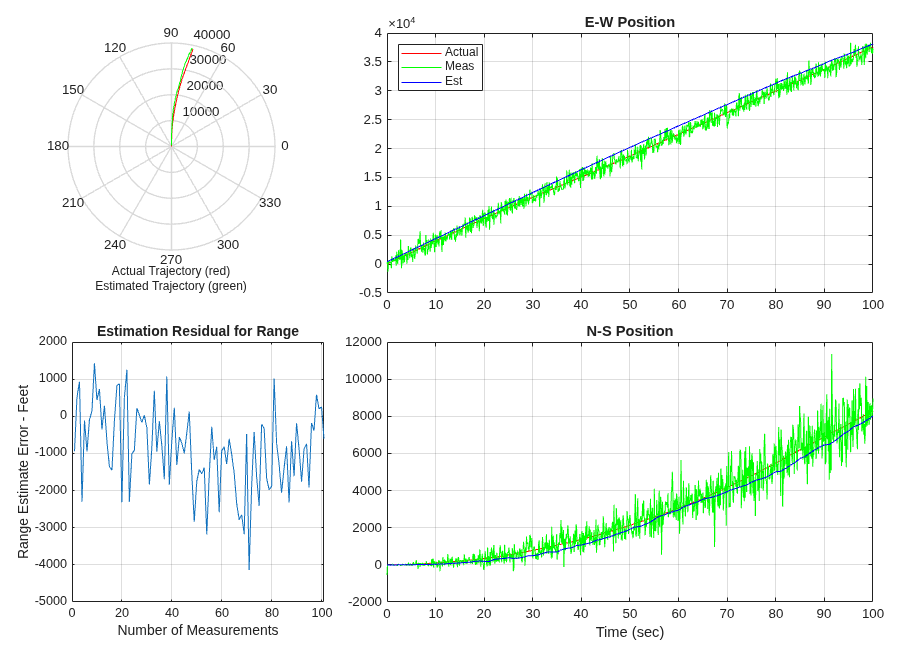
Aircraft Position Radar Model
The code generated for a Simulink® model containing a MATLAB® script.

