Customize C Functions Generated from Simulink Functions Scoped in Subsystems
R2026bIn the generated model code, each Simulink function corresponds to one of the generated functions. The return value and input arguments of the generated function represent the Argument Inports and Argument Outports of the Simulink function, and the function body corresponds to the Simulink function logic.
A scoped Simulink function is a Simulink Function block with the Function visibility parameter of its Trigger block specified as scoped. When a scoped Simulink function is nested inside a subsystem, it is callable from the subsystem it is located in and from any subsystem in its hierarchy. To read more about scoped Simulink functions in subsystems, see Scoped Simulink Function Blocks in Subsystems.
This example shows how to customize the name, return value, input arguments, and qualifier of a function generated from a scoped Simulink function nested inside a subsystem.
Tip: For this example, we refer to this Simulink function as nested.
Open Model and Explore Nested Simulink Function Block
Load the model SimFuncs and open the Simulink Function block nestedSimFunc inside the subsystem subsystemWithSF.
sfModel = "SimFuncs";
nestedSf = "SimFuncs/subsystemWithSF/nestedSimFunc";
load_system(sfModel)
open_system(nestedSf)
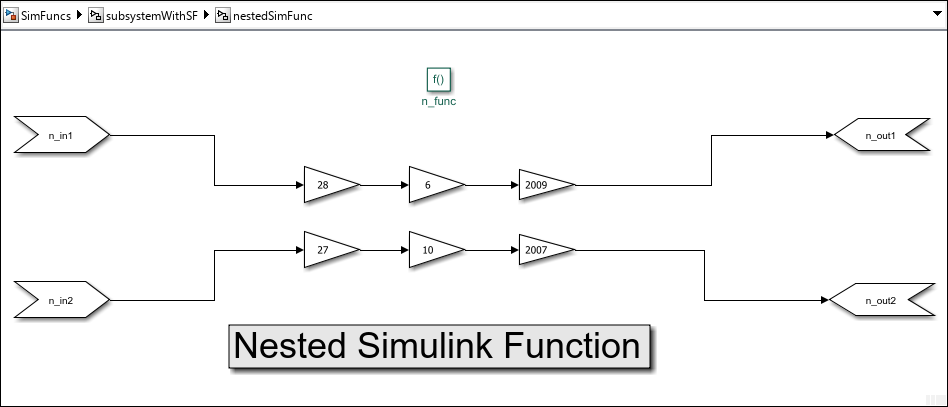
In nestedSimFunc, double-click the Trigger block n_func to open its Block Parameters dialog box.
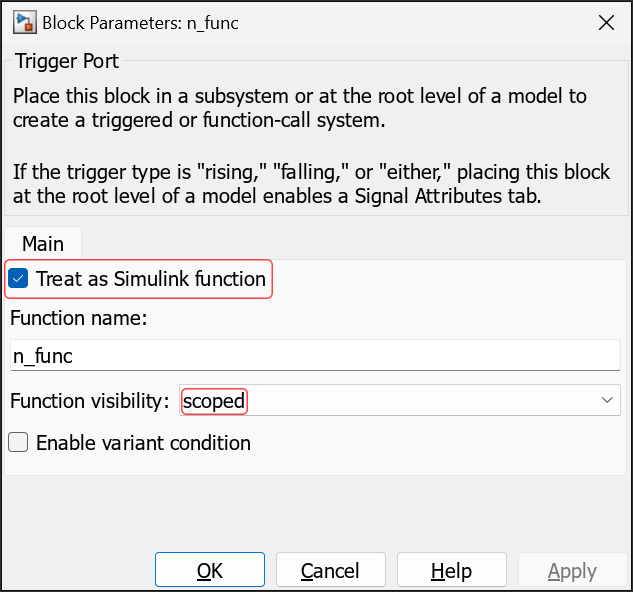
Treat as Simulink function is selected and Function visibility is set to scoped.
Customize Generated Function Name and Argument Identifiers
You customize the names and argument identifiers of functions generated from nested Simulink functions (scoped inside any level of model hierarchy) by specifying the configuration parameters in the table. Specify each naming rule as a combination of valid C language characters and the available macros for the parameter. The specified naming rules apply to all nested Simulink functions in the model. Customizing names and argument identifiers of individual nested Simulink functions of the model is not supported.
Elements | Configuration Parameter | Available Macros |
|---|---|---|
Function name | Subsystem methods |
See Subsystem methods for the definition of each macro. |
Argument identifiers | Subsystem method arguments |
See Subsystem method arguments for the definition of each macro. |
To specify the naming rules, open the Configuration Parameters dialog box and navigate to Code Generation > Identifiers. In the Identifier format control pane, specify Subsystem methods as custName_$N$M and specify Subsystem method arguments as custArg_$I_$N$M, respectively. Then, click Apply.
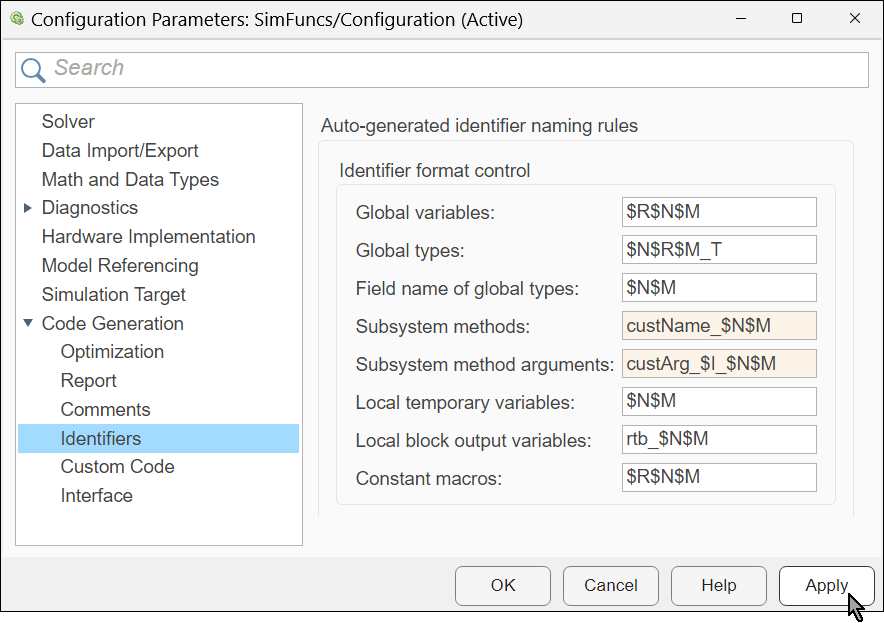
In the naming rule for function names, custName_$N$M:
The macro
$Nis replaced by the Simulink Function block name.The macro
$Mis required. It is replaced by an autogenerated name-mangling text to avoid naming collisions. If there is no name collision, this macro is ignored.
In the naming rule for argument identifiers, custArg_$I_$N$M:
The macro
$Iis replaced by the letterufor each input argument that corresponds to an Argument Inport block of the Simulink function, by the letteryfor each input argument that corresponds to an Argument Outport block of the Simulink function, and by the letter pairuyfor each combined input argument that corresponds to one Argument Inport block and one Argument Outport block of the Simulink function. For an example of using combined arguments, see Use Combined Inports and Outports.The macro
$Nis replaced by the name of the Argument Inport block or Argument Outport block of the Simulink function.The macro
$Mis required. It is replaced by an autogenerated name-mangling text to avoid naming collisions. If there is no name collision, this macro is ignored.
Generate model code and examine the function generated from the nested Simulink function:
Open the Embedded Coder® app.
In the Simulink Toolstrip, select the C Code tab.
In the Generate Code section, click Generate Code
 to generate code from the model.

In the Code pane, navigate to the generated source code file SimFuncs.c and search for n_func to see the prototype of the generated function.
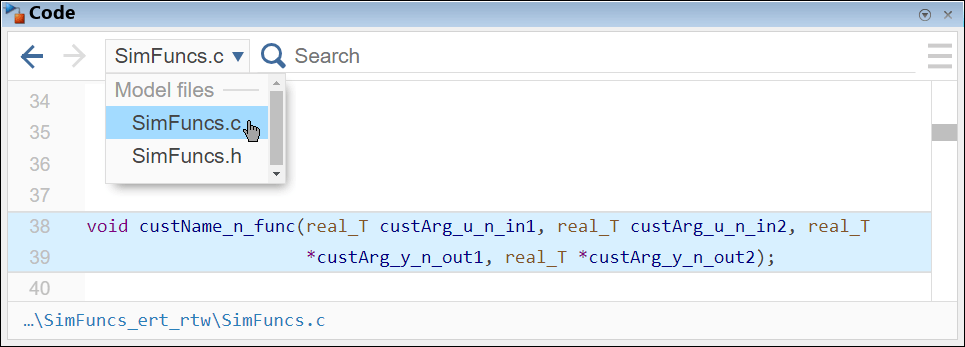
The function name and argument identifiers adhere to the naming rules you specified.
Use Combined Inports and Outports
You can customize the generated function to have combined arguments, corresponding each to one Argument Inport and one Argument Outport of the Simulink function. A combined argument is passed by pointer and is used in the generated function for both input and output. To use combined arguments, specify the same identifier for both the Argument Inport and the Argument Outport in the Simulink Function block. In the example, update the Simulink function prototype with the argument n_in_out as both the first Argument Inport and the first Argument Outport.
In the Simulink Editor, navigate to subsystem block subsystemWithSF. The nested Simulink Function block, nestedSimFunc, is at the bottom. Above it is its Function Caller block, nestedSimFuncCaller.
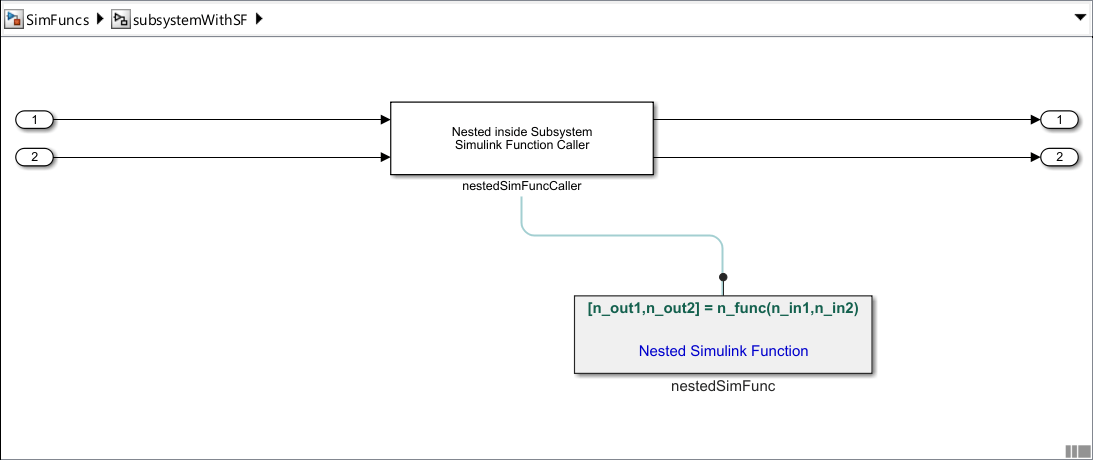
Update the prototype in the Simulink function block:
Click once on the prototype of the Simulink Function block to turn on editing mode.
Revise the prototype to
[n_in_out,n_out2] = n_func(n_in_out,n_in2).
![Prototype of Simulink Function block is [n_in_out,n_out2] = n_func(n_in_out,n_in2).](../../examples/ecoder/CustomizeNestedSimulinkFunctionsExample_08.png)
Update the Function Caller block:
Double-click on the Simulink Function Caller block,
nestedSimFuncCaller.In the Block parameters dialog box that opens, change the Function prototype parameter to the new Simulink function prototype.
Click OK.
![Block Parameters dialog box of nestedSimFuncCaller. The Function prototype is [n_in_out,n_out2] = n_func(n_in_out,n_in2).](../../examples/ecoder/CustomizeNestedSimulinkFunctionsExample_09.png)
Generate code from the model and examine the generated function in the Code pane. This time look at the definition of the function so you can see how it uses the combined argument for both input and output.
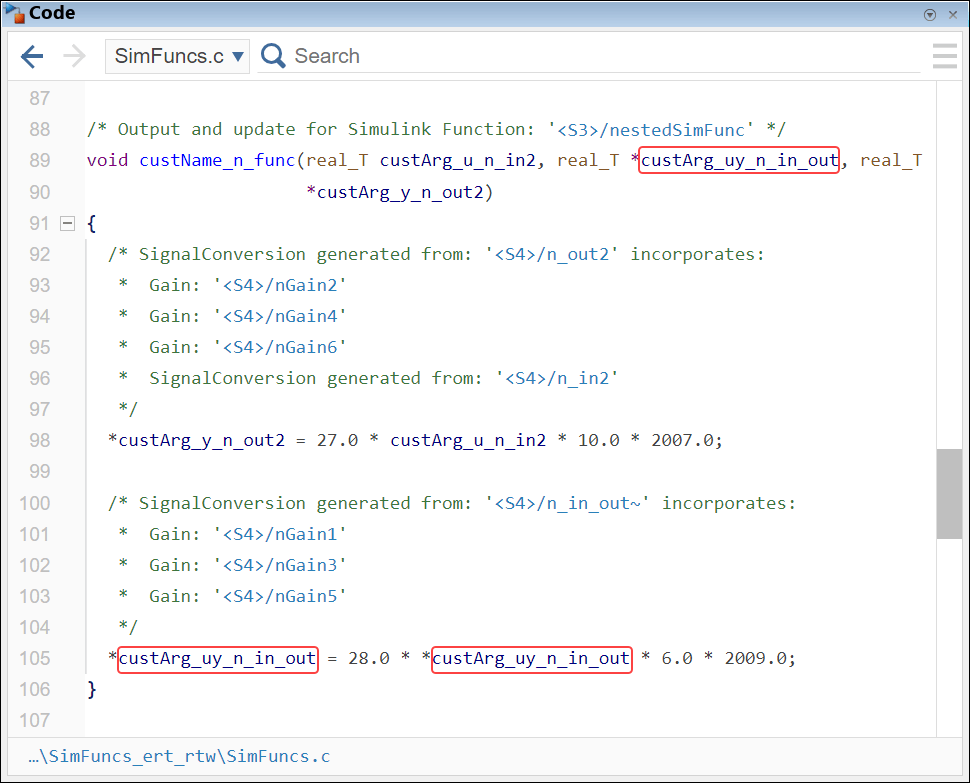
In the generated function:
The
$Ipart of the naming rule is replaced byuyin the combined argument.The combined argument is used for both input and output in the function body. Its value is used in the calculation and is being updated.
Customize Function Qualifiers
You can customize the qualifier of the generated function to be static or extern by enabling on the configuration parameter for either qualifier. Enable the parameter for extern:
In the Configuration Parameters dialog box, navigate to Code Generation > Code Style. On the right, select Preserve extern keyword in function declarations. Click Apply.
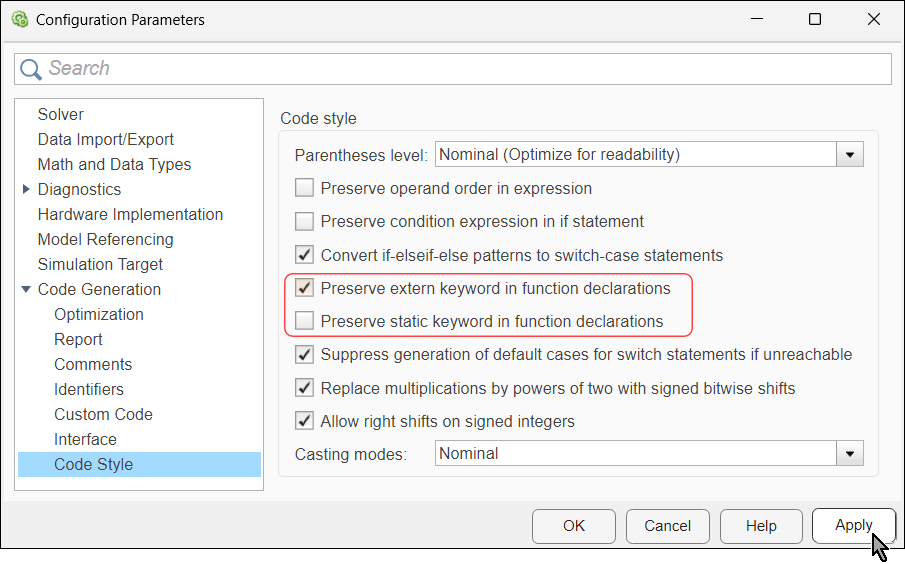
Note:
If both parameters are enabled, the code generator ignores the parameter for
extern.Customizing individual nested functions to use the
staticorexternqualifiers is not supported.
Generate code from the model again, and examine the declaration of the function in the Code pane:
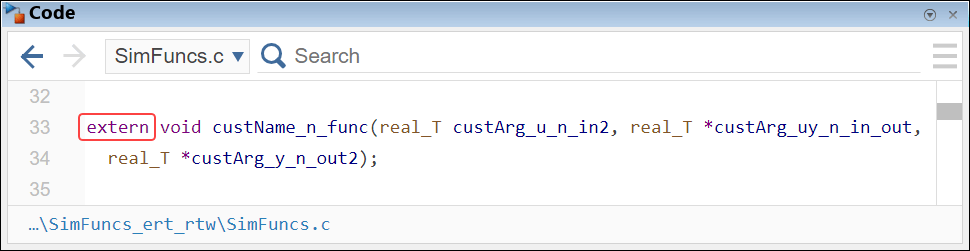
The function declaration has the extern qualifier.
See Also
Subsystem methods | Subsystem methods arguments | Function visibility

