Customize Generated Entry-Point C Function Names
R2026bEntry-point functions are functions in the generated model code that interface with your external code. This example shows how to customize the names of the generated entry-point functions.
Note: To build an executable from a model with custom entry-point function names, use one of these methods:
Select the model configuration parameter Generate an example main program, located in the Code Generation > Templates pane of the Configuration Parameters dialog box.
Include a custom main program that uses the custom entry-point function names to invoke the generated entry-point functions.
Open and Explore Model
Open the model EntryPoints.
epModel = "EntryPoints";
open_system(epModel)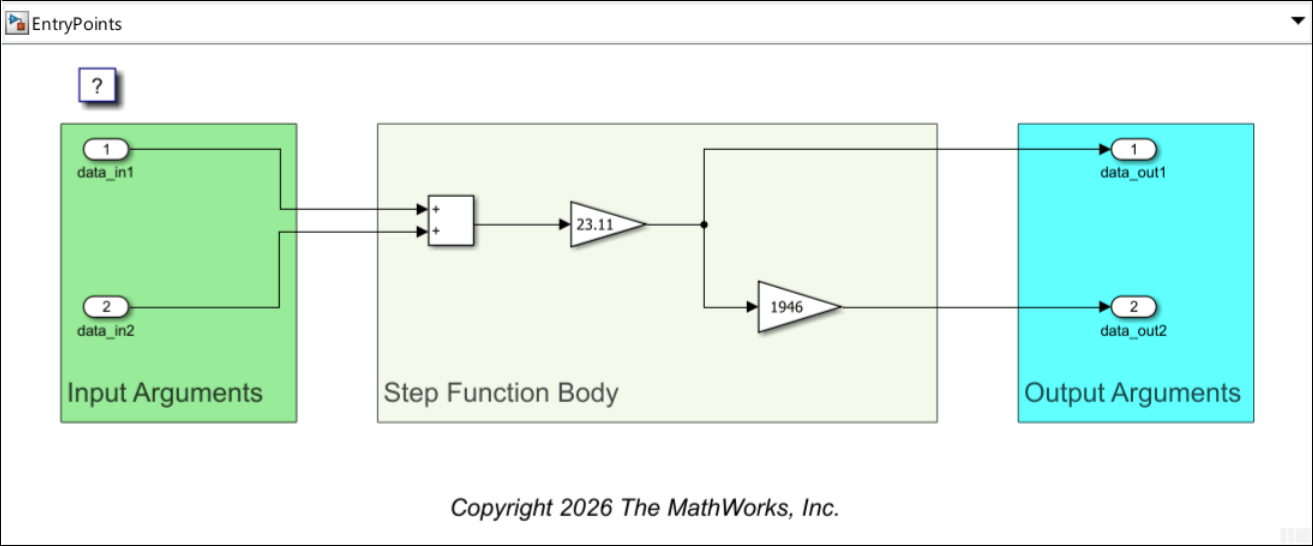
EntryPoints is a nonreusable, single-rate model configured to use the ERT system target file.
You can use one of these configuration options to customize the names of the generated entry-point functions.
Specify Function Customization Template for Function Categories — When you specify a function customization template for a function category, the code generator uses its naming rule to create the names of the generated functions of the category for which you do not specify an explicit naming rule or an individual function customization template.
Specify Function Customization Template for Individual Functions — When you specify a function customization template for an individual entry-point function and you do not explicitly specify a naming rule for the function, the code generator uses the naming rule of the template to create the name of the generated function.
Explicitly Specify Function Naming Rule — You can specify an explicit naming rule for any of the entry-point functions to customize its name.
The names of functions you do not use any of these options with are created according to the default naming rule for entry-point function names. When the model is configured for component deployment type the default naming rule is modelName_funcName, and you cannot change it. Here, modelName is the name of the model and funcName is the name of the function as defined in Types of Generated Entry-Point Functions. For example, the name of the generated initialization function according to this naming rule is modelName_initialize. In this example, keep the model configured for component deployment type.
When the model is configured for subcomponent deployment type, you can customize the default naming rule. This is demonstrated in the example Customize Default Naming Rule of Generated Entry-Point C Functions in Subcomponent Models.
Specify Function Customization Template for Function Categories
A function customization template is a set of specifications for generating functions. These templates are defined in the Embedded Coder™ Dictionary of the model, or in a shared dictionary linked to the model. To learn more about templates, see Embedded Coder Dictionary > Function Customization Templates.
When you specify a template for a function category, the code generator uses the Function Naming Rule of the template to generate the names of the entry-point functions in the category, except the names of functions for which you specify individual function customization templates or explicit naming rules. The naming rule of the function customization template is a combination of valid C language characters and the macros $R, $N, $U, $C, and $M. For the definition of each macro, see Embedded Coder Dictionary > Function Naming Rule.
Open the Embedded Coder Dictionary of the model:
Open the Embedded Coder® app.
In the Simulink® Toolstrip, navigate to the C Code tab.
Select Code Interface > Embedded Coder Dictionary (Model).
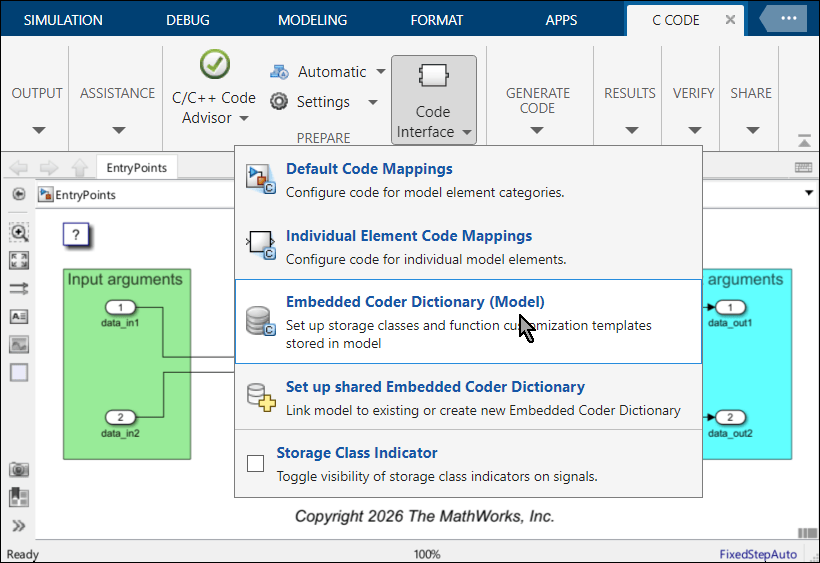
In the dictionary that opens, create two new function customization templates:
On the left pane, select Function Customization Template.
In the middle pane, click Create to create a new function customization template.
On the right pane, change the value of Name to
initTermFcnTemplate.Specify Function Naming Rule as
initTermDictFcn_$N.Create another new template,
execFcnTemplate, and specify its naming rule asexecDictFcn_$N.
The macro $N is replaced by the model source name of the generated function, as defined in Types of Generated Entry-Point Functions.
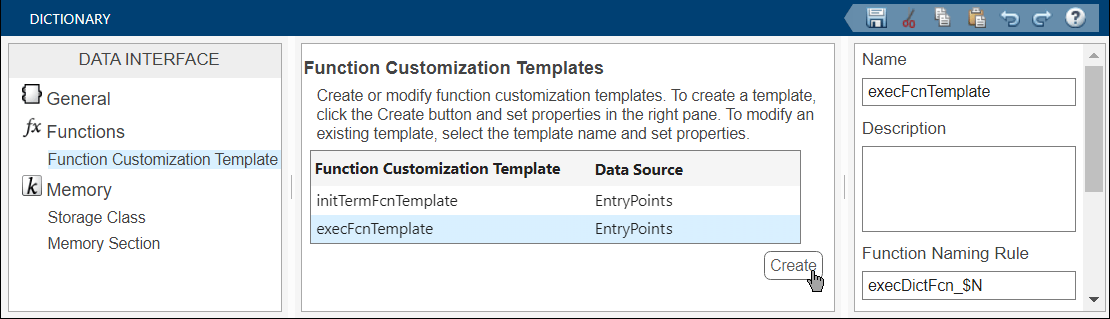
Specify the new function customization templates as the default templates for the Initialize/Terminate function category and the Execution function category:
Open the Code Mappings editor and navigate to the Function Defaults tab. For the Initialize/Terminate category, select initTermFcnTemplate from the Function Custom Template list. For the Execution category, select execFcnTemplate from the Function Custom Template list.
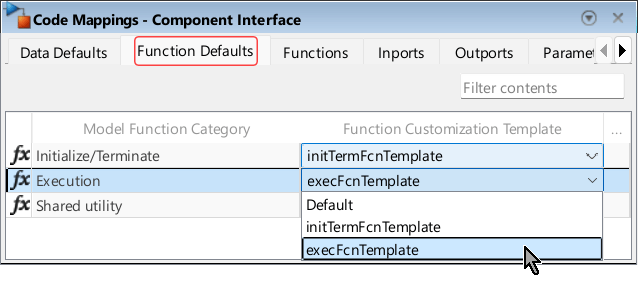
The naming rule initTermDictFcn_$N is applied to the initialization and termination functions, and the naming rule execDictFcn_$N is applied to the step function.
In the Simulink Toolstrip, select the C Coder tab. Then, in the Generate Code section, click Generate Code  to generate code from the model.

In the Code pane, navigate to the generated header file EntryPoints.h and examine the declaration of the model entry-point functions.
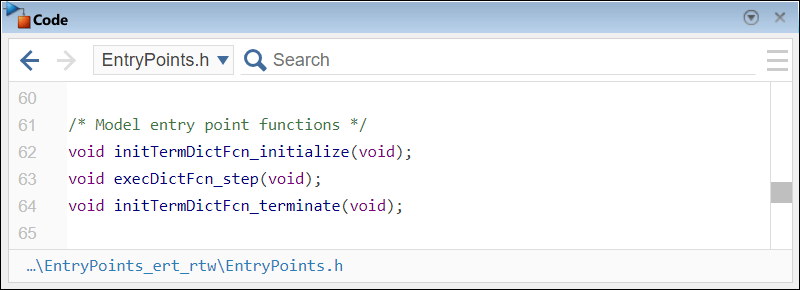
The function names adhere to the naming rules you specified in the function customization templates.
Specify Function Customization Template for Individual Functions
When you specify a function customization template for an individual entry-point function, its naming rule overrides the naming rule of the function customization template specified for the function category (if there is one). Open the model dictionary again and add another template, loneFcnTemplate. Specify Function Naming Rule for this template as loneDictFcn_$N.
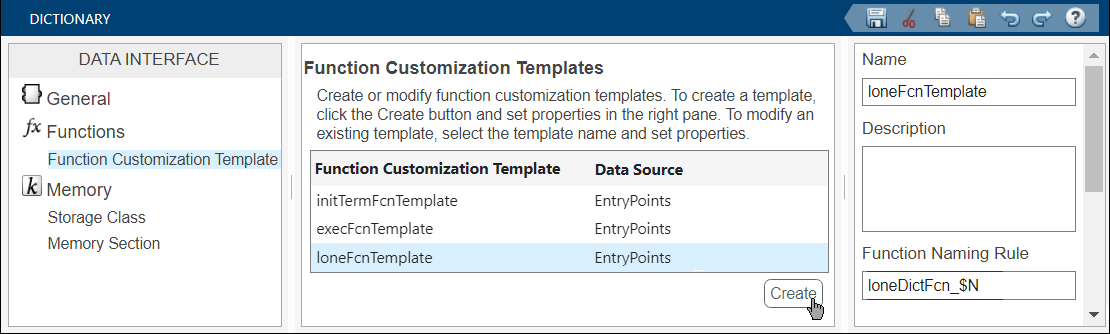
Use this new function customization template for the termination function and for the step function. In the Code Mappings editor, navigate to the Functions tab. For the Terminate and Periodic: D1 functions, select loneDictTemplate from the Function Custom Template list.
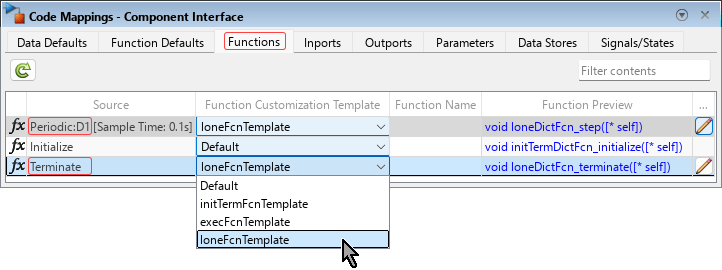
The values of the Function Preview column are updated for the periodic function and the terminate function according to the naming rule of the loneDicFcn template.
Generate code from the model again, and examine the generated entry-point function declarations in the header file EntryPoints.h.
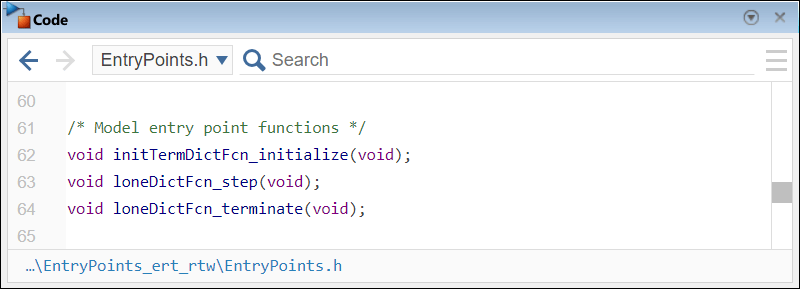
The initialization function name adheres to the category naming rule while the termination function and the step function names adhere to the naming rule of the individually specified template.
Explicitly Specify Function Naming Rule
Specifying naming rules for individual entry-point functions explicitly overrides the naming rules you specify in function customization templates. In the Code Mappings editor, in the Functions tab, locate the initialization function entry. Double-click the Function Name cell to make it editable. Enter the naming rule explicitRule_$N (and click outside the cell to end the editing of the table cell).
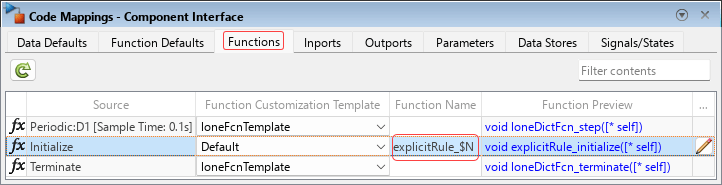
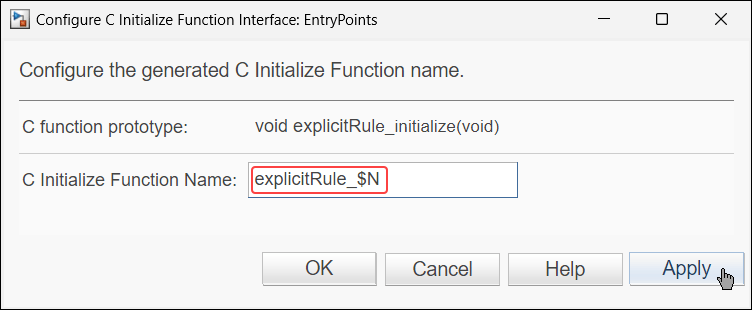
Alternatively, click the Function Preview cell of the table entry to open the Configure C Initialize Function Interface dialog box. In it, specify the naming rule for the function, explicitRule_$N.
Generate code from the model again, and examine the declaration of the initialization function to see its revised name.
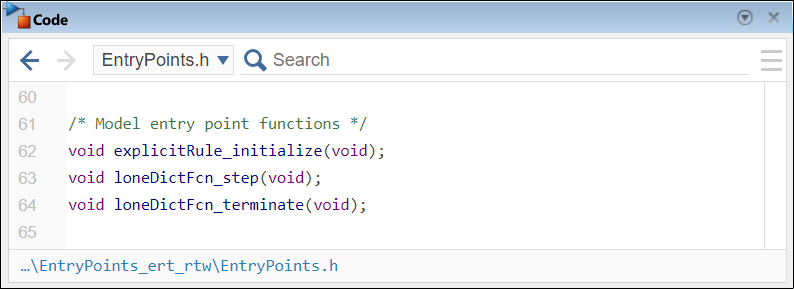
The name of the generated initialization function adheres to the explicit naming rule you specified, explicitRule_$N.

