arima
R2026bCreate univariate autoregressive integrated moving average (ARIMA) model
Description
The arima function returns an arima object
specifying the functional form and storing the parameter values of an ARIMA(p,D,q) model for a
univariate response process yt.
arima enables you to create variations of the ARIMA model, including:
An autoregressive (AR(p)), moving average (MA(q)), or ARMA(p,q) model.
A model containing multiplicative seasonal components (SARIMA(p,D,q)⨉(ps,Ds,qs)s).
A model containing a linear regression component for exogenous covariates (ARIMAX).
A composite conditional mean and conditional variance model. For example, you can create an ARMA conditional mean model containing a GARCH conditional variance model (
garch).
The key components of an arima object are the polynomial degrees (for
example, the AR polynomial degree p and the degree of integration
D) because they completely specify the model structure. Given polynomial
degrees, all other parameters, such as coefficients and innovation-distribution parameters,
are unknown and estimable unless you specify their values. For more details on creating a
model object, see Represent Univariate Dynamic Conditional Mean Models in MATLAB.
To estimate a model containing unknown parameter values, pass the model and data to
estimate. To work with an estimated or fully specified arima
object, pass it to an object function.
Alternatively, you can:
Create and work with
arimamodel objects interactively by using Econometric Modeler.Model serial correlation in a disturbance series of a regression model by creating a regression model with ARIMA errors. For more details, see
regARIMAand Alternative ARIMA Model Representations.
Creation
Description
Mdl = arima
Mdl = arima(p,D,q)p,D,q) model containing nonseasonal AR polynomial lags from 1 through p, the degree D nonseasonal integration polynomial, and nonseasonal MA polynomial lags from 1 through q.
This shorthand syntax provides an easy way to create a model template in which you specify the degrees of the nonseasonal polynomials explicitly. The model template is suited for unrestricted parameter estimation. After you create a model, you can alter property values using dot notation.
Mdl = arima(Name,Value)'ARLags',[1 4],'AR',{0.5 –0.1} specifies the values –0.5 and 0.1 for the nonseasonal AR polynomial coefficients at lags 1 and 4, respectively.
This longhand syntax allows you to create more flexible models. arima infers all polynomial degrees from the properties that you set. Therefore, property values that correspond to polynomial degrees must be consistent with each other.
For details on how model parameters and object properties correspond, see ARIMA Model Parameters and Corresponding Object Properties.
Input Arguments
Name-Value Arguments
Properties
Object Functions
estimate | Fit univariate ARIMA or ARIMAX model to data |
summarize | Display univariate ARIMA or ARIMAX model estimation results |
infer | Infer univariate ARIMA or ARIMAX model residuals or conditional variances |
filter | Filter disturbances using univariate ARIMA or ARIMAX model |
impulse | Generate univariate ARIMA model impulse response function (IRF) |
simulate | Monte Carlo simulation of univariate ARIMA or ARIMAX models |
forecast | Forecast univariate ARIMA or ARIMAX model responses or conditional variances |
Examples
Create a default regression model with ARIMA errors by using regARIMA.
Mdl = regARIMA
Mdl =
  regARIMA with properties:

     Description: "ARMA(0,0) Error Model (Gaussian Distribution)"
      SeriesName: "Y"
    Distribution: Name = "Gaussian"
       Intercept: NaN
            Beta: [1×0]
               P: 0
               Q: 0
              AR: {}
             SAR: {}
              MA: {}
             SMA: {}
        Variance: NaN
Mdl is an regARIMA object. Properties of the model appear at the command line.
The default model is
where is an unknown constant and is a series of iid Gaussian random variables with mean 0 and variance .
Mdl is a model template for estimation. You can modify property values by using dot notation or fit the model to data by using estimate, but you cannot pass Mdl to any other object function.
Create a default ARIMA model by using arima.
Mdl = arima
Mdl =
  arima with properties:

     Description: "ARIMA(0,0,0) Model (Gaussian Distribution)"
      SeriesName: "Y"
    Distribution: Name = "Gaussian"
               P: 0
               D: 0
               Q: 0
        Constant: NaN
              AR: {}
             SAR: {}
              MA: {}
             SMA: {}
     Seasonality: 0
            Beta: [1×0]
        Variance: NaN
Mdl is an arima object. Properties of the model appear at the command line.
The default model is
,
where is an unknown constant and is a series of iid Gaussian random variables with mean 0 and variance .
Mdl is a model template for estimation. You can modify property values by using dot notation or fit the model to data by using estimate, but you cannot pass Mdl to any other object function.
Create the ARIMA(2,1,1) model represented by this equation:
where is a series of iid Gaussian random variables. Use the longhand syntax to specify parameter values in the equation written in difference-equation notation:
Mdl = arima('ARLags',2,'AR',-0.5,'D',1,'MA',-0.2,...
    'Constant',3.1)
Mdl =
  arima with properties:

     Description: "ARIMA(2,1,1) Model (Gaussian Distribution)"
      SeriesName: "Y"
    Distribution: Name = "Gaussian"
               P: 3
               D: 1
               Q: 1
        Constant: 3.1
              AR: {-0.5} at lag [2]
             SAR: {}
              MA: {-0.2} at lag [1]
             SMA: {}
     Seasonality: 0
            Beta: [1×0]
        Variance: NaN
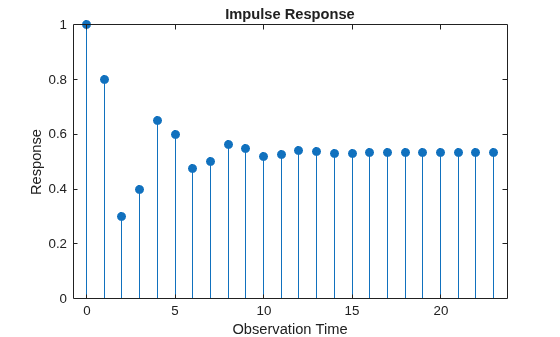
Mdl is a fully specified arima object because all its parameters are known. You can pass Mdl to any arima object function except estimate. For example, plot the impulse response function of the model for 24 periods by using impulse.
impulse(Mdl,24)
Create the AR(1) model represented by this equation:
where is a series of iid Gaussian random variables with mean 0 and variance 0.5. Use the shorthand syntax to specify an AR(1) model template, then use dot notation to set the Constant and Variance properties.
Mdl = arima(1,0,0);
Mdl.Constant = 1;
Mdl.Variance = 0.5;
Mdl
Mdl =
  arima with properties:

     Description: "ARIMA(1,0,0) Model (Gaussian Distribution)"
      SeriesName: "Y"
    Distribution: Name = "Gaussian"
               P: 1
               D: 0
               Q: 0
        Constant: 1
              AR: {NaN} at lag [1]
             SAR: {}
              MA: {}
             SMA: {}
     Seasonality: 0
            Beta: [1×0]
        Variance: 0.5
Mdl is a partially specified arima object. You can modify property values by using dot notation or fit the unknown coefficient to data by using estimate, but you cannot pass Mdl to any other object function.
Create the ARIMA(3,1,2) model represented by this equation:
,
where is a series of iid Gaussian random variables with mean 0 and variance .
Because the model contains only nonseasonal polynomials, use the shorthand syntax.
Mdl = arima(3,1,2)
Mdl =
  arima with properties:

     Description: "ARIMA(3,1,2) Model (Gaussian Distribution)"
      SeriesName: "Y"
    Distribution: Name = "Gaussian"
               P: 4
               D: 1
               Q: 2
        Constant: NaN
              AR: {NaN NaN NaN} at lags [1 2 3]
             SAR: {}
              MA: {NaN NaN} at lags [1 2]
             SMA: {}
     Seasonality: 0
            Beta: [1×0]
        Variance: NaN
The property P is equal to + = 4. NaN-valued elements indicate estimable parameters.
To include additive seasonal lags, specify the lags matching the appropriate periodicity. For example, create the additive monthly MA(12) model represented in this equation:
where is a series of iid Gaussian random variables with mean 0 and variance .
Mdl = arima('Constant',0,'MALags',[1 12])
Mdl =
  arima with properties:

     Description: "ARIMA(0,0,12) Model (Gaussian Distribution)"
      SeriesName: "Y"
    Distribution: Name = "Gaussian"
               P: 0
               D: 0
               Q: 12
        Constant: 0
              AR: {}
             SAR: {}
              MA: {NaN NaN} at lags [1 12]
             SMA: {}
     Seasonality: 0
            Beta: [1×0]
        Variance: NaN
Create the SARIMA model (multiplicative, monthly MA model template with one degree of seasonal and nonseasonal integration) represented by this equation:
where is a series of iid Gaussian random variables with mean 0 and variance .
Mdl = arima('Constant',0,'D',1,'Seasonality',12,...
	'MALags',1,'SMALags',12)
Mdl =
  arima with properties:

     Description: "ARIMA(0,1,1) Model Seasonally Integrated with Seasonal MA(12) (Gaussian Distribution)"
      SeriesName: "Y"
    Distribution: Name = "Gaussian"
               P: 13
               D: 1
               Q: 13
        Constant: 0
              AR: {}
             SAR: {}
              MA: {NaN} at lag [1]
             SMA: {NaN} at lag [12]
     Seasonality: 12
            Beta: [1×0]
        Variance: NaN
Create the AR(3) model represented by this equation:
where is a series of iid Gaussian random variables with mean 0 and variance 0.01.
Mdl = arima('Constant',0.05,'AR',{0.6,0.2,-0.1},'Variance',0.01)
Mdl =
  arima with properties:

     Description: "ARIMA(3,0,0) Model (Gaussian Distribution)"
      SeriesName: "Y"
    Distribution: Name = "Gaussian"
               P: 3
               D: 0
               Q: 0
        Constant: 0.05
              AR: {0.6 0.2 -0.1} at lags [1 2 3]
             SAR: {}
              MA: {}
             SMA: {}
     Seasonality: 0
            Beta: [1×0]
        Variance: 0.01
Add a nonseasonal MA term at lag 2 with coefficient 0.2. Then, display the MA property.
Mdl.MA = {0 0.2}Mdl =
arima with properties:
Description: "ARIMA(3,0,2) Model (Gaussian Distribution)"
SeriesName: "Y"
Distribution: Name = "Gaussian"
P: 3
D: 0
Q: 2
Constant: 0.05
AR: {0.6 0.2 -0.1} at lags [1 2 3]
SAR: {}
MA: {0.2} at lag [2]
SMA: {}
Seasonality: 0
Beta: [1×0]
Variance: 0.01
Mdl.MA
ans = 1×2 cell array
    {[0]}    {[0.2000]}
In the model display, lags indicates the lags to which the corresponding coefficients are associated. Although MATLAB® removes zero-valued coefficients from the display, the properties storing coefficients preserve them.
Change the model constant to 1.
Mdl.Constant = 1
Mdl =
  arima with properties:

     Description: "ARIMA(3,0,2) Model (Gaussian Distribution)"
      SeriesName: "Y"
    Distribution: Name = "Gaussian"
               P: 3
               D: 0
               Q: 2
        Constant: 1
              AR: {0.6 0.2 -0.1} at lags [1 2 3]
             SAR: {}
              MA: {0.2} at lag [2]
             SMA: {}
     Seasonality: 0
            Beta: [1×0]
        Variance: 0.01
Create an AR(1) model template and specify iid -distributed innovations with unknown degrees of freedom. Use the longhand syntax.
Mdl = arima('ARLags',1,'Distribution',"t")
Mdl =
  arima with properties:

     Description: "ARIMA(1,0,0) Model (t Distribution)"
      SeriesName: "Y"
    Distribution: Name = "t", DoF = NaN
               P: 1
               D: 0
               Q: 0
        Constant: NaN
              AR: {NaN} at lag [1]
             SAR: {}
              MA: {}
             SMA: {}
     Seasonality: 0
            Beta: [1×0]
        Variance: NaN
The degrees of freedom DoF is NaN, which indicates that the degrees of freedom is estimable.
Create the fully specified AR(1) model represented by this equation:
where is an iid series of -distributed random variables with 10 degrees of freedom. Use the longhand syntax.
innovdist = struct('Name',"t",'DoF',10);
Mdl = arima('Constant',0,'AR',{0.6},...
    'Distribution',innovdist)
Mdl =
  arima with properties:

     Description: "ARIMA(1,0,0) Model (t Distribution)"
      SeriesName: "Y"
    Distribution: Name = "t", DoF = 10
               P: 1
               D: 0
               Q: 0
        Constant: 0
              AR: {0.6} at lag [1]
             SAR: {}
              MA: {}
             SMA: {}
     Seasonality: 0
            Beta: [1×0]
        Variance: NaN
Create the ARMA(1,1) conditional mean model containing an ARCH(1) conditional variance model represented by these equations:
Create the ARMA(1,1) conditional mean model template by using the shorthand syntax.
Mdl = arima(1,0,1)
Mdl =
  arima with properties:

     Description: "ARIMA(1,0,1) Model (Gaussian Distribution)"
      SeriesName: "Y"
    Distribution: Name = "Gaussian"
               P: 1
               D: 0
               Q: 1
        Constant: NaN
              AR: {NaN} at lag [1]
             SAR: {}
              MA: {NaN} at lag [1]
             SMA: {}
     Seasonality: 0
            Beta: [1×0]
        Variance: NaN
The Variance property of Mdl is NaN, which means that the model variance is an unknown constant.
Create the ARCH(1) conditional variance model template by using the shorthand syntax of garch.
CondVarMdl = garch(0,1)
CondVarMdl =
  garch with properties:

     Description: "GARCH(0,1) Conditional Variance Model (Gaussian Distribution)"
      SeriesName: "Y"
    Distribution: Name = "Gaussian"
               P: 0
               Q: 1
        Constant: NaN
           GARCH: {}
            ARCH: {NaN} at lag [1]
          Offset: 0
Create the composite conditional mean and variance model template by setting the Variance property of Mdl to CondVarMdl using dot notation.
Mdl.Variance = CondVarMdl
Mdl =
  arima with properties:

     Description: "ARIMA(1,0,1) Model (Gaussian Distribution)"
      SeriesName: "Y"
    Distribution: Name = "Gaussian"
               P: 1
               D: 0
               Q: 1
        Constant: NaN
              AR: {NaN} at lag [1]
             SAR: {}
              MA: {NaN} at lag [1]
             SMA: {}
     Seasonality: 0
            Beta: [1×0]
        Variance: [GARCH(0,1) Model]
All NaN-valued properties of the conditional mean and variance models are estimable.
Create an ARMAX(1,2) model for predicting changes in the US personal consumption expenditure based on changes in paid compensation of employees.
Load the US macroeconomic data set.
load Data_USEconModelDataTimeTable is a MATLAB® timetable containing quarterly macroeconomic measurements from 1947:Q1 through 2009:Q1. PCEC is the personal consumption expenditure series, and COE is the paid compensation of employees series. Both variables are in levels. For more details on the data, enter Description at the command line.
The series are nonstationary. To avoid spurious regression, stabilize the variables by converting the levels to returns using price2ret. Compute the sample size.
pcecret = price2ret(DataTimeTable.PCEC);
coeret = price2ret(DataTimeTable.COE);
T = numel(pcecret);
Because conversion from levels to returns involves applying the first difference, the transformation reduces the total sample size by one observation.
Create an ARMA(1,2) model template using the shorthand syntax.
Mdl = arima(1,0,2);
The exogenous component enters the model during estimation. Therefore, you do not need to set the Beta property of Mdl to a NaN so that estimate fits the model to the data with the other parameters.
ARMA(1,2) process initialization requires Mdl.P = 1 observation. Therefore, the presample period is the first time point in the data (first row) and the estimation sample is the rest of the data. Specify variables identifying the presample and estimation periods.
idxpre = Mdl.P;
idxest = (Mdl.P + 1):T;
Fit the model to the data. Specify the presample by using the 'Y0' name-value pair argument, and specify the exogenous data by using the 'X' name-value pair argument.
EstMdl = estimate(Mdl,pcecret(idxest),'Y0',pcecret(idxpre),...
    'X',coeret(idxest));
    ARIMAX(1,0,2) Model (Gaussian Distribution):

                  Value      StandardError    TStatistic      PValue
                _________    _____________    __________    __________

    Constant    0.0091866       0.001269         7.239      4.5203e-13
    AR{1}        -0.13506       0.081986       -1.6474        0.099478
    MA{1}       -0.090445       0.082052       -1.1023         0.27034
    MA{2}         0.29671       0.064589        4.5939      4.3505e-06
    Beta(1)        0.5831       0.048884        11.928      8.4532e-33
    Variance    5.305e-05     3.1387e-06        16.902       4.358e-64
All estimates, except the lag 1 MA coefficient, are significant at 0.1 level.
Display EstMdl.
EstMdl
EstMdl =
  arima with properties:

     Description: "ARIMAX(1,0,2) Model (Gaussian Distribution)"
      SeriesName: "Y"
    Distribution: Name = "Gaussian"
               P: 1
               D: 0
               Q: 2
        Constant: 0.00918662
              AR: {-0.135063} at lag [1]
             SAR: {}
              MA: {-0.0904451 0.296714} at lags [1 2]
             SMA: {}
     Seasonality: 0
            Beta: [0.583095]
        Variance: 5.30503e-05
Like Mdl, EstMdl is an arima model object representing an ARMA(1,2) process. Unlike Mdl, EstMdl is fully specified because it is fit to the data, and EstMdl contains an exogenous component, so it is an ARMAX(1,2) model.
Create an arima model object for the random walk represented in this equation:
where is a series of iid Gaussian random variables with mean 0 and variance 1.
Mdl = arima(0,1,0);
Mdl.Constant = 0;
Mdl.Variance = 1;
Mdl
Mdl =
  arima with properties:

     Description: "ARIMA(0,1,0) Model (Gaussian Distribution)"
      SeriesName: "Y"
    Distribution: Name = "Gaussian"
               P: 1
               D: 1
               Q: 0
        Constant: 0
              AR: {}
             SAR: {}
              MA: {}
             SMA: {}
     Seasonality: 0
            Beta: [1×0]
        Variance: 1
Mdl is a fully specified arima model object.
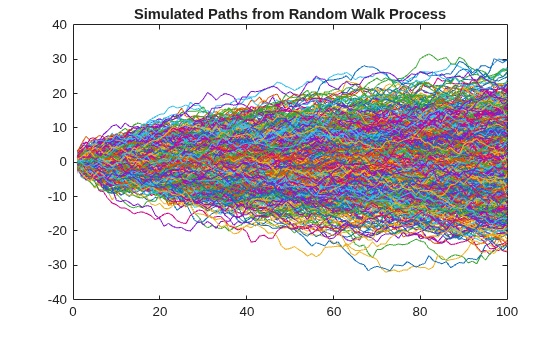
Simulate and plot 1000 paths of length 100 from the random walk.
rng(1) % For reproducibility
Y = simulate(Mdl,100,'NumPaths',1000);
plot(Y)
title('Simulated Paths from Random Walk Process')
Forecast NASDAQ daily closing prices over a 500-day horizon.
Load the US equity indices data set.
load Data_EquityIdxThe data set contains daily NASDAQ closing prices from 1990 through 2001. For more details, enter Description at the command line.
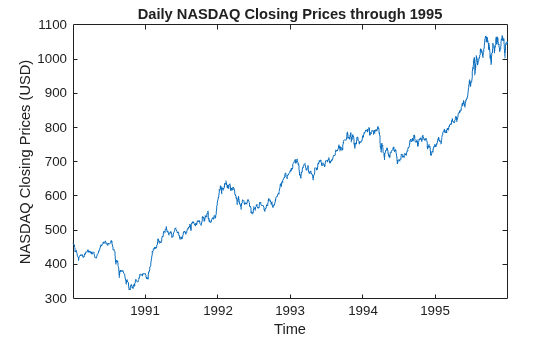
Plot the daily NASDAQ prices through the end of 1995.
d1995 = dates(dates < datetime(1996,01,01));

figure
plot(d1995,DataTimeTable.NASDAQ(d1995))
title("Daily NASDAQ Closing Prices through 1995")
ylabel("NASDAQ Closing Prices (USD)")
xlabel("Time")
Suppose an ARIMA(1,1,1) model is appropriate for describing this series.
Create an ARIMA(1,1,1) model template.
Mdl = arima(1,1,1);
estimate requires a presample of size Mdl.P = 2.
Fit the model to the data. Specify the first two observations as a presample.
psDates = d1995(1:Mdl.P);
estDates = d1995((Mdl.P + 1):end);
EstMdl = estimate(Mdl,DataTimeTable.NASDAQ(estDates), ...
    Y0=DataTimeTable.NASDAQ(psDates));
    ARIMA(1,1,1) Model (Gaussian Distribution):

                 Value      StandardError    TStatistic     PValue
                ________    _____________    __________    ________

    Constant     0.38791       0.17618         2.2018       0.02768
    AR{1}       0.009064      0.087491         0.1036       0.91749
    MA{1}        0.19798       0.08449         2.3433      0.019116
    Variance      29.463       0.63538         46.371             0
Forecast the closing values into a 500-day horizon by passing the estimated model to forecast. To initialize the model for forecasting, specify the last two observations in the estimation data as a presample.
fh = 500;
fhDates = dates(dates >= datetime(1996,01,01));
fhDates = fhDates(1:500);
T = numel(d1995) + numel(fhDates);
yf0 = DataTimeTable.NASDAQ(estDates(end - 1:end));
yf = forecast(EstMdl,fh,yf0);
Plot the estimation sample, the observations in the forecast horizon, and the forecasts.
figure
h1 = plot(dates(1:T),DataTable.NASDAQ(1:T));
hold on
h2 = plot(fhDates,yf);
legend([h1 h2],["Observed" "Forecasted"], ...
	     Location="northwest")
title("NASDAQ Composite Index: " + string(dates(1)) + " – " + string(fhDates(end)))
xlabel("Time (days)")
ylabel("Closing Price")
hold off
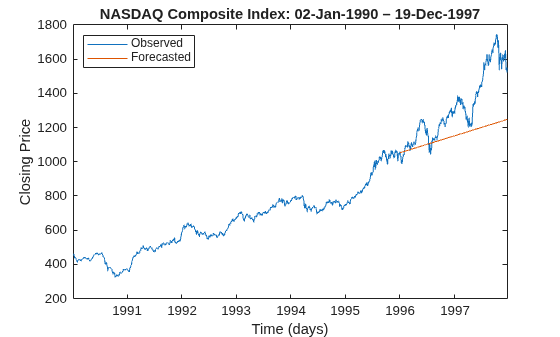
After the start of 1995, the model forecasts almost always underestimate the true closing prices.
More About
References
[1] Box, George E. P., Gwilym M. Jenkins, and Gregory C. Reinsel. Time Series Analysis: Forecasting and Control. 3rd ed. Englewood Cliffs, NJ: Prentice Hall, 1994.
[2] Hamilton, James D. Time Series Analysis. Princeton, NJ: Princeton University Press, 1994.
Version History
Introduced in R2012aSee Also
Apps
Objects
Topics
- Analyze Time Series Data Using Econometric Modeler
- Represent Univariate Dynamic Conditional Mean Models in MATLAB
- Modify Properties of Conditional Mean Model Objects
- Specify Conditional Mean Model Innovation Distribution
- Create Autoregressive (AR) Models
- Create Moving Average (MA) Models
- Create Autoregressive Moving Average (ARMA) Models
- Create Autoregressive Integrated Moving Average (ARIMA) Models
- Create ARIMA Models That Include Exogenous Covariates
- Create Seasonal ARIMA (SARIMA) Models
- Create Seasonal ARIMA (SARIMA) Model for Time Series Data
- Specify Conditional Mean and Variance Models

