Verify Fault Mitigation Logic by Using Fault Tree Analysis and Simulink Test
R2026bThis example shows how to verify fault mitigation logic by running tests from a fault tree document. By using Simulink® Test™, Requirements Toolbox™, and Simulink Fault Analyzer™, you can validate whether a model mitigates fault injection scenarios, identify design discrepancies, and maintain traceability between safety artifacts and test results.
A fault tree is a predictive analysis that calculates the probability of a system-level failure due to a combination of basic events and logical relationships. In this example, the fault tree maps its basic events to faults in the model. To test the prediction, the fault tree links each basic event to a test that injects a fault and simulates the model. You run the linked tests from the fault tree and compare the results against the fault tree predictions. When the test fails, the fault tree document flags the discrepancy for you to resolve.
Open and Set Up the Example Files
Open the example model, the fault tree document, and the test file. Set up the faults and links by using the aircraftFaultTreeTestsSetup helper function. The helper function deletes the existing Simulink Fault Analyzer model artifacts, replaces them with the faults used in the example, and establishes the links between the fault tree document and the test cases.
mdlName = "aircraftElevatorFaultAnalyzer";
open_system(mdlName)
ftaName = "elevatorFaultTreeTM.mldatx";
aircraftFTA = safetyAnalysisMgr.openDocument(ftaName);
aircraftFaultTreeTestsSetup
Inspect the Fault Tree Document
Open the Safety Analysis Manager to view the fault tree document, elevatorFaultTreeTM.mldatx.
safetyAnalysisManager
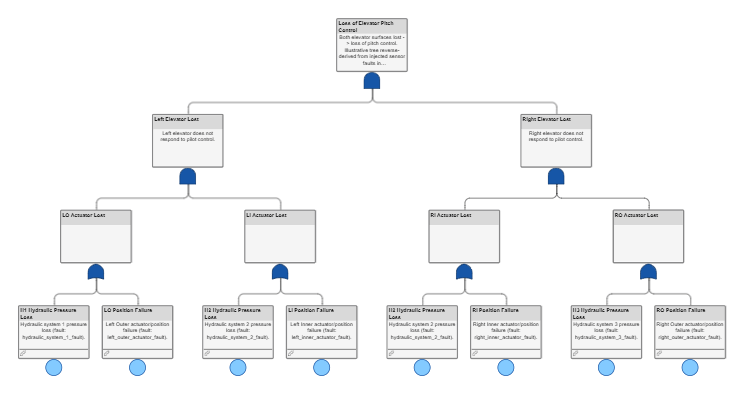
The fault tree document predicts how faults combine to cause a loss of the elevator. In the fault tree:
The top-level gate represents the total loss of control of the aircraft elevator. Both the left and the right elevators must fail in order for this failure to occur.
The
Left Elevator LostandRight Elevator Lostgates represent the loss of the left or right elevator. The elevators fail only if their interior and exterior actuators fail.Seven basic events contribute to the failure at the top-level gate. Although each event is independent, the
H2 Hydraulic Pressure Lossevent is a shared event that is an input to two gates. Each event is linked to a fault in the model. Three of the faults affect the hydraulic systems, and four affect the actuator positions.
Inspect the Model and Faults
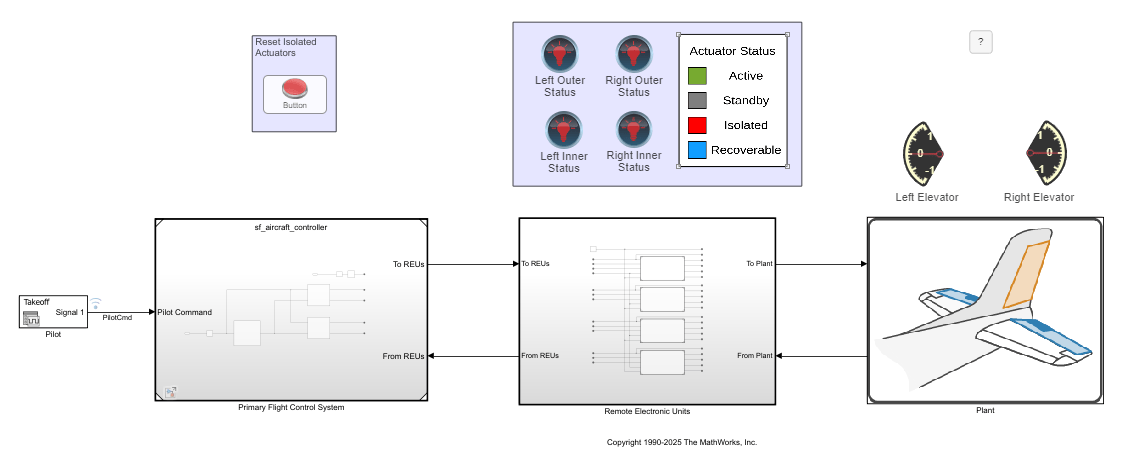
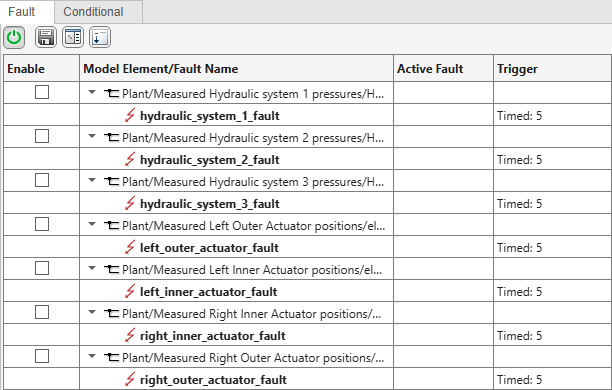
View the aircraftElevatorFaultAnalyzer.slx model. This model uses the same faults as the Test Fault Mitigation Logic by Using Fault Tree Analysis example. The model contains seven faults, each of which corresponds to a basic event in the fault tree.
Open the Fault Table pane to view the faults. In the Apps tab, click Fault Analyzer. In the Fault Analyzer tab, in the View section, click Fault Table.
View the Tests
To test the fault mitigation logic, this example uses tests in the Simulink Test Manager. See Write and Run Tests That Inject Faults by Using the Simulink Test Manager. Open the Simulink Test Manager and load the aircraftTestsFTA.mldatx test file. In the Apps tab, click Simulink Test. In the Tests tab, click Simulink Test Manager. In the Simulink Test Manager, open the aircraftTestsFTA.mldatx test file. Alternatively, enter this command:
sltest.testmanager.load("aircraftTestsFTA.mldatx");
sltest.testmanager.view;
The Simulink Test Manager stores the tests and their properties. This test file has seven test cases, one for each fault.
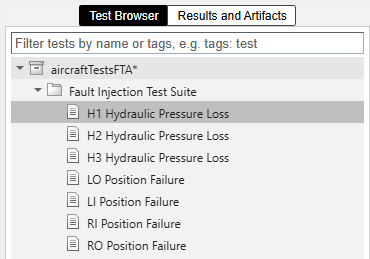
Each test case specifies the fault to inject in the fault set. To view the fault set, in the Simulink Test Manager, in the left pane, click Test Browser. Expand the test file and the test suite, and select a test. In the right pane, expand the Fault Settings section to view the fault set. This image shows the fault set for the test case that injects the hydraulic_system_1_fault fault.

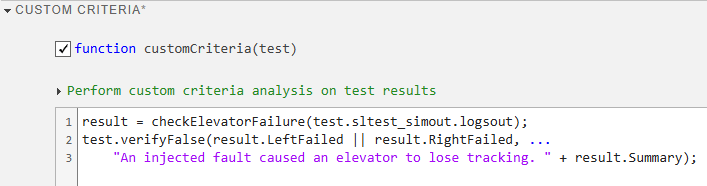
To establish the pass or fail criteria for the tests, each test case includes a custom criteria. The criteria evaluates a script, checkElevatorFailure, based on the test results. If the pilot control deviates from the elevator position beyond a specified threshold, the script indicates that one or both of the elevators fail, and the test fails. To inspect how the script works, open checkElevatorFailure.
Because the test is identical for each fault, each test uses the same custom criteria. To view the custom criteria, select a test and expand the Custom Criteria section.
Simulate and Resolve Design Inconsistencies
To execute the tests from the fault tree document, you create and execute a callback. See Write Callbacks to Analyze Safety Analysis Manager Fault Tree Documents. In this example, the fault tree document executes a callback when you click Analyze Document  . The callback runs the code in the custom MATLAB® function
 validateAircraftFTAUsingTests, which checks that each event is linked to a test and runs the linked test.
Run the tests and verify that the fault logic in the fault tree is consistent with the behavior in the model. Click Analyze Document  .
.
runAnalysis(aircraftFTA)
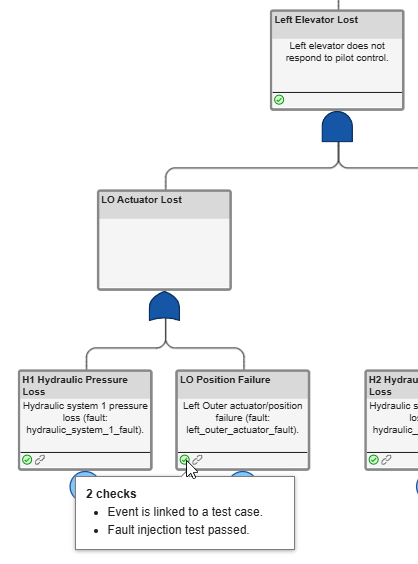
After running the tests, the analysis determines that each event is linked to a test, and four of the tests failed. The fault tree adds check and error flags to each event associated with a failed test, and error flags to four of the events and the Left Elevator Lost gate. Point to the flags to see the messages.
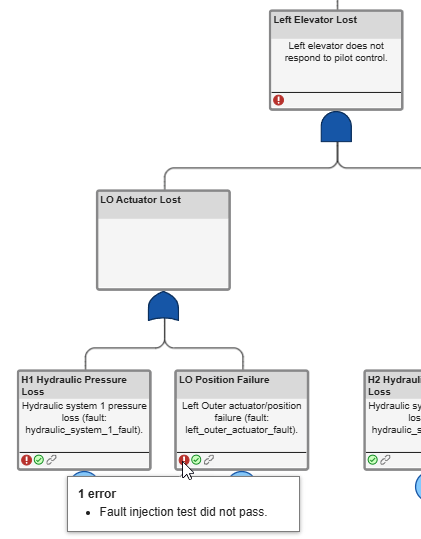
These results indicate that the logic in the fault tree is inconsistent with the test criteria, the model, or both.
Investigate the Inconsistency and Update the Model
Creating parity between your design, the fault tree, and the test cases is iterative. In this example, you update the control logic to solve the discrepancy.
In the model, open the primary flight control unit (PFCU) that models the fault mitigation logic for the inner-left actuator. Open the Primary Flight Control System referenced model, and then open the PFCU2 subsystem. The PFCU2 subsystem models the control systems for the inner-left and inner-right actuators. Open the Left Inner chart to inspect the logic.
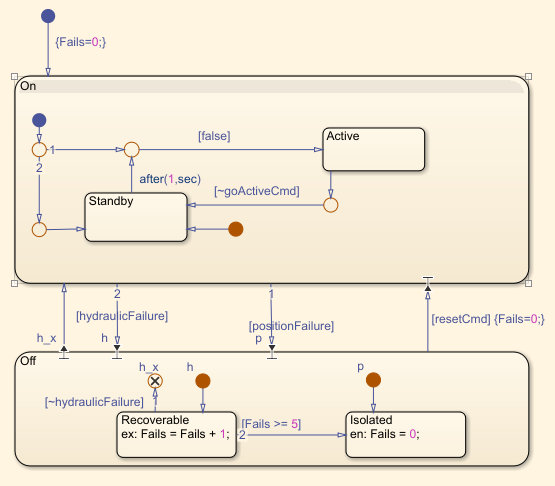
The transition with the label false does not implement the intended logic. When the left actuator is inactive and there are no faults, the elevator tracks the pilot command normally. When the goActiveCmd input is true because of a fault, the chart should enter the Active state. Instead, nothing happens. To fix the transition, double-click the transition and enter goActiveCmd.
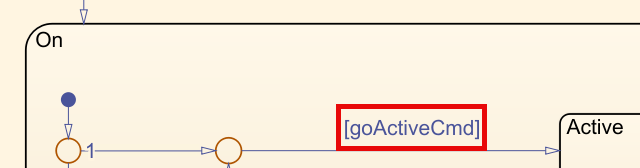
After updating the transition, save the model and run the analysis of the fault tree document again. This time, the events and intermediate gates have only check flags. The fault tree document, test cases, and model now align with each other.
If the fault mitigation logic requires additional protections, such as resilience against more than one fault, update the mitigation logic, the fault tree, the callback, and the tests, then rerun the analysis.

