bitget
Get bits at certain positions
Syntax
Description
Examples
Consider the following unsigned fixed-point fi number with a value of 85, word length 8, and fraction length 0:
a = fi(85,0,8,0); disp(bin(a))
01010101
Get the binary representation of the bit at position 4:
c = bitget(a,4);
bitget returns the bit at position 4 in the binary representation of a.
Begin with a signed fixed-point 3-by-3 matrix with word length 4 and fraction length 0.
a = fi([2 3 4;6 8 2;3 5 1],0,4,0); disp(bin(a))
0010 0011 0100 0110 1000 0010 0011 0101 0001
Get the binary representation of the bits at a specified position.
c = bitget(a,fi(2))
c =
1 1 0
1 0 1
1 0 0
DataTypeMode: Fixed-point: binary point scaling
Signedness: Unsigned
WordLength: 1
FractionLength: 0
MATLAB® returns a matrix of the bits in position fi(2) of a. The output matrix has the same dimensions as a, and a word length of 1.
Begin with a signed fixed-point vector with word length 16, fraction length 4.
a = fi([86 6 53 8 1],0,16,4); disp(bin(a))
0000010101100000 0000000001100000 0000001101010000 0000000010000000 0000000000010000
Create a vector that specifies the positions of the bits to get.
bit = [1,2,5,7,4]
bit = 1×5
1 2 5 7 4
Get the binary representation of the bits of a at the positions specified in bit.
c = bitget(a,bit)
c =
0 0 1 0 0
DataTypeMode: Fixed-point: binary point scaling
Signedness: Unsigned
WordLength: 1
FractionLength: 0
bitget returns a vector of the bits of a at the positions specified in bit. The output vector has the same length as inputs, a and bit, and a word length of 1.
Create a default fi object with a value of pi.
a = fi(pi); disp(bin(a))
0110010010001000
The default object is signed with a word length of 16.
Create a vector of the positions of the bits you want to get in a, and get the binary representation of those bits.
bit = fi([15,3,8,2]); c = bitget(a,bit)
c =
1 0 1 0
DataTypeMode: Fixed-point: binary point scaling
Signedness: Unsigned
WordLength: 1
FractionLength: 0
MATLAB® returns a vector of the bits in a at the positions specified by the index vector, bit.
Input Arguments
Input array, specified as a scalar, vector, matrix, or multidimensional
array of fixed-point fi objects. If a
and bit are both nonscalar, they must have the same
dimension. If a has a signed
numerictype, the bit representation of the stored
integer is in two's complement representation.
Data Types: fixed-point
fi
Bit index, specified as a scalar, vector, matrix or multidimensional array
of fi objects or built-in data types. If
a and bit are both nonscalar, they
must have the same dimension. bit must contain integer
values between 1 and the word length of
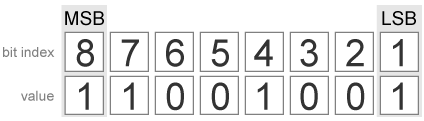
a, inclusive. The LSB (right-most
bit) is specified by bit index 1 and the
MSB (left-most bit) is specified by the word length
of a. bit does not need to be a vector
of sequential bit positions; it can also be a variable index value.
a = fi(pi,0,8); a.bin
11001001
Data Types: fi |
single | double |
int8 | int16 |
int32 | int64 |
uint8 | uint16 |
uint32 | uint64
Output Arguments
Output array, specified as an unsigned scalar, vector, matrix, or
multidimensional array with WordLength 1.
If a is an array and bit is a
scalar, c is an unsigned array with word length 1. This
unsigned array comprises the values of the bits at position
bit in each fixed-point element in
a.
If a is a scalar and bit is an
array, c is an unsigned array with word length 1. This
unsigned array comprises the values of the bits in a at
the positions specified in bit.
Extended Capabilities
C/C++ Code Generation
Generate C and C++ code using MATLAB® Coder™.
For VHDL®, generates the slice operator: a(idx).
For Verilog®, generates the slice operator: a[idx].
Version History
Introduced before R2006a
MATLAB Command
You clicked a link that corresponds to this MATLAB command:
Run the command by entering it in the MATLAB Command Window. Web browsers do not support MATLAB commands.
Seleziona un sito web
Seleziona un sito web per visualizzare contenuto tradotto dove disponibile e vedere eventi e offerte locali. In base alla tua area geografica, ti consigliamo di selezionare: .
Puoi anche selezionare un sito web dal seguente elenco:
Come ottenere le migliori prestazioni del sito
Per ottenere le migliori prestazioni del sito, seleziona il sito cinese (in cinese o in inglese). I siti MathWorks per gli altri paesi non sono ottimizzati per essere visitati dalla tua area geografica.
Americhe
- América Latina (Español)
- Canada (English)
- United States (English)
Europa
- Belgium (English)
- Denmark (English)
- Deutschland (Deutsch)
- España (Español)
- Finland (English)
- France (Français)
- Ireland (English)
- Italia (Italiano)
- Luxembourg (English)
- Netherlands (English)
- Norway (English)
- Österreich (Deutsch)
- Portugal (English)
- Sweden (English)
- Switzerland
- United Kingdom (English)