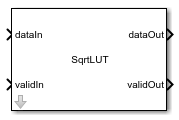
SqrtLUT
Libraries:
HDL Coder
Description
The SqrtLUT block computes the square root of an input signal by using a look-up table (LUT) and piecewise linear interpolation. Use this block for fixed-point signal processing applications where you need a high-speed square root operation with low latency and minimal resource usage. The SqrtLUT block normalizes input values outside the range [0,1] and then computes the square root by using piecewise linear interpolation based on the values in a lookup table. Finally, the block rescales the interpolated result and outputs it. For more information, see Compute Square Root Using Look-up Table Approach.
The block uses the validIn input port and validOut output port to indicate when the input data is valid and the output data is ready. Use these ports to simulate the block accurately with latency. The algorithm operates on a fixed-point format internally and maintains a fixed latency regardless of input data type. For more information, see Data Type Considerations.
To use this block in your Simulink® model, open the HDLMathLib library by entering this command
in the MATLAB® Command
Window:
open_system("HDLMathLib")Examples
This example shows how to compute the square root of fixed-point value and generate HDL code.
Create Data and Open Model
Create a variable that contains the data to compute. For this example, create a variable that contains a linear sweep. You can change these values according to your requirements.
SQRT_input = fi(1/2^15:1/2^15:1,0,16,15)';
Specify the word length for fixed-point data types and the latency for the model. The block maintains a fixed latency regardless of the input data type.
WL = 16; latency = 7;
Open the hdlcoderSqrtLUT model and specify a stop time sufficient to process all the input combinations.
stoptime = length(SQRT_input)-1+latency; open_system("hdlcoderSqrtLUT") sim("hdlcoderSqrtLUT")
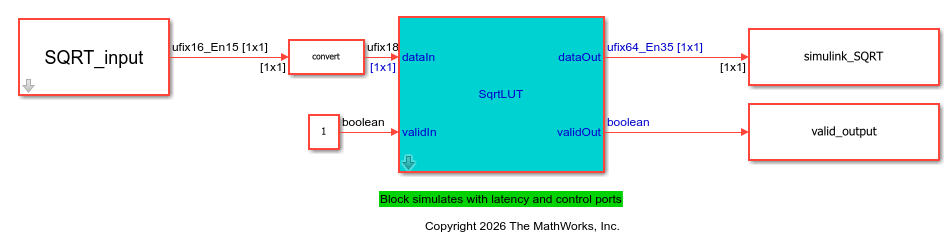
This figure shows the simulation waveform for the model. You can see that dataOut output is valid when validOut is 1, which is after 7 cycles.

Validate Simulink Output With Reference Value
To validate the output of the Simulink model, compare the output of the simulation to a reference value. Compute the reference output by using the sqrt function.
ref_SQRT = sqrt(double(SQRT_input));
Use logical indexing to extract the valid output.
implementation_SQRT = simulink_SQRT(valid_output);
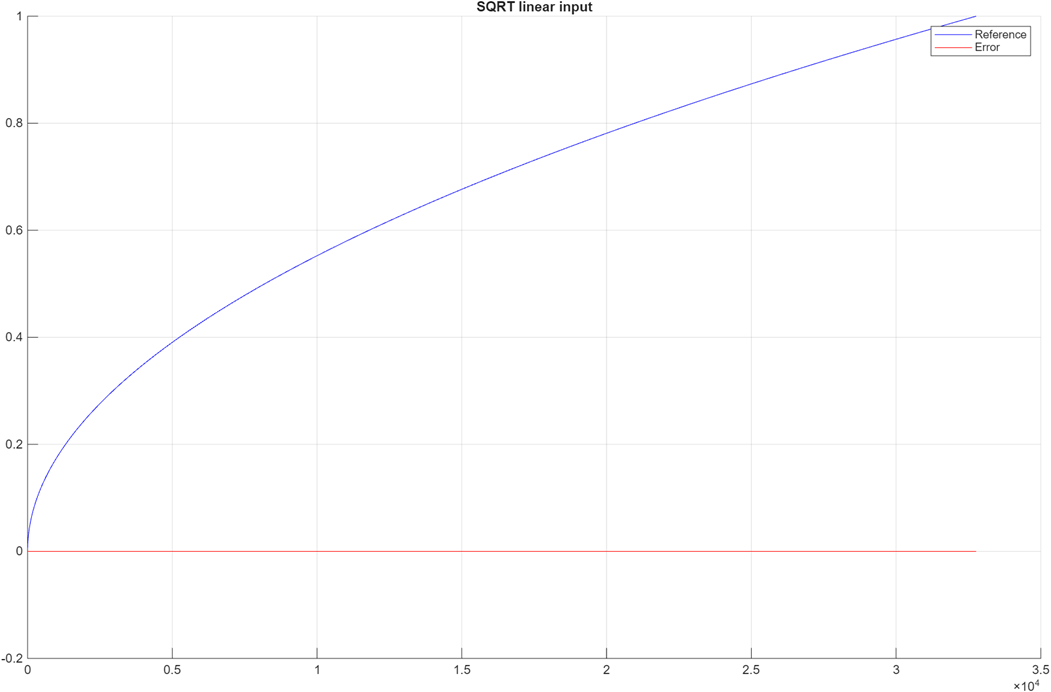
Plot the comparison results by using the comparison_plot_sqrt function. The maximum error value is significantly smaller than the output of the model.
comparison_plot_sqrtLUT(ref_SQRT,implementation_SQRT,1,"SQRT linear input");Maximum Error SQRT linear input 7.906744e-06 Maximum PctError SQRT linear input 1.358995e-03
Generate HDL Code for Square Root Implementation
Check the HDL settings of the model by using the hdlsaveparams function.
hdlsaveparams("hdlcoderSqrtLUT")%% Set Model 'hdlcoderSqrtLUT' HDL parameters
hdlset_param('hdlcoderSqrtLUT', 'Backannotation', 'on');
hdlset_param('hdlcoderSqrtLUT', 'HDLSubsystem', 'hdlcoderSqrtLUT/SqrtLUT');
hdlset_param('hdlcoderSqrtLUT', 'ProjectFolder', 'hdl_prj');
hdlset_param('hdlcoderSqrtLUT', 'ResetType', 'Synchronous');
hdlset_param('hdlcoderSqrtLUT', 'SynthesisTool', 'Xilinx Vivado');
hdlset_param('hdlcoderSqrtLUT', 'SynthesisToolChipFamily', 'Zynq UltraScale+');
hdlset_param('hdlcoderSqrtLUT', 'SynthesisToolDeviceName', 'xazu11eg-ffvf1517-1-i');
hdlset_param('hdlcoderSqrtLUT', 'TargetDirectory', 'hdl_prj\hdlsrc');
hdlset_param('hdlcoderSqrtLUT', 'TargetFrequency', 500);
hdlset_param('hdlcoderSqrtLUT', 'Traceability', 'on');
% Set Delay HDL parameters
hdlset_param('hdlcoderSqrtLUT/SqrtLUT/Linear_Interpolation/Delay12', 'ResetType', 'none');
% Set Delay HDL parameters
hdlset_param('hdlcoderSqrtLUT/SqrtLUT/Linear_Interpolation/Delay13', 'ResetType', 'none');
Generate HDL code for the model by using the makehdl function.
makehdl("hdlcoderSqrtLUT/SqrtLUT")### Working on the model hdlcoderSqrtLUT ### Generating HDL for hdlcoderSqrtLUT/SqrtLUT ### Using the config set for model hdlcoderSqrtLUT for HDL code generation parameters. ### Running HDL checks on the model 'hdlcoderSqrtLUT'. ### Begin compilation of the model 'hdlcoderSqrtLUT'... ### Begin compilation of the model 'hdlcoderSqrtLUT'... ### Working on the model 'hdlcoderSqrtLUT'... ### Working on... GenerateModel ### Begin model generation 'gm_hdlcoderSqrtLUT'... ### Copying DUT to the generated model.... ### Model generation complete. ### Generated model saved at hdl_prj/hdlsrc/hdlcoderSqrtLUT/gm_hdlcoderSqrtLUT.slx ### To highlight lookup tables mapped to RAM, click the following MATLAB script: hdl_prj/hdlsrc/hdlcoderSqrtLUT/highlightLUTPipeliningDiagnostic.m ### To clear highlighting, click the following MATLAB script: hdl_prj/hdlsrc/hdlcoderSqrtLUT/clearhighlighting.m ### Begin VHDL Code Generation for 'hdlcoderSqrtLUT'. ### Working on... Traceability ### Working on hdlcoderSqrtLUT/SqrtLUT/Linear_Interpolation as hdl_prj/hdlsrc/hdlcoderSqrtLUT/Linear_Interpolation.vhd. ### Working on hdlcoderSqrtLUT/SqrtLUT/Normalizer as hdl_prj/hdlsrc/hdlcoderSqrtLUT/Normalizer.vhd. ### Working on hdlcoderSqrtLUT/SqrtLUT/Variable_Right_Shift as hdl_prj/hdlsrc/hdlcoderSqrtLUT/Variable_Right_Shift.vhd. ### Working on hdlcoderSqrtLUT/SqrtLUT as hdl_prj/hdlsrc/hdlcoderSqrtLUT/SqrtLUT.vhd. ### Generating package file hdl_prj/hdlsrc/hdlcoderSqrtLUT/SqrtLUT_pkg.vhd. ### Code Generation for 'hdlcoderSqrtLUT' completed. ### Generating HTML files for code generation report at index.html ### Creating HDL Code Generation Check Report SqrtLUT_report.html ### HDL check for 'hdlcoderSqrtLUT' complete with 0 errors, 0 warnings, and 1 messages. ### HDL code generation complete.
close_system("hdlcoderSqrtLUT") close all;
Resource Summary of SqrtLUT Block
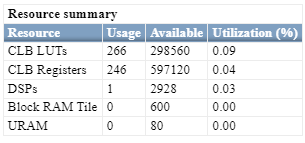
Use the HDL Workflow Advisor to perform FPGA synthesis of your model. In the Workflow Advisor, select the target device and run the synthesis by navigating to FPGA Synthesis and Analysis > Perform Synthesis and P/R > Run Implementation task. Right-click the task and choose Run to Selected Task. The figure illustrates the synthesis performance of the SqrtLUT block on a Xilinx Zynq UltraScale+ device.
Limitations
You cannot use these data types as input values for the block:
Vectors, matrices, or buses
Complex numbers
Signed integers
Additionally, you cannot use input values that have more than 32 bits.
Ports
Input
Value from which to calculate the square root, specified as a scalar.
Data Types: uint8 | uint16 | uint32 | fixed point
Whether the input signal is valid, specified as a scalar.
Data Types: Boolean
Output
Square root of the input signal, returned as a scalar.
Data Types: int8 | int16 | int32 | int64 | uint8 | uint16 | uint32 | uint64 | Boolean | fixed point
Whether output signal is valid, returned as a scalar.
Data Types: Boolean
Parameters
Specify the output data type. Set this parameter to Inherit: Inherit
via internal rule to inherit the data type or set it to another value to
specify the data type.
Programmatic Use
Block Parameter:
OutDataTypeStr |
| Type: character vector |
Values: 'Inherit: Inherit via
internal rule' | 'uint8' |
'uint16' | 'uint32' |
fixdt(1,16,0) | '<data type
expression>' |
Default: 'Inherit: Inherit via
internal rule' |
More About
The Sqrt block in
the HDLMathLib library computes square roots by using an iterative
algorithm for fixed-point arithmetic, which often results in higher latency and larger
hardware area. In contrast, the SqrtLUT block reduces both latency and
resource usage by applying LUT-based interpolation and a single multiplier.
This table compares the performance of the Sqrt block and the SqrtLUT block.
| Design Attribute | Sqrt Block | SqrtLUT Block |
|---|---|---|
| Computation Method | Iterative algorithm | LUT-based with piecewise linear interpolation |
| Accuracy | High precision | Low precision |
| Latency | The latency is higher compared to the SqrtLUT block. The latency depends on the word length of fixed-point data types. | The block provides a fixed latency of seven cycles, independent of the word length of the fixed-point inputs. |
| Resource Usage | More hardware usage | Lesser hardware usage |
| Input Types | Fixed-point | Fixed-point values less than or equal to 32 bits in length |
| Best For | Precision-critical designs | High-speed, low-latency designs |
The table below summarizes FPGA synthesis results for these two blocks The comparison highlights trade-offs in resource utilization, approximation error, and performance across different hardware targets. The synthesis results are computed based on the following block configuration:
Input type: ufix_32_18
Output type: ufix_64_35
Synthesis Results — Tool: Xilinx Vivado, Device: Zynq UltraScale+
| Metric | SqrtLUT Block Results | Sqrt Block Results |
|---|---|---|
| Fmax (MHz) | 350 | 200 |
| LUTs (logic) | 296 | 4038 |
| DSPs | 1 | 0 |
| Approximate Error | 1.25E‑3 | 1.18E‑8 |
Synthesis Results — Tool: Intel Quartus Pro, Device: Stratix 10
| Metric | SqrtLUT Block Results | Sqrt Block Results |
|---|---|---|
| Fmax (MHz) | 255 | 273 |
| ALUTs (logic) | 204 | 4287 |
| DSPs | 1 | 0 |
| Approximate Error | 1.25E‑3 | 1.18E‑8 |
Algorithms
The SqrtLUT block computes the square root by normalizing the values, interpolating the value linearly, and then rescaling it.
Normalization
First, the block normalizes the input by left-shifting it until the most significant bit (MSB) is set. To determine the shift amount:
The block checks for bits in groups of 16, 8, 4, or 2, and shifts the value 16, 8, 4, or 2 values to the left, respectively. For example, If the upper 16 bits are all zeros, the block shifts the values left by 16 bits.
Records the total shift amount.
This step ensures the input falls within range of up to 31 bits.
Linear Interpolation
The block computes the interpolated value by using the equation:
Value = Initial + Delta × (Final − Initial).
The piecewise linear interpolation:
Uses the high 8 bits of the normalized input to look up an initial value in a LUT.
Retrieves the difference between consecutive LUT entries from another LUT.
Scales this difference by using the lower bits of the input and adds it to the initial value.
Rescaling
The block compensates for the initial left shift by right-shifting the output by half the shift amount by using this equation:
This approach avoids fractional factors such as 21/2.
The algorithm operates on a fixed-point format with a 32-bit word length and 18 fractional bits. If the input uses a different data type, the block converts it to this format by using a Data Type Conversion (DTC) block before processing. After computing the square root, the block converts the result back to the required data type using another DTC block. For best results, use input and output types that have word lengths less than 32 bits.
The block maintains a fixed latency regardless of the input value, which simplifies timing analysis in HDL designs. The block has a fixed latency of 7.
Extended Capabilities
The block supports HDL code generation using HDL Coder™. HDL Coder provides additional configuration options that affect HDL implementation and synthesized logic.
| Architecture | Description |
|---|---|
Module (default) | Generate code for the subsystem and the blocks within the subsystem. |
BlackBox | Generate a black box interface. The generated HDL code includes only the input/output port definitions for the subsystem. Therefore, you can use a subsystem in your model to generate an interface to existing, manually written HDL code. The black-box interface generation for subsystems is similar to the Model block interface generation without the clock signals. |
| Remove the subsystem from the generated code. You can use the subsystem in simulation, however, treat it as a “no-op” in the HDL code. |
| General | |
|---|---|
| AdaptivePipelining | Automatic pipeline insertion based on the synthesis tool, target frequency, and
multiplier word-lengths. The default is |
| BalanceDelays | Detects introduction of new delays along one path and inserts
matching delays on the other paths. The default is |
| ClockRatePipelining | Insert pipeline registers at a faster clock rate instead of the slower data rate. The
default is |
| ConstrainedOutputPipeline | Number of registers to place at
the outputs by moving existing delays within your design. Distributed
pipelining does not redistribute these registers. The default is
|
| DistributedPipelining | Pipeline register distribution,
or register retiming. The default is |
| FlattenHierarchy | Remove subsystem hierarchy from generated HDL code. The default
is |
| InputPipeline | Number of input pipeline stages
to insert in the generated code. Distributed pipelining and constrained
output pipelining can move these registers. The default is
|
| OutputPipeline | Number of output pipeline stages
to insert in the generated code. Distributed pipelining and constrained
output pipelining can move these registers. The default is
|
| SharingFactor | Number of functionally equivalent resources to map to a single shared resource. The default is 0. See also Resource Sharing. |
| StreamingFactor | Number of parallel data paths, or vectors, that are time multiplexed to transform into serial, scalar data paths. The default is 0, which implements fully parallel data paths. See also Streaming. |
| SynthesisAttributes |
Specifies the synthesis attributes for the blocks and block output signals in the model. The generated HDL code contains these attributes. For more information, see SynthesisAttributes. |
Target Specification
This block cannot be the DUT, so the block property settings in the Target Specification tab are ignored.
Version History
Introduced in R2026a
See Also
Math Function | Sqrt | rSqrt | Sqrt
MATLAB Command
You clicked a link that corresponds to this MATLAB command:
Run the command by entering it in the MATLAB Command Window. Web browsers do not support MATLAB commands.
Seleziona un sito web
Seleziona un sito web per visualizzare contenuto tradotto dove disponibile e vedere eventi e offerte locali. In base alla tua area geografica, ti consigliamo di selezionare: .
Puoi anche selezionare un sito web dal seguente elenco:
Come ottenere le migliori prestazioni del sito
Per ottenere le migliori prestazioni del sito, seleziona il sito cinese (in cinese o in inglese). I siti MathWorks per gli altri paesi non sono ottimizzati per essere visitati dalla tua area geografica.
Americhe
- América Latina (Español)
- Canada (English)
- United States (English)
Europa
- Belgium (English)
- Denmark (English)
- Deutschland (Deutsch)
- España (Español)
- Finland (English)
- France (Français)
- Ireland (English)
- Italia (Italiano)
- Luxembourg (English)
- Netherlands (English)
- Norway (English)
- Österreich (Deutsch)
- Portugal (English)
- Sweden (English)
- Switzerland
- United Kingdom (English)