Convert a Heat Pump Model to Use the EN14511 Heat Pump (2P) Block
R2026bThis example shows how to parameterize the EN14511 Heat Pump (2P) block to meet specific performance conditions. In this example, you parameterize the EN14511 Heat Pump (2P) block to meet the same performance conditions as the ResidentialAirSourceHeatPump model. For more information on the ResidentialAirSourceHeatPump model, see Residential Air Source Heat Pump.
To skip the conversion steps and see the completed model with the EN14511 Heat Pump (2P) block, open the ResidentialEN14511HeatPump model.
Examine the Original Model
Open the ResidentialAirSourceHeatPump model, which models a heat pump that heats a residential building. In this example, you use a test harness to measure the performance of the heat pump in this model, then replace the individual heat pump blocks with an EN14511 Heat Pump (2P) block.
open_system("ResidentialAirSourceHeatPump");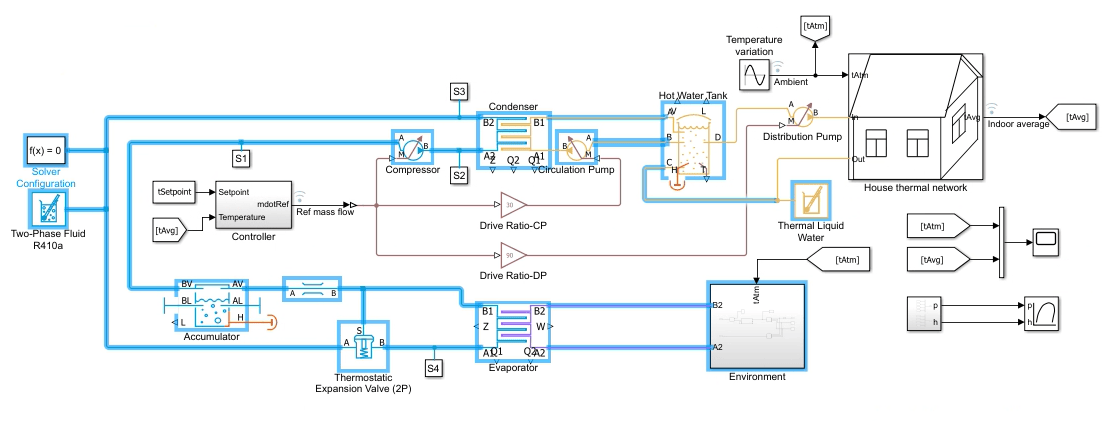
To measure the heat pump performance, isolate the blocks that model the heat pump into a new model. The new model functions as a test harness which you use to collect performance data at specific operating points. Open the ResidentialEN14511HeatPumpTestHarness model.
testharnessmdl = "ResidentialEN14511HeatPumpTestHarness";
open_system(testharnessmdl);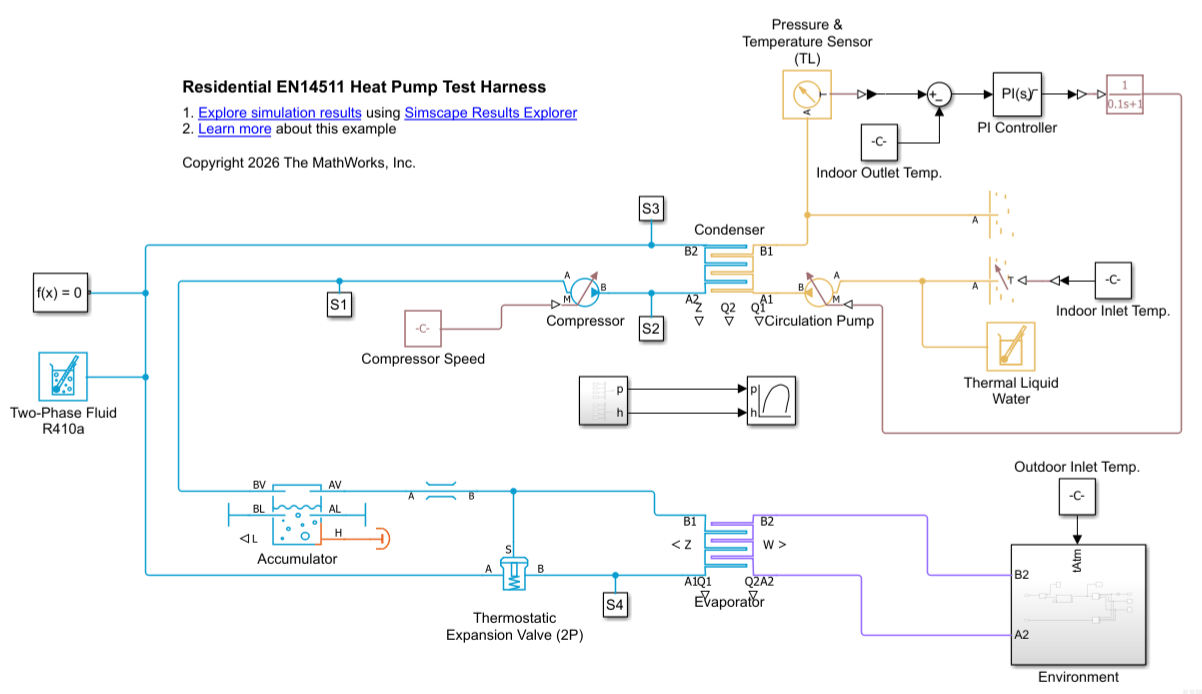
This model contains the blocks that model the heat pump from the ResidentialAirSourceHeatPump model along with the following changes:
A Reservoir (TL) block serves as the input to the
Circulation Pumpblock. The reservoir specifies the outdoor inlet temperature conditions, which a Constant block specifies asIn_inlet.A loop for a PI Controller block, which finds the correct pump speed to match the indoor outlet temperature. The loop contains these blocks in series between the Condenser outlet and the Circulation Pump input port: a Pressure & Temperature Sensor (TL), Sum, PI Controller, and PS Transfer Function. The Sum block takes the difference between the Condenser outlet and the Indoor Outlet Temperature,
In_outlet.Constant inputs specify the compressor speed as
C_speedand the outdoor inlet temperature asOut_inlet.
Use Test Harness Model to Collect Operating Point Data
To collect performance data on the heat pump, define operating points for running the test harness model. At each operating point, record the capacity and heating power input values to determine the Heating capacity 3D table, q(Tod, Tid, s) and Heating power input 3D table, w(Tod, Tid, s) parameter values for the EN14511 Heat Pump (2P) block. This model uses the following operating points:
Indoor heat exchanger outlet and inlet temperature pairs: (35, 30) and (55, 47) degC
Outdoor heat exchanger inlet temperatures: -7 and 12 degC
Compressor speeds: 0.132 kg/s, 0.175 kg/s, or 0.222 kg/s. Here 0.175 kg/s is the speed for nominal operating conditions, which corresponds to a compressor capacity of 1. To calculate the compressor capacity for each of the speeds, divide by 0.175. Additionally, add a data point at 0 for when the compressor is off.
Create variables in MATLAB that represent the operating points. The model with the Heat Pump EN14511 (2P) block also uses these vectors as parameter values.
outd_fluid_vec = [-7 12]; % degC
ind_fluid_vec_outlet = [35,55]; % degC
ind_fluid_vec_inlet = [30,47]; % degC
C_speed_vec = [0 0.132 0.175 0.222]; % kg/s
C_cap_vec = C_speed_vec./0.175;
Run the ResidentialEN14511HeatPumpTestHarness model at each of the operating points. Because the heating capacity and power input are 0 when the compressor speed is 0, begin testing at the first non-zero compressor speed. Define the operating point for testing.
C_speed = C_speed_vec(2); % kg/s
Out_inlet = outd_fluid_vec(1); % degC
In_inlet = ind_fluid_vec_inlet(1); % degC
In_outlet = ind_fluid_vec_outlet(1); % degC
Run the model and plot the evaporator and condenser rate of heat transfer.
out = sim(testharnessmdl);
t_model = out;
heating_power = simlog_ResidentialEN14511HeatPumpTestHarness.Evaporator.Q1.series.values("kW");
heating_capacity = simlog_ResidentialEN14511HeatPumpTestHarness.Compressor.power.series.values("kW");
plot(t_model,heating_power,t_model,heating_capacity)
legend("Heating Power", "Heating Capacity")
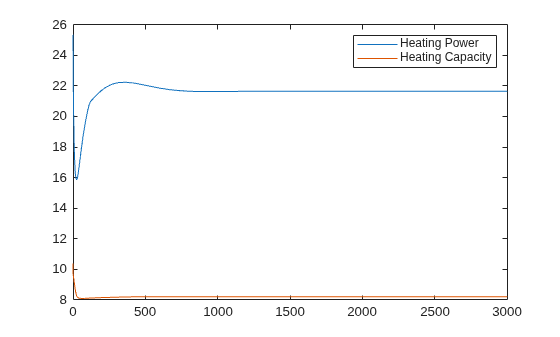
At the defined operating point, the heating power from the compressor is about 8.19 kW and the heating capacity from the condenser is about 29.86 kW at steady-state. Because the heating power and capacity 3-D tables in the Heat Pump EN14511 (2P) block are a function of the outdoor fluid temperature, the indoor fluid temperature, and the compressor speed, the Heating capacity 3D table, q(1, 1, 2) is 29.86 and the Heating power input 3D table, w(1, 1, 2) is 8.19. Repeat the process for the 11 remaining operating points. You may need to tune the PI Controller block between measurements.
The performance data for every operating point is:
Heating capacity 3D table, q(Tod, Tid, s) -
cat(3, zeros(2, 2), [29.9, 21.0; 32.1, 22.0], [42.7, 34.2; 45.6, 37.2], [55.0, 48.2; 58.7, 52.5])Heating power input 3D table, w(Tod, Tid, s) -
cat(3, zeros(2, 2), [8.2, 9.3; 8.4, 9.8], [11.2, 12.8; 11.5, 13.4], [14.2, 16.4; 14.6, 17.1])
Configure the EN14511 Heat Pump (2P) Block for the Residential Heating Model
After collecting the performance data, replace the heat pump blocks in the ResidentialAirSourceHeatPump model with the EN14511 Heat Pump (2P) block. Use these parameter settings to parameterize the block:
Parameter Name | Value or Setting |
Heating mode parameterization |
|
Outdoor fluid temperature vector, Tod |
|
Indoor fluid temperature vector, Tid |
|
Scale heating capacity linearly with compressor capacity |
|
Compressor capacity vector, s |
|
Heating capacity 3D table, q(Tod, Tid, s) | Calculated values from the test harness |
Heating power input 3D table, q(Tod, Tid, s) | Calculated values from the test harness |
Additionally, use a PS Gain block to scale the Ref mass flow signal in the ResidentialAirSourceHeatPump model for input to the EN14511 Heat Pump (2P) block. The S port of the EN14511 Heat Pump (2P) block specifies the compressor capacity and a value of 1 corresponds to the nominal operating conditions. In the previous section, you specified the compressor speed at nominal operating conditions as 0.175 kg/s. To configure the value of the input signal at port S, scale the Ref mass flow signal so that a mass flow rate of 0.175 kg/s corresponds to a value of 1 at port S. Set the PS Gain block Gain parameter to 1/0.175.
To see the completed model with the EN14511 Heat Pump (2P) block, open the ResidentialEN14511HeatPump model. Run the model.
mdl = "ResidentialEN14511HeatPump";
open_system(mdl);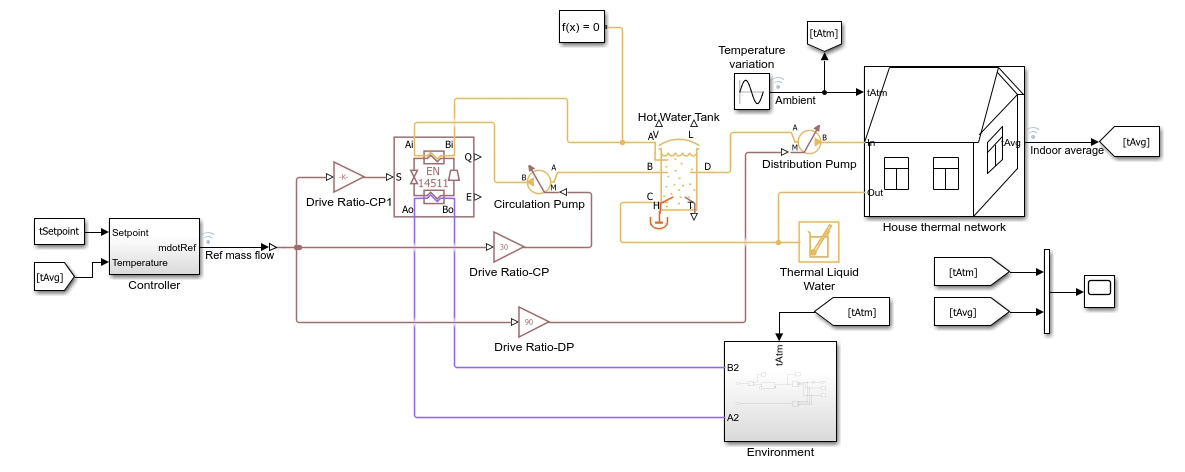
Use the ResidentialAirSourceHeatPumpPlot1T helper function to plot a graph of the indoor temperature in each room compared to the outdoor temperature and the average temperatures of the building.
ResidentialEN14511HeatPumpPlot1T
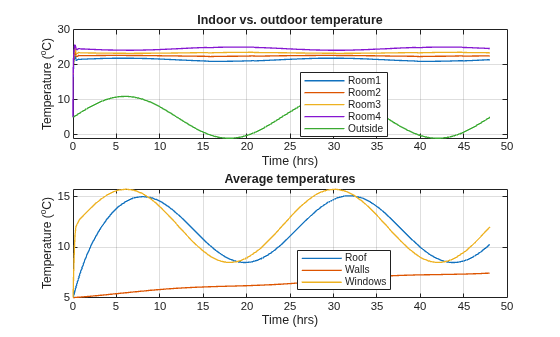
The function generates two plots. The top plot shows the temperature variation of each room compared to the outside temperature fluctuations. The bottom plot shows the average overall temperatures of the roof, walls, and windows. The initial indoor temperature of the rooms is equal to the ambient temperature of 5 degC, and the heat pump quickly increases the average indoor temperature to the setpoint temperature of 23 degC. This behavior matches the results of the original ResidentialAirSourceHeatPump model.

